
Why does a luxury villa in Palm Jumeirah or Dubai Hills still suffer from buffering in the master suite when the city offers some of the world’s fastest fiber speeds? You’ve likely felt the frustration of a security camera dropping its feed or a gaming session lagging right when it matters most. It’s a common struggle in large residences where reinforced concrete and dozens of connected devices overwhelm a standard router. You want a home that functions perfectly behind the scenes, providing the peace of mind that comes with a stable, high-performance network.
Mastering your home’s connectivity starts with professional Network Switch Installation & Configuration, which acts as the central nervous system for your entire property. This guide provides the expert knowledge you need to select, install, and configure the right hardware for seamless, lag-free performance. We’ll explore how to use PoE+ for your access points, set up SIRA-compliant CCTV pathways, and future-proof your infrastructure for 10GbE speeds. You’ll learn how to transform your villa’s internet into a robust, secure, and sophisticated ecosystem that supports your lifestyle without any digital friction.
Key Takeaways
- Understand why standard ISP routers often struggle with villa connectivity and how a dedicated switch acts as the essential spine for your high-speed network.
- Learn to calculate the ideal port density and power budget for your property, ensuring every CCTV camera and Wi-Fi access point receives consistent, reliable power.
- Explore the security benefits of managed switches, including traffic control and network segmentation, to protect your smart home from external vulnerabilities.
- Follow a professional approach to Network Switch Installation & Configuration that prioritizes thermal management and organized cable integration within your AV rack.
- Discover how expert integration eliminates common technical friction like IP conflicts and network loops, providing you with a truly “invisible” and dependable digital lifestyle.
The Role of a Network Switch in Modern Villa Connectivity
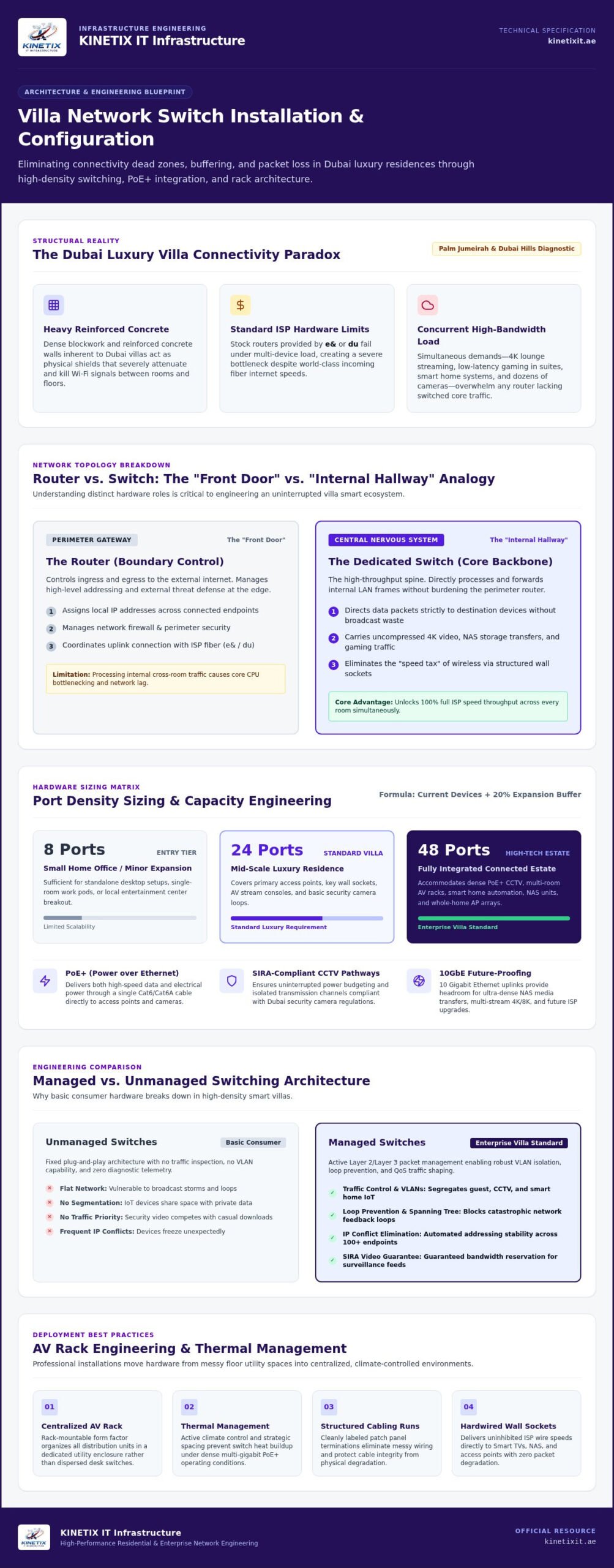
Most Dubai residents rely on the standard router provided by e& or du. While these devices are capable entry points, they often become a major bottleneck in spacious, multi-story villas. A single router simply cannot handle the simultaneous demands of 4K streaming in the lounge, high-stakes gaming in the bedroom, and a dozen security cameras. This is where a dedicated network switch becomes the invisible enabler of your home’s digital life, acting as the central nervous system for every connected device.
A network switch is a sophisticated hardware device that connects multiple devices within your local area network (LAN). It uses specific network switch architecture to receive, process, and forward data only to the device that needs it. Unlike a router that mostly manages your connection to the outside world, the switch organizes your internal traffic. For larger properties, professional Network Switch Installation & Configuration ensures that data flows without congestion, even when the whole family is online at once.
To visualize how this hardware fits into your home ecosystem, watch this practical overview of switch setup basics:
By integrating a switch into your structured cabling system, you deliver full ISP speeds to every corner of your home. This setup eliminates the “speed tax” often paid when relying solely on wireless signals. It provides the dedicated bandwidth required for a lag-free lifestyle, ensuring your home office remains productive while the rest of the house enjoys high-definition entertainment without interruption.
Router vs. Switch: Understanding the Difference
Think of your router as the front door of your villa; it controls who enters and exits from the internet. The switch, however, acts as the internal hallway that directs traffic to specific rooms. While the router assigns IP addresses and manages security, the switch handles the heavy lifting of moving data between your Smart TV, consoles, and computers. You need both to maintain a stable, high-performance smart home environment that doesn’t crash under pressure.
Expanding Your Network Beyond Wi-Fi
Dubai villas are built with heavy reinforced concrete and dense blockwork, which are notorious for killing Wi-Fi signals. Relying on wireless alone leads to dead zones and frustratingly slow speeds. By using switches to power internet wall sockets, you gain 100% reliability through a hardwired connection. This is essential for high-density environments where devices like Network Attached Storage (NAS) and gaming consoles demand constant, uninterrupted throughput. Professional Network Switch Installation & Configuration allows you to scale your network as your collection of smart devices grows.
Choosing the Right Switch: Ports, PoE, and Speed
Selecting the right hardware for a Dubai villa requires more than just picking a device off a shelf. It’s about precision and scalability. Start by calculating your port density. While an 8-port switch might suffice for a small home office, luxury villas often require 24 or 48 ports to handle a vast array of integrated technology. Planning for your current inventory plus a 20% expansion ensures your infrastructure remains relevant as you add more IoT devices, smart appliances, or additional access points over time.
Physical placement and form factor are equally vital considerations. While small desktop switches work for minor expansions, professional Network Switch Installation & Configuration typically involves rack-mountable units. These are designed to sit within a centralized, climate-controlled AV rack. This approach provides superior thermal management and organized cable runs, keeping your utility room tidy and protecting your investment from the heat of the UAE climate.
PoE and PoE+: Powering Your Security Infrastructure
Power over Ethernet (PoE) is the secret to a clean, professional finish in a modern home. It allows a single Ethernet cable to deliver both data and electricity to your devices, which is essential for a high-end intercom system installation. By using PoE, you eliminate the need for bulky power adapters and extra electrical sockets near every camera or intercom terminal, resulting in a much sleeker aesthetic.
Understanding the power budget of your switch is critical for system stability. Basic PoE supports standard IP phones, but modern Wi-Fi 7 access points and motorized PTZ cameras often require PoE+ or even the latest IEEE 802.3bt Power over Ethernet standards for high-draw hardware. If you’re planning a comprehensive security layout, our specialists can help you calculate your total power requirements to ensure your switch never reaches its limit during peak usage.
Speed and Throughput Requirements
In 2026, Gigabit (1Gbps) speeds are the absolute baseline for smooth 4K streaming and reliable browsing. However, for villas equipped with high-end home servers or professional media editing suites, 10-Gigabit (10Gbps) uplinks are becoming the preferred standard. This level of performance future-proofs your home against the increasing bandwidth demands of 8K content and massive cloud data backups.
Don’t overlook backplane capacity when reviewing technical specs. This refers to the switch’s internal ability to process traffic across all ports simultaneously. A high-quality switch ensures that even if every family member is streaming or gaming at full speed, the hardware won’t cause internal congestion. This dependability is what separates professional Network Switch Installation & Configuration from a basic DIY setup, providing the fluidity and speed you expect from a premium home network.
Managed vs. Unmanaged Switches: Which Does Your Villa Need?
When designing a network for a high-end villa, the choice between managed and unmanaged switches determines your level of control and security. Unmanaged switches are simple, plug-and-play devices. They’re effective for adding a few extra ports in a bedroom or small media room, but they lack the intelligence required to manage a complex home ecosystem. They simply forward data without any ability to prioritize traffic or monitor performance.
For properties with extensive CCTV, intercoms, and smart home integration, professional Network Switch Installation & Configuration requires a managed switch. These devices allow for precise monitoring and remote troubleshooting. They align with CISA network infrastructure security recommendations, which emphasize the importance of hardening network devices to protect your private data. By choosing a managed solution for your Network Switch Installation & Configuration, you gain the ability to troubleshoot issues before they disrupt your lifestyle. While unmanaged switches are less expensive, they leave your network “flat,” meaning a vulnerability in a single smart appliance could potentially expose your entire home network.
VLANs: Segregating Your Home Network for Security
A managed switch enables Virtual Local Area Networks (VLANs), which create digital walls within your network. This technology is vital for maintaining privacy and security in a large household. You can isolate your security cameras from your private Wi-Fi, ensuring your CCTV feed doesn’t consume bandwidth needed for your work. It also allows you to create a secure silo for guests. This ensures that visitors can access the internet without ever having visibility into your private servers, smart locks, or automation controllers.
Quality of Service (QoS) for Lag-Free Living
Quality of Service (QoS) is the secret to a lag-free home. It allows you to prioritize traffic based on its importance. For instance, you can ensure that a video call or a competitive gaming session always takes precedence over a background software update or a large file download. This ensures a fluid experience even when the house is full of digital activity. A professional WiFi technician in Dubai can configure these rules during the initial setup, providing you with a network that feels intuitive and responsive to your daily needs. This level of optimization ensures that your most critical tasks always have the bandwidth they require.
Step-by-Step Guide to Network Switch Installation & Configuration
Successful network deployment begins with precise physical placement. In Dubai villas, where utility rooms can become warm, ensuring your switch is housed in a well-ventilated AV rack is essential. Proper airflow prevents thermal throttling, which can degrade your internet speeds during the peak of summer. During this phase, organizing your network cabling with clear labeling and professional patching is vital. A tidy rack doesn’t just look sophisticated; it simplifies future maintenance and troubleshooting, ensuring your home infrastructure remains manageable.
Once the hardware is securely mounted, the “First Boot” process involves connecting a computer to the switch to access its management interface. Before adjusting any settings, your first priority is a firmware update. Manufacturers frequently release patches that resolve security vulnerabilities and improve hardware stability. Skipping this step leaves your network exposed. A professional approach to Network Switch Installation & Configuration ensures that your system is running the most current, secure software before it goes live.
Initial Configuration and IP Management
Managing a complex network requires a logical structure. Assigning a static IP address to your switch is a critical step; it ensures you can always find the device on your network without searching through dynamic lists. Simultaneously, you must replace default admin credentials with a unique, high-entropy password to prevent unauthorized access. This stage also allows for basic port configuration, where you can verify that each port is operating at its maximum speed and correct duplex setting, providing a solid foundation for your villa’s digital traffic.
Advanced Setup: VLANs and Security
The final stage of Network Switch Installation & Configuration involves tailoring the hardware to your lifestyle. We implement VLAN tagging to separate your home into distinct zones, such as a private family network, an isolated guest Wi-Fi, and a dedicated lane for IoT devices. This segmentation prevents a compromised smart appliance from accessing your private documents. For added protection, configuring Port Security ensures that only recognized devices can connect to your physical wall sockets.
For homeowners with high-capacity storage needs, setting up Link Aggregation (LAG) can double the throughput for your Network Attached Storage (NAS), making file backups and media streaming incredibly fluid. If you’re ready to upgrade your home’s backbone, you can book a professional network consultation to ensure your system is configured for peak performance and absolute security.
Professional Network Integration for Dubai Homeowners
Achieving complete villa networking in a sprawling Dubai villa is a task that extends far beyond buying the right hardware. The sheer scale of these properties, often spanning multiple floors and outdoor entertainment areas, requires a level of orchestration that standard consumer setups can’t provide. While the previous sections detailed the technical aspects of Network Switch Installation & Configuration, the true challenge lies in making these components work as a single, harmonious unit. Precision in the planning stage ensures that your home functions with the fluidity you expect from a premium residence.
Many homeowners attempt a DIY approach only to encounter frustrating technical friction. Without professional oversight, it’s common to see IP conflicts where two devices fight for the same address, or catastrophic network loops that can bring your entire internet connection to a standstill. These issues don’t just interrupt your streaming; they can disable your security sensors and smart locks. Professional intervention by KINETIX IT Infrastructure eliminates these risks by creating a logical, organized data path that handles high-density traffic without breaking a sweat.
The KINETIX IT Infrastructure Difference: Beyond Just Hardware
We understand the unique architectural challenges of the region. Dubai’s signature reinforced concrete walls are excellent for insulation but act as a barrier to digital signals. Our approach to Network Switch Installation & Configuration accounts for these physical obstacles, ensuring that your backbone infrastructure is powerful enough to penetrate every corner of your estate. We don’t just install boxes; we engineer a reliable environment where technology serves your lifestyle.
Our expertise isn’t limited to data throughput. We specialize in the fluid integration of security systems, providing comprehensive CCTV troubleshooting and proactive network health monitoring. This level of service ensures that your cameras, intercoms, and access points are always online and secure. KINETIX IT Infrastructure offers peace of mind through organized maintenance and support contracts, acting as your trusted partner in maintaining a sophisticated and secure digital lifestyle.
Start Your Network Transformation Today
Identifying the need for a professional upgrade is usually straightforward. If you’re experiencing dead zones, intermittent camera drops, or buffering in specific rooms despite having a high-speed ISP plan, your internal distribution is likely the culprit. A KINETIX IT Infrastructure visit begins with a thorough site survey. We analyze your villa’s layout, identify existing bottlenecks, and design a customized roadmap for your network transformation. Our goal is to make your technology invisible, reliable, and incredibly fast.
Our team handles the heavy lifting, from structured cabling to the final software settings. You can expect a tidy, rack-mounted solution that functions perfectly behind the scenes, allowing you to focus on what matters most. It’s time to move away from erratic connectivity and embrace a future-proofed home infrastructure. Contact KINETIX IT Infrastructure for professional switch installation in Dubai and secure the reliable, high-performance network your villa deserves.
Elevate Your Home with Seamless Digital Integration
Building a robust home network requires more than just high-speed fiber; it demands a sophisticated backbone that can handle the complexities of a modern luxury lifestyle. By prioritizing the correct hardware and implementing secure VLAN segmentation, you ensure that your security cameras, home office, and entertainment systems function without friction. Professional Network Switch Installation & Configuration is the final step in transforming your villa into a truly connected estate, providing the reliability you expect from high-end residential infrastructure. To see how these principles come together in practice, explore our complete villa networking case study for a real-world example of seamless digital integration.
As Dubai’s leading residential network specialists, KINETIX IT Infrastructure provides the expertise needed to integrate CCTV, intercoms, and whole-home Wi-Fi into one cohesive system. We focus on delivering sophisticated, reliable solutions that operate silently behind the scenes, allowing you to enjoy your home without technical interruptions. It’s time to eliminate buffering and security drops for good. Secure Your Villa’s Network with KINETIX IT Infrastructure and experience the peace of mind that comes from a perfectly optimized home network. Our team is ready to help you achieve a future-proofed digital environment today.
Frequently Asked Questions
Do I really need a network switch if my router has four ports?
A standard router’s four ports are rarely enough for a modern Dubai villa. Once you connect a few Wi-Fi access points, a security NVR, and a home office setup, you’ve already exceeded that limit. A dedicated switch expands your capacity and provides a much higher switching capacity. This ensures that internal data transfers, like streaming a movie from a local media server, don’t slow down your overall internet performance.
What is the difference between PoE and PoE+ for my CCTV cameras?
The primary difference lies in the power output. Standard PoE delivers approximately 15.4 watts per port, which is sufficient for basic IP phones or older cameras. However, PoE+ provides up to 30 watts. In many Dubai residences, high-end 4K security cameras and Wi-Fi 6 access points require this extra power to operate at peak performance. Using an underpowered switch can lead to intermittent device reboots or failed night vision sensors.
Can a network switch improve my Wi-Fi speed in a large villa?
A switch doesn’t change the speed of your ISP plan, but it significantly improves your Wi-Fi’s actual performance. By creating a hardwired backbone for your access points, you bypass the thick concrete walls that typically block wireless signals in Dubai homes. This wired backhaul ensures that your Wi-Fi access points receive a clean, full-speed data feed, allowing them to provide consistent, high-speed wireless coverage in every bedroom and garden area.
Is it difficult to configure a managed switch for a home network?
While the physical setup is straightforward, the software configuration is quite technical. Managed switches offer advanced features like VLANs for security and Quality of Service for traffic prioritization. Setting these up correctly requires an understanding of network topology and security protocols. Choosing professional Network Switch Installation & Configuration ensures that your guest network is isolated and your work video calls always take priority over background downloads or gaming traffic.
Where is the best place to install a network switch in a Dubai home?
You should install your switch in a centralized, cool, and dust-free environment. Most luxury villas in Dubai feature a dedicated AV rack or a utility closet designed for this purpose. It’s critical to avoid unventilated cabinets or laundry rooms where humidity and heat can accumulate. Proper placement ensures that your network’s brain stays cool, which is vital for maintaining 24/7 stability during the demanding summer months in the UAE.
How many ports should I look for in a residential network switch?
We recommend starting with a 24-port switch for most four-bedroom villas. This count quickly adds up when you include ceiling-mounted Wi-Fi access points, outdoor CCTV cameras, smart TV points, and home office connections. It’s always a professional standard to leave about 20% of your ports empty. This allows for future technology upgrades or new smart home additions without the need to replace your entire core infrastructure a few years later.
What happens if I plug a non-PoE device into a PoE switch port?
Modern active PoE switches are designed with safety in mind. Before sending any electrical current, the switch communicates with the connected device to verify its power requirements. If you plug in a non-PoE device, such as a desktop computer or a printer, the switch recognizes it doesn’t need power and only transmits data. This intelligent sensing prevents any electrical damage to your hardware, making it safe to mix PoE and non-PoE devices.
Why is my network switch getting hot, and how can I prevent it?
Heat is a natural byproduct of high-speed data processing and PoE power delivery. In Dubai, switches often run hot if they are placed in cramped spaces without active cooling. You can prevent overheating by ensuring your Network Switch Installation & Configuration includes a ventilated rack and proper cable management to allow for airflow. If a switch gets too hot, it may throttle performance or reboot unexpectedly, disrupting your entire home’s connectivity.
2 Responses