
Power cycling a dark camera rarely solves a dropped feed. When outdoor surveillance goes offline, the fault almost never stems from a defective sensor; it traces back to congested network traffic, hidden cabling faults, or thermal strain. Mastering professional CCTV Troubleshooting & Repair requires looking beyond the camera housing to evaluate the complete data and power pathway supporting your property.
It’s deeply frustrating to open your mobile app while away from home only to encounter a black screen, leaving you uncertain whether the failure stems from an in-wall cable run, an overwhelmed switch, or network interference. You deserve complete peace of mind knowing your perimeter monitoring functions flawlessly day and night.
In this diagnostic guide, you’ll learn how to accurately pinpoint camera offline errors, resolve intermittent signal drops, and restore uninterrupted high-definition recording. We examine the structured hardware checks, power delivery assessments, and network configurations needed to build a resilient surveillance setup that withstands demanding environmental conditions.
Key Takeaways
- Pinpoint whether camera offline errors stem from physical port degradation, insufficient power delivery, or local network congestion.
- Learn the methodical diagnostic steps required for CCTV Troubleshooting & Repair to restore stable, uninterrupted recording across all channels.
- Identify how thermal stress and high nighttime infrared power draw trigger sudden signal drops in outdoor surveillance hardware.
- Understand the boundary between safe DIY connectivity checks and advanced structured cabling diagnostics that require professional precision.
- Discover how dedicated surveillance network configurations and UV-rated cabling infrastructure preserve crystal-clear feeds across luxury residential properties.
Common CCTV System Failures: Identifying Why Security Cameras Go Offline
A silent failure in your perimeter surveillance compromises peace of mind fast. In modern closed-circuit television systems, an offline channel rarely signals an entirely broken device. Instead, technical hiccups usually emerge from voltage instability, network handshake breakdowns, or physical connector wear. Recognizing specific visual symptoms allows you to execute precise CCTV Troubleshooting & Repair without unnecessary component replacements.
Black Screens, Video Loss, and Flickering Feeds
A blank display demands a clear distinction between absent power and interrupted video transmission. When a channel displays solid black or a persistent “Video Loss” banner, the root cause often rests in the physical signal chain:
- Damaged Termination: Crimped RJ45 connectors or oxidized coaxial BNC fittings drop high-frequency data packets, causing spontaneous feed cutouts.
- Resolution Incompatibilities: Output ports configured for 4K video feeds can push connected monitors into protection mode if the display panel only supports 1080p output.
- Voltage Fluctuations: Pinched copper strands cause rapid voltage dips, creating horizontal banding lines and sudden screen flickers during active recording.
Network Disconnections and Mobile Remote Viewing Drops
A system might record cleanly to your local network video recorder (NVR) yet remain totally inaccessible on your smartphone. When local monitors display live feeds but external mobile apps show camera offline errors, your transmission breakdown sits between the recorder and your wide-area network router. Strict firewall rules, misconfigured DNS addresses, or stale peer-to-peer (P2P) cloud handshakes frequently prevent your mobile client from reaching local video streams. Resolving these communication barriers requires structured CCTV Troubleshooting & Repair targeted at routing tables, subnet masks, and outbound traffic authorization.
Poor Night Vision and Infrared Halo Effects
Camera imagery that looks sharp by day can deteriorate rapidly once the sun sets. Outdoor surveillance failures often present three distinct nighttime anomalies:
Internal mechanical IR-cut filters can jam mid-transition, locking your sensor into daylight filtering and starving the sensor of ambient infrared illumination. Dark lenses with cloudy, circular glare typically suffer from internal infrared reflection caused by a slipped rubber gasket inside the dome housing. Finally, if a camera reboots the moment dusk falls, its power supply is failing under the heavy electrical draw required by active infrared illuminator arrays.
Root Causes Behind Surveillance Failures in Modern Dubai Properties
Diagnosing erratic surveillance behaviour across luxury residences demands understanding local environmental demands alongside digital infrastructure. When multi-channel feeds freeze, pixelate, or disconnect unexpectedly, the culprit rarely hides in the camera software. Systematic CCTV Troubleshooting & Repair usually uncovers unmanaged electrical loads, network saturation, or aggressive regional heat breaking down exterior hardware.
Power Delivery and PoE Switch Inadequacies
Power over Ethernet (PoE) powers modern residential surveillance, yet total wattage capacity remains widely misunderstood. Standard 802.3af switches provide up to 15.4W per port, which comfortably powers basic indoor fixed lenses. Motorized outdoor pan-tilt-zoom units and advanced long-range night optics demand 802.3at (PoE+, 30W) or even 802.3bt (PoE++, up to 60W or 90W) delivery. When total switch wattage is oversubscribed, cameras enter continuous reboot loops during the day or lose connection entirely as soon as infrared boards power on. Long cable runs crossing expansive villa gardens also trigger severe voltage drops over distance, starving distant cameras of adequate operating current.
Network Bottlenecks, IP Conflicts, and Bandwidth Saturation
Surveillance feeds generate continuous data streams that can overwhelm generic residential network equipment. When smart home controllers, media servers, and laptops share unmanaged switches without Quality of Service (QoS) priorities, heavy local data bursts drop real-time camera frames. Duplicate static IP assignments create sudden subnet disconnections, causing two devices to battle for the same address until one is kicked offline. Isolating feeds through professional network switch installation and configuration resolves these bottlenecks by separating high-bitrate video streams into dedicated virtual networks.
Environmental Wear: Desert Heat, Dust, and Cable Degradation
Dubai’s climate introduces intense hardware strain that standard equipment simply cannot withstand. Outdoor ambient temperatures exceeding 50°C quickly push dark metal camera housings beyond 65°C due to direct solar radiation, triggering internal processor throttling or thermal shutdowns. Surveillance hardware operating under SIRA technical standards and maintenance regulations demands a baseline ingress protection rating of IP66 to resist ultra-fine silica sand penetration that clouds internal lenses.
- Thermal Degradation: Unshaded exterior cameras suffer damaged sensor circuits and discolored daytime imaging when continuous operating temperatures breach factory ratings.
- Cable Jacket Brittleness: Non-UV-rated PVC Ethernet lines running along exposed villa parapets crack open under constant ultraviolet rays, allowing moisture and humidity to corrode copper conductors.
- Hard Disk Wear: NVR surveillance hard drives running 24/7 in unventilated server cupboards build up bad sectors rapidly, halting continuous recording loops.
Systematic CCTV Diagnostics: DIY Checks vs. Component Failures
Methodical troubleshooting protects hardware from accidental damage while pinpointing faults rapidly. Rather than swapping out parts at random, systematic CCTV Troubleshooting & Repair follows an elimination process that isolates physical cabling, power distribution, and digital communication layers in order. Knowing which diagnostic steps are safe to perform at home saves time and prevents unnecessary equipment replacements.
Hardware Isolation: Testing Cables, Ports, and Power Supplies
Physical isolation should always be your first diagnostic phase. Plug a non-responsive camera into an adjacent, functioning PoE switch port using a short patch lead. If the link light activates and video returns, your issue lies along the original in-wall cable run rather than inside the camera itself. For standalone analog or IP units using external transformers, test the 12V DC plug with a digital multimeter. A reading below 11.4V under active load reveals a collapsing power supply that cannot maintain stable operation.
Network Layer Auditing: Pinging IPs and Checking NVR Status
Confirming digital integrity requires interrogating the camera through network utilities. Open your terminal to execute continuous ping requests against the camera’s static IP address:
- No Response (Request Timed Out): Indicates complete layer-1 disconnection, bad termination, or a burned internal network interface card.
- High Latency Spikes and Jitter: Signals severe packet collisions, physical cable pinch points, or intense electromagnetic interference along the conduit.
- Active Ping with Black Stream: Confirms healthy network connectivity, meaning the fault stems from corrupted RTSP streaming settings or failing image processing boards.
Log in to your recorder’s interface to review encoding settings and verify that stream bitrates align with the recommendations in our 2026 residential security guide, ensuring bandwidth profiles match local storage capabilities.
When Safe Home Triage Ends and Technical Hazards Begin
Basic diagnostics can quickly transition into scenarios requiring certified intervention. Standard physical security and surveillance guidelines emphasize operating boundaries to safeguard personal safety and system integrity. Homeowners can comfortably verify patch cables and check software logs, but complex physical faults demand specialized expertise.
Steer clear of handling central multi-output metal power boxes with exposed mains AC wiring, as faulty transformers create severe shock hazards. Similarly, scaling tall extension ladders to troubleshoot cameras mounted high on two-story villa facades poses genuine fall risks in breezy conditions. When multi-drive RAID storage arrays crash or underground conduits suffer internal continuity breaks, professional CCTV Troubleshooting & Repair protects expensive hardware and restores data without risking personal injury. Partnering with a qualified cctv maintenance company in Dubai ensures that complex faults are handled by specialists who understand both environmental protection and network-level resilience.
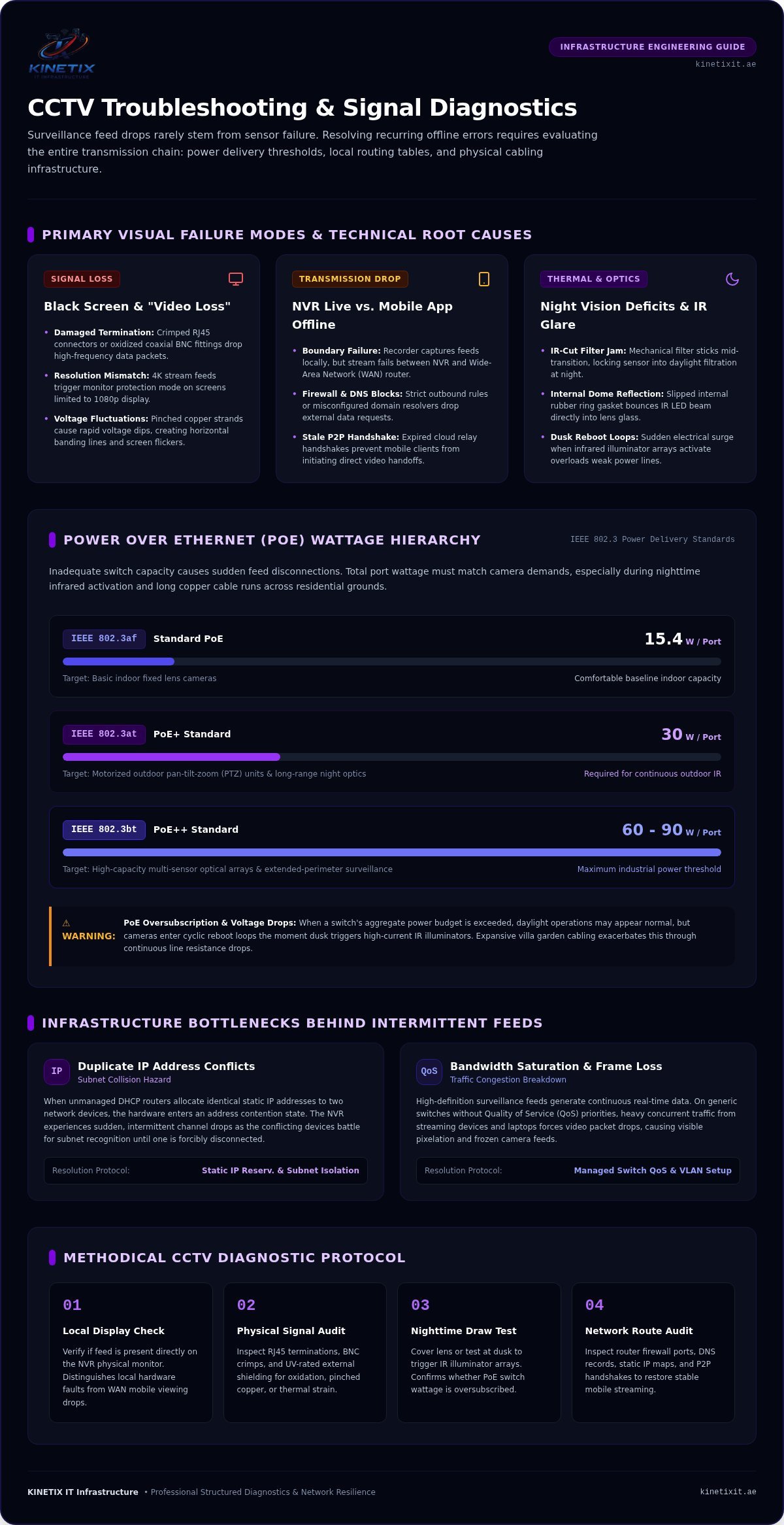
Step-by-Step CCTV Troubleshooting Protocol for Residential Systems
Restoring a dropped surveillance feed requires an orderly sequence rather than haphazard rebooting. Skipping diagnostic stages often masks underlying physical faults, allowing small line errors to evolve into permanent hardware failures. By following this proven five-step protocol for CCTV Troubleshooting & Repair, you can systematically clear communication barriers and re-establish continuous security recording.
- Step 1: Controlled Power Sequencing: Shut down the NVR, unmanaged switches, and camera power injectors completely. Wait sixty seconds to drain residual capacitance, then power the network switch first, the NVR second, and the perimeter cameras last to guarantee clean DHCP addressing.
- Step 2: Terminal Inspection: Unseat, inspect, and firmly re-click RJ45 connectors, coaxial BNC twists, and DC barrel plugs across all terminations.
- Step 3: Address Audit: Scan local subnets to ensure no newly added household devices have hijacked existing camera static IPs.
- Step 4: Firmware Patching: Apply verified manufacturer updates to clear memory leak bugs affecting continuous RTSP streams.
- Step 5: Cloud Token Re-authentication: Re-link mobile companion apps to clear stale peer-to-peer security certificates.
Verifying Physical Connections and Power-over-Ethernet Links
Begin by checking the activity LEDs on your PoE switch faceplate. A solid amber or green light confirms active link negotiation, while a dark or rapidly flashing light indicates physical transmission failure. Inspect outdoor connectors for green copper oxidation or moisture build-up inside the weather-seal boot. Terminating cables with shielded, moisture-resistant connectors restores signal purity and aligns your property with modern network cabling standards.
Reconfiguring NVR Firmware and Subnet Settings
Access your recorder’s network settings menu using a directly connected monitor. Verify that the IPv4 default gateway points directly to your main villa router and that the subnet mask matches your local scheme. To eliminate recurring IP conflicts permanently, reserve static IP addresses inside your primary router’s DHCP management table for every camera MAC address. Applying official firmware updates directly through the manufacturer portal also rectifies known video buffering flaws and strengthens device security against external intrusion.
Restoring Secure Remote Access and Mobile Push Alerts
When local recording functions properly but remote smartphone access fails, refresh the P2P cloud service handshake. Toggle the cloud platform setting off, save changes, and toggle it back on to generate a fresh registration token and QR code. Check that your router allows outbound transmission over ports 80, 443, and 8000 without blocking handshake packets. Re-sync your notification schedules to ensure real-time perimeter push alerts deliver instantly to your phone.
If persistent offline errors or underground cabling faults continue to disrupt your surveillance feeds, request professional assistance from KINETIX IT Infrastructure. You can easily schedule expert CCTV Troubleshooting & Repair to restore crystal-clear residential monitoring across your entire property.
Professional CCTV Repair & Long-Term Maintenance in Dubai
Sustaining uninterrupted video recording across a luxury residence requires durable infrastructure paired with proactive oversight. When basic troubleshooting reveals physical degradation or persistent stream latency, professional intervention restores total operational integrity. Expert CCTV Troubleshooting & Repair delivers engineered solutions that withstand severe weather patterns while preserving your home’s pristine architectural design.
Recabling and Upgrading to Shielded Industrial Infrastructure
Bespoke diagnostic time-domain reflectometers trace hairline fractures inside subterranean conduits without disruptive trenching. Replacing brittle, sun-baked wiring with heavy-duty, direct-burial Cat6 lines prevents transmission dropouts and eliminates signal attenuation. Implementing high-performance structured cabling shields sensitive data channels from nearby electrical lines, while IP67-rated junction boxes seal termination points against fine airborne sand and seasonal humidity.
Integrating Surveillance with Dedicated Smart Villa VLANs
High-resolution IP cameras produce relentless data volumes that should never compete against residential entertainment traffic. Isolating your security ecosystem onto a dedicated Virtual Local Area Network (VLAN) guarantees dedicated throughput for every lens. This logical separation keeps 8K smart TVs, automated audio zones, and family streaming demands from choking camera packets. It also prevents erratic stream stuttering, establishing a private digital highway that secures recording consistency as detailed in our CCTV troubleshooting guide.
Scheduled Preventative Servicing for Uninterrupted Peace of Mind
Preventative care protects surveillance hardware from extreme environmental degradation before failures disrupt your perimeter visibility. Comprehensive routine servicing addresses critical stress points across the entire system. Selecting a reputable CCTV maintenance company in Dubai that goes beyond basic surface dusting to deliver network-level audits and environmental protection ensures your system remains compliant and fully operational year-round:
- Optical Reconditioning: Neutralizing mineral haze and fine dust deposits using specialized optical solutions prevents nighttime infrared glare.
- Storage Health Audits: Tracking S.M.A.R.T. disk telemetry identifies accumulated bad sectors early, allowing seamless drive replacement before video history is permanently lost.
- Environmental Thermal Inspections: Calibrating cooling airflow and cleaning internal NVR intake fans protects processors from heat throttling during scorching summer months.
Entrusting your residential security to KINETIX IT Infrastructure delivers effortless protection, ensuring your surveillance hardware operates with seamless precision year after year.
Restore Lasting Clarity and Resilience to Your Villa Surveillance
Protecting your property perimeter requires looking past surface symptoms to address the true causes of signal failure. Eliminating persistent camera offline errors and video stutter demands adequate PoE power budgeting, dedicated network segmentation, and weather-sealed connectivity. A structured approach to CCTV Troubleshooting & Repair guarantees that minor line hiccups don’t escalate into complete recording outages.
When subterranean cabling faults, intense summer heat, or complex network collisions disrupt your live feeds, professional intervention makes all the difference. KINETIX IT Infrastructure provides specialized diagnostic testing, clean structured cabling, and climate-resilient engineering tailored specifically for luxury residences across Dubai. You don’t have to tolerate blank screens or unreliable mobile alerts when seamless visibility is within reach. Restore your villa security with KINETIX IT Infrastructure and enjoy effortless, round-the-clock peace of mind.
Frequently Asked Questions
Why does my CCTV camera say “No Signal” on the monitor screen?
A “No Signal” error indicates the recorder has lost both video transmission and electrical communication with that specific channel. This issue typically stems from a severed Ethernet or coaxial transmission line, a blown PoE port, or an interrupted 12V power supply. Check the physical link lights on your recorder or switch faceplate first. If the port LED is completely dark, the connection has failed before reaching your display.
Can extreme Dubai summer heat cause outdoor security cameras to shut down?
Yes, intense Dubai summer ambient temperatures exceeding 50°C frequently push dark exterior camera housings past their operating limits. When direct sunlight heats internal components above 65°C, built-in thermal protection circuits trigger automatic shutdowns to protect the image sensor. Cameras lacking adequate IP66 weatherproofing and wide-temperature ratings will throttle performance, show discolored video, or reboot continuously until ambient temperatures drop in the evening.
Why can I view my security cameras at home but not on mobile data outside?
Viewing feeds locally while failing remotely means your home recorder cannot broadcast outbound video streams past your primary router. This situation occurs when the NVR gateway address is misconfigured, your router firewall blocks outbound cloud ports, or your peer-to-peer cloud registration has expired. Refreshing your remote registration token and reserving a dedicated static IP address through professional CCTV Troubleshooting & Repair usually restores remote access immediately.
How do I know if my CCTV issue is the camera or the NVR recorder?
You can isolate the failure by connecting the offline camera directly into a known working port on your recorder using a short patch lead. If the video feed returns, the camera is functional and the fault lies within your extended structural cabling. If multiple channels go dark at once while the recorder fan runs loudly, the problem points to an internal NVR power supply failure or hard disk crash.
Why are my night vision security camera images foggy or completely black?
Foggy night vision is almost always caused by infrared light bouncing off scratched dome covers or fine silica dust common across the UAE. If the screen is entirely black, the internal mechanical IR-cut filter may be stuck, or the infrared LED board has burned out from heat. Inadequate voltage delivery along long cable runs can also prevent high-draw nighttime illuminators from powering up when darkness falls.
Is it possible to repair a damaged underground or in-wall CCTV cable?
Yes, technicians can locate internal cable breaks without opening finished walls or excavating landscaping by using specialized time-domain reflectometer diagnostics. While quick patch splices work temporarily, underground lines exposed to moisture require pulling a replacement UV-rated shielded Cat6 run through the conduit. Investing in expert CCTV Troubleshooting & Repair ensures clean terminations and restores signal transmission without compromising your villa’s architectural luxury.
What causes an IP security camera to intermittently disconnect and reconnect?
Intermittent drops usually stem from PoE switch wattage exhaustion, loose RJ45 terminations, or IP address collisions across your home network. If another connected device on your network claims the camera’s static address, the camera will repeatedly drop off the subnet. Fluctuating voltage or heavy packet loss on unmanaged switches also forces cameras into continuous reboot cycles during peak traffic periods.
2 Responses