
That premium router your provider installed was never engineered to penetrate three levels of reinforced concrete and dense architectural framing. When you try to eliminate wifi dead spots in three story villa properties using plug-in extenders, the results are familiar: dropped video calls when climbing the stairs, buffering media in master suites, and smart intercoms failing at the perimeter. You shouldn’t have to tolerate spotty connectivity in a home designed for effortless modern luxury.
True vertical coverage requires a tailored approach that treats your property’s physical structure as the primary design factor. In this guide, you’ll discover how to achieve seamless, high-speed wireless performance across every floor of your residence. We examine why wireless signals struggle against dense flooring, how discreet wired backhauls preserve your interior aesthetics, and the exact steps to ensure flawless roaming from the ground floor to the rooftop terrace.
Key Takeaways
- Learn how to permanently eliminate wifi dead spots in three story villa layouts by replacing wireless extenders with dedicated, structured wired backhauls.
- Understand why reinforced concrete slabs and dense flooring disrupt vertical radio frequencies, requiring specialized physical placement rather than higher transmit power.
- Discover the ideal floor-by-floor hardware blueprint to maintain uninterrupted Gigabit roaming from basement entertainment suites up to rooftop terraces.
- Explore how professional RF heat-mapping and concealed cabling protect your villa’s architectural design while delivering dependable, whole-home coverage.
- See how intelligent network segmentation keeps smart home automation, security cameras, and private devices operating smoothly without competing for bandwidth.
Understanding Why Three Story Villas Suffer From Severe Wi-Fi Dead Spots
A wireless dead spot occurs whenever radio frequency (RF) signal strength falls below usable operating thresholds, causing latency spikes and dropped connections. Most mainstream networking advice assumes timber-frame construction, suggesting a simple router repositioning to fix coverage issues. In a multi-level luxury villa, this advice completely falls apart. High-performance properties rely on thick masonry, dense structural foundations, and fiber gateways tucked away in ground-floor utility cabinets, forming an immediate barrier to signal distribution.
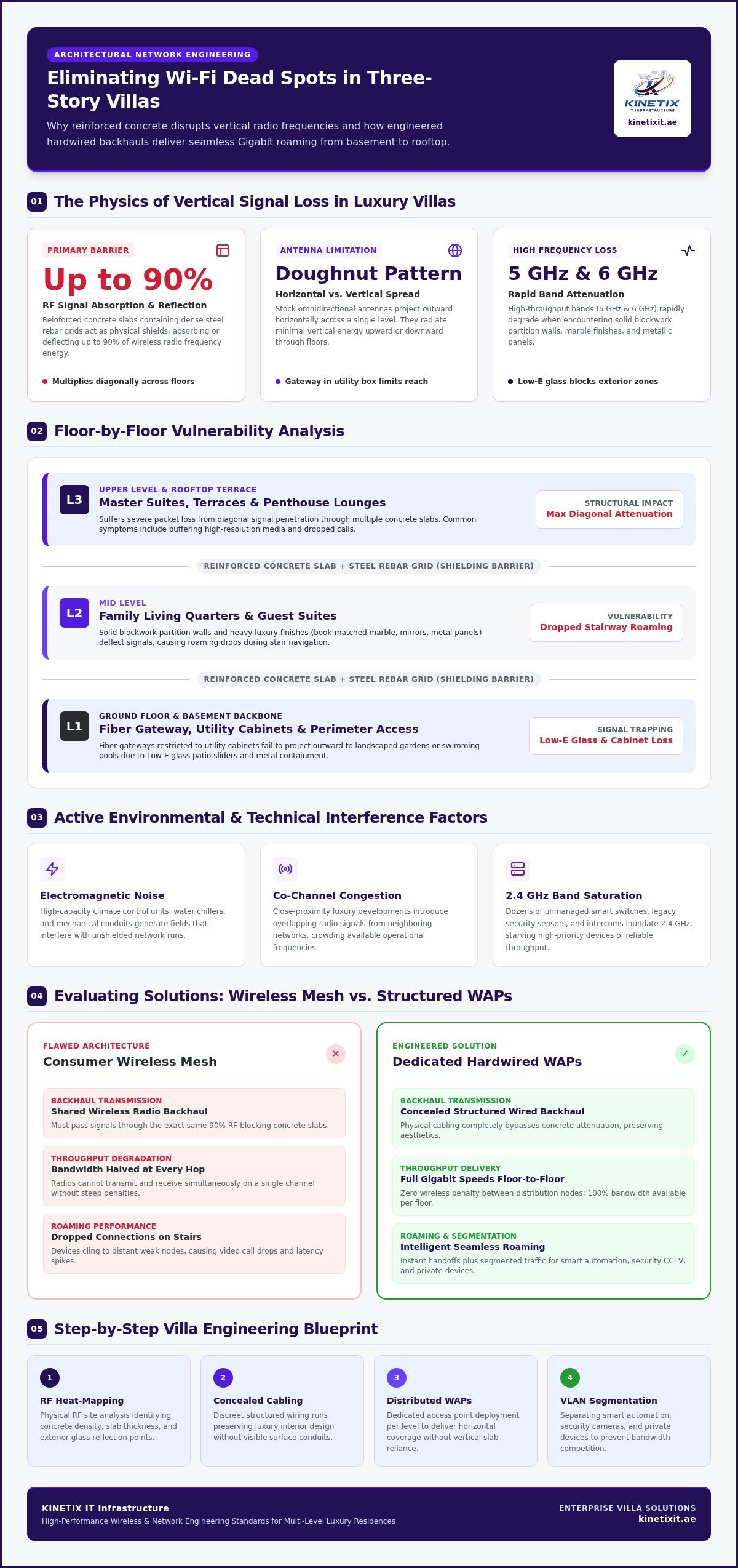
Vertical RF attenuation in residential concrete represents the exponential loss of signal strength as radio waves penetrate dense structural slabs reinforced with steel rebar grids. Because horizontal propagation can’t naturally bridge multi-level concrete divides, homeowners need a deliberate strategy to eliminate wifi dead spots in three story villa layouts. Rather than relying on a solitary gateway, distributing dedicated Wireless Access Points (WAPs) across each level bridges the structural divide.
To visualize how these physical barriers disrupt connectivity throughout your home, watch this helpful walkthrough:
The Impact of Concrete, Steel, and Luxury Finishes
Solid building materials act as literal shields against wireless energy. Reinforced concrete slabs containing dense steel rebar grids can absorb or reflect up to 90% of an incoming RF signal. Inside the home, solid blockwork partition walls rapidly degrade modern 5 GHz and 6 GHz spectrum bands. High-end finishes compound the issue: book-matched marble slabs, oversized metallic wall panels, and heavy mirrors deflect signals, while low-emissivity glass patio sliders prevent coverage from reaching exterior terraces, swimming pools, and landscaped gardens.
Vertical Radio Frequency Attenuation Across Floors
Stock routers utilize omnidirectional antennas engineered to cast radio waves outward in a flattened, doughnut-shaped pattern. They deliver wide horizontal reach across a single floor but radiate very little upward or downward energy. As signals travel diagonally toward upper bedrooms or basement suites, the effective density of the concrete slab multiplies, resulting in severe packet loss. A single router located on the ground floor simply cannot pierce these cumulative vertical obstacles.
Radio Interference from Smart Home Systems and Utilities
Physical mass is only part of the problem. Modern multi-level homes house extensive utility backbones that actively disrupt wireless communication:
- Electromagnetic Noise: High-capacity climate control units, water chillers, and mechanical conduits generate fields that interfere with nearby unshielded runs.
- Co-Channel Congestion: Close-proximity luxury developments introduce overlapping radio signals from neighboring networks, crowding available frequencies.
- IoT Density: Dozens of unmanaged smart switches, legacy security sensors, and wireless intercoms inundate the 2.4 GHz band, starving high-priority traffic of reliable throughput.
Overcoming these stacked physical and atmospheric hurdles requires structured planning tailored specifically to your villa’s physical layout.
Evaluating Solutions: Consumer Wireless Mesh vs. Hardwired Access Points
Many homeowners first attempt to resolve coverage gaps with off-the-shelf consumer mesh kits or plug-in extenders. While easy to set up, these devices rely on wireless backhaul, meaning they share the same radio frequencies to talk to each other that they use to communicate with your devices. When trying to eliminate wifi dead spots in three story villa properties, this wireless link must pass through the exact same structural floor slabs that blocked your primary router in the first place.
Every wireless jump across a concrete boundary cuts usable throughput drastically. Basic extenders often halve your available bandwidth at each hop because the radio cannot transmit and receive simultaneously on a single band. Standard guidance such as the FCC home networking tips highlights that placement and physical environment dictate real-world wireless performance. In a multi-level concrete build, a wireless link quickly becomes a severe bottleneck.
The Realities of Wireless Mesh in Concrete Architecture
Wireless mesh nodes require robust inter-node communication to maintain high speeds. When nodes sit on different floors separated by solid masonry, the backhaul link degrades rapidly. Daisy-chaining three wireless units from the ground floor up to a second-floor office introduces cumulative latency, high packet jitter, and random disconnects during real-time tasks like voice calls. You can compare detailed hardware behaviors in our guide on best mesh WiFi for UAE villas.
Why Enterprise-Grade Wired Access Points Excel
Dedicated access points bypass the atmosphere entirely by using a structured physical backbone:
- Direct Gigabit Throughput: Each access point connects straight to a central managed switch using dedicated Ethernet cabling, ensuring full incoming speed reaches every zone.
- Clean Single-Cable Delivery: Power over Ethernet (PoE) technology supplies electrical power and multi-gigabit data through a single cable, avoiding wall transformers.
- Top-Down Signal Cones: Ceiling-mounted access points transmit downward unobstructed, delivering balanced coverage across entire suites rather than struggling behind furniture.
- Centralized Radio Management: Intelligent controllers dynamically adjust transmission power and channel selection, allowing devices to hand off cleanly as you walk between floors.
Cost, Aesthetics, and Long-Term Value Comparison
Consumer mesh cubes demand visible tabletop placement near scarce power outlets, leaving trailing cords across high-end furniture. Enterprise access points sit flush against ceilings, resembling minimalist architectural fixtures or smoke alarms. Investing in a structured wired backbone treats connectivity as an essential utility. It increases the functional value of the estate, protects clean interior design, and allows for quick hardware upgrades down the road. If you prefer a seamless finish without visual clutter, partnering with a specialist for complete villa & home Wi-Fi setup ensures your network operates reliably behind the scenes.
Architectural Blueprint: Floor-by-Floor Coverage for Multi-Level Villas
Achieving uniform connectivity across multiple floors requires treating each level as an independent operational zone. A common misconception is placing access points inside open stairwells, hoping the vertical shaft acts as a natural conduit. In reality, hard stone and glass stairwells create severe radio wave reflections while failing to project signal sideways into living suites. To truly eliminate wifi dead spots in three story villa properties, every floor demands dedicated hardware mapped to its layout and functional use.
Carefully managed hardware ensures your devices transition without drops as you move between stories. Industry evaluations of the best mesh Wi-Fi systems emphasize that coverage alone is insufficient without fast roaming. Modern multi-AP networks rely on 802.11k, 802.11v, and 802.11r roaming protocols to guide smartphones and laptops seamlessly to the nearest transmitter without dropping your active video conference or streaming audio.
Ground Floor: Open Living, Kitchen, and Outdoor Patios
The ground level centers on hospitality, everyday gatherings, and exterior flow. This floor features wide open majlis spaces, heavy entertaining zones, and extensive glass doors leading outside:
- High-Density Indoor Zones: Mount central ceiling access points away from kitchen appliances and electrical panels to prevent localized electromagnetic disruptions during large gatherings.
- Dedicated Weatherproof Exterior Units: Install IP67-rated outdoor access points under covered patio eaves to bridge the low-emissivity glass barrier, providing continuous coverage across pools, cabanas, and landscaped lawns.
- Perimeter Continuity: Position exterior antennas to ensure video doorbells and smart garden gates stay reliably connected to your core network.
First Floor: Bedrooms, Study Suites, and Family Lounges
This level demands extreme stability, privacy, and low latency. Position access points centrally in master hallways or study antechambers rather than tucking them behind heavy wooden wardrobes, walk-in closets, or metal privacy screens. For dedicated home offices and gaming stations, augment wireless access with structured wall sockets to provide zero-latency hardwired links for desktops and consoles.
Second Floor and Rooftop: Terraces, Gyms, and Staff Quarters
Upper levels frequently present cabling isolation challenges. Rooftop lounges, private wellness suites, and service quarters need full operational throughput to support connected gym equipment, 4K streaming displays, and laundry utility automation. For actionable hardware criteria and structural mapping strategies, review our Dubai villa Wi-Fi installation guide. Dedicated zoning on these top floors ensures that smart building functions never suffer from spotty edge reception.
Step-by-Step Engineering Process to Eliminate Villa Dead Spots
Overcoming severe dead zones requires shifting from quick consumer patches to a disciplined engineering workflow. Quick fixes like restarting modems or downloading consumer mobile setup apps fail to address the core physical barriers built into luxury architecture. Permanent signal stability demands systematic measurement, clean cabling deployment, and precision frequency tuning.
Professional predictive RF site surveying in luxury villas utilizes digital architectural modeling and live spectrum analysis to simulate signal decay across structural walls before a single hole is drilled. Applying this level of rigor is the only reliable way to eliminate wifi dead spots in three story villa estates while protecting your finished interiors.
Phase 1: Professional RF Site Survey and Spectrum Analysis
Precision begins with data. Field specialists conduct physical walkthroughs using calibrated spectrum analyzers to capture live baseline metrics:
- RSSI Mapping: Recording exact Received Signal Strength Indicator values in decibels milliwatts across primary suites, detached courtyards, and deep basements.
- Obstruction Pinpointing: Identifying hidden architectural RF blockers such as private elevator shafts, dense HVAC risers, and thick structural columns.
- Interference Profiling: Measuring external noise floors created by adjacent residential wireless transmitters and high-voltage building systems.
Phase 2: Deploying a Discreet Structured Cabling Backbone
Clean pathways prevent unsightly cables from compromising architectural finishes. High-performance Category 6A cabling is carefully routed through concealed MEP conduits, drywall reveals, and vertical floor chases. These lines terminate inside a dedicated central rack housing managed network switches and gateway hardware. Technicians also install sleek internet wall sockets in executive studies, media lounges, and gaming rooms. You can explore modern cabling practices in our structured cabling essential foundation guide.
Phase 3: Hardware Placement and Network Optimization
Proper physical mounting determines downstream performance. Enterprise-grade access points mount flush against ceilings, radiating signals downward in clean hemispherical patterns. Once installed, technicians calibrate channel widths across 20, 40, and 80 MHz spectra to ensure nearby nodes don’t broadcast on overlapping bands.
Engineers also adjust minimum RSSI thresholds. This setting forces mobile phones to detach from distant units and bind instantly to the closest ceiling node, preventing the common “sticky client” issue where a phone clings to a ground-floor signal while you sit in a second-floor bedroom. To ensure your system delivers flawless coverage across all three floors, book an expert WiFi technician in Dubai to handle your complete site survey and precision deployment.
Future-Proofing Your Villa Network: Smart Integration and Professional Support
Modern residences operate more like mini-enterprises than traditional homes, often hosting dozens of active endpoints simultaneously. Connected lighting, motorized shades, climate automation, security systems, and high-definition media players all contest for network bandwidth alongside your mobile devices. Simply adding access points to eliminate wifi dead spots in three story villa properties isn’t enough; you also need an intelligent architecture that prevents peripheral devices from clogging your main data channels.
Without logical traffic separation, high-volume hardware can cause severe throughput bottlenecks and security liabilities. Isolating background systems ensures that everyday smart home traffic never compromises sensitive personal laptops, private storage drives, or live video conferences.
Segmenting Networks for Security, Guests, and Automation
Network switches and managed routers enable the creation of Virtual Local Area Networks (VLANs), dividing a single physical installation into isolated digital environments:
- Private Family Network: Reserved exclusively for primary personal laptops, mobile phones, and local storage backups, ensuring maximum speed and security.
- Isolated IoT Subnet: Confines smart lighting, smart plugs, and voice assistants away from sensitive personal data while blocking unauthorized lateral network movement.
- Dedicated Guest Portal: Provides visitors with high-speed internet access while keeping your core infrastructure, cameras, and intercom controls hidden.
- Quality of Service (QoS) Rules: Gives top priority to executive home office workstations and real-time VoIP audio over casual streaming downloads.
Integrating CCTV, Video Intercoms, and Smart Systems
Continuous surveillance cameras and high-definition video door stations place heavy demands on local networking infrastructure. Hardwiring IP cameras directly to central PoE network switches removes high-bitrate video traffic from your wireless airwaves entirely, freeing critical radio airtime for mobile devices. Direct cabling also ensures smart video intercoms deliver immediate doorbell alerts to your phone without buffering delays, while climate controllers and lighting scenes respond without hesitation.
Partnering with KINETIX IT Infrastructure for Total Connectivity
Delivering high-speed wireless across multiple concrete levels requires engineering discipline, specialized equipment, and careful craftsmanship. As a trusted local specialist, KINETIX delivers turn-key solutions including Wi-Fi installation & setup, Wi-Fi dead zone fixing, network cabling, and full-scale villa network integration across Dubai. Our technicians route cables through hidden pathways to keep hardware completely invisible, preserving your home’s bespoke finishes.
You gain pristine coverage from the ground floor out to the boundary walls, backed by prompt technical support to keep firmware updated and performance tuned. To eliminate wifi dead spots in three story villa layouts permanently, schedule your tailored site consultation with KINETIX IT Infrastructure today.
Transform Your Multi-Level Residence into an Effortless Wireless Haven
Achieving dependable Gigabit performance across a vertical residence isn’t a matter of trial-and-error hardware tweaks. Replacing wireless repeaters with dedicated ceiling-mounted access points powered by structured Category 6A backhauls permanently solves vertical RF loss. When you combine hardwired reliability with precision spectrum calibration and intelligent device segmentation, dropped calls and buffering become things of the past.
The definitive way to eliminate wifi dead spots in three story villa properties is partnering with specialists who understand luxury architectural dynamics. Backed by proven engineering expertise solving complex connectivity issues in luxury UAE villas, our team provides specialized technical knowledge in structural cabling, Cat6A termination, and RF optimization. We employ clean, concealed installation practices that protect high-end architectural finishes while delivering wall-to-wall performance. Take the final step toward pristine whole-home connectivity and eliminate your villa Wi-Fi dead spots with KINETIX IT Infrastructure today.
Frequently Asked Questions
Why does my Wi-Fi work on the ground floor but fail completely on the second floor?
Your signal fails because standard consumer routers broadcast radio waves horizontally rather than vertically. In luxury Dubai homes, solid floor slabs built from reinforced concrete and dense steel rebar absorb up to 90% of those waves. Diagonally traveling signals lose strength rapidly across multiple barriers, leaving upper bedrooms, suites, and home offices completely starved of usable wireless coverage.
Can I solve three-story villa dead spots using plug-in wireless range extenders?
No, plug-in wireless extenders cannot reliably eliminate wifi dead spots in three story villa properties. They must receive an incoming wireless signal through the exact concrete floors that block your mobile devices. This causes severe signal degradation and cuts your available bandwidth in half at each hop. To achieve dependable speeds, you need hardwired access points linked via physical Ethernet cabling.
How many Wi-Fi access points are typically needed for a three-story villa?
Most three-story properties require between four and six hardwired access points to ensure comprehensive coverage. As a baseline, technicians place one to two units per level depending on square footage, architectural layout, and partition thickness. Additional specialized outdoor access points are often installed to deliver continuous connectivity across private courtyards, swimming pools, and rooftop entertaining lounges.
Will installing wired network cables damage the marble or decorative ceilings in my villa?
Professional installations cause zero damage to high-end finishes, stone floors, or decorative gypsum. Certified cabling specialists utilize existing MEP conduits, vertical utility chases, service risers, and false ceiling cavities to pull Category 6A lines discreetly. Technicians ensure all cabling remains entirely hidden behind the scenes, preserving the architectural integrity and bespoke interior aesthetics of your home.
What is sticky client syndrome and why does my phone stay connected to the wrong floor?
Sticky client syndrome happens when a smartphone or tablet clings to a distant access point on the ground floor even after you walk upstairs near a stronger node. Client devices make roaming decisions based on built-in thresholds. Professional network configuration corrects this behavior by calibrating minimum signal levels (RSSI), prompting your device to switch smoothly to the nearest ceiling access point as you move between levels.
Does my choice of ISP router from du or Etisalat cause villa dead zones?
ISP-supplied routers from du or Etisalat perform well as basic optical fiber gateways, but they aren’t designed to broadcast across expansive multi-level villas. These units often sit hidden away in ground-floor utility cupboards or metal distribution panels. Effective whole-home coverage requires bridging the ISP modem to dedicated managed switches and ceiling-mounted access points distributed purposefully on every level.
Can an outdoor access point withstand the extreme summer heat and dust in Dubai?
Yes, enterprise-grade outdoor access points are specifically designed to endure harsh desert climates. These units feature IP67-rated weatherproof enclosures that seal completely against fine sand and wind-blown dust. They operate reliably in ambient temperatures exceeding 50 degrees Celsius, ensuring dependable coverage across your garden, barbecue patio, and swimming pool throughout the year.