
A neat bundle of cables isn’t necessarily a serviceable network. If a crowded rack makes equipment hard to identify or connections difficult to trace, the goal of a home network rack organization and cable comb service should be clearer access, sensible airflow and easier troubleshooting, not appearance alone.
It’s reasonable to ask what this work includes and whether your rack needs a specialist. This guide explains what a professional tidy-up may cover and how to assess whether a provider can handle your setup. In Dubai, “cable comb service” may describe part of broader cabling or network support rather than a separate, clearly defined service, so agree on the scope before booking.
You’ll learn what to ask about cable routing, equipment identification, testing and documentation, and how to compare providers. You’ll also find out what to prepare for an assessment, from rack photos to a list of equipment and known issues. KINETIX IT Infrastructure provides network cabling, switch configuration and network support in Dubai. Confirm directly whether your rack organization and cable-combing requirements can be included in the work.
Key Takeaways
- A useful rack tidy-up makes connections easier to trace and service, not just cables neater to look at.
- Equipment placement, cable routes and the room environment can affect access and airflow.
- Use the comparison guide to decide when a simple tidy-up is suitable and when live connections or unfamiliar cabling call for professional support.
- Before requesting a home network rack organization and cable comb service, prepare rack photos, an equipment list and a clear record of known network issues.
- Ask providers to define the written scope, including labeling, testing, documentation and exclusions, and confirm that your specific requirements are covered.
What Home Network Rack Organization and Cable Combing Actually Include
Home network rack organization means arranging equipment, identifying connections and routing cables so components are easier to access and maintain. Cable combing groups compatible cables into orderly runs. The aim is serviceability, not simply a polished appearance. Neater cables alone don’t improve network performance.
The scope of a home network rack organization and cable comb service depends on the rack, installed equipment, access and your priorities. A basic tidy-up might focus on visible cable routes. A broader review could include discussing equipment positions or connection changes before any work is approved. Ask what the provider proposes to handle and what is outside the scope.
For a visual overview of cable management in a home rack, watch this video:
What does a home network rack tidy-up typically involve?
A sensible first step is a visual review of the equipment, connections, cable paths and available rack space. This can reveal tangled runs, blocked access or connections that are difficult to trace. The work should account for the network’s existing configuration rather than treating every cable as interchangeable.
Before work begins, agree whether the provider may rearrange equipment or disconnect and reconnect anything. Labels and a connection map can make future checks easier, but they are not automatic inclusions. Ask whether they’re part of the written scope and what the documentation will show, for example, whether it identifies the connected room or device.
What cable combing can and cannot do
Cable combs or guides can align compatible cable runs into neat, consistent groups. Routing still needs to preserve connector access and avoid putting strain on cables. Cable type and bend limits matter, as does leaving suitable space around equipment instead of crowding vents or obstructing airflow.
Combing is a cable-management technique, not a speed upgrade. It won’t, by itself, increase internet speed or extend Wi-Fi coverage. Those concerns may require separate network troubleshooting or changes to network equipment. For broader context on organized building cabling and connection points, see these structured cabling principles. A written scope helps distinguish a visual tidy-up from work intended to make connections more maintainable.
How Rack Layout, Patch Panels, and Cable Routes Affect Everyday Network Support
A clear rack layout makes routine checks more direct. When a connection needs tracing, identifiable ports and visible cable paths can help a technician follow the route from a switch to the relevant wall outlet without guessing. Organization improves visibility and serviceability, not bandwidth. It doesn’t make an internet plan faster or increase network capacity.
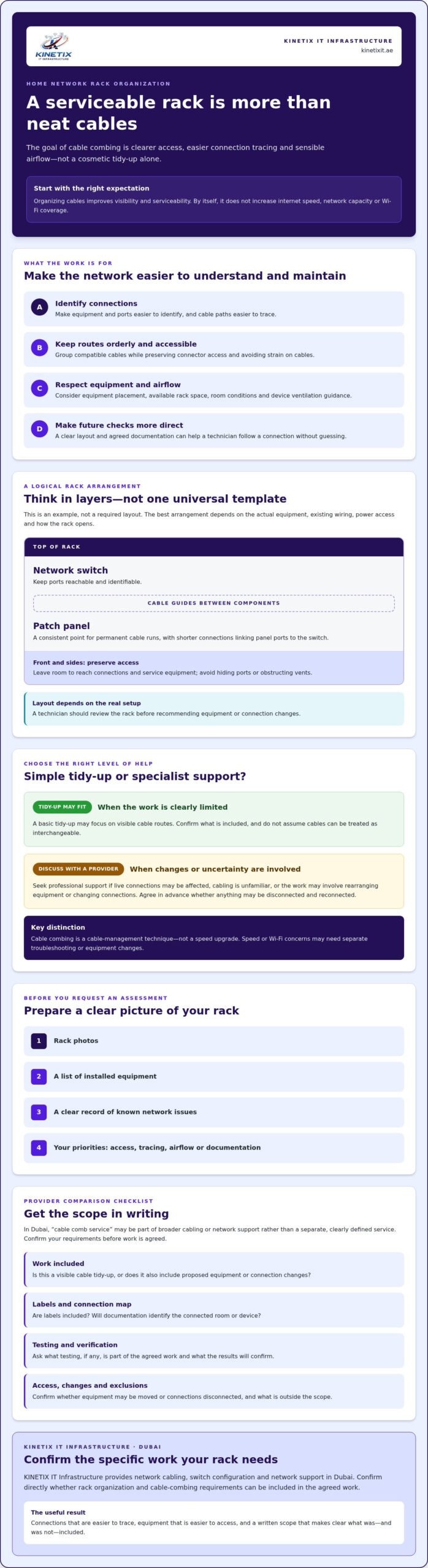
Here’s a simple example of a logical arrangement. It’s a guide, not a universal layout:
Top: Network switch, with reachable, identifiable ports
Middle: Patch panel, separating permanent cable runs from equipment connections
Between: Cable guides, keeping compatible runs orderly and accessible
Front and sides: Space to reach connections and service equipment
How should switches, patch panels, and cable guides be arranged?
A patch panel can bring permanent cabling to a consistent, labeled point, while shorter connections link its ports to the switch. Cable guides can keep those connections orderly without hiding ports that need access. The best position depends on equipment dimensions, existing wiring, power access and how the rack opens. A technician should review the actual setup before recommending changes.
Airflow also needs consideration. It depends on the room, equipment placement, ventilation and the manufacturer’s guidance for each device. A tidy rack can make vents easier to inspect, but cable arrangement alone can’t correct a poorly ventilated location or unsuitable equipment placement.
Why labeling and cable routing matter during troubleshooting
Consistent labels at both ends can help identify which patch-panel port or cable serves a particular room or device. Agree on the labeling approach with the provider, including whether labels and a connection record are included in the project scope. Clear routes then give a technician a more useful starting point when checking an outlet, switch connection or suspected cable fault.
For background on how planned cabling supports manageable connections, see KINETIX’s structured cabling fundamentals. The Institution of Engineering and Technology’s professional cable management guide is another reference for understanding cable types and management considerations.
If the rack work involves Ethernet cabling or switch configuration, you can discuss your home network cabling needs with KINETIX in Dubai. Confirm whether the requested rack layout, labeling and cable routing are within the project scope.
DIY Rack Tidying or Professional Cable Comb Service: How to Decide
A network that works today can still be difficult to maintain. Clearer access and a record of what connects where can make future checks less uncertain, especially if a household issue requires tracing a cable. The choice between DIY tidying and professional support depends less on whether the internet is working and more on what needs to be moved, disconnected or identified.
| Situation | DIY may be reasonable | Consider professional support |
|---|---|---|
| Task complexity | Arranging visible, loose cables without unplugging anything | Sorting multiple switches, patch panels or connected systems |
| Access | Connections are easy to see and reach | Cables are crowded, taut, unidentified or difficult to trace |
| Equipment changes | No equipment or connections need to move | A router, switch or other device may need repositioning or reconnection |
| Documentation | You only need a simple visual improvement | You want agreed labels or a connection record for future servicing |
When is a basic DIY tidy-up reasonable?
Keep DIY work to low-risk organization, such as gently arranging visible cables without disconnecting equipment. Photograph the rack and connections first so you have a reference if you make a small, reversible change. Don’t unplug unidentified connections or press cables against vents. Stop if a cable is taut, damaged, difficult to identify or blocking access to equipment.
When should a Dubai homeowner request professional help?
An assessment is sensible if several switches, patch panels or connected systems share the rack, or if changes could interrupt household internet and connected devices. A working network may still benefit from clearer access and documentation, but be explicit about the intended outcome. Ask the provider to confirm in writing whether rack organization and cable combing are within scope, and whether reconnection, labeling or testing is included.
If your concern extends beyond the rack to connectivity across rooms, KINETIX’s Dubai villa Wi-Fi installation guidance offers related context. KINETIX provides network cabling, Ethernet installation, switch configuration and network support in Dubai. Confirm whether your specific rack tidy-up requirements fit the requested work.
What to Check Before Booking a Home Network Rack Organization Service
A clear brief helps a provider assess the rack and lets you compare proposals on more than appearance. Before arranging a home network rack organization and cable comb service, gather the details below and ask for the proposed work in writing.
- Take clear rack photos. Photograph the front, visible sides, connections and surrounding space. Don’t remove covers or disturb cables just to get a better view.
- List the equipment. Note what you recognize, such as the router, switches, patch panels, CCTV or intercom equipment. Mark unknown devices as unidentified rather than guessing.
- Describe access. Explain where the rack is located, how much room there is to work around it, and whether access is restricted.
- Record known issues. Mention loose or damaged cables, hard-to-trace connections, intermittent network problems or equipment that’s difficult to reach.
- Agree on scope before equipment is moved. Confirm in writing what may be handled, disconnected, rearranged or reconnected, and what requires your approval first.
Questions to ask before the visit
Ask whether the provider will assess the existing rack and explain feasible organization options before starting. Clarify whether cable guides or combs, labeling, patch-panel changes, testing and documentation are included or excluded. Ask whether the proposed work affects connected routers, switches, CCTV or intercom equipment, and how any interruption or unexpected issue will be handled.
Keep the scope specific. For example, “organize visible patch leads and label agreed connections” is clearer than “tidy the rack.” Confirm whether post-work checks are planned and what they cover. Rack organization and cable combing aren’t automatically included in general network cabling or support, so verify that your particular requirements are within the provider’s scope.
What a clear handover should explain
Before the work is considered complete, request a simple explanation of the connections and any labels applied. Confirm which changes were completed, which recommendations remain optional, and whether the agreed checks were carried out. Ask how to identify the provider or reference the work if you need network troubleshooting later. A concise record gives you a useful starting point, while recognizing that the rack’s configuration may change over time.
KINETIX IT Infrastructure provides network cabling, Ethernet installation, router and switch configuration, and network support in Dubai. Discuss your network rack requirements with KINETIX and confirm whether the requested organization, labeling and cable-combing work can be included in your project scope.
Discuss Rack Organization and Network Cabling with KINETIX in Dubai
A rack tidy-up may overlap with network cabling or equipment configuration, particularly if connections need tracing or a switch is involved. KINETIX IT Infrastructure serves homes and villas in Dubai with network cabling, Ethernet installation, router and switch configuration, and network support. Rack organization and cable combing aren’t confirmed standalone services, so ask whether your specific request can be included before arranging work.
How to prepare a useful rack assessment request
A focused request helps the provider understand your setup and the result you want. Share the Dubai location, a brief description of the rack and your priorities, such as easier access to connections, clearer cable routes or help addressing a recurring issue.
- Include clear photos. Show the rack and its visible connections, but keep passwords, network names and other sensitive information out of the images.
- List the equipment. Identify known routers, switches and connected systems. Note anything you can’t identify rather than guessing.
- Describe the problem. Mention recurring connection issues, difficult-to-trace cables or equipment that’s hard to access.
- Note planned changes. Tell the provider if you expect to add or replace equipment, as that may affect the proposed routing or layout.
- Explain access and timing. Share any access constraints and your preferred appointment timing, then confirm what can be arranged.
How KINETIX network services may fit the project
Network cabling and Ethernet installation may be relevant if the work involves existing cable runs or connections. Router and switch configuration, alongside network support, may also be pertinent if troubleshooting or equipment changes are part of the request. The right scope depends on the actual rack and the work you need.
Before confirming, ask whether KINETIX can include the requested rack organization or cable combing in your project, and clarify any assessment steps, handling permissions, labeling, testing and documentation. Agree on what equipment may be moved or reconnected, what requires your approval, and which tasks are outside scope. That way, you’ll know what the proposed work covers instead of assuming “cable management” means the same thing to every provider.
With photos, an equipment list and a clear description of your desired outcome, the discussion can start with practical next steps. Discuss your home network requirements with KINETIX and confirm whether your rack organization needs fit the available project scope.
Make Your Home Network Easier to Maintain
A well-organized rack is more than a neat display. Clear routes, accessible connections and agreed labeling can make equipment easier to identify and service, while a thoughtful layout helps preserve access for checks and maintenance. Cable combing alone won’t improve bandwidth or Wi-Fi coverage, so define the outcome you need before work begins.
Before booking a home network rack organization and cable comb service, prepare photos, an equipment list and a note of recurring issues. Ask for the scope in writing, including what may be moved or reconnected, whether testing and documentation are included, and whether your specific cable-combing requirements are covered.
KINETIX supports homes and villas in Dubai with network cabling, Ethernet installation, switch configuration and network support. Rack organization and cable combing aren’t confirmed standalone services, so discuss your setup and verify what can be included. Discuss your Dubai home network requirements with KINETIX to confirm whether the work fits your project.
Frequently Asked Questions
What is a home network rack organization and cable comb service?
It describes arranging network equipment and grouping compatible cable runs to make connections easier to identify, access and maintain. A home network rack organization and cable comb service may involve reviewing the existing setup, planning cable routes and discussing labels or documentation. The exact work depends on the rack, equipment and access. Cable combing improves order, not network speed, and shouldn’t be assumed to include equipment changes or testing unless agreed.
Does organizing network cables improve Wi-Fi speed?
No. Tidier cables alone don’t increase Wi-Fi speed, internet bandwidth or wireless coverage. Organization can make equipment connections easier to see and service, which may help a technician investigate a separate network issue. If your Wi-Fi is slow or coverage is inconsistent, the cause may need troubleshooting rather than cable combing. In Dubai, clarify whether your concern is physical rack access, wired connections, wireless performance or more than one issue.
Can I organize my home network rack myself?
Yes, if the task is limited to gently arranging visible cables without unplugging equipment or changing connections. Take photos first so you can refer to the original layout. Don’t move unidentified connections, strain cables or block equipment ventilation. Stop if cables are damaged, taut, hard to trace or obstructing access. If the rack contains multiple switches, patch panels or connected systems, ask a network professional to assess it before making changes.
What should a professional cable comb service include?
There’s no single standard scope implied by the phrase, so ask for a written description before booking. It may cover a visual assessment, agreed cable routing, cable guides, labeling, post-work checks or documentation, but these deliverables need confirmation. Clarify whether equipment handling, reconnection, patch-panel changes and testing are included, and which tasks are excluded. Agree on how any interruption or unexpected issue will be handled before work begins.
How do I choose a network rack organization service in Dubai?
Choose a provider that reviews your specific rack, explains feasible options and sets out the work in writing. Check that the scope addresses access, cable handling, labeling, equipment changes and post-work checks. KINETIX IT Infrastructure serves homes and villas in Dubai with network cabling, Ethernet installation, router and switch configuration, and network support. Confirm directly whether rack organization or cable combing can be included in your particular project.
Will cable combing interrupt my home internet?
It may if the agreed work requires a live connection to be disconnected, moved or reconnected. A visual review or routing work that leaves connections untouched may have a different impact. Ask the provider to identify which devices or services could be affected, how interruptions will be handled and whether reconnections require your approval. Mention household systems that rely on the network, such as work devices, smart TVs, CCTV or intercom equipment.
What information should I provide before requesting a rack assessment?
Share your Dubai location, clear photos of the rack and a list of equipment you can identify. Describe recurring connection issues, difficult-to-trace cables and the outcome you want, such as easier access or clearer labeling. Note access constraints and planned equipment additions. Keep passwords and sensitive network details out of photos or messages. Ask the provider to confirm the assessment process and written scope, including handling, testing, documentation and exclusions.