
More airflow isn’t always safer for a network cabinet in a Dubai garage. A fan can move heat out, but it can also draw dust into the enclosure if airflow and filtration aren’t planned together. That’s why network cabinet ventilation solutions for garage installation Dubai need to account for equipment heat, garage conditions, and protection as one system.
If you’re concerned that garage temperatures could affect routers, switches, or other network equipment, start by assessing the cabinet, its equipment load, and its location. Passive vents or a fan may suit different setups, but neither is automatically the right choice. The airflow path and how clean air enters while warm air leaves matter just as much.
This guide explains how to assess airflow, reduce dust exposure, and plan ventilation alongside power and equipment layout. You’ll learn when passive airflow may be sufficient, when fan-assisted ventilation may be suitable, and how to coordinate cabinet-linked cabling and equipment setup. A considered plan treats cooling and dust control as part of a dependable network environment.
Key Takeaways
- Match passive, fan-assisted, or filtered airflow to the cabinet’s equipment load, available airflow path, and garage dust exposure.
- Review each device manufacturer’s temperature limits before planning ventilation or choosing where the cabinet will sit.
- Use a pre-installation checklist to assess heat sources, enclosure placement, airflow openings, and maintenance access.
- Plan network cabinet ventilation solutions for garage installation Dubai alongside cable routing, equipment layout, and device configuration.
- Clear cable organization and labeling make the network setup easier to inspect and service.
Why a Dubai Garage Needs a Planned Network Cabinet Ventilation Solution
A network cabinet in a garage faces different conditions from equipment installed in an indoor office. Temperatures can change, air movement may be limited, and dust or nearby heat sources can affect the cabinet. The enclosure itself can also restrict the movement of warm air. Planning network cabinet ventilation solutions for garage installation Dubai means assessing these factors together, rather than choosing a fan based on cabinet size alone.
Heat builds up when routers, switches, and other devices release warmth faster than it can leave the enclosure. Crowded equipment, cable bundles, and blocked vents can restrict airflow or allow heat from one device to affect another. At the same time, an open airflow path may admit dust. Ventilation can help remove accumulated heat, but it doesn’t change a device’s specified operating temperature or make an unsuitable location appropriate.
Start with an observable check of the installation area:
- Enclosed space: Is the cabinet in a recess or another location with little air movement?
- Blocked vents: Are cabinet openings or equipment intake and exhaust areas obstructed?
- Dust: Is dust visible around the cabinet, or likely to enter through its airflow openings?
- Stacked equipment: Are devices packed tightly together or covering one another’s vents?
These signs don’t diagnose a fault on their own. They show what to inspect and account for in a ventilation plan. The overview of cooling methods for 19-inch racks describes airflow approaches and practical challenges such as dust and fan failure. These are also useful considerations when reviewing a smaller network cabinet.
What makes a garage installation different?
Garage layouts vary. A cabinet near a sun-warmed wall, a vehicle, or heat-producing household equipment may experience different conditions from one in a more open, shaded area. An enclosed layout can also limit how readily warm air disperses. Dubai’s climate makes it especially relevant to assess the actual installation site, rather than assume conditions based on the room alone.
A garage cabinet isn’t automatically equivalent to a server room, and not every installation faces the same concerns. A climate-controlled server room is designed around managed environmental conditions; a garage may not be. Assess the location and equipment together, then compare what you observe with the manufacturers’ guidance.
Which signs suggest airflow needs attention?
Look for intake or exhaust openings blocked by walls, stored items, cables, or adjacent equipment. Check whether devices are crowded, dust is accumulating, or equipment status indicators show warnings. Compare the conditions around the cabinet with each device’s operating limits in its manufacturer documentation. If conditions approach a stated limit, changing airflow alone may not resolve an unsuitable placement issue.
Plan garage ventilation around observed site conditions, equipment limits, and a clear path for air to move. This helps distinguish a simple obstruction from a broader cabinet-layout concern.
How Heat Builds Up Inside a Network Cabinet
Cabinet heat builds up when equipment generates warmth faster than the enclosure can release it. The temperature inside can rise even when every device is operating normally. Routers and switches add heat, while the cabinet, its location, and its airflow openings affect how readily that heat escapes. Think of it as a balance between heat entering the cabinet and heat leaving it.
A fan or vent alone doesn’t guarantee effective cooling. If an intake is blocked, an exhaust opening faces a wall, or equipment is crowded, air may not travel through the cabinet as intended. Heat can linger around individual devices instead of being carried away.
How switches, routers, and other devices contribute heat
Powered equipment releases heat during operation. A cabinet holding a router and a switch has more heat sources than one holding a single device. Placement also affects whether warm air from one unit reaches another. Cable bundles can add to the congestion by covering vents or making it harder to maintain the spacing recommended in device installation guidance.
Check each device’s documentation for operating limits and installation clearances. There isn’t one temperature or power figure that applies to every router, switch, or network component. Requirements depend on the specific model and how it is installed.
Why airflow direction and cabinet layout matter
Trace the intended airflow route using the cabinet’s actual vent positions. For example, if air enters through lower openings and leaves through upper openings, keep both areas clear. Don’t place equipment or cable bundles across that route. If the cabinet uses a fan, identify which opening draws air in and which releases it. Don’t assume the fan direction matches the enclosure’s natural airflow.
An exhaust fan can remove warm air effectively only if replacement air has a clear path into the cabinet. Without that path, airflow may be restricted or drawn through unintended gaps, potentially bringing dust with it. Planning network cabinet ventilation solutions for garage installation Dubai therefore means considering equipment layout and cabling as well as the ventilation method.
- Review the equipment load: List the devices that will operate in the cabinet, including planned additions.
- Check the enclosure: Note vent locations and whether nearby surfaces, stored items, or the cabinet’s position obstruct them.
- Follow device guidance: Compare installation conditions with each manufacturer’s temperature and clearance instructions.
- Keep routes clear: Arrange cabling so it doesn’t cross intake or exhaust openings or press against device vents.
These checks also support an orderly network installation. If cabinet-linked cabling and equipment placement need to be coordinated, network cabling and setup can be planned as part of the wider home network arrangement. A clear layout makes it easier to see whether the airflow path remains open as equipment is installed or changed.
Passive, Fan-Assisted, or Filtered Ventilation for a Garage Cabinet?
Choose a ventilation approach based on the cabinet’s heat load, the route air can take, the amount of dust in the garage, and how easily the setup can be inspected. Passive vents rely on natural air movement. Fans actively move air. A filtered fan arrangement adds a barrier to some airborne dust, but that barrier also needs attention. More airflow isn’t automatically better if it draws dust into the cabinet or bypasses the intended path.
Use this comparison as a starting point, then assess site conditions and each device manufacturer’s installation guidance:
| Approach | Heat load and airflow path | Dust and maintenance |
|---|---|---|
| Passive vents | May suit a modest equipment load when vent placement and natural air movement provide a clear route through the cabinet. | No fan to power, but open vents can admit dust. Keep openings clear and inspect them regularly. |
| Fan-assisted | Can move air when passive circulation doesn’t suit the assessed setup. The fan needs a clear intake and exhaust route. | Consider dust entry, power, noise, inspection access, and how fan operation or failure will be noticed. |
| Filtered fan arrangement | Combines fan-driven airflow with a filter, which may be relevant where dust exposure matters and active air movement is needed. | Filters can collect dust and restrict airflow if neglected. Plan access for inspection and cleaning or replacement according to component guidance. |
When can passive ventilation be appropriate?
Passive ventilation may be suitable when the cabinet has well-positioned openings and surrounding conditions allow natural airflow. Its effectiveness depends on where air can enter and leave, nearby obstructions, and the temperature around the cabinet. Don’t assume vents alone will keep equipment within its operating limits. Compare the actual installation conditions with the manufacturer’s requirements.
When should fan-assisted or filtered airflow be considered?
Consider a fan if assessment shows that natural airflow isn’t sufficient for the equipment and cabinet arrangement. A filter can help manage dust, but it isn’t a fit-and-forget solution. Include filter access and inspection in the layout. Also plan how the fan will receive power, whether its noise is acceptable for the location, and how its operation can be checked. A failed or obstructed fan can reduce the intended airflow.
For a garage, choose the approach that suits observed conditions, device requirements, and realistic maintenance access. There’s no universal rule that every cabinet needs a fan, or that the highest airflow is the safest. Network cabinet ventilation solutions for garage installation Dubai should balance heat removal with dust management and a serviceable layout.
Cabinet airflow also depends on equipment placement and cable routing. Planning network cabling and equipment setup together helps keep ventilation openings accessible as the installation takes shape.
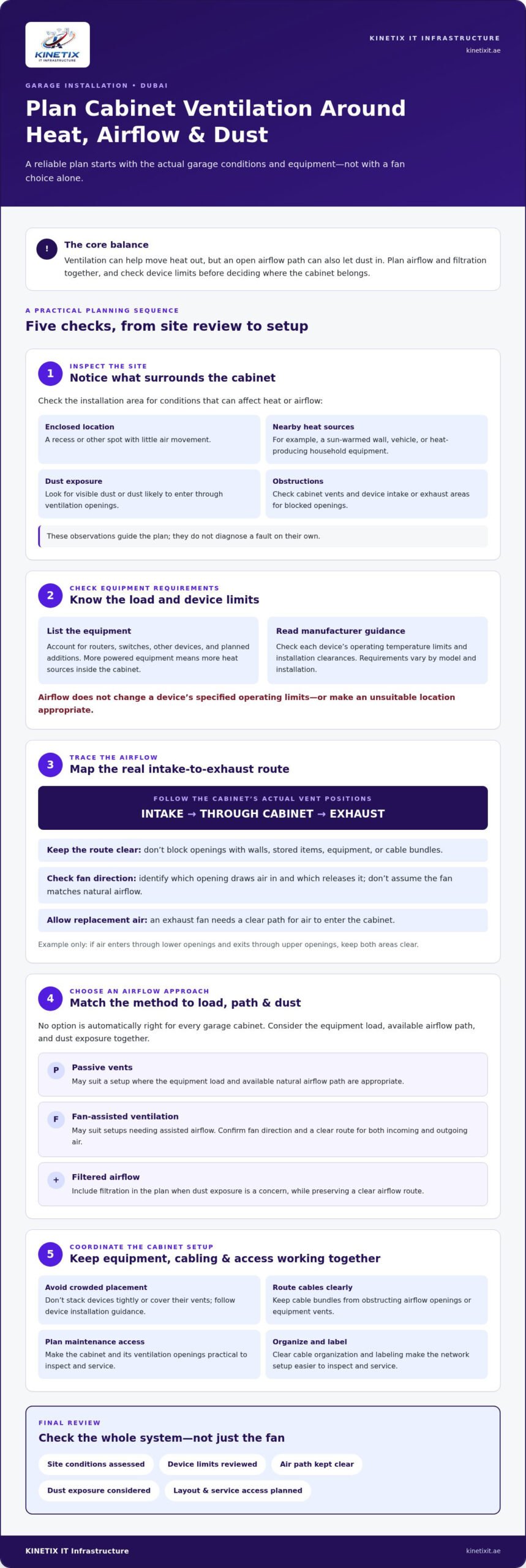
How to Plan Network Cabinet Ventilation Before Garage Installation
A site review turns ventilation planning from a guess into a coordinated installation plan. Record what equipment will operate in the cabinet, where it will sit, how air can move through the enclosure, and what access will be available for inspection. For network cabinet ventilation solutions for garage installation Dubai, document conditions at the actual site instead of relying on assumptions about the garage.
What to assess during the site survey
Follow a consistent sequence before finalizing the cabinet position or equipment layout:
- Step 1: Inventory the equipment. List the routers, switches, and other network devices planned for the cabinet. Note possible additions so the layout accounts for the intended setup.
- Step 2: Review manufacturer limits. Check each device’s stated operating conditions, placement guidance, and required clearances. Keep the documentation available for later reference.
- Step 3: Inspect the location. Record the cabinet’s proposed position, enclosure conditions, nearby heat sources, visible dust exposure, and surrounding surfaces or stored items that may obstruct openings.
- Step 4: Map airflow and connections. Mark the cabinet’s intake and exhaust openings, device positions, power needs, and cable entry points. Note where cables or equipment could obstruct the intended airflow route.
- Step 5: Plan service access. Check that equipment, vents, filters if fitted, and power connections can be reached without moving stored items or dismantling the installation.
Record ambient readings at the cabinet location, noting when and where they were taken. Pair those readings with observations about the cabinet and equipment, then compare them with manufacturers’ stated requirements. A log provides useful context if the equipment layout changes or conditions vary. One reading alone doesn’t represent every operating condition.
How to keep ventilation maintainable
Ventilation remains useful only if its openings and components stay accessible. Leave room to inspect vents and filters, reach connections, and remove or reposition equipment for service. Set an inspection routine that reflects the garage’s dust conditions and the relevant equipment guidance. During each review, note visible dust, blocked openings, changes to cable routing, and equipment status warnings.
Cabinet placement, cable entry, and equipment arrangement work best as one plan. The Network Cabling Dubai guide provides wider context for organizing network routes. For a cabinet-linked home network, plan your network cabling and setup alongside the ventilation layout.
Pre-installation site checklist
- Equipment inventory and manufacturer guidance are recorded.
- Cabinet position, surrounding heat sources, and dust exposure are noted.
- Airflow openings, cable routes, and power needs are mapped.
- Ambient readings and relevant site observations are documented.
- Vents, filters, connections, and devices remain accessible for inspection.
Integrate Cabinet Ventilation with a Reliable Dubai Network Setup
Ventilation planning works best as part of the network layout, not as a late adjustment after equipment and cables are in place. Cabinet position affects access to vents and connections. Cable routes affect airflow and service clearance. Router and switch placement affects how easily the installation can be inspected or changed. Coordinating these decisions creates a more organized home network without promising a particular temperature or performance result.
Coordinate cabling and equipment layout
Map cable entry points and the route each connection will take. Keep wiring away from intake and exhaust openings, and avoid tight bundles that cover device vents or make equipment difficult to reach. Position routers and switches according to their connection needs and manufacturer guidance, while preserving access for inspection and maintenance.
Clear labels help identify which cable serves a device or room. Orderly routing also makes it easier to trace connections without disturbing the cabinet layout. These details are useful during routine checks and when equipment is added or repositioned. A structured cabling foundation guide can help homeowners understand how planned cable routes fit into a broader network design.
Prepare a clear brief for the installation
Before the network setup, gather the details that shape cabinet placement and equipment arrangement. A concise brief helps coordinate ventilation access with cabling and device configuration:
- Devices: List the routers, switches, and other network equipment planned for the cabinet, including where each device will sit.
- Requirements: Note relevant manufacturer operating guidance, connection needs, and access considerations.
- Garage conditions: Record the proposed cabinet location, nearby heat sources, dust exposure, and any obstructions around the enclosure.
- Desired layout: Identify the access needed for equipment, a clear airflow path, and organized, labeled network connections.
This brief supports practical coordination. Network cabling and Ethernet installation can be planned alongside router placement and switch configuration, so cable entry, equipment positions, and ventilation access are considered together. If garage conditions or the device list change, update the notes and review whether the planned routes and clearances still make sense.
For homes and villas in Dubai, KINETIX IT Infrastructure provides network cabling, router and switch configuration, and complete network setup as part of the wider installation plan. Plan your Dubai network setup with KINETIX as a coordinated next step.
Make the Cabinet Plan Ready for What Comes Next
A garage network can evolve as you add devices, change how rooms are used, or update equipment. Review the cabinet layout when those changes happen. Check that ventilation openings remain accessible, cables stay orderly, and the equipment arrangement still follows manufacturer guidance.
This keeps network cabinet ventilation solutions for garage installation Dubai connected to the wider needs of your home network. Rather than treating the cabinet as an isolated box, plan its placement and connections as part of an installation that can be understood, inspected, and adjusted over time.
KINETIX IT Infrastructure supports home and villa network planning across Dubai, including network cabling, switch configuration, and complete network setup. Discuss your Dubai home network setup with KINETIX to plan a clear, coordinated installation.
A considered plan today can make future network changes easier to manage.
Frequently Asked Questions
Can a network cabinet be installed in a Dubai garage?
Yes, a network cabinet can be installed in a Dubai garage if the location and conditions suit the equipment. Before choosing a position, check exposure to heat and dust, available airflow, and access for inspection. Compare conditions at the proposed location with each device’s installation guidance. If the garage is used for storage or workshop tasks, consider whether items or activities could block vents or expose equipment to dust.
How hot is too hot for a network cabinet?
There’s no single temperature limit for every cabinet or device. Use the operating range stated by the manufacturer for each router, switch, and other component, and assess conditions at the equipment location rather than relying only on general room temperature. If a device reports a temperature warning or behaves abnormally, review its documentation and check the cabinet conditions. Don’t assume adding a fan makes temperatures above the specified limit acceptable.
Will a cabinet fan keep dust out of network equipment?
No, a fan alone doesn’t keep dust out. Depending on its direction and the cabinet openings, it may draw dusty garage air into the enclosure. A filter can help limit dust entering through an intended intake, but it needs inspection so accumulated debris doesn’t impede airflow. Also check cable openings, unused vents, and the surrounding area, since dust can enter through routes that bypass the filter.
Should a garage network cabinet have an exhaust fan or an intake fan?
Choose the fan direction to suit the cabinet’s complete airflow route, not as a standalone rule. An exhaust fan can remove warm air when replacement air has a clear way in; an intake fan needs a suitable exit path for warmer air. Check the enclosure’s vent positions and the devices’ airflow directions. After installation, confirm the intended route isn’t blocked by a wall, cable bundle, or nearby stored item.
How often should network cabinet ventilation filters be checked?
Set the inspection frequency according to the garage’s dust exposure and the filter or equipment manufacturer’s maintenance guidance. A cabinet near a dusty work area may need closer attention than one in a cleaner, less disturbed part of the garage. Check for visible dust buildup and reduced airflow, and record inspections so you can adjust the routine if the filter accumulates debris quickly. Follow the filter maker’s instructions for cleaning or replacement.
Can I put a router and network switch in the same cabinet?
Yes, a router and network switch can share a cabinet if there’s room to install and access both according to their manufacturers’ guidance. Keep each device’s vents clear, avoid stacking equipment in a way that obstructs airflow, and leave space to reach network and power connections. Plan cable routes so they don’t cover openings or make either device difficult to remove. For network cabinet ventilation solutions for garage installation Dubai, assess the combined equipment arrangement rather than each device in isolation.