
What if the best camera system for your Arabian Ranches home starts with where you need to see, not which camera you buy? A successful poe security camera installation Arabian Ranches homeowners can feel confident about begins with a clear coverage plan. Entrances, boundary approaches and outdoor areas each need considered positioning, while the cameras also depend on a well-planned network connection.
It’s reasonable to wonder whether your home network can support reliable camera feeds and recording, or how to compare specifications without getting buried in technical detail. This guide explains what a professionally integrated PoE system involves and how to plan one around your property’s layout and priorities.
You’ll learn how to identify useful camera positions, understand which features matter, and coordinate CCTV installation with cabling, Ethernet connections and network configuration. Planning these elements together helps you take confident next steps towards a connected camera system designed for your home.
Key Takeaways
- Plan camera views around your entrances, driveway, boundary approaches and regularly used outdoor spaces.
- Understand how PoE combines camera data and compatible power on one Ethernet cable, with recording and viewing handled by connected system components.
- Choose camera locations, recording approach and network integration to suit your villa layout, rather than relying on a fixed camera count.
- For poe security camera installation Arabian Ranches, map cable routes and camera positions before installation begins.
- See how KINETIX IT Infrastructure coordinates CCTV installation with network cabling and configuration to support a connected home system.
PoE Security Camera Installation in Arabian Ranches: Plan Coverage Around Your Home
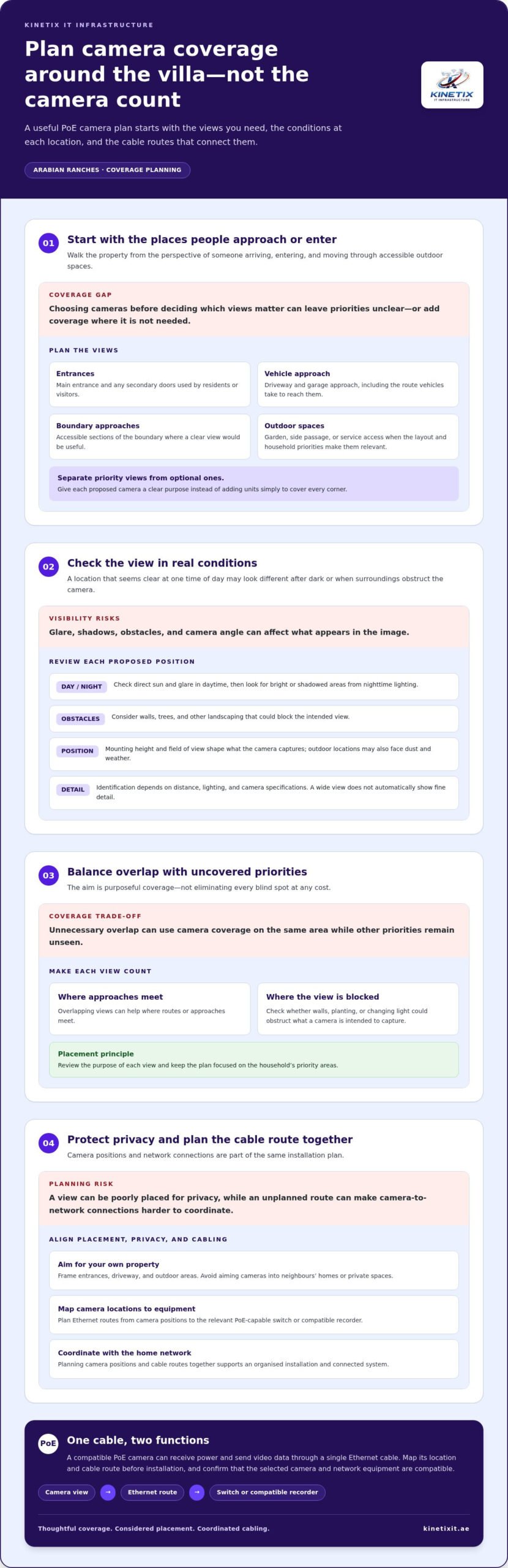
Clear views of key approaches can help you check what’s happening around your home, but cameras can’t prevent every incident. For a practical poe security camera installation Arabian Ranches homeowners should first identify the areas they most want to monitor, then plan camera positions around the villa’s layout. Mapping coverage before installation also helps align useful viewing angles with sensible cable routes.
Start with the places people approach or enter the property. Consider:
- The main entrance and any secondary doors used by residents or visitors.
- The driveway and garage approach, including the route vehicles take to reach them.
- Accessible sections of the boundary where a clear view would be useful.
- Outdoor areas used regularly, such as a garden, side passage or service access, when the layout makes them a priority.
Separate essential views from optional ones. This makes it easier to decide where each camera adds value instead of adding units simply to cover every corner. A PoE system uses Ethernet cabling to connect compatible cameras with the network, so planning camera positions and cable routes together supports a more considered installation. For background on the connection method, see this overview of Power over Ethernet (PoE) technology.
Which areas should an Arabian Ranches villa camera plan consider?
Walk the property from the perspective of someone arriving, entering and moving around its accessible outdoor spaces. Note which doors, driveway routes and boundary approaches need a clear view. A garden or side passage may warrant coverage if it’s frequently used or provides access to the home; otherwise, it may be optional. This priority-based plan keeps the system tailored to household needs.
What can affect outdoor camera placement and image quality?
Check each proposed view in daytime and after dark. Direct sun can cause glare, while nighttime lighting may create bright or shadowed areas. Walls, trees and other landscaping can block a view, and outdoor positions may be exposed to dust and weather. Mounting height and field of view also shape what appears in the image. Identification depends on distance, lighting and camera specifications, so don’t assume every wide view will show fine detail.
Positioning is a balance, not a race to eliminate every blind spot. Overlapping views can help where approaches meet, but unnecessary overlap may use camera coverage on the same area while other priorities remain unseen. Review what each camera is intended to capture and whether walls, planting or changing light could obstruct that view.
Privacy matters too. Frame cameras towards your own entrances, driveway and outdoor areas, and avoid aiming them into neighbours’ homes or private spaces. A site-led plan considers the view from each proposed position before cabling begins. That gives the installation a clear purpose: useful coverage, thoughtful placement and integration with the property’s network.
How PoE Security Cameras Work: Power, Cabling and Recording
Power over Ethernet (PoE) lets a compatible camera receive power and send video data through a single Ethernet cable. A camera can connect to a PoE-capable network switch or recorder without a separate power cable at its location. The IEEE 802.3af standard is one reference for PoE specifications, but actual device compatibility depends on the equipment selected.
PoE describes how a camera receives power; Wi-Fi describes a wireless network connection. A PoE camera normally uses a cable for both power and data, while a Wi-Fi camera sends data wirelessly and typically needs a separate power source. A wired link can simplify camera connections, but it still requires a suitable network design and compatible equipment.
What equipment does a PoE camera system need?
A typical setup includes PoE cameras, Ethernet cabling, and either a PoE-capable network switch or a compatible recorder with PoE ports. An NVR, or network video recorder, records video from compatible network cameras; it isn’t required in every setup. A router or other network connection may support access from devices on the home network. The right arrangement depends on the selected equipment and how you want footage recorded and viewed.
Consider the camera, switch and recorder specifications together before installation. A switch’s available ports affect how many wired devices it can connect, while its power budget determines how much power it can supply across those ports. An NVR with built-in PoE ports may combine recording and camera connections, but its capabilities vary. Matching equipment avoids assuming that any camera will work with any recorder or switch.
Ethernet runs link each camera to the relevant switch or recorder. Cable routes should connect the planned camera locations to that equipment, with the central network and recording components placed where they can be configured and accessed. In a villa, coordinating CCTV cabling with the home network helps keep the installation organised and the system easier to manage.
Does PoE CCTV need a strong home internet connection?
Not necessarily for every function. Cameras may communicate with a local switch or recorder, and an NVR can store footage on the property. Remote viewing from outside the home, however, depends on an internet connection as well as suitable network and system configuration. Live viewing and notifications can also be affected by how the camera system is connected and configured.
Think of the system in two parts: local connections handle communication between cameras, network equipment and the recorder; internet access can enable features beyond the home network. This distinction explains why recording may be set up locally while remote access relies on additional network settings. Remote access isn’t uninterrupted by default.
For poe security camera installation Arabian Ranches, CCTV, Ethernet cabling and network configuration are best planned as connected parts of the same project. KINETIX coordinates these elements for residential systems, including home and villa network setup, so camera connections fit the property’s wider network.
Choosing a PoE Camera Setup for an Arabian Ranches Property
The right setup depends on the views you need, where cameras can be positioned, and how you want footage recorded and accessed. Camera count should follow the villa’s layout and coverage priorities, not a fixed number. For poe security camera installation Arabian Ranches, compare system choices by the job each camera and connection needs to perform.
| Coverage priority | Possible location | Recording approach | Network integration |
|---|---|---|---|
| See who approaches or enters | Main entrance or secondary door | Choose a recording mode that captures the times or events that matter | Plan an Ethernet route to the switch or compatible recorder |
| Monitor vehicle access | Driveway or garage approach | Consider whether footage needs to be available locally or remotely | Account for the camera connection and the network path for viewing |
| View an outdoor access route | Boundary approach or side passage | Set retention needs around how the footage will be reviewed | Check that outdoor camera, cabling and network equipment are compatible |
Use the table as a planning guide, not a fixed specification. A broad view may cover more space, while separate views may be more suitable where entrances or routes need distinct coverage. Choose specifications to suit the scene and viewing need. This keeps camera features connected to practical use rather than technical detail for its own sake.
Which camera specifications matter for a villa?
Compare resolution, field of view and low-light performance against each camera’s position and purpose. A wide field of view can show more of a driveway, but distant details may appear smaller. A narrower view may suit a particular entrance, yet leave more of the surrounding area outside the frame. Check outdoor suitability and weather or dust protection ratings for each proposed location rather than assuming every camera is designed for the same conditions.
How should recording and remote viewing needs shape the setup?
Recording and remote viewing are different system functions. Compatible equipment may support continuous, scheduled or event-based recording, but available modes vary. Consider how much footage you expect to review and how long it needs to remain accessible when planning storage. Remote access depends on compatible equipment and secure network configuration; its performance also relies on the network connection and system setup.
Local recording can store footage on a recorder at the property, while remote viewing lets you access the system through a connected device when configured. One doesn’t replace the other. A considered plan brings camera views, recording preferences and network integration together, so the final setup reflects how your household intends to use it.
PoE Camera Installation Steps: From Site Survey to System Testing
A dependable installation follows a clear sequence: decide what each camera needs to capture, plan the cable routes, then configure and test the connected system. For poe security camera installation Arabian Ranches, this helps coordinate the villa’s camera positions with its network layout before work begins. KINETIX provides CCTV installation and network integration for homes and villas in Dubai, bringing cabling and system configuration together as part of the project.
What happens during a PoE camera site assessment?
The assessment considers priority views, suitable mounting positions and practical routes for Ethernet cables back to network equipment. It also reviews the home network and the intended recording and remote viewing experience. Finished surfaces, outdoor cable routes and the location of the recorder or switch can all shape the installation plan, so these decisions are considered before installation work starts.
A typical project moves through these stages:
- Review coverage needs. Confirm which views matter most and what each camera is expected to show.
- Plan positions and cable routes. Select mounting locations and map cable paths to the network equipment, taking the villa’s structure and finished surfaces into account.
- Coordinate the system design. Match the cameras with compatible network and recording equipment, and plan where those devices will be placed.
- Install cameras and cabling. Run Ethernet connections along the planned routes, mount the cameras and connect them to the system.
- Configure network and recording. Set up the relevant network connections and recording options for the selected equipment and viewing needs.
- Test and hand over. Check each camera’s view and connection, review recording behaviour, and explain the basic controls for everyday use.
Planning cable routes early matters in a finished home. A route through an accessible pathway may be more suitable than one that would require disturbing a completed surface. Equipment placement also affects how cameras connect to the network and where footage is managed. Coordinating cabling, CCTV and network setup helps keep these decisions part of one installation plan.
What should be tested before installation is handed over?
Test every installed camera in the intended viewing or recording system. Review each camera’s angle during daytime and in low light, check that timestamps are appropriate, and confirm that recording follows the selected settings. During handover, learn how to open live views and recordings, and how to recognise a camera that isn’t appearing as expected. These checks make the system easier to use and help surface setup issues before the project is complete.
A camera that appears in the app or recorder still needs a useful view, so test the actual scene rather than relying only on a connection indicator. Confirm that the recorded image shows the intended area and that the controls make sense for the household. When CCTV installation, cabling and network configuration are coordinated, the handover can explain how the system works as a whole.
To arrange a professionally integrated system for your villa, plan your PoE camera installation with KINETIX.
Arrange PoE Security Camera Installation in Arabian Ranches
A well-scoped project starts with practical details about your villa and how you want to use the system. For poe security camera installation Arabian Ranches, share the property layout, the areas you want to monitor and who needs to view footage. This gives the installation plan a clear basis, from camera positions to cabling and network configuration.
What should homeowners prepare before planning installation?
Gather a few details before planning begins. You don’t need technical drawings; a simple list or marked-up layout can help explain your priorities and access considerations.
- List priority areas, such as entrances, driveway access and outdoor routes, and note which views are optional.
- Describe when household members may need to view footage, such as from home or while away.
- Note existing network equipment, including the router or switch, and any known Ethernet cabling routes.
- Identify access limitations, such as finished surfaces, restricted equipment locations or outdoor areas that may affect camera positioning.
- Share relevant property access details so indoor and outdoor mounting positions can be assessed in context.
These points connect the intended coverage with the home’s network and physical layout. They can also highlight where cabling access or equipment placement needs careful planning before installation work starts.
How does KINETIX support a connected CCTV installation?
KINETIX coordinates CCTV installation with residential network integration, bringing camera connections, network cabling and configuration into one project where needed. The system plan can be shaped around the villa layout, priority views, existing network equipment and the household’s recording and viewing needs. This joined-up approach aligns the camera installation with the property’s connected infrastructure.
Before handover, use a short checklist to make sure the essentials are clear:
- Review each camera view and confirm it covers the intended area.
- Locate the recording system and practise opening live views and saved footage.
- Review the selected recording settings and how to find recordings.
- Understand the basic viewing controls and what to look for if a camera stops appearing in the system.
- Confirm how remote viewing is accessed, if it’s part of the setup.
A useful handover should leave household members familiar with everyday viewing, not just the equipment location. If multiple people will use the system, make sure each knows how to access the views and recordings they need. Keep the key camera locations and any basic operating notes together for easy reference.
With the property details and viewing priorities ready, KINETIX can plan a connected CCTV installation that brings camera coverage and network integration together. Arrange PoE camera installation for your Arabian Ranches home.
Take the Next Step Towards a System That Fits
A useful camera plan should reflect your household’s routines as well as your property. Before moving ahead, consider who will use the system, which views matter most in everyday life, and what you’d want to see if you checked footage later. These priorities help shape a setup that feels practical from the start, rather than adding features without a clear purpose.
Your next step can be simple: gather a basic villa layout, note any access considerations, and write down your preferred viewing needs. This gives the project a clear starting point. Planning poe security camera installation Arabian Ranches homeowners can feel confident about means turning those details into decisions suited to the property and household.
KINETIX provides CCTV installation and network integration for homes and villas in Dubai. Arrange a PoE camera installation discussion with KINETIX to plan a connected system for your villa.
Frequently Asked Questions
What is PoE security camera installation?
PoE security camera installation connects compatible cameras using Ethernet, so a cable carries both network data and electrical power. A system commonly includes cameras, Ethernet runs, a PoE-capable switch or compatible network video recorder, and storage for footage. The key planning detail is compatibility: camera power needs, switch output and recorder support must align. In a Dubai villa, this can also involve integrating the connections with existing home networking.
Is PoE better than Wi-Fi for security cameras?
PoE provides a wired network connection and power through Ethernet, while a Wi-Fi camera sends data wirelessly and generally needs a separate power source. Wi-Fi can offer more flexibility where running cable is difficult; PoE can suit planned positions where a wired connection is practical. Neither is automatically best for every villa. The suitable choice depends on the camera location, cable access, existing network and how the system will be configured.
Can PoE cameras work if the internet goes down?
PoE cameras may continue communicating with local network equipment and recording locally during an internet outage, provided the system has power and is configured for local recording. Remote viewing from outside the home typically relies on internet access, so that feature may be unavailable during the outage. The exact behaviour depends on the recorder, network setup and storage method. Check which functions operate locally and which require an internet connection.
How many security cameras does an Arabian Ranches villa need?
There’s no fixed camera count for every Arabian Ranches villa. The number depends on the property layout, priority views, obstructions and the level of coverage you want. For example, a camera with a broad view may suit an open approach, while a side passage or screened entrance may need separate consideration. Start by listing essential views, then assess where walls, planting or distance could limit what each camera captures.
Does PoE camera installation require new cabling?
PoE cameras use Ethernet cabling to carry data and compatible power, but a new cable isn’t automatically needed for every project. Existing routes may be inaccessible, unsuitable for the planned camera positions or incompatible with the system design. A site assessment can review the available cabling and connection points. The plan should account for each camera’s route back to network equipment, without assuming existing cables can be reused.
Can PoE security cameras record at night?
Some PoE cameras support low-light recording or night vision, but capability varies by camera. Review the specifications for each proposed position and consider how nearby lighting, glare, shadows and distance affect the view after dark. A camera facing a brightly lit entrance may capture a different scene from one covering a dim side route. Test nighttime footage during setup to check that the selected angle and image detail suit the intended use.
What happens during a CCTV installation site assessment in Arabian Ranches?
A site assessment reviews the views you want, possible camera positions and practical cable routes around the property. For poe security camera installation Arabian Ranches homeowners can also use this stage to discuss existing network equipment, where the recorder could sit and whether they need local or remote viewing. The assessment considers access to indoor and outdoor areas, helping shape an installation plan around the villa rather than a generic layout.