
The easiest mesh setup may not be the most dependable one. If Wi-Fi drops between floors or fades behind concrete walls, the hardwired ethernet backhaul vs wireless mesh reliability comparison matters: wireless nodes can be affected by the same barriers and interference that weaken everyday Wi-Fi. In an existing Dubai villa, you may want stable coverage without disruptive cabling work.
The right choice depends on your home’s layout, construction, and connected devices. This guide compares how wired and wireless backhaul affect stability and coverage, and explains how to plan a setup around your needs. A hybrid design can combine flexible mesh placement with a wired link between selected nodes. For larger homes or persistent weak spots, carefully planned Ethernet cabling and access point placement can help create a coordinated network. The aim is dependable connections from room to room, with a solution that suits the building.
Key Takeaways
- Understand what backhaul reliability measures, and how it differs from your internet service and the Wi-Fi connection to your devices.
- See how hardwired ethernet backhaul vs wireless mesh reliability depends on the signal path, interference, installation needs, and potential points of failure.
- Assess your villa’s floors, room distances, wall construction, and existing Ethernet before choosing a network design.
- Use a practical planning sequence to map weak areas, locate equipment, review cabling, and prioritize devices that need a steady connection.
- Learn how coordinated Wi-Fi setup, Ethernet cabling, wall sockets, access points, routers, and switches can support whole-home connectivity.
Hardwired Ethernet Backhaul vs Wireless Mesh: What Reliability Really Means
A home network can show a strong Wi-Fi signal and still feel unreliable. The cause may be the connection between the router and the mesh node serving that room, rather than the internet service itself. That distinction is central to understanding hardwired ethernet backhaul vs wireless mesh reliability.
Wired backhaul carries traffic between network equipment over Ethernet cable; wireless backhaul carries that traffic over a Wi-Fi link between the router and a mesh node. Both connect devices to the wider network, but they create different routes for data. A Wireless mesh network uses connected nodes to extend network coverage, while wired backhaul gives those nodes a cable-based route to the router or network.
What does backhaul do in a home Wi-Fi network?
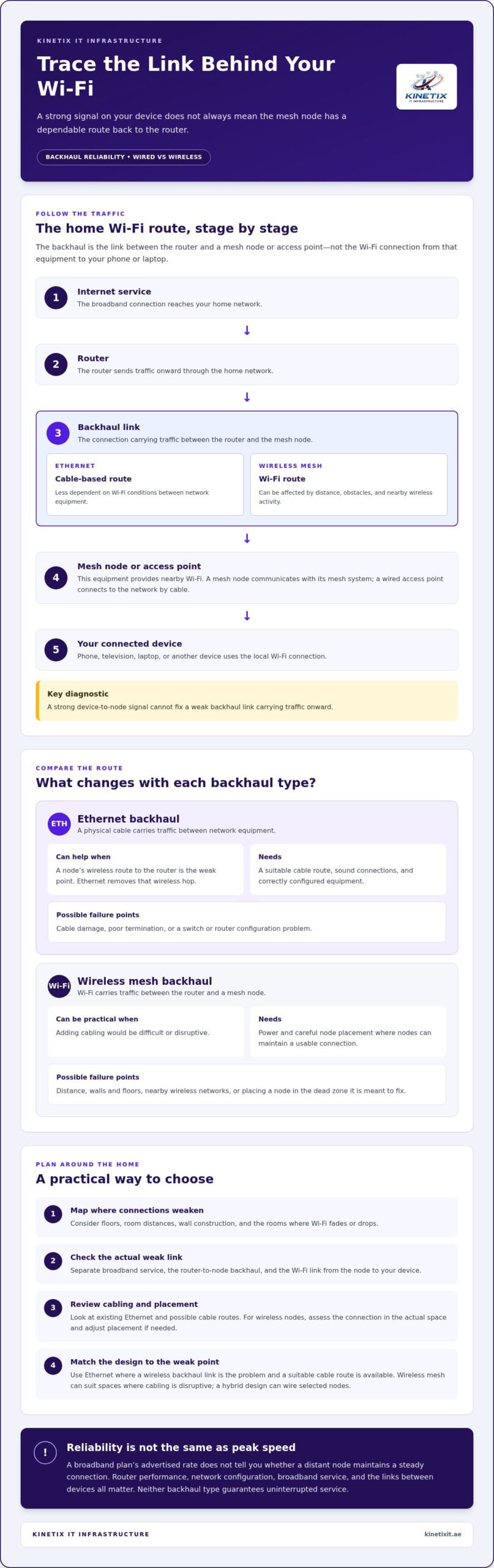
Think of the route in stages: internet service reaches your router, the router sends traffic to a mesh node or access point, and that equipment connects your phone, television, laptop, or other device. The link carrying traffic between the router and the node is the backhaul. In wireless mesh systems, that link uses Wi-Fi; with Ethernet backhaul, it travels over a cable.
If a wireless node has a weak or inconsistent connection to the router or another node, devices connected to it may experience delays, buffering, or dropped sessions. A strong signal between your device and the nearby node won’t fix a weak link carrying traffic onward. Ethernet reduces the node’s dependence on wireless conditions along that backhaul route.
A mesh node and a wired access point can both provide nearby Wi-Fi, but they aren’t interchangeable terms. A mesh node is part of a mesh system and communicates with the rest of that system, wirelessly or through Ethernet if supported. A wired access point connects to the network over a cable and broadcasts Wi-Fi from its location. The equipment and configuration determine how each device fits into the network.
What does reliability mean for a home network?
Reliability means a connection stays consistent, avoids frequent interruptions, and recovers when a link has a problem. It isn’t the same as peak speed. A broadband plan’s advertised rate describes the service package, but it doesn’t show whether a node in a distant room maintains a steady connection or whether a video call will freeze.
In everyday use, a reliable network helps keep a home-office call clear, stream video without repeated buffering, and reconnect devices smoothly after a brief interruption. Reliability has more than one layer: the internet service can be available while a room’s Wi-Fi is weak, or Wi-Fi can appear strong while the node’s backhaul is struggling. Separating these paths helps pinpoint what needs attention and makes the comparison between wired and wireless backhaul practical.
How Ethernet and Wireless Backhaul Affect Mesh Stability
The main difference is the route traffic takes between your router and each node. Ethernet uses a physical cable; wireless backhaul sends traffic over Wi-Fi. That difference affects which conditions can interrupt the link, but neither option guarantees uninterrupted service. Router performance, network configuration, the broadband connection, and the condition of the links between devices all matter.
| Factor | Ethernet backhaul | Wireless backhaul |
|---|---|---|
| Signal path | Traffic travels over a cable between network equipment. | Traffic travels over a wireless link between nodes. |
| Interference exposure | Less dependent on Wi-Fi conditions between nodes. | Can be affected by nearby networks and other wireless interference. |
| Installation needs | Requires a suitable cable route and correctly connected equipment. | Requires power and careful node placement, but no backhaul cable. |
| Likely failure points | Cable damage, poor termination, switch or router configuration. | Distance, obstacles, interference, or a poorly placed node. |
Why can Ethernet backhaul improve consistency?
An Ethernet cable creates a physical path for traffic between network equipment. It removes the wireless hop between the router and a node, so that part of the connection is less affected by walls, distance, or competing Wi-Fi activity. This can help in a distant room if the node’s wireless link to the router is the weak point, even when devices nearby receive a strong Wi-Fi signal.
Wired doesn’t mean fault-proof. A damaged cable or poor termination can disrupt the connection, and an incorrectly configured network switch or router can also cause problems. The cable route and connections need to be sound, and the equipment at each end must be set up correctly.
When can wireless mesh backhaul remain reliable?
Wireless backhaul can be practical where adding cabling would be difficult or disruptive. Its performance depends on the link between nodes: place them where they can communicate reliably, rather than putting a node in the very dead zone it is meant to fix. A node can extend coverage, but it still needs a usable connection to the rest of the network.
Walls, floors, distance, and nearby wireless networks can all affect signal conditions. In a Dubai home, construction materials and their impact vary by property and location, so judge node placement in the actual space. A node in an open area with a strong link may serve rooms well; one behind several obstacles may struggle to carry traffic consistently. If conditions change, try moving the node and reassessing the connection.
The practical choice in hardwired ethernet backhaul vs wireless mesh reliability is whether you can create a dependable cable route or establish strong wireless links where coverage is needed. A hybrid layout can use Ethernet for nodes where cabling is practical and wireless links elsewhere. Planning Wi-Fi coverage alongside Ethernet cabling, wall sockets, routers, and switches helps account for the home’s layout and existing infrastructure. Plan a home network setup around the conditions in your home, rather than expecting one solution to suit every room.
Which Backhaul Is More Reliable in a Dubai Villa?
There isn’t one backhaul choice that suits every Dubai villa. The more dependable design depends on how far the signal must travel, how many floors it needs to cover, what separates rooms, and whether Ethernet is already available. Thick or reinforced walls can weaken wireless links, but their effect varies with the property’s construction, layout, and node positions. Consider the actual building rather than assuming every villa has the same coverage challenges.
For hardwired ethernet backhaul vs wireless mesh reliability, consider what each room needs. A fixed home office or entertainment area used for work calls, streaming, or other steady connections may benefit from a wired link to its network equipment. Wireless mesh offers more freedom to place nodes without routing new cables. A hybrid layout can use Ethernet for key locations and wireless backhaul where cabling is impractical.
Where does wired backhaul make the most difference?
Ethernet can be especially useful when a node or access point needs to serve a distant room, another floor, or a regularly used home office. It can also suit a fixed entertainment area where stable connectivity matters. If an Ethernet outlet is available in that location, a compatible mesh node or access point can use it to connect to the network instead of relying on a wireless link across the home.
The benefit still depends on the complete setup. The outlet must connect correctly to the network, and the router, switches, access points, and other equipment need to work together. A cable in the right room won’t resolve every coverage issue if equipment placement or the wider network design is unsuitable. A Dubai villa Wi-Fi installation buying guide can help you consider the home’s layout and existing infrastructure.
When is wireless mesh the more practical choice?
In an existing villa, adding cable routes may not be practical for the household or the building. Wireless nodes can be easier to position and adjust, making them useful where there are no suitable Ethernet outlets. Placement is key: put a node where it can maintain a sound link to the router or another node, not deep inside the area where Wi-Fi already struggles.
Floors, walls, room distance, and nearby wireless activity can all influence that link. Try positioning nodes in open, central locations between the router and weak-coverage rooms, then assess performance where people actually work or stream. If the signal remains inconsistent, try a different location or consider a wired connection. The best mesh Wi-Fi for UAE villas guide can help you consider mesh placement and fit.
In short, wired backhaul often makes sense for fixed, high-use locations with a viable cable route; wireless can be practical when flexibility matters and nodes can maintain strong links. Floor count, room distance, wall construction, and existing Ethernet together point toward the right balance.
How to Choose and Plan a Reliable Backhaul Setup
A dependable design starts with the rooms and devices you need to serve, not with adding nodes at random. Compare the home’s weak spots, available cable routes, and connection priorities before choosing wired, wireless, or a combination. This makes the hardwired ethernet backhaul vs wireless mesh reliability decision more practical for your layout.
- Map weak areas. Sketch each floor and mark the router, rooms with dropouts, and places where Wi-Fi is consistently weak. Note where you use laptops, televisions, phones, and smart-home equipment. A useful network plan should reflect everyday use, not just the building plan.
- Identify equipment locations. Mark where a mesh node or access point could serve each problem area. Include fixed-use locations such as a home office or television area, and consider the route between each proposed location and the router. A node needs a useful connection back to the network, not simply a convenient power socket.
- Check existing cabling. Look for Ethernet wall sockets and accessible cable routes that connect suitable locations. Note where outlets are and whether they could support a node or access point. Before extending Ethernet, consider the route and how it connects to the router or network switch.
- Match the design to your needs. List the devices and activities that need steady connections, including video calls, streaming, and smart-home equipment. Prioritize wired connections for suitable fixed locations where cable access exists. Consider wireless nodes where flexibility matters and the link between nodes is strong.
Assess rooms, dead zones, and existing cabling
Walk through the home and test the rooms where connections matter most, including different floors and the far ends of the layout. Record whether a problem follows a particular room, device, or time of use. Then compare those locations with the router position and existing Ethernet sockets. This gives you a clearer basis for choosing equipment locations than relying on a single signal reading. The structured cabling foundation guide explains why planning cable routes can support a coordinated home network.
Decide between wired, wireless, or a hybrid layout
Choose Ethernet for fixed nodes where an appropriate cable route is available, and wireless backhaul where nodes can maintain a sound link but new cabling would be impractical. A hybrid layout can connect priority rooms by Ethernet while using wireless nodes to extend coverage elsewhere. The equipment and network configuration still need to support the design.
Decision rule: If priority rooms are far from the router and suitable cable access exists, consider wired backhaul. If cabling is difficult and nodes can maintain strong links, wireless may fit. If different rooms suit different approaches, plan a hybrid network.
For a villa where cabling, access points, routers, and switches need to work as one system, plan your home network setup around the layout and existing infrastructure.
Build a More Reliable Home Network with KINETIX IT
Choosing between wired and wireless backhaul is only part of the decision. Equipment locations, cable routes, existing outlets, and rooms that need dependable coverage all shape how well the network works as a whole. A network design that accounts for these details can help determine where Ethernet is practical, where wireless mesh fits, and whether a hybrid arrangement makes sense for your home.
KINETIX IT Infrastructure provides Wi-Fi setup and optimization, Ethernet cabling, internet wall sockets, access point installation, and router and network switch configuration for homes and villas in Dubai. Coordinating these elements helps align the backhaul plan with the property rather than treating each device or cable as a separate fix.
What a professionally planned setup can address
A planned installation considers where access points or mesh nodes should sit, how wired links can reach priority locations, and how routers and switches connect those components. In a multi-floor home, that means accounting for the layout and the rooms where stable connectivity matters most, such as a home office or entertainment area. The aim is an integrated network design based on existing infrastructure and actual coverage needs.
Planning can also clarify whether an existing Ethernet outlet can support a useful connection or whether a cable route needs to be considered. That context matters: adding an access point won’t necessarily resolve a problem if its connection back to the network is weak or poorly arranged. A coordinated approach brings cabling, wall sockets, network equipment, and Wi-Fi coverage into one setup.
When to get help with Wi-Fi or Ethernet installation
Consider professional help if dead zones persist after moving nodes, connections between nodes remain unstable, or you’re unsure how a cable could reach a priority room. These issues can make it difficult to tell whether the bottleneck is placement, cabling, configuration, or the equipment itself. Reviewing the home’s layout and infrastructure can help identify a suitable next step without assuming every problem needs the same solution.
For example, a villa may benefit from wired connections to fixed work or entertainment areas, with wireless coverage in rooms where a cable route is difficult. Another home may be better served by access point placement and Wi-Fi optimization using its existing network layout. KINETIX IT Infrastructure provides Wi-Fi installation, Ethernet cabling, wall sockets, access points, routers, and switches for Dubai homes and villas, coordinating the setup around the property’s needs.
The key criteria are the building layout, available cable access, and quality of the wireless links between nodes. If coverage problems continue or the cabling plan feels complex, plan a reliable home network with KINETIX IT Infrastructure. A considered setup can help make everyday work, streaming, and connected devices more consistent across the home.
Make Your Next Network Decision with Confidence
A reliable home network should fit the way you use each room, not just the equipment you own. Before making changes, note where connections falter and which locations matter most for work, entertainment, or everyday devices. Those observations can turn the hardwired ethernet backhaul vs wireless mesh reliability question into a practical plan for your home.
If you’re still weighing options, a considered layout can align Wi-Fi optimization with Ethernet cabling and the network equipment that supports it. KINETIX IT works with homes and villas in Dubai, coordinating Wi-Fi setup, cabling, and network equipment around the property’s infrastructure and connectivity needs. The next step may be adjusting the wireless layout or planning a wired connection where it makes sense.
Plan a more reliable home network with KINETIX IT for a setup designed around your home’s connectivity needs.
Frequently Asked Questions
Does Ethernet backhaul make mesh Wi-Fi more reliable?
Yes, Ethernet backhaul can improve consistency when the link between a mesh node and the rest of the network is causing interruptions. To isolate the cause, compare performance in the same room with the node wired and wireless, keeping its location and connected devices unchanged. If the connection behaves differently, the backhaul may be contributing. A speed test alone won’t show whether there are fewer dropouts or steadier performance over time.
Can wireless mesh work reliably in a multi-storey villa?
Yes, wireless mesh can work across multiple floors if the nodes maintain effective links to one another. In a Dubai villa, test the connection in the rooms where you actually use devices, not just near the nodes. A laptop on an upper floor and a television in a distant room can reveal different coverage issues. If one floor remains inconsistent, try adjusting node positions before adding equipment, since placement can affect the route between floors.
Will Ethernet backhaul improve internet speed or only stability?
It can improve the consistency of the connection between network equipment, and it may help usable speeds in a room if a weak wireless backhaul was limiting performance. It won’t increase the speed provided by your broadband plan. For a useful comparison, test the same device and location under similar conditions, and distinguish internet speed from Wi-Fi signal quality. A slowdown may also come from the router, device, or broadband connection rather than backhaul.
Can I use existing Ethernet wall sockets for mesh backhaul?
Often, yes, if the sockets connect to the network and the mesh equipment supports Ethernet backhaul. A wall socket’s presence alone doesn’t show where its cable leads. Trace or test the connection, then confirm how it connects to the router or network switch. For example, a socket in a study may be useful if it links back to the network equipment. Correct configuration matters as much as the outlet’s location.
What happens to a mesh network if one Ethernet backhaul cable fails?
The affected node may lose its wired connection. Depending on the mesh system and its configuration, it might reconnect wirelessly if a usable signal is available, or devices relying on it may lose connectivity. Other nodes can continue working if their links remain intact, but behavior varies by equipment. Check whether the node reports a wired or wireless connection, inspect both cable ends, and test the cable before changing the whole network.
Can wired and wireless backhaul be used together in one home network?
Yes, some mesh systems support a mixed setup, with Ethernet connecting selected nodes and Wi-Fi linking others. This can suit a home where an office has a network outlet but a guest room does not. Confirm that the system supports mixed backhaul and connect each wired node as directed by its configuration. A clear layout helps avoid accidental loops or connections that disrupt communication between network equipment.
Is wireless mesh reliable through thick concrete walls?
It can be, but thick or reinforced concrete may weaken wireless links, and the effect depends on the wall, distance, and node locations. In a villa, test from the rooms beyond the walls rather than relying on the signal beside a node. If connections falter across a particular barrier, repositioning equipment may help; a wired link or access point closer to the room may be a better fit for that location.