
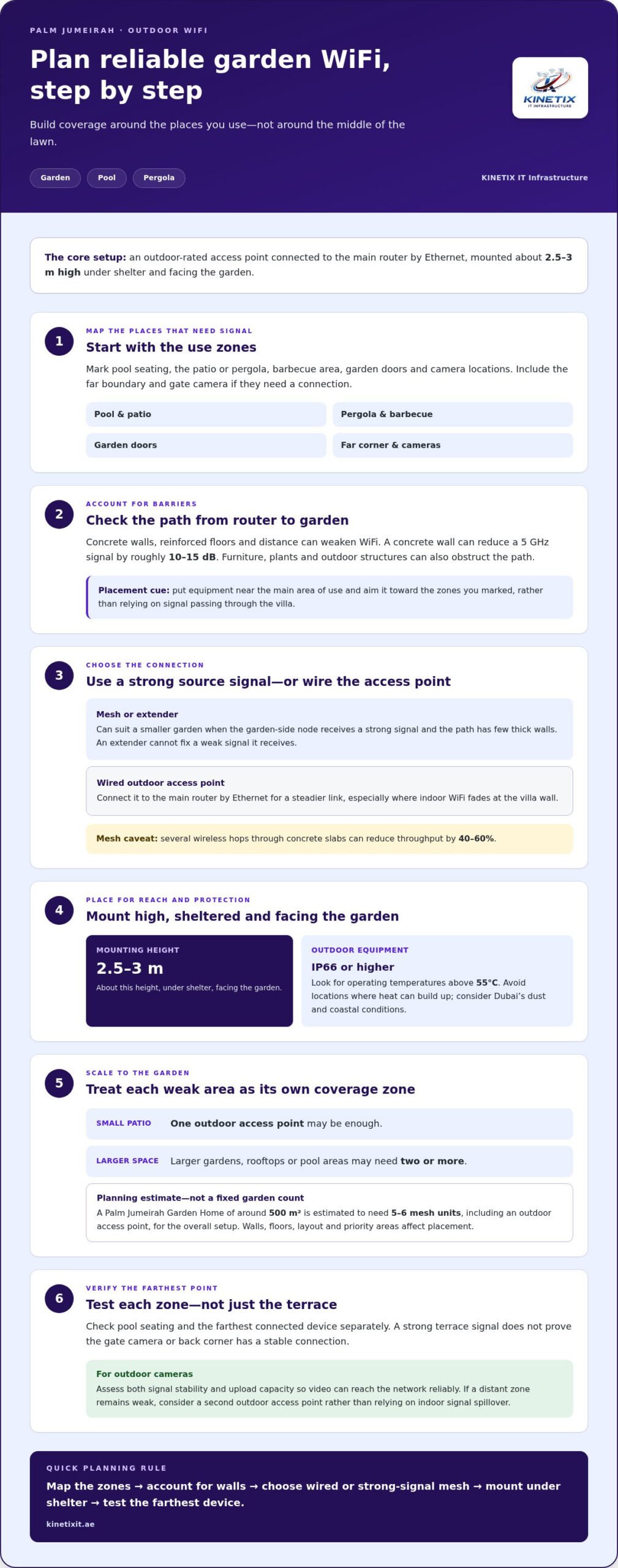
A WiFi extender can help a Palm Jumeirah garden if it receives a strong signal, but it won’t fix a weak one. A dependable outdoor garden WiFi coverage setup in Palm Jumeirah usually uses an outdoor-rated access point connected to the main router by Ethernet, mounted about 2.5-3 m high under shelter and facing the garden. A small patio may need one access point; larger gardens or pool areas may need two or more.
It’s easy to expect an indoor router to reach the terrace, especially when WiFi works well inside. But concrete walls, reinforced floors and distance to garden seating or cameras can weaken the signal. In Dubai, heat, dust and coastal conditions also make equipment choice and placement important.
This guide explains when an extender or mesh node may be enough, when a wired access point is a better fit, and how to plan coverage for a garden, pool or pergola. It also covers building materials and outdoor-rated equipment, so you can choose a setup for the spaces where you use WiFi.
Key Takeaways
- Plan coverage around where you use WiFi, including pool seating, pergolas and distant camera locations, rather than placing equipment in the middle of the lawn.
- A garden-side mesh node can suit a smaller space with a clear signal path; several wireless hops through concrete slabs can reduce throughput by 40-60%.
- For Dubai’s outdoor conditions, look for equipment rated IP66 or higher and for operating temperatures above 55°C, and avoid locations where heat can build up.
- A concrete wall can reduce a 5 GHz WiFi signal by roughly 10-15 dB, so account for walls and reinforced floors when planning access point locations.
- For outdoor cameras, assess both signal stability and upload capacity so video can reach the network reliably.
Outdoor access points for gardens, pools and pergolas
Garden WiFi depends on access point placement, outdoor equipment and the connection back to the router. For a practical outdoor garden WiFi coverage setup in Palm Jumeirah, plan for the pool, patio, pergola and far corners.
Placement for Pools and Patios
For a small patio, one outdoor access point may be enough. Place it near the terrace or pergola where people connect, rather than expecting an indoor router to send a strong signal through an exterior wall. Mounting it about 2.5-3 metres high and facing the garden helps reduce blockage from furniture, plants and outdoor structures.
A pool, seating area and distant gate camera may need separate coverage zones. An access point beside the terrace might serve the pool but leave the garden’s far end without a stable connection. Where practical, place it under a sheltered pergola and connect it to the main router by Ethernet for a steadier link than a repeated wireless signal.
Reducing Garden Dead Zones
First, mark the places that need WiFi: pool seating, the barbecue area, garden doors and camera locations. Position an outdoor access point near the main area of use, rather than in the middle of the lawn. Mounting it high with a clear path toward those locations helps reduce obstructions from walls, plants and furniture.
If the back corner or gate camera still has a weak signal, a stronger indoor router won’t solve the distance and obstruction problem. Instead, assess whether a second outdoor access point can serve that zone. An Ethernet connection from the main router provides a stable route, especially where indoor WiFi fades at the villa wall.
Garden Home Access Point Counts
The guide estimates that a Palm Jumeirah Garden Home of around 500 m² needs 5-6 mesh units, including an outdoor access point. That is a planning estimate for the overall setup, not a rule that each garden needs the same count. The villa’s walls, floors, garden layout and priority areas all affect placement.
One outdoor access point may cover the main seating area of a small patio. Larger gardens, rooftops or pool areas may need two or more. If a poolside unit can’t reach a distant camera or back corner, treat that location as its own coverage zone rather than relying on indoor signal spillover.
Outdoor Coverage Zones
Divide the garden into practical zones, such as the pergola, pool, barbecue area and far boundary. Place each access point near the zone it serves, mounted high and directed toward the areas people use. This accounts for walls and outdoor structures without putting equipment in the lawn’s centre.
For stable garden coverage, run Ethernet from the main router to an outdoor access point in a sheltered area. Test the pool seating and the farthest connected device separately: a strong terrace signal doesn’t prove the gate camera will connect. A clear zone plan helps show where one access point is enough and where another is needed.
Is mesh WiFi good enough for a large villa?
Mesh can extend coverage when garden cabling isn’t practical, but each node needs to receive a strong signal.
Mesh WiFi for Uncabled Gardens
Place a mesh node near the garden-facing side of the villa, where it can receive a strong signal from the existing network. This may suit a smaller garden with few thick walls between the node and outdoor seating. For a detached garden area, position the node where the villa’s signal is still usable, then check coverage at the farthest connected device.
Wireless mesh avoids running a cable, but each node depends on its connection to the previous point. Across concrete slabs, daisy-chained wireless backhaul can reduce throughput by 40-60%. A hybrid arrangement can use wired access points indoors and wireless mesh for a difficult garden zone.
Mesh Systems for Dubai Villas
Dubai villas commonly need several strategically placed access points because of multiple floors and concrete walls. A guide estimate puts the range at 4-8 mesh access points for villa coverage, not one in every room. Choose a system based on the existing router, the villa layout and whether the garden node can receive a solid signal.
Wi-Fi 6 and Wi-Fi 6E describe different system capabilities, but the garden’s signal path still matters. Outdoor 6 GHz WiFi deployments in the UAE require TDRA licensing. For a home mesh plan, consider whether nodes can serve indoor areas and the garden without placing an outdoor 6 GHz deployment where licensing applies.
Extenders and UniFi Mesh Installation
An extender can help when it receives a strong signal from the router. If its incoming signal is already weak, the garden connection may be weak too. An outdoor mesh unit near the garden-facing wall is another option, as is an outdoor access point.
The UniFi U6-Mesh is an outdoor access point listed with an operating temperature rating of 70°C. For a wired installation, an Ethernet cable can connect the garden access point to the main router; a PoE Ethernet run has a maximum effective distance of 100 metres. Outdoor home equipment should be rated for outdoor use, rather than placing an indoor router or extender outside.
Power and cabling shape the installation: PoE carries power over the Ethernet connection, while a wireless node avoids that cable run. In either case, mount equipment where it can serve the garden without blocking its signal path. For a villa layout that needs a wired and wireless mix, villa Wi-Fi setup can address access point placement and network configuration.
Network troubleshooting and signal optimisation
To troubleshoot, compare the internet connection indoors with the WiFi signal on the terrace. Internet may work reliably inside while garden devices receive only one or two bars.
Test in a consistent order. Check the router’s status, then use the same phone or laptop indoors and on the terrace. If indoor internet works but the garden signal drops, focus on coverage and obstructions. If both locations struggle, investigate the router, its connection and network settings before adding equipment.
Outdoor cameras need a strong, stable WiFi signal and enough upload speed to send video properly. Test at the camera’s actual mounting location, not just beside the nearest door. A usable phone signal nearby doesn’t prove that a camera can maintain its video connection behind a wall or garden structure.
Keep visitors separate from household devices by using a guest network instead of sharing the main home WiFi password. This separates visitors’ phones from the network used by family devices, smart-home equipment and cameras. For a Palm Jumeirah villa, name the guest network clearly and share its password without exposing the main network credentials.
A captive portal adds a sign-in step for guests, while a guest network can use a separate password. Neither option improves a weak terrace signal. First confirm that the access point reaches the seating area, then choose the guest access method that suits how visitors connect.
- Use a strong password for the outdoor WiFi network.
- Enable modern encryption on the router and access points.
- Keep network firmware updated.
These steps help protect connected devices, but they don’t replace coverage testing. If a camera drops offline at the garden gate, check its signal and upload performance there. A KINETIX IT Infrastructure technician can compare those results with readings at the router and terrace to identify whether the problem is coverage, network configuration or the internet connection.
For internet providers and router compatibility in Palm Jumeirah, match the router’s WAN connection and configuration requirements to the provider’s service. A provider’s name alone doesn’t establish that every router will work. Check the existing router’s supported connection settings against the supplied service details.
Before changing settings, note the affected device, location and symptom. For example, record whether a phone loses signal only on the terrace or a camera disconnects while other garden devices remain connected. These details give a KINETIX IT Infrastructure technician a clearer starting point for isolating the fault and improving the villa network.
A wireless extender may provide a weak connection if the signal it receives is already weak. Outdoor WiFi networks should use a strong password, modern encryption, and updated firmware to ensure reliable performance across your Palm Jumeirah property.
Outdoor WiFi equipment ratings for Dubai’s heat, dust, humidity and salt air
Outdoor wireless equipment faces more than a signal challenge at a Palm Jumeirah property. Direct sun, dust, humidity and coastal salt air can affect hardware, enclosures and cabling. Choose equipment designed for outdoor use and assess the mounting location and exposure before installation. An indoor router or extender placed outside isn’t a substitute for outdoor-rated equipment.
Check two specifications first: the equipment’s ingress protection rating and its operating temperature range. The guide recommends IP66 or higher and operating temperatures above 55°C for Dubai conditions. Those ratings help narrow the hardware choice, but placement still matters. A west-facing villa wall can receive direct sun above 45°C from May through September, so avoid mounting equipment where heat builds up.
Salt air adds another consideration near the coast. For outdoor installations within 3 km of Dubai’s coast, use corrosion-resistant hardware and sealed enclosures. That guidance applies to mounting parts and protective housings as well as the access point itself. A sheltered position can reduce direct exposure, but it shouldn’t trap heat around the equipment.
A site survey helps match equipment to the property. It measures WiFi signal room by room and provides a coverage map, showing where an outdoor access point is needed and where cabling can connect it to the indoor network. In a larger garden, assess each intended use area instead of relying on a single reading beside the villa.
Cabling also needs to suit outdoor conditions. Don’t expose indoor cable or adapters to direct UAE sunlight; choose cable and connections intended for the installation environment. Ethernet can connect an outdoor access point to the network, while suitable enclosures and mounting choices protect connection points. Keep the cabling route and equipment location away from areas where heat can accumulate.
Before arranging equipment, review the manufacturer’s warranty terms for the exact model and installation conditions. Check what the warranty covers, how claims are handled, and whether outdoor mounting or environmental exposure affects coverage. Keep the model details and warranty documents with the property’s network records. Warranty periods vary by device.
For example, the Ubiquiti UniFi U6-Mesh is listed with an operating temperature rating of 70°C. Compare that specification with the chosen mounting position, not just Dubai’s general climate. A device’s temperature rating doesn’t remove the need for shade, airflow and outdoor-rated connections. During installation, keep equipment accessible for inspection and avoid hiding it behind enclosed panels.
After installation, include the enclosure, cable entry points and mounting hardware in routine property maintenance. Look for loose seals, exposed connections or corrosion, especially in coastal locations. Careful equipment selection, a site survey and a considered installation plan help match the network to Dubai’s demanding outdoor conditions.
Concrete walls and reinforced floors as WiFi barriers
WiFi can work well indoors yet weaken sharply after crossing a concrete wall. In a Palm Jumeirah villa, reinforced floors and multiple walls can also interrupt the route between an indoor router and garden devices. Coverage depends on the signal band, construction and access point position, so one distance estimate won’t describe every property.
A concrete wall in a Dubai villa can reduce a 5 GHz WiFi signal by roughly 10-15 dB. That loss matters when the garden access point or camera sits beyond the wall, especially if another structure blocks the path. The 2.4 GHz band may travel farther, but the best band depends on the device and network conditions.
For outdoor WiFi coverage through walls and across a garden, a single router’s stated real-world indoor range is 15-20 metres, while a typical Dubai villa footprint is 25-35 metres. These figures describe indoor range and villa footprint, not a guaranteed outdoor reach. Walls, reinforced floors, garden layout and device position all affect the actual signal.
Map the route from the router to each priority area before deciding where to extend coverage. Test the signal in the room facing the garden, just outside that wall and at the garden seating area. If the signal drops at the exterior wall, an indoor extender placed farther away won’t solve its weak incoming connection.
A basement majlis, gym or maid’s room separated by more than two walls may need an extra access point. The same applies to a gate camera or device in a distant garden corner: each obstruction can weaken the signal path. Placing an access point closer to the separated space can avoid relying on a signal passing through several barriers.
Building materials and layouts vary between Palm Jumeirah homes and villas in Arabian Ranches or The Springs. Don’t assume a setup that works in one community will cover another villa’s floors or garden. Use the actual room layout and test the signal where cameras, phones and other connected devices will operate.
During a site survey, record weak locations and identify the walls or floors between them and the router. A technician’s certification label won’t remove a concrete barrier: equipment placement and a suitable connection route remain central. The survey can show whether an additional access point belongs near a stairwell, garden-facing room or separated basement space.
If reinforced construction leaves your garden or basement with weak WiFi, request WiFi coverage improvement based on the affected locations and signal path.
KINETIX IT Infrastructure: Wi-Fi Installation & Setup
KINETIX IT Infrastructure can help when garden WiFi remains unreliable after you’ve considered access point placement, mesh and building materials. Its Wi-Fi Installation & Setup service covers new network setups, while Wi-Fi Troubleshooting & Repair can investigate existing connection problems.
For persistent weak spots in a villa, Wi-Fi Dead Zone Fixing and Wi-Fi Optimization can address coverage gaps and network performance. The right approach depends on the affected areas, router and connection path to outdoor devices. Share where the signal drops, such as beside the pool, under a pergola or near a garden camera, to give the setup a clear starting point.
For help planning or improving your villa’s WiFi, contact KINETIX IT Infrastructure.
Make Your Garden WiFi Ready for What’s Next
Your outdoor network should support how you use your villa, from evenings on the terrace to connected cameras and future smart-home additions. A well-planned outdoor garden WiFi coverage setup in Palm Jumeirah starts with the spaces and devices that matter most to you, then creates a clear path to reliable everyday use.
If you’re ready to put your plan into action, KINETIX IT Infrastructure offers Wi-Fi Installation & Setup, Wi-Fi Troubleshooting & Repair, and Wi-Fi Dead Zone Fixing. These services can help with a new installation, persistent connection problems or coverage gaps that disrupt outdoor use. Share where connectivity matters and what isn’t working, so the next step can focus on your villa’s needs.
Contact KINETIX IT Infrastructure to discuss your garden WiFi setup and move toward a more connected outdoor space.
Frequently Asked Questions
Can a WiFi Extender Work Outside?
Yes, but only if the extender is designed for outdoor use and receives a usable signal from the router. An indoor extender on a terrace isn’t built for outdoor exposure. If an extender inside the villa receives a weak signal through an exterior wall, repeating that weak connection won’t create reliable garden coverage. Check both the device’s intended environment and the strength of the signal where it connects.
Dubai regulations for installing outdoor Wi-Fi equipment at home
Outdoor 6 GHz Wi-Fi deployments in the UAE require TDRA licensing. The material gives no other home-installation regulations.
Outdoor Wi-Fi installation cost in Dubai UAE