
A large estate’s intercom coverage should follow its access layout, not a one-size-fits-all zone count. Jumeirah Golf Estates spans 1,119 hectares and includes 16 neighbourhoods, so a multi-zone video intercom for a large estate in Jumeirah Golf Estates needs to reflect how entrances, residences and indoor stations connect across the community. The practical number of zones depends on those access points and how visitors should reach each home or building.
A video intercom for a large estate should do more than show who is at the nearest gate. A well-planned layout can route calls clearly across separate entrances and homes, rather than treating the estate as one entry point. This guide explains how zones, gates, buildings and indoor stations fit together, and what to consider when planning a system for a home or residential building in Jumeirah Golf Estates.
Key Takeaways
- Plan intercom zones around entrances, buildings and the intended visitor route, rather than choosing a zone count in isolation.
- Map how gates, indoor stations and access points should connect so calls reach the right residence or building.
- Consider how intercoms work alongside gate access control, CCTV, smart-home systems and mobile apps, including which functions need to communicate.
- Review app access, account security, network coverage and video privacy as part of the overall system design.
- Reliable Wi-Fi coverage can support app-connected intercom use; troubleshooting, dead-zone fixing and optimization can address weak points.
How many intercom zones, gates, buildings, and indoor stations can these systems support?
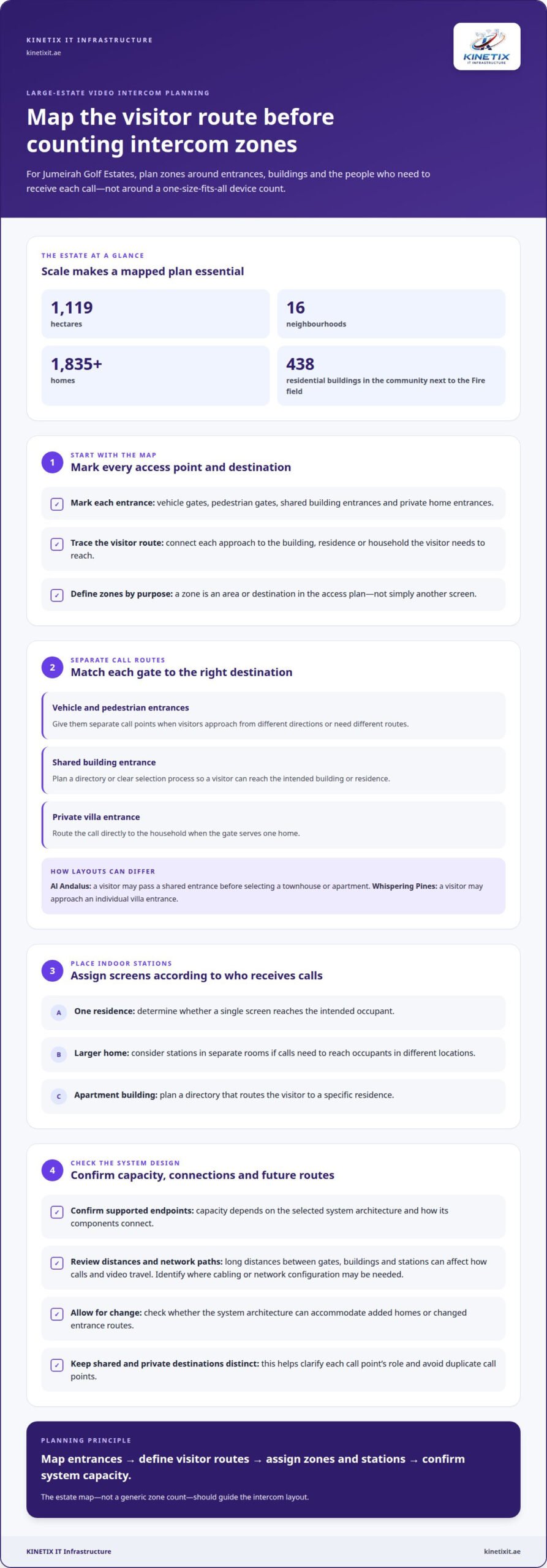
There is no single intercom capacity that suits every estate. The supported number of zones, gates, buildings and indoor stations depends on the selected system architecture and how its components connect. For a multi-zone video intercom for a large estate in Jumeirah Golf Estates, begin with the actual access layout, not an assumed device limit. Jumeirah Golf Estates has over 1,835 homes, so coverage needs to reflect distinct residential areas and visitor routes.
Residential formats differ across the estate. Residential developments can include different types of homes, so access plans should reflect their layouts. Those settings create different call-routing requirements: an apartment entrance may serve several residences, while a villa entrance usually directs visitors to one household. These examples help define the system’s structure, but they don’t establish a universal maximum for connected buildings or stations.
Treat a zone as a defined part of the access plan, not simply another screen. A zone might cover a vehicle entrance, pedestrian entrance, residential building or group of homes. In Al Andalus, for example, the plan may separate a shared building entrance from individual townhouse access. The aim is to route each visitor call to the right destination without confusing one entrance with another.
Count gates by their function and the route they control. A vehicle gate and pedestrian gate may need separate call points if visitors approach from different directions. A shared entrance serving several buildings may need a directory or a clear selection process. A private villa gate, by contrast, may route directly to the home. The estate layout, entry points and residents’ access patterns determine these divisions.
- Zones: Group access points by the area or destination they serve.
- Gates: Map each vehicle and pedestrian entrance to its intended call route.
- Buildings: Identify shared entrances separately from private home entrances.
- Indoor stations: Assign screens to the people or locations that must receive calls.
The number of indoor stations depends on how calls should reach occupants. One residence might need a single screen, while a larger home may need stations in separate rooms. In an apartment building, a directory can route a visitor to a specific residence. At a villa, calls may go directly to the household. Plan the station locations around the call route and the home’s layout.
In a shared community, plan the building entrance and home destination as separate points. In Al Andalus, a visitor might first reach a shared entrance, then select a townhouse or apartment. That route differs from Whispering Pines, where a visitor may approach an individual villa entrance. Defining these paths before selecting equipment helps avoid duplicate call points and clarifies each station’s role.
Start with an estate map. Mark every gate, building entrance, private entrance and planned indoor station, then connect each visitor approach to its destination. A delivery visitor at a shared entrance, for example, needs a clear route to the intended building or resident. A guest at a private villa gate needs a direct call destination. Assign each route to a zone.
The network layout determines how the system connects across these locations. Long distances between gates, buildings and indoor stations can affect how video and calls travel. Account for the physical routes between components and the network connections available. A clear map helps identify where cabling or network configuration may be needed, instead of adding devices without a defined role.
Plan for possible expansion, too. If a community adds homes or changes an entrance route, the system architecture needs to accommodate the new destination. Capacity means the number of endpoints the selected system can support, along with the intended call routing and connection method. Compare that design with the estate map rather than relying on a generic zone count.
KINETIX IT Infrastructure recommends mapping entrance routes before allocating stations, so shared call points and private destinations are counted distinctly. The community next to the Fire field includes 438 residential buildings, a scale that makes building-by-building routing worth checking against the access plan. The Jumeirah Golf Estates metro station is on Route 2020; it provides a location reference, while intercom capacity still needs to reflect the estate’s entrances, call paths and indoor destinations. Confirm the required totals during design.
Do intercom systems integrate with gate access control, CCTV, smart-home systems, and mobile apps?
Yes, a video intercom can be designed to work with other systems when their equipment and communication methods are compatible. Integration may connect a visitor call with a gate action, camera view, indoor screen or mobile device. In Jumeirah Golf Estates, start by identifying which functions need to work together at each entrance, rather than assuming every device can connect.
Gate access control is one example. A visitor calls from an entrance panel, a resident identifies them, and an authorised user operates the connected gate control. The intercom handles communication; the access-control equipment handles the gate. The panel, control interface and gate operation need to work together, so a call at a pedestrian entrance follows the intended access route.
CCTV can provide additional visual context during an intercom call. A camera covering a vehicle approach, for example, may show the arrival area, while the intercom camera shows the person at the panel. The views have different purposes. A coordinated design specifies which camera feeds appear on which screens and whether the intercom can communicate with the CCTV equipment.
Integration does not automatically mean that every CCTV camera appears in every intercom app. Devices need compatible connections, and the system must be configured for the required view. At a shared entrance, a screen might show the caller while a separate CCTV view covers the approach. Clear roles help residents understand what each image shows.
Smart-home integration can link selected intercom functions with household controls. A resident might want an indoor screen near a home control panel, for example, or a compatible system may coordinate a visitor call with other connected equipment. Available functions depend on the intercom and smart-home platforms. Define the desired action first, then match the connection method to it.
Mobile apps can provide another destination for calls, depending on the intercom’s supported app and network connection. To receive calls away from an indoor station, a resident needs the system to route them to the correct account or device. In a multi-residence setting, each user’s access should correspond to the intended home, not an unclear shared destination.
Before planning integration, map how each entrance connects to its equipment:
- Gate control: Identify which panel call can trigger which gate action.
- CCTV: Assign relevant camera views to the entrance or screen they support.
- Smart home: Specify the household function that should interact with the intercom.
- Mobile app: Set the intended call recipient and account for each residence.
For example, a visitor at a villa gate may call the household directly, while a shared building entrance may need a directory to route the call. CCTV can show the approach, and an app may receive the call if the system supports that route. Give each connection a defined purpose so the devices work as one coordinated system, rather than as unrelated components.
Network design matters as well. Video, audio and control signals must travel between the panel, indoor station, connected cameras and network equipment. A weak connection along any part of the route can affect performance, even when the devices are otherwise compatible. Planning the network path helps identify where configuration or better coverage is needed.
For a home or building in Jumeirah Golf Estates, decide which integration outcomes matter most: operating a gate, viewing a camera, routing a call to an app, or coordinating a smart-home function. Then match each outcome to compatible equipment and a clear network path. Intercom network configuration can help align those connections into one coherent setup.
What security and privacy risks should be considered when using app-connected video intercoms?
An app-connected intercom adds a phone, account and network to the entry system, each of which needs managing. For a Jumeirah Golf Estates villa, a stolen phone could expose visitor calls if the app remains signed in. A shared building also needs clear boundaries between residents’ accounts and entrances. Include devices, access permissions and video handling in the security plan.
Start with account access. Use a unique password for the intercom account instead of reusing a household or email password. Enable multi-factor authentication if the app offers it. Where supported, give each resident an individual login rather than sharing one household credential. Remove a person’s access when they leave. These steps help limit the impact of a forgotten or exposed password.
Have a straightforward response ready for a lost phone. Remove the intercom app’s access through its account settings, then secure the phone’s own account. If several family members receive calls, make sure everyone knows who manages permissions. For example, a villa owner can review household access when a tenant or staff member changes. Do not leave an old phone signed in as an active call destination.
Network security matters because the app and intercom communicate over a connected network. Protect the router’s administrator account with a strong, unique password. Limit home network access to trusted users, and avoid sharing its credentials with visitors. If the router supports a guest network, use it to separate visitor internet access from household devices and reduce unnecessary access between them.
Keep software up to date as part of routine security. Update the phone’s operating system and intercom app, and apply device updates through their supported settings. An outdated phone can put an account at risk even if the intercom itself has not changed. Assign one household member to review update prompts and account settings so maintenance does not rely on everyone remembering.
Video privacy depends on what each camera captures. Aim a villa entrance camera at the gate and approach, not neighbouring windows or private garden areas. At a shared building entrance, choose a view that identifies the caller without unnecessarily recording nearby homes. Review the camera angle after installation, since a small adjustment can change what appears in the image.
Call history and recorded footage can reveal residents’ routines. Decide who can view recordings, how long to retain them, and how to remove access when people’s roles change. At a shared apartment entrance, for example, residents should not have unrestricted access to footage from unrelated areas. Use the intercom’s privacy and account controls to match access to each person’s role.
- Accounts: Use separate credentials and remove access after household changes.
- Phones: Revoke app access from a lost or replaced device.
- Network: Protect router access and limit unnecessary device connections.
- Camera views: Frame the entrance while avoiding neighbouring private spaces.
- Footage: Restrict viewing rights and set a clear retention approach.
For a multi-zone property, assess every entrance separately. A villa gate, shared lobby and service entrance may each capture different people and activity. Confirm which residents can receive calls from each location and who can view related footage. Clear permissions help prevent residents from receiving calls or images meant for another household.
Finally, treat app access as part of the intercom’s overall configuration. Check account permissions, phone access, camera framing and network settings whenever household access changes. For help aligning connected devices and intercom network settings, get support for your intercom setup.
Call history and recorded footage can reveal when residents come and go, so retain only what is needed for a clear purpose. Limit who can view or export recordings, check whether the app stores clips locally or in an online account, and remove old footage using the available controls. Make sure household members know when recording is active and how to request access or deletion. If the intercom offers motion alerts, adjust them to avoid unnecessary notifications or capture beyond the entrance.
That care matters in Jumeirah Golf Estates, where villas in gated communities have 3 to 6 bedrooms and a private garden: a camera pointed too widely could expose private outdoor space. Jumeirah Luxury consists of 291 villas, so residents should also understand which entrance or shared area their intercom covers and who can access its recordings. Keep the view and permissions limited to the intended entry.
KINETIX IT Infrastructure: Wi-Fi Installation & Setup
KINETIX IT Infrastructure provides WiFi & Internet Support for homes where app-connected intercom performance relies on a stable network. If video calls lag near an entrance or an app loses connection in part of a villa, Wi-Fi troubleshooting can address the network issue. Dead zones may need attention, while Wi-Fi optimization can improve existing coverage. This support addresses the network side of an intercom setup; it does not replace the intercom system itself.
For a Jumeirah Golf Estates home, consider network support when coverage problems affect intercom calls or connected devices. Contact KINETIX IT Infrastructure or visit kinetixit.ae.
Plan Your Next Intercom Upgrade With Confidence
Turn your preferred visitor experience into a short project brief. Note who should receive calls, which routines the system needs to support and how residents expect to use connected features. This gives the design a practical starting point and keeps technology choices aligned with daily life at home. For a multi-zone video intercom for a large estate in Jumeirah Golf Estates, thoughtful planning can make the system intuitive rather than complicated.
Network performance is also part of the experience, especially when video calls rely on connected devices. If Wi-Fi issues interrupt intercom use, KINETIX IT Infrastructure can help address the network side. Contact KINETIX IT Infrastructure to discuss your home’s Wi-Fi needs and the next step for a more connected setup. A well-considered plan can make everyday access feel clearer and more composed.
Frequently Asked Questions
What are the installation requirements for cabling, network coverage, power, and gate controllers?
Installation requires suitable cable routes, network connectivity, power at system components and a compatible connection to the gate controller. At a villa entrance, plan the route from the outdoor panel to the indoor station and network equipment, while accounting for the gate-control connection. Wi-Fi coverage supports app-connected functions, but the system may use wired connections where its design calls for them. KINETIX IT Infrastructure provides network cabling, WiFi & Internet Support and intercom installation.
Which multi-zone video intercom systems are suitable for a large estate in Jumeirah Golf Estates?
Choose an architecture that supports the estate’s required gates, buildings, zones and indoor stations, with calls routed along the intended visitor paths. Map each entrance and destination first, then confirm the system can support the required endpoints and network connections.