A gate can do more than open at the press of a button. Video intercom gate integration in Dubai links an entrance call station to an indoor monitor or connected smartphone, allowing residents to see and speak with visitors before releasing the gate. The release control works through a connection between the intercom and gate system.
Choosing a setup means balancing clear video and audio with reliable connectivity and a release method suited to the entrance. This guide explains how audio, IP and wireless intercoms differ, how they connect to automated gates, and what release controls do. It also covers the installation details that shape a practical setup for a Dubai home or office.
Key Takeaways
- Match the intercom type to the property, entrance layout and preferred way to communicate with visitors.
- Understand how wiring, wireless links and network connectivity affect the system’s reliability across a property.
- See what needs to align between an intercom and an automated gate for visitor access to work smoothly.
- Learn how release controls can grant entry after a visitor has been identified.
- Find out when Wi-Fi setup, troubleshooting or coverage improvements can support a connected intercom system.
What is a video intercom system?
A video intercom connects an entrance station to an indoor monitor or, on connected systems, a smartphone app. When a visitor presses the call button, residents can see and speak with them before deciding whether to release a door or gate. In Dubai, video intercom gate integration can support access management at a villa entrance, apartment lobby or office service gate.
The right arrangement depends on who uses the entrance and what it controls. At a villa, a camera station might serve the pedestrian gate, while a separate entrance serves vehicles. In an apartment building, residents may use a shared lobby panel; an office may need a reception point for visitors and a separate service entrance. Each layout calls for different user access, station placement and release arrangements.
Residential and office intercom systems share the same basic purpose, but their day-to-day use differs. A home setup may serve household members at a main door or gate. An office system may route calls to reception or designated staff. In either setting, place the station where it captures the approach and visitors can comfortably reach the call button.
Analog and IP describe different ways intercom components communicate. An analog system uses direct connections between components; an IP system communicates over a network and may support connected features. Compatibility matters when a new station must work with existing monitors, network equipment, CCTV or a gate release. Identify the existing components before planning an addition or replacement.
Wiring, internet and power requirements depend on the station, indoor monitor and gate controls selected. Wired systems need a suitable cable route between components. IP and app-based functions rely on network connectivity, and each powered device needs an appropriate power source.
For maintenance, keep the exterior camera lens and call button clean, test gate motor battery backups, and check for cloud-app software updates. Set warranty expectations from the written terms, including coverage and conditions, and record system testing at handover.
Use this sequence to narrow the system choice:
- Identify whether the property is a villa, apartment or office.
- Decide whether the station serves a pedestrian gate, main door, lobby or service entrance.
- List existing monitors, network connections, CCTV and gate controls to assess compatibility.
- Choose audio or video communication, then consider whether app access is useful.
Planning around the property helps distinguish a basic entrance call system from a connected setup that also controls gate release. It also clarifies which cables, network links and powered components the installation must accommodate.
Video, audio, IP, wireless and gate intercom options
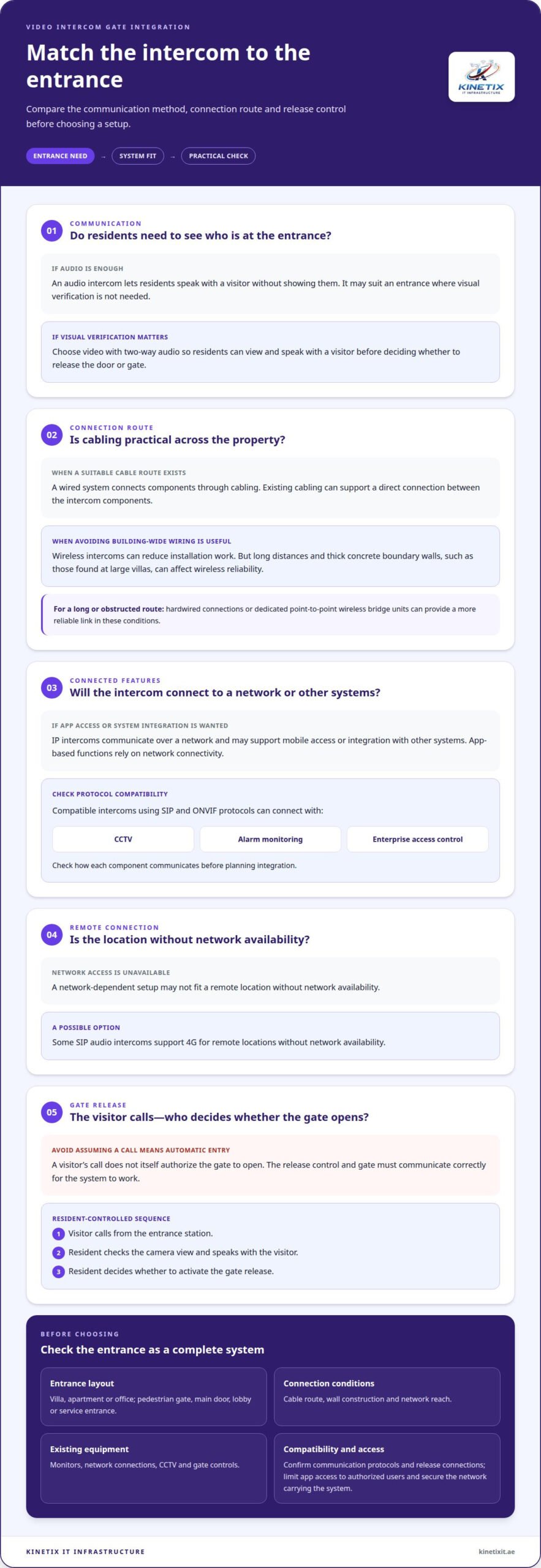
A gate intercom can provide audio alone or combine two-way audio with live video. Video lets residents check who is at the entrance before deciding whether to release a door or gate. Audio supports conversation without showing the visitor and may suit entrances where visual verification is not needed. The choice affects what residents can assess before granting access.
Wired systems connect components through cabling. Wireless intercoms can reduce installation work by avoiding wiring throughout the building. In large Dubai villas, thick concrete boundary walls and long distances can affect wireless reliability. Hardwired connections or dedicated point-to-point wireless bridge units can provide a more reliable link in these conditions.
IP intercoms use a network to connect stations and may support mobile access or integration with other systems. SIP and ONVIF protocols can connect compatible intercoms with CCTV, alarm monitoring or enterprise access control platforms. Some SIP audio intercoms support 4G for remote locations without network availability. Check how each component communicates before planning integration.
An audio intercom may also trigger a door release, depending on the system. A resident can speak with a visitor at the entrance station, identify them and activate the release control. This is not automatic entry: the visitor’s call does not itself authorize the gate to open. The resident decides whether to send the release command.
For video intercom gate integration in Dubai, compare the entrance layout, wall construction, cable route and network reach before choosing wired or wireless equipment. A long, obstructed route may make a wireless link less dependable, while existing cabling can support a direct connection. These practical details help narrow the options.
Approval arrangements in the UAE depend on the property and the work involved. At an apartment or gated community entrance, coordinate with building management or the Owners Association on the shared panel, door release and community-side wiring. For a private villa, plan around its entrance and existing gate equipment.
Risks with smart intercoms include incompatible devices, an unstable network link, and unintended access to visitor video or app controls. Match protocols and release connections before installation, limit app access to authorized users, and secure the network carrying the system. For video intercom gate integration in Dubai, assess these points alongside communication and release requirements.
Before choosing a system, note the entrance’s communication needs, cable route, network reach and release method. A villa with thick boundary walls may need a different connection from an apartment video door station. This review helps match the installation to the property’s layout and intended use, without adding features the entrance cannot support.
Intercom integration with automated gates
A video intercom and automatic gate work together when the visitor station, release control and gate motor communicate correctly. A visitor calls from the entrance; the resident checks the camera view, speaks with them, then activates the gate release. This combines visual verification with entry control instead of treating the intercom and gate as separate devices.
Existing automatic gates with standard control boards can usually be retrofitted with a compatible video intercom. The key is the connection between the intercom’s release output and the motor control board. The installation plan should identify the gate motor, control board, release method and cable route. For example, an existing villa gate needs a compatible release connection, not simply a camera mounted beside it.
Plan the integration around the entrance and how residents use it. A pedestrian gate may need a separate release from the vehicle gate, while a driveway entrance may require the station to sit within comfortable reach. The camera should cover the visitor’s approach. The system should make clear which gate opens when a resident presses release.
For a joined setup, define each connection before installation:
- Match the intercom release output with the gate motor control board.
- Record the cabling route between the station, indoor monitor and gate equipment.
- Identify whether the setup includes CCTV, access control or smart home automation.
- Test the visitor call, two-way communication and gate release as separate functions.
These steps help locate a fault when a call works but the gate does not open. They also clarify whether the camera provides a view only or works with CCTV for event review. In a connected home, smart automation can coordinate compatible devices, but each integration depends on the equipment and its connections.
Apartment buildings and gated communities need additional coordination because entrances may be shared. Establish with building management or the Owners Association whether the shared panel, door release and community-side wiring are included in the installation scope. A private apartment intercom cannot independently control shared entrance equipment without the relevant system connection.
After installation, test the complete sequence at the gate: place a call, confirm clear communication, check the camera view, activate the release and observe the gate response. In offices, test the same sequence at the visitor entrance and any separate service entrance. A documented handover gives occupants a clear operating reference and helps distinguish intercom issues from gate automation faults.
Door release controls
A door release control lets an authorized resident unlock an entrance after identifying a visitor. With a video intercom, the resident answers on an indoor monitor or connected device, checks the visitor, then activates the release. The intercom carries the request; the electric strike or gate controller performs the unlocking action.
At a villa, the release may operate a pedestrian gate, a main door or an automated vehicle gate. These are separate access points, so the control should clearly identify which entrance it opens. For example, a call from the pedestrian gate should not accidentally trigger the driveway gate. Clear monitor labels help residents select the intended release.
For an electric strike, the intercom wiring must connect to the lock control. Some installations use 4-6 pairs to connect outside while controlling an electric strike. The cable route, lock position and release interface shape the connection. A gate motor uses its control board for release, so its connection differs from a door strike.
Access control can also use temporary digital credentials. These can be set to expire automatically after a specified time, making them useful for time-limited access. A resident could issue one for an expected service visit and rely on its expiry rather than leaving access active indefinitely. The credential’s permissions should match the entrance it is meant to open.
Plan the release around these points:
- Identify every controlled entrance, such as the outdoor pedestrian gate and main door.
- Match each monitor or app control to the correct lock or gate motor.
- Decide who can activate a release and which visitors receive temporary credentials.
- Test the call, visitor verification and release as distinct functions.
Testing matters because a clear call does not prove that the lock or gate responds. During handover, place a visitor call, confirm the image and conversation, activate each release control, and observe the relevant entrance. If the property has multiple release points, test each one individually and record its label for residents.
A connected intercom solution can combine the call station, indoor monitor and access control, with each part serving a defined role. The station handles visitor communication, the monitor presents the call and release options, and the strike or gate controller acts on the command. This helps occupants describe a fault precisely, such as video working while the outdoor release does not.
For shared apartment entrances, release controls can affect more than one residence. The shared panel, door release and community-side wiring must therefore match the building’s access arrangement. Clearly mapped release points let residents grant verified visitors entry without confusing one entrance with another.
IP video intercom options
An IP video intercom connects its entrance station and indoor monitor through a network. At a Dubai villa, the outdoor station can send a visitor call to an indoor monitor, while a connected smartphone can support remote communication. The network path determines how these components exchange calls, video and release commands.
IP systems can also connect with CCTV, alarms and building management systems. For example, an entrance camera may work alongside CCTV for visual verification while the intercom handles the call. Device and protocol compatibility matters: a network connection alone does not make every camera, alarm or access control component compatible.
Cloud-connected options let residents answer remotely when the gate station has a stable internet connection and the smartphone has network access. A visitor presses the outdoor button, the system routes the call and the resident responds through the connected device. If either network path is unavailable, remote calling cannot rely on that connection. An indoor monitor provides a local answering point within the property.
Buildings with shared entrances need a clear network and access arrangement. An apartment visitor may call a resident through the shared entrance panel, while a villa may route calls to an indoor monitor and app. In either case, distinguish shared entrance equipment from devices inside the private home. This clarifies which system handles the call and which controls the release.
Before selecting an IP arrangement, map the connection from the gate station to its destination:
- Locate the entrance station and identify its network connection.
- Choose whether calls go to an indoor monitor, smartphone or both.
- List CCTV, alarm or building management devices for planned integration.
- Test local calls and remote calls as separate functions.
This sequence helps pinpoint where a connection issue occurs. If the indoor monitor receives a call but the smartphone does not, inspect the remote network path separately. If video appears on the monitor but a connected CCTV device does not share it, examine device compatibility and integration rather than assuming the entire network has failed.
For villas, network placement matters because the gate station sits outside the main living area. A stable connection between that station and the home network supports the intended IP functions. An indoor monitor provides a local answering point, while remote access adds another option when the resident is away.
For help setting up the network path and connected intercom devices, configure an IP video intercom network as part of a coordinated system installation.
KINETIX IT Infrastructure: Wi-Fi Installation & Setup
KINETIX IT Infrastructure can help when Wi-Fi coverage or network performance affects a connected intercom’s remote functions. Its Wi-Fi Installation & Setup service supports a suitable network foundation for video intercom systems that rely on connectivity between the gate station, indoor monitor and smartphone.
Choose Wi-Fi Troubleshooting & Repair when calls or video connections are unreliable, or Wi-Fi Dead Zone Fixing when coverage drops near the entrance. Wi-Fi Optimization can also help improve how the home network supports connected devices. These services address the network side of the setup, complementing the intercom and gate controls.
For help with Wi-Fi installation, troubleshooting or coverage in Dubai, contact KINETIX IT Infrastructure.
Plan the Next Step for Your Property
A well-planned video intercom gate integration in Dubai should suit how residents use the entrance today while providing a clear path for connected devices. Before proceeding, note where Wi-Fi coverage is strong, where calls or video falter, and which areas need better connectivity. These observations help shape a practical network plan around your intercom.
KINETIX IT Infrastructure offers Wi-Fi Installation & Setup, Wi-Fi Troubleshooting & Repair, and Wi-Fi Dead Zone Fixing. These services address network issues when a connected intercom needs stronger or more consistent coverage. Focus the next step on the specific connection problem affecting your property, rather than adding features that will not solve it.
For help with Wi-Fi supporting a connected home system, contact KINETIX IT Infrastructure. A clear network foundation can make your chosen setup easier to use day to day.
Frequently Asked Questions
Can temporary access codes be set up for delivery drivers?
Yes, temporary digital access credentials can be configured to expire automatically after a specified time. For a scheduled delivery, assign access to the intended entrance and set an expiry that fits the visit. This limits how long the credential remains active. If you prefer to verify each arrival personally, a video intercom call lets you speak with the driver before granting entry.
What video intercom systems integrate with automatic gates in Dubai?
Compatible video intercom systems can integrate with automatic gates, including existing motors with standard control boards that can usually be retrofitted. IP systems may also connect with compatible CCTV, alarms or access control platforms. The right option depends on the gate controller and the functions needed, such as visitor video, indoor answering or remote access. Protocol compatibility matters when linking separate systems.
How does video intercom integration with an existing gate work?
An existing gate integrates through a compatible connection between the intercom release control and the gate motor’s control board. The intercom handles the visitor call and verification; the gate controller responds to the release command. During setup, identify which entrance the control operates, then test the call, communication and gate movement separately. This helps pinpoint whether a fault affects the intercom or gate response.
Can Dubai video intercom systems open gates remotely from a smartphone?
Yes, a cloud-connected system can support remote gate use when the gate station has a stable internet connection and the smartphone has network access. A resident can answer a visitor call and release the gate after verification. For example, someone away from home can respond to an expected delivery. Remote operation depends on both network connections being available for the call and control command.
What UAE regulations or approvals apply to gate access and intercom installation?
Approval arrangements depend on the property and work involved. For an apartment or gated community, coordinate with building management or the Owners Association about the shared panel, door release and community-side wiring.
How much does video intercom gate integration cost in Dubai?
What factors affect the cost of gate intercom installation in Dubai?
Costs depend on whether the system is audio or video, the cable route and wall access, power requirements, and whether gate release, motor compatibility or app integration is needed. The number of indoor monitors can also affect the cost.