
Why should setting up your home internet feel like a part-time job spent waiting on hold for 101 support? You’ve just moved into a stunning new Dubai villa or apartment, and you’re ready to start your next chapter. All you need is a fast, reliable connection to bring your space to life. We understand that facing a wall of technical jargon like PPPoE or VLAN IDs is frustrating. That’s why we’re here to provide the expert Etisalat router configuration help you need to take total control of your connection!
You’re in the right place to get your home online fast. We’ll show you exactly how to find your unique credentials, master those tricky VLAN tags, and optimize your hardware for wall-to-wall coverage. Whether you’re setting up a third-party router or fixing a dead zone in a large villa, we’ve got you covered. Are you ready to say goodbye to buffering and hello to high-speed WiFi in every room? Let’s dive into the simple steps to master your Etisalat router setup today!
Key Takeaways
- Locate your ONT box and select the best cables to prepare your home for lightning-fast fiber speeds!
- Master your setup with expert Etisalat router configuration help to navigate PPPoE and VLAN settings with total confidence.
- Unlock seamless coverage throughout your villa by learning how to overcome the challenge of thick concrete walls.
- Decode router status lights and fix authentication errors instantly to keep your household online and happy.
- Discover when to call a professional WiFi technician in Dubai to ensure your network is fully optimized and ready for action!
Preparing for Your Etisalat Router Configuration: The Pre-Flight Checklist
You’re about to unlock high-speed internet in your home, and the journey starts with a few simple physical steps! Before we dive into the software, we need to ensure your hardware is ready for action. In most Dubai apartments and villas, your fiber connection enters through an Optical Network Terminal, also known as an ONT. You’ll usually find this small white box tucked away in a hallway cupboard or near the main entrance. It’s the gateway to your digital world!
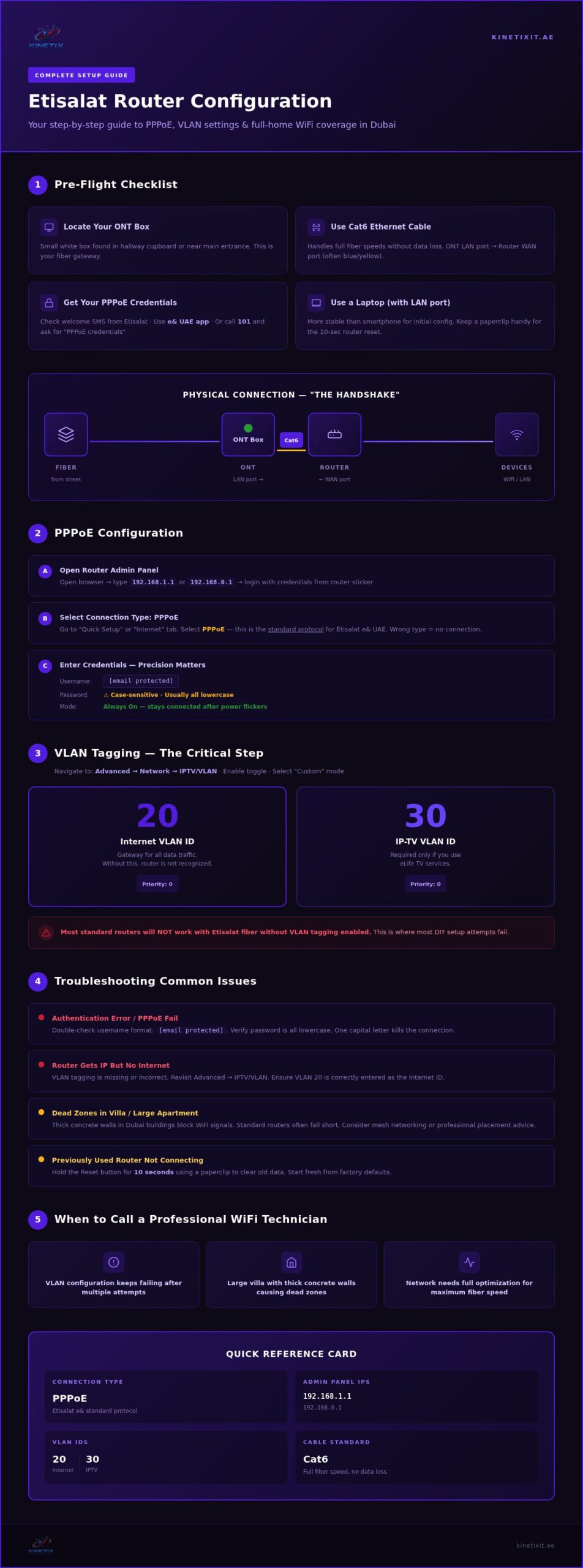
Now, let’s talk about the “Physical Handshake.” This is the most important part of the physical setup. You need a high-quality Ethernet cable to bridge the gap between your ONT and your new router. We strongly recommend using a Cat6 cable. It’s designed to handle the blazing-fast fiber speeds available across the UAE without any data loss. Take one end of the cable and plug it into the LAN port of your ONT. Take the other end and plug it into the WAN port on your router. The WAN port is often highlighted in a different color, such as blue or yellow. Is everything clicked into place? Excellent! Now, plug your router into the power outlet and switch it on. Wait for the status lights to stop flashing before you move to the next step.
Where to Find Your Etisalat PPPoE Credentials
You can’t get online without your unique account details. This is where many residents feel stuck, but it’s actually very simple! First, check your smartphone for the initial welcome SMS from Etisalat. This message contains your alphanumeric username and password. If you’ve deleted it, don’t panic! You can download the “e& UAE” app to retrieve your account details in seconds. If you prefer a human touch, call 101 and ask the agent for your “PPPoE credentials.” They’ll provide exactly what you need for your Etisalat router configuration help session. Do you have your username and password written down? You’re doing great!
Essential Tools for a Smooth Configuration
Being prepared makes the whole process feel like a breeze. We suggest using a laptop with a physical Ethernet port for the initial setup. It provides a much more stable connection than a smartphone when you’re changing internal settings! If you’re using a router that was previously used elsewhere, keep a small paperclip nearby. You might need to hold the “Reset” button for ten seconds to clear out old data. Finally, keep the default login IP address in mind. Most modern routers use 192.168.1.1 or 192.168.0.1 to access the admin panel. Are you ready to see that login screen? Let’s go!
Step-by-Step Etisalat Router Setup: PPPoE and VLAN Settings
You’ve connected the cables. Now, let’s bring the router to life! Open your web browser on your laptop. Type your router’s IP address into the search bar. This is usually 192.168.1.1. You’ll see a login screen asking for a username and password. Check the sticker on the back of your router for these defaults. Once you’re in, look for the “Quick Setup” or “Internet” tab. This is where the magic happens!
You must select “PPPoE” as your connection type. This is the standard protocol for Etisalat e& services in the UAE. Selecting the wrong type is a common mistake that keeps many residents offline. Once selected, you’ll be prompted for your account credentials. If this part feels overwhelming, a professional WiFi technician in Dubai can handle the entire process for you to ensure a perfect result.
Configuring the PPPoE Connection
It’s time to enter those credentials you retrieved earlier. Your username usually follows a specific format, such as your account number followed by @etisalat.ae. Precision is key here! Pay close attention to your password. Etisalat passwords are case-sensitive, and they often require all lowercase letters. One wrong capital letter will stop the connection in its tracks. Finally, look for a setting called “Connection Mode” and set it to “Always On.” This ensures your router stays connected even after a power flicker.
VLAN Tagging and IPTV Settings
This is the most critical part of the process. Most standard routers won’t work with Etisalat fiber unless you enable VLAN tagging. This is where many DIY attempts fail, but you’re prepared! Navigate to the “Advanced” tab, then select “Network” and “IPTV/VLAN.” You’ll need to enable the “IPTV/VLAN” toggle to get started. By using the right Etisalat router configuration help, you’ll avoid the common pitfalls of manual tagging. For a deeper dive into hardware selection and advanced configuration strategies, our guide on professional network router setup in Dubai covers everything you need to know.
- Select “Custom” mode from the dropdown menu to unlock manual entry.
- Enter “20” in the Internet VLAN ID field.
- Enter “30” in the IP-TV VLAN ID field if you use eLife TV services.
- Ensure the Priority is set to “0” for both fields to maintain standard traffic flow.
VLAN 20 is the gateway for your data traffic. Without this specific tag, the Etisalat network won’t recognize your router as a valid device. Click “Save” and watch your router reboot. Are you ready to see that internet light turn green?
Why Your Standard Etisalat Router Might Be Failing You
Dubai homes are built to last, but those thick reinforced concrete walls are absolute signal killers! If you’re living in a spacious villa in Jumeirah or a modern apartment in Dubai Marina, you’ve probably noticed that your WiFi signal drops the moment you leave the living room. Standard ISP-provided routers are great for basic connectivity, but they often lack the “punch” needed to penetrate the heavy construction materials used across the UAE. This is exactly where professional Etisalat router configuration help becomes a game-changer for your daily digital life.
Upgrading to a high-performance third-party router or a Mesh system offers massive benefits that standard hardware just can’t match. Modern WiFi 6 and WiFi 7 devices are designed specifically for high-density environments like Downtown Dubai. They cut through the “noise” of dozens of neighboring networks to give you a stable, clear signal. Plus, you’ll gain access to advanced security features, built-in firewalls, and robust parental controls to keep your family safe. Are you ready to upgrade your digital experience and enjoy the speeds you’re actually paying for?
When to Consider a Mesh WiFi Upgrade
Do you experience annoying buffering in the master bedroom while trying to stream your favorite show? Is the kitchen a total dead zone for your tablet when you’re following a recipe? These are classic signs that your single router is struggling to keep up. A Mesh system uses multiple nodes to blanket your entire property in a single, seamless network name. You won’t have to manually switch between different connections as you move upstairs! For a truly flawless experience, consider a professional Mesh WiFi Installation UAE service to ensure every single corner of your villa is fully connected.
The Role of Structured Cabling in Home Networking
Wireless is convenient, but physical wires are still king for absolute performance and stability. In multi-story properties, using a wired backhaul is the gold standard for networking. This means connecting your Mesh nodes via physical cables rather than relying on a wireless signal to jump through thick floors. This is why Network Cabling Dubai experts are so vital for serious home offices and lag-free gaming setups. We can even help you convert those old, unused phone sockets into high-speed data points! It’s a simple, efficient way to modernize your home’s infrastructure without a major renovation. Is your home’s wiring working as hard as it should be?
Troubleshooting Common Etisalat Connection Issues
Seeing a red light on your router can feel like a major setback, but it’s actually just a helpful signal! That glowing red LED usually points to a simple communication gap between your device and the Etisalat network. Most of the time, this is caused by a tiny typo in your credentials. Open your settings and double-check your PPPoE password. Even one wrong character will stop the authentication process in its tracks. Are you still seeing that red glow? It might be time to check for a firmware update. Keeping your router’s software current ensures it stays perfectly compatible with the latest network standards in the UAE!
Want to give your browsing a quick speed boost? Try switching your DNS settings to Google’s public servers at 8.8.8.8. This simple change helps your router find websites faster, making your daily internet use feel much snappier. If these technical tweaks feel a bit daunting, you aren’t alone. You can always reach out for professional Etisalat router configuration help to get your network running at peak performance without the stress!
Fixing the “Connected, No Internet” Error
Have you ever seen a full WiFi signal on your phone, yet nothing loads? This “Connected, No Internet” status is a common headache for many residents. First, check your WAN IP address in the router’s status page. If it shows 0.0.0.0, your router hasn’t successfully grabbed an address from Etisalat yet. Verify that your VLAN ID 20 is correctly tagged on the WAN port. If everything looks right in the software, try the 30-second rule. Power down both your ONT box and your router for a full half-minute. This reset clears out old sessions and often fixes the issue instantly!
Optimizing WiFi Speed and Reducing Interference
Dubai’s high-rise buildings are packed with signals from your neighbors! This congestion can slow your speeds down to a crawl. You can fix this by changing your WiFi channel to a less crowded one in your router’s wireless settings. For your high-speed streaming and gaming, always use the 5GHz band. Reserve the 2.4GHz band for smart home devices that don’t need much bandwidth. Also, check your router’s physical placement. Is it hidden away in a wooden cabinet? Move it to an open, central spot. Your signal needs room to breathe to reach every corner of your home! If you want to go further, our complete guide to network router setup in Dubai covers advanced placement strategies and interference reduction techniques for UAE homes.
Getting Professional Help: When to Call a WiFi Technician in Dubai
Sometimes, despite your best efforts, technology just won’t cooperate. You’ve followed every step, entered the VLAN 20 tag, and double-checked your credentials, but that internet light stays stubbornly off. It’s incredibly frustrating to be stuck in a configuration loop when all you want is to enjoy your new home! This is exactly when you need a helping hand. KINETIX IT Infrastructure specializes in turning these technical hurdles into seamless victories. We bring immediate confidence to your home setup, ensuring you can focus on your life while we handle the complex backend details. Why struggle alone when expert Etisalat router configuration help is just a phone call away?
Your internet connection is the backbone of your modern lifestyle. It’s not just about browsing; it’s about integrating your CCTV systems, smart home devices, and essential office infrastructure. For those running a business from home, long-term stability is a non-negotiable requirement. We provide expert Office Internet Repair Dubai to keep your professional life running without a hitch. Why settle for a “good enough” connection when you can have a fully optimized network that never lets you down?
What a Professional WiFi Technician Does Differently
Professionals don’t just guess; they measure. Our team uses advanced signal heat-mapping to visualize exactly how WiFi travels through your specific Dubai villa layout. We find the perfect spot for every access point to eliminate dead zones forever. We also provide professional cable termination and rack organization. This creates a clean, organized look in your hallway cupboard that’s easy to manage. Finally, we perform end-to-end testing. This guarantees you’re actually receiving the high-speed performance you pay for every single month!
Ready for a Stress-Free Internet Experience?
You’ve worked hard all week. Don’t spend your precious weekend fighting with confusing router settings and technical manuals! KINETIX provides fast, reliable, and secure technology solutions across the UAE. We’re your friendly guide in the digital world, standing right beside you to ensure your environment is fully prepared for success. We take the heavy lifting out of your Etisalat router configuration help journey so you can get back to what matters most. Contact KINETIX IT Infrastructure today for expert router configuration and WiFi support. Let’s get you connected and ready for action!
Ready to Experience Flawless Dubai WiFi?
You’ve taken the first steps toward a faster, more reliable digital life! By mastering your PPPoE credentials and correctly tagging VLAN 20, you’ve unlocked the true potential of your fiber connection. Whether you’re streaming in a high-rise apartment or working from a spacious villa, you now have the tools to conquer dead zones and eliminate buffering for good. Setting up your network is the start of an exciting new chapter in your home!
If you find yourself needing a little extra boost, remember that you don’t have to go it alone. Kinetix IT Infrastructure is here to be your friendly guide for expert Etisalat router configuration help. We specialize in fast on-site WiFi repair in Dubai and have deep expertise in all major brands, including TP-Link, Netgear, Linksys, and Cisco. From villa-wide mesh networks to complex office setups, we ensure your technology is fully optimized for your success. Get Professional Etisalat Router Help from Kinetix!
Your perfect internet experience is waiting and we’re ready to help you reach it. Let’s get your home connected today!
Frequently Asked Questions
What is the Etisalat VLAN ID for internet configuration?
The standard VLAN ID for Etisalat internet traffic is 20. You must enter this specific number in your router’s IPTV/VLAN settings to allow the fiber signal through. If you use eLife TV, you’ll also need VLAN ID 30 for the television service. Entering these tags correctly ensures your router communicates perfectly with the local exchange. Have you saved these settings yet?
Can I use any router with my Etisalat eLife connection?
Yes, you can use almost any modern third-party router with your eLife connection! The key requirement is that the device must support PPPoE and manual VLAN tagging. High-performance brands like TP-Link, Netgear, and Linksys are excellent choices for Dubai homes. Using your own hardware often results in better coverage and faster speeds. Are you ready to upgrade to a more powerful device?
How do I get my Etisalat PPPoE username and password?
You can find your credentials in the initial welcome SMS sent by Etisalat when your service was activated. If you can’t find that message, simply log into the “e& UAE” app to retrieve your account details instantly. You can also call 101 and speak with an agent to request your PPPoE data. Do you have a pen ready to write down your username and password?
Why is my internet light red on my Etisalat router?
A red light usually indicates that your router is powered on but cannot establish an internet connection. This often happens due to a typo in your PPPoE password or a missing VLAN ID tag. Check your physical cables first to ensure the ONT is connected to the WAN port. If the light stays red, reach out for professional Etisalat router configuration help to solve the issue fast!
How do I log into my Etisalat router admin page?
You can access your admin page by typing 192.168.1.1 or 192.168.0.1 into your web browser’s address bar. Use a laptop connected via an Ethernet cable for the most stable experience. The default username and password are usually printed on a sticker on the back of your device. Once you’re logged in, you can manage all your network settings with ease. What’s the first setting you’ll change?
What is the difference between an ONT and a router?
The ONT (Optical Network Terminal) is the small box that converts the fiber optic signal from the street into a digital signal your home can use. Your router then takes that signal and shares it wirelessly with all your devices. Think of the ONT as the gateway and the router as the distributor. Is your router currently plugged into the correct port on your ONT?
How can I improve my WiFi signal in a large Dubai villa?
The best way to boost your signal in a large villa is to install a Mesh WiFi system. These systems use multiple nodes to bypass thick concrete walls and provide seamless coverage in every room. You should also place your main router in a central, open location rather than inside a cupboard. Have you considered moving your nodes to find the perfect signal path?
Should I change my DNS settings for Etisalat internet?
Changing your DNS settings can significantly improve your browsing speed and reliability! We recommend using Google’s public DNS (8.8.8.8 and 8.8.4.4) or Cloudflare (1.1.1.1). These servers often resolve website addresses faster than the default ISP settings. It’s a simple tweak that makes your daily internet use feel much smoother. Are you ready to see the difference in your loading speeds?
2 Responses