
What if Wi-Fi isn’t the real problem? When work calls freeze, streaming buffers, or a camera drops offline, the cause may be somewhere beyond the router. In Dubai homes and villas, wireless coverage, Ethernet cabling, switches, and connected security systems all rely on a network that works as one. Network Support looks at those connections together instead of treating every device as a separate fault.
A fast internet plan doesn’t guarantee a reliable connection in every room. Router placement, Wi-Fi dead zones, cabling, and equipment settings can all contribute to recurring dropouts. When several home systems share the same network, it can be difficult to pinpoint where the problem begins.
This guide explains how the parts of a home network work together, which symptoms may call for structured troubleshooting, and what professional support can address. You’ll also learn how KINETIX IT Infrastructure helps with Wi-Fi optimization, router and switch configuration, network cabling, and CCTV and intercom integration, so everyday connections are more dependable.
Key Takeaways
- Trace a connection from your internet service through the router to each device. This helps show where Wi-Fi coverage and internet access differ.
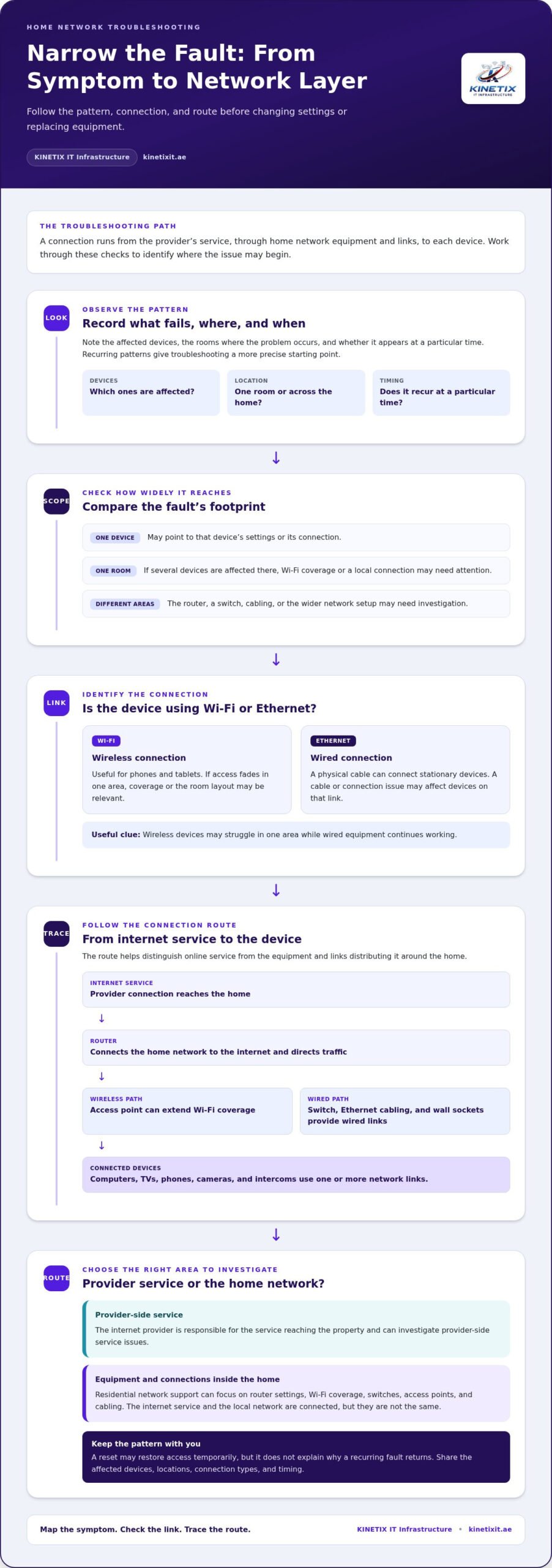
- Record which devices are affected, where problems occur, and when they happen to help narrow down the cause.
- Network Support can address different needs, from router and switch configuration to Wi-Fi coverage improvements and Ethernet cabling.
- Check whether a fault affects one device, one room, or the whole home before deciding what to investigate next.
- Note your connected devices and affected areas before a support visit to give a clearer picture of your home network.
What Does Network Support Mean for a Dubai Home?
A video call freezes just as you’re speaking. The TV buffers, while a camera or intercom briefly loses access. These symptoms can feel like one internet problem, but they may come from different parts of the home setup. Network Support means diagnosing, configuring, and improving the equipment and connections that let devices communicate around your home.
A useful distinction: the internet connection brings online access into your home; the local network distributes that connection between your devices. Your internet provider is responsible for the service reaching your property and can investigate provider-side service issues. Residential network support focuses on equipment and connections inside the home, including router settings, Wi-Fi coverage, switches, and cabling. The two areas are connected, but they aren’t the same.
For a foundational overview of the equipment and wired and wireless connections involved, see these home network basics. Understanding the different parts makes it easier to describe a fault and identify where troubleshooting should begin.
Which parts of a home network can need support?
The router connects your home network to the internet and directs traffic between connected devices. Wi-Fi access points extend wireless coverage, while switches connect multiple wired devices. Ethernet cabling and wall sockets provide direct connections to locations such as a home office or TV area. Phones, computers, televisions, cameras, and intercoms use one or more of these links to communicate.
In a villa, wired and wireless connections often work together. An access point can provide Wi-Fi in another area, while Ethernet connects devices that benefit from a direct link. CCTV cameras and intercom systems may also rely on the home network for communication or access. A fault affecting one system could involve the device itself, its connection, or shared network equipment.
When does a connectivity issue become a support problem?
A problem limited to one device may point to that device’s settings or connection. If several devices fail in one room, Wi-Fi coverage or a local connection may need attention. If devices in different areas disconnect, the router, switch, cabling, or wider network setup may need investigation.
Recurring unstable video calls, buffering across devices, or smart devices that connect intermittently are useful clues, especially when they happen in a consistent location or at particular times. A reset may restore access temporarily, but it doesn’t explain why the fault returns. Record which devices are affected and where the problem occurs. Those patterns give troubleshooting a more precise starting point.
How a Home Network Works: From Router to Connected Device
Think of the connection as a route. Internet service reaches the home through the provider’s connection, then the router directs data between that connection and household devices. A device may connect over Wi-Fi or through Ethernet cabling. An access point can extend wireless coverage, while a network switch provides additional wired connections.
A router coordinates your home’s local network, directing data between connected devices and the internet. That role is different from providing internet service itself. Your plan and the provider’s connection affect online access, while router configuration, coverage, and in-home links affect how reliably devices connect around the property. Network Support considers how these parts work together.
Wi-Fi, Ethernet, routers, and switches: what each one does
Wi-Fi connects devices without a cable, making it useful for phones and tablets. Ethernet uses a physical cable and can suit stationary devices such as a desktop computer or television. A router manages network traffic; an access point provides a Wi-Fi connection in another area; and a switch expands the number of devices that can use wired links. Performance depends on the equipment, placement, cabling, and conditions in the home.
Why connected home systems depend on a stable network
Smart TVs use network access for online content, while home-office computers rely on it for calls and work tools. CCTV and intercom systems may also use the home network to carry communications. The connection method matters: weak wireless coverage may affect a device in a distant room, while a damaged or poorly connected cable can interrupt a wired device. For a closer look at wired infrastructure, read this network cabling guide.
Several devices can share the same network, but a fault won’t necessarily affect them all in the same way. Wireless devices may struggle in one area even as wired equipment continues working. Network activity can affect some uses more noticeably than others, and a cabling issue may be limited to devices on that link. Check connection type, location, and affected equipment to narrow down the cause before changing settings or replacing hardware.
When Wi-Fi, wired connections, and connected systems need to work as one, residential network support can help address configuration, coverage, and cabling needs.
How to Recognize and Narrow Down Common Network Problems
Start by looking for a pattern instead of changing settings at random. Check whether the problem affects one device or several, whether it happens in one room or across the home, and whether it appears at a particular time. These details can help distinguish a device-specific fault from a wider connection or coverage issue.
What recurring dropouts, slow connections, and dead spots can indicate
If wireless access fades in one area, the room layout, distance from an access point, or other local conditions may be affecting coverage. Slow performance can have several possible causes, including the internet connection, Wi-Fi conditions, network equipment, or the device itself. A symptom alone doesn’t identify the cause. For planning coverage in a villa, see this Dubai villa Wi-Fi installation guide.
Compare a wireless device with one connected by Ethernet, if a wired connection is already available. If Wi-Fi struggles while the wired device remains stable, the wireless link may need closer attention. If both are affected, the cause could lie elsewhere in the connection or network. These checks offer clues, not a diagnosis.
A clear first-check sequence before requesting network support
Keep your checks simple and non-disruptive. Record your observations before attempting a restart, and avoid changing advanced router settings or disturbing cabling.
- List affected devices: Note whether the issue occurs on one phone or computer, or across several devices.
- Mark the location: Record the rooms where connections fail, slow down, or remain stable.
- Compare connection types: Note whether Ethernet-connected equipment behaves differently from devices on Wi-Fi.
- Track timing: Write down when the issue starts, how often it returns, and what you were doing at the time.
- Try a basic restart: If appropriate, restart the relevant device or router according to its instructions, then see whether the issue returns.
A restart can restore a connection temporarily, but repeated resets don’t reveal whether the underlying cause is coverage, equipment configuration, a device, or cabling. If several devices are affected, the issue keeps returning, or a wired connection also fails, structured Network Support troubleshooting can help isolate the fault. Leave complex configuration and cabling checks to a professional, and share your notes to give the investigation a clear starting point.
What Professional Network Support Can Address in a Dubai Home
A useful support visit starts with the symptoms and traces them through the equipment and connections involved. KINETIX IT Infrastructure provides residential network support in Dubai, including Wi-Fi troubleshooting and optimization, router and switch configuration, Ethernet and wall-socket cabling, access point installation, and network integration for CCTV and intercom systems.
| Symptom | Support that may help |
|---|---|
| Wi-Fi drops or weak coverage in certain areas | Troubleshooting, optimization, coverage improvement, or access point installation |
| A wired device loses its connection | Ethernet cabling or wall-socket checks and installation |
| Several devices have connection issues | Router or network switch configuration and network troubleshooting |
| CCTV or intercom has network connectivity issues | System troubleshooting and network integration |
Wi-Fi and equipment configuration support
Wi-Fi troubleshooting can help identify recurring dropouts, while optimization addresses how the wireless setup is configured. If particular areas lack reliable coverage, support can include coverage improvements or access point installation. Router configuration helps manage the home’s connections, and switch configuration supports devices linked through wired connections. For more Wi-Fi-specific guidance, read this expert Wi-Fi technician guide.
Wired connections and network-integrated home systems
Ethernet installation and internet wall sockets provide connection points for devices that use a wired link, such as a desktop computer or television. This can complement Wi-Fi across a home rather than replace it. A closer look at intercom system installation can explain how communication systems fit into a connected property. CCTV and intercom troubleshooting may also involve how those systems connect to the home network.
The right work depends on the symptoms and setup. A coverage issue calls for a different response than a faulty cable or configuration concern. Considering Wi-Fi, wired links, equipment, and connected systems together helps focus on the relevant part of the network.
Learn more about professional Wi-Fi and network support in Dubai.
A Practical Plan for More Dependable Home Network Support
A few clear notes can make a home network problem easier to understand. Before a troubleshooting visit, capture what happens, where it happens, and which devices are involved. This helps relate the symptoms to the home’s Wi-Fi, wired connections, equipment, and connected systems without relying on guesswork.
Prepare useful details before network troubleshooting
Make a simple room-by-room record. Include whether each affected device connects through Wi-Fi or Ethernet, how often the issue occurs, and whether other devices in the same area continue working. Note relevant changes, such as a new router, a device moved to another room, or a recently added camera or intercom.
- Describe the symptom: Note whether a device disconnects, struggles to load content, or loses access intermittently.
- Map the location: Identify rooms where connections are unreliable and areas where they work normally.
- Record the timing: Mention when the issue began and whether it happens at particular times or during specific activities.
- List connected systems: Include computers, TVs, CCTV, intercoms, and other devices that depend on the network.
- Protect access details: Don’t include passwords or sensitive network information in public posts or unsecured messages.
Keep the notes factual. “The office computer loses its Wi-Fi connection during calls, while the TV in the same room stays online” gives a clearer starting point than “the internet is unreliable.” You don’t need to diagnose the cause yourself.
Build a network that supports everyday home use
Think about how each room is used, not just where the router sits. Wi-Fi suits devices that move around or need flexible placement. Ethernet and wall sockets can provide wired connections for stationary equipment. Consider CCTV and intercom systems as part of the home’s connected setup, alongside everyday devices and future additions.
Planning around current and future needs can clarify where wireless coverage, cabling, access points, or equipment configuration may be relevant. KINETIX IT Infrastructure provides residential Network Support in Dubai, including Wi-Fi troubleshooting and optimization, router and switch configuration, Ethernet and wall-socket cabling, access point installation, and network integration for CCTV and intercom systems.
See KINETIX network support for more about residential connectivity services.
Make Your Home Network Work as One
A dependable connected home relies on more than a fast internet plan. The router, Wi-Fi coverage, Ethernet links, and connected systems each play a part. Recurring faults are easier to understand when you consider how those parts work together. Tracking which devices and rooms are affected also gives troubleshooting a clearer starting point.
Professional Network Support can address needs ranging from Wi-Fi troubleshooting, optimization, and coverage improvement to network cabling and router or switch configuration. It can also consider how CCTV and intercom systems connect with the wider home network. The right approach depends on the symptoms and setup, not repeated resets alone.
If connection problems keep disrupting work, entertainment, or home systems, KINETIX IT Infrastructure can help assess your Dubai home network. Explore professional network support for your Dubai home and take a practical step toward more reliable everyday connectivity.
Frequently Asked Questions
What does network support include for a home?
Home Network Support can include diagnosing connectivity problems, configuring routers and switches, improving Wi-Fi coverage, and addressing Ethernet cabling or wall sockets. It may also consider how CCTV cameras and intercoms connect to the home network. This differs from an internet-provider service issue: the provider can investigate the internet service reaching your property, while residential support focuses on equipment and connections within the home. The work depends on the symptoms and setup.
When should I call for professional network support?
Consider professional support when connection problems keep returning, affect several devices, or occur in particular rooms despite basic checks. A technician can examine the network as a connected system rather than treating each symptom in isolation. Before arranging support, note which devices are affected, where the problem occurs, and when it began. Avoid changing unfamiliar router settings, since an adjustment may affect other devices or make the cause harder to identify.
Can network support fix Wi-Fi dead zones in a Dubai villa?
Yes, network support can assess Wi-Fi coverage problems in a Dubai villa and identify possible factors such as access point placement, configuration, room layout, or building materials. The right approach depends on the property and its setup. A weak signal in one area could also relate to a device or another network issue, so assessing the symptoms helps distinguish a coverage concern from an internet-service problem before choosing a suitable change.
What is the difference between Wi-Fi support and network support?
Wi-Fi support focuses on wireless connections, including coverage, access points, and wireless configuration. Network support is broader and can also cover routers, switches, Ethernet cabling, wall sockets, and connected systems such as CCTV or intercoms. The areas can overlap: a Wi-Fi problem may be part of a wider home network issue. Describe which devices are affected and whether they connect wirelessly or by cable to clarify what needs attention.
Can network support help with CCTV or intercom connection problems?
Yes, network support can help investigate connection or integration issues when CCTV cameras or an intercom use the property’s network. The cause may involve the device, its network connection, configuration, or another part of the home setup. Note which system is affected and whether other devices are also having trouble. This helps frame troubleshooting across the connected home instead of assuming the camera or intercom is the only possible source.
How do I know if my router or internet connection is causing the problem?
Start by noting whether one device or several are affected, and whether the issue occurs throughout the home or in specific rooms. If an Ethernet connection is already available, compare its behaviour with Wi-Fi without changing advanced settings. These observations can help narrow down the possibilities, but they don’t confirm the cause. A professional assessment can help distinguish an internet-service issue from equipment, wireless coverage, or cabling concerns.
Does network support include Ethernet cabling and wall sockets?
Yes, residential network support can include Ethernet installation and internet wall-socket work as part of a home’s wired network. A wired connection can suit stationary devices, such as a desktop computer or television, while Wi-Fi gives mobile devices more flexibility. The appropriate arrangement depends on the home layout and connected equipment. A support assessment can consider how wired links and wireless coverage fit together across the property.
What should I prepare before a network support visit?
Prepare a short record of affected devices, rooms, symptoms, and how often the issue occurs. Note whether each device uses Wi-Fi or Ethernet, when the problem began, and any recent changes to equipment, placement, cabling, or connected systems. Include areas where connections work normally, too. Don’t share passwords or sensitive access details in public or unsecured messages. These observations give a support professional a clearer starting point for understanding your home network.
2 Responses