
When a weak connection in a distant room needs more than another Wi-Fi adjustment, a wired link can provide a direct connection to your network. If video calls stutter or fixed devices keep losing connection, ethernet cable installation dubai can help address the problem. The key is planning cable routes and connection points around the property, not simply running a cable.
Choosing a cable category, deciding where internet wall sockets should go, and keeping routes practical all take planning, especially in an occupied home. Start with the devices and rooms that need reliable connections, then consider how cables can reach them and connect to your router or switch.
This guide explains how Ethernet cabling is planned, installed, terminated, and tested, and how it works alongside routers, network switches, and Wi-Fi. KINETIX IT Infrastructure provides network cabling, internet wall socket installation, and router or switch configuration for Dubai homes and villas, helping connect workstations, smart TVs, access points, and other devices.
Key Takeaways
- List the rooms and fixed devices that need connections before choosing socket locations.
- Plan cable routes around the property layout, existing finishes, and access to work areas.
- Compare Cat6, Cat6a, and fibre according to the intended connection, equipment, and project requirements.
- For ethernet cable installation dubai, consider the full connection path, from cable route and termination to network testing.
- Use Ethernet for selected fixed devices and Wi-Fi for devices that need mobility, with routers, switches, and access points connecting the network.
Why Ethernet Cable Installation Matters in Dubai Homes, Villas, and Offices
Ethernet cable installation connects selected devices to a property’s network using physical cables. Instead of relying on a wireless signal for every device, it gives equipment that stays in one place a direct network connection. In Dubai homes and villas, ethernet cable installation dubai can complement Wi-Fi by connecting priority devices and work areas.
Wi-Fi suits phones, tablets, and laptops used in different rooms. Ethernet is often a practical option for a desktop computer, home-office workstation, smart TV, networked camera, or Wi-Fi access point. The goal is not to replace wireless convenience, but to choose the connection that fits each device. For a broader look at how connected devices and network components work together, see Network Support: A Practical Guide for Connected Dubai Homes.
What does Ethernet installation include?
Installation can include routing cables from network equipment to selected rooms, terminating both ends, and fitting internet wall sockets where devices will connect. The cables link back to a router or network switch, which connects wired devices to the local network and the internet. This organized approach is commonly called a structured cabling system.
Ethernet installation is the planned connection of network equipment and devices through routed, terminated cables and accessible connection points. A useful installation considers where sockets will be used and how the connected equipment will join the network, not just where a cable can be run.
Which devices benefit from a wired connection?
Start with devices that stay in place and handle work, streaming, or network functions. A desktop computer or workstation can connect at a desk, while a smart TV can use a wall socket instead of relying solely on Wi-Fi. Networked cameras and access points can also connect to the wider network by cable. The best mix depends on how you use the property.
For example, a Dubai villa may need connections across several rooms or floors, while retaining Wi-Fi for mobile devices. In an apartment, the priorities might be a living-room TV and a home-office desk. For a home office, identify the desk location and any other fixed equipment first, then plan a socket and cable route that avoids a loose lead crossing the room. A planned wired network supports everyday use without giving up wireless convenience.
How Ethernet Cable Installation Works Across Dubai Properties
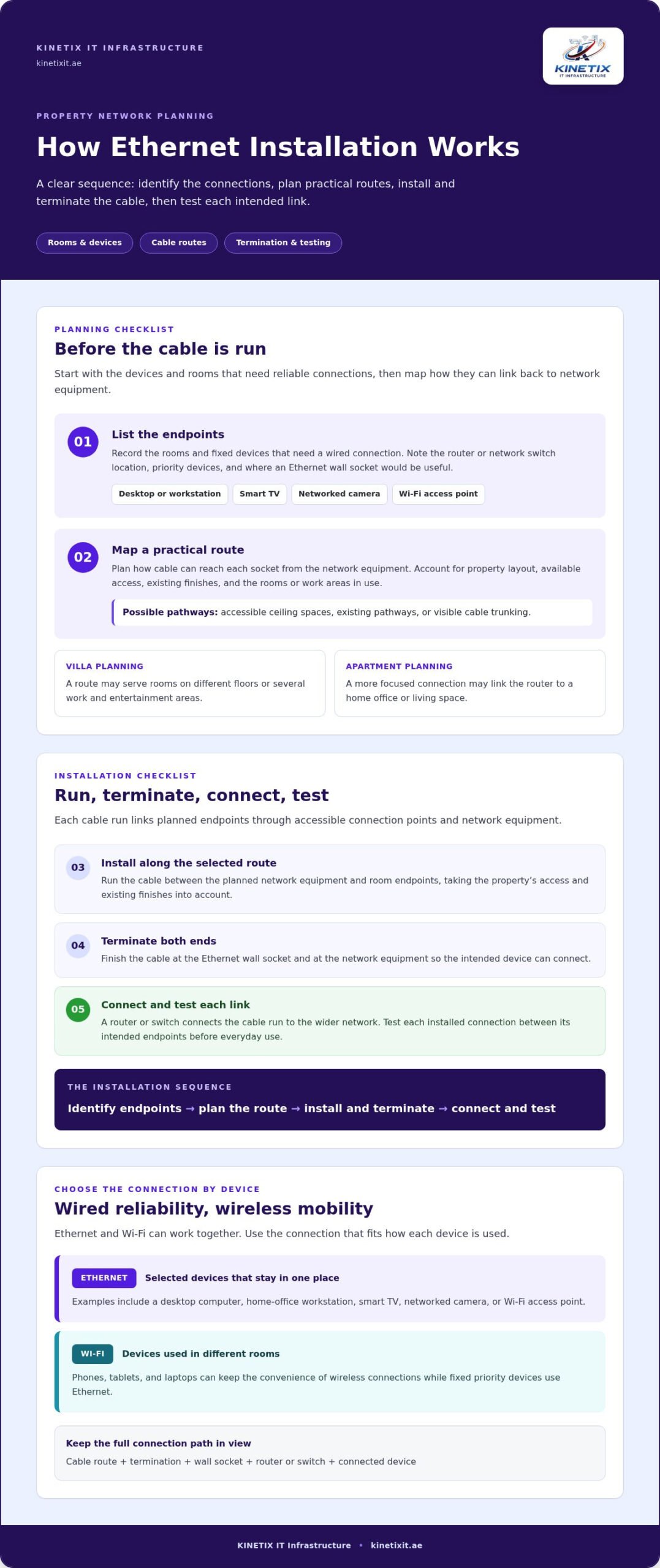
A reliable installation follows a clear sequence: identify the connections you need, plan cable routes and socket positions, install and terminate the cables, then test the links. For ethernet cable installation dubai, the route depends on the property layout, available access, and existing finishes. Villas, apartments, and offices can have different pathways, so the plan should fit the space rather than assume one standard route.
Planning cable routes and Ethernet socket locations
List the rooms and fixed devices that need wired connections. Then note where the router or network switch is located, where sockets would be useful, and how a cable could run between those points. Planning the network connections alongside the physical layout, as outlined in IBM’s guide to planning your networking, helps make each endpoint part of a coherent network.
In a villa, a route may need to connect rooms on different floors or serve several work and entertainment areas. An apartment may need a more focused connection between the router and a home office or living space. Existing finishes and access affect the practical options. Depending on the property, a route may use accessible ceiling spaces, existing pathways, or visible cable trunking. In an occupied home, consider which rooms and work areas need access so the installation can be planned around their use.
Connecting and testing the installed network
Once the route and endpoints are planned, the cable is installed and terminated at both ends, including at the Ethernet wall socket and network equipment. A router or switch connects the cable run to the wider network. KINETIX IT Infrastructure provides network cabling, wall socket installation, and router or switch configuration. For related details, read about Internet Wall Socket Installation in Villas.
Testing checks that each installed connection works between its intended endpoints. It can reveal a connection issue before the network is put into everyday use. Identify the endpoints, map the route, install and terminate the cable, then test each intended connection.
- Identify: Record the rooms, devices, and connection priorities.
- Plan: Choose practical cable routes and socket locations around the equipment and property access.
- Install: Run the cable along the selected route, taking existing finishes into account.
- Connect and test: Terminate both ends and check the link between the intended endpoints.
For a property-specific wired network, explore Ethernet cable installation in Dubai from KINETIX IT Infrastructure.
Choosing Ethernet Cable and Connection Points for a Dubai Installation
The right cabling depends on what the network needs to connect, where cables will run, and which router, switch, and devices will use them. For ethernet cable installation dubai, choosing a category alone is not enough. The complete connection path, including terminations and network equipment, affects what the installation can support.
Cat6, Cat6a, and fibre: what is the difference?
Cat6 and Cat6a are copper Ethernet cable categories. Cat6a supports 10 Gigabit Ethernet, while the appropriate choice for a particular connection depends on the equipment and installation requirements. Fibre uses optical strands rather than copper conductors, so it serves a different role, such as linking network areas where a fibre connection is specified.
| Option | High-level capability | Possible context |
|---|---|---|
| Cat6 | Copper Ethernet cabling for network connections. The result depends on the full installed link and connected equipment. | Home or office endpoints where the planned network and devices suit this category. |
| Cat6a | Copper Ethernet cabling that supports 10 Gigabit Ethernet. | Connections where compatible equipment and project requirements call for this capability. |
| Fibre | Optical cabling, distinct from copper Ethernet categories. | Network links designed around fibre, such as a connection between network areas. |
A cable category alone does not guarantee end-to-end performance. The router or switch, endpoint ports, cable route, terminations, and testing all matter. Choose based on the property design, intended use, existing equipment, and project requirements rather than assuming one category suits every connection.
Where should Ethernet sockets go?
Position sockets near devices that are likely to stay in place, such as a home-office desk, a smart TV, or network equipment. Consider furniture placement and how each device will be used, so the socket is accessible and does not require a long loose lead across the room. Plan the number and position of sockets around the actual layout and connection needs instead of using a fixed formula.
In a villa, endpoints may serve separate rooms or levels. In an apartment, a few priority work and entertainment areas may guide the plan. For more context on organizing network infrastructure, read Structured Cabling for High-Performance Home Networks. Suitable cable and practical socket locations help connect fixed devices while leaving Wi-Fi available for mobile use.
Planning Ethernet Installation in Dubai: Property Access, Wi-Fi, and Network Equipment
A clear plan connects the right devices while taking account of how the property is used. Before ethernet cable installation dubai, note which rooms need wired connections, where the network equipment is located, and how installers can access the proposed routes. In an occupied home, existing finishes and daily routines can influence the practical route and work sequence.
What to prepare before installation
Use this checklist to clarify your priorities:
- Rooms: List the areas where a wired connection would be useful, such as a home office, living room, or equipment area.
- Devices: Note fixed devices that need a connection, including desktop computers, smart TVs, cameras, or Wi-Fi access points.
- Current equipment: Record the router and any network switches, along with their locations and existing internet wall sockets.
- Connection priorities: Describe known weak spots and the devices where a wired link would be useful.
- Property access: Identify rooms, work areas, or routes that may need access, and coordinate applicable property or building requirements before work begins.
This gives the installation plan a practical starting point. Existing finishes, available access, and room use can shape the route, so the cable path is planned for the specific property rather than assumed to follow a standard layout.
Integrating Ethernet with routers, switches, and Wi-Fi
A router connects the local network to the internet. When several wired endpoints need network connections, a network switch can link those devices to the router. KINETIX IT Infrastructure brings cabling together with internet wall sockets and router or switch configuration. For more on network equipment, see the Router Configuration Service in Dubai.
Wi-Fi remains useful for phones, tablets, and other mobile devices, while Ethernet connects equipment that stays in place. A Wi-Fi access point can also connect to the network by cable and provide wireless access in a selected area. This approach combines a wired network with Wi-Fi rather than treating them as competing options.
For a property-specific approach that brings routes, sockets, and network equipment together, plan Ethernet cable installation for your Dubai property.
Ethernet Cable Installation in Dubai: A Connected Network from One Service
A dependable wired network depends on several decisions working together: where cables run, which cable suits the project, how endpoints are terminated, and whether each intended connection is tested. For a home office, entertainment area, or connected villa, plan these details as one network setup rather than treating every cable as a separate fix.
What a coordinated installation can cover
KINETIX IT Infrastructure provides Ethernet installation and network cabling in Dubai, including cable runs, internet wall sockets, and router or network switch configuration. A router connects the home network to the internet, while a switch can link multiple wired endpoints. Placing sockets where fixed devices are used helps connect workstations, smart TVs, and other networked equipment as part of the overall layout.
In a villa, the plan may include connections for a home office, entertainment areas, or devices in different parts of the property. Wi-Fi remains useful for phones and tablets, while wired access points can connect to the network to provide wireless access in selected areas. The final arrangement depends on the property, the devices, and the existing network equipment.
Next steps for Ethernet installation in Dubai
To prepare a practical plan, outline your property type, priority rooms, fixed devices, router or switch locations, and any connectivity issues you want to address. This makes it easier to plan cable routes and connection points around the way you use the property. KINETIX IT Infrastructure can bring network cabling, wall sockets, and network equipment configuration together as part of the installation.
For a connected wired network in your Dubai home or villa, explore Ethernet installation and network cabling.
Build a More Connected Dubai Property
A dependable wired network starts with a plan shaped around the property. Identify priority devices, choose practical cable routes and socket locations, then connect and test each endpoint. The appropriate cable and network equipment depend on how the rooms are used and what the network needs to support. Ethernet can connect fixed devices while Wi-Fi keeps phones and tablets flexible.
With ethernet cable installation dubai, KINETIX IT Infrastructure brings network cabling together with internet wall sockets and router or switch configuration. This coordinated setup can support home-office workstations, entertainment devices, and connected villa networks.
To plan Ethernet cable installation for your Dubai property, contact KINETIX IT Infrastructure with your priority rooms, devices, and connection goals.
Frequently Asked Questions
Is Ethernet cable installation worth it in a Dubai home?
It can be useful for devices that stay in one place or need a consistent network connection. A wired link can suit a home-office computer, smart TV, or networked device, while Wi-Fi remains convenient for phones and tablets. The right setup depends on your Dubai property’s layout, device locations, existing equipment, and how you use the network. Ethernet and Wi-Fi can work together.
Which Ethernet cable is best for a home installation?
There is no single cable option that suits every home. Cat6, Cat6a, and fibre serve different network requirements, so selection depends on your equipment, intended use, cable route, and project design. Consider the complete connection, including cable endpoints and the router or switch, rather than choosing by category alone. For a Dubai villa or apartment, plan around the layout and the devices you want to connect.
How does Ethernet cable installation work?
Ethernet cable installation starts by identifying the rooms and devices that need wired connections. The route and socket locations are planned around the property, then cables are run, terminated, and tested between their intended endpoints. The approach can vary with the building layout, existing finishes, equipment locations, and access. In an occupied Dubai home, account for room use and access when planning the installation.
Can Ethernet installation improve Wi-Fi coverage?
Ethernet does not directly strengthen a wireless signal, but it can connect a Wi-Fi access point to the main network. This lets wired links support fixed devices while access points provide Wi-Fi in selected areas. In a Dubai villa, the arrangement depends on router and access-point locations, the property layout, and network needs. Phones and tablets can stay on Wi-Fi while workstations and other fixed equipment use wired connections.
Can Ethernet cables be installed in an existing Dubai villa?
Yes. Ethernet cabling can be planned for an existing villa, with routes shaped by the building and available access. The plan takes account of room layout, finished surfaces, router or switch locations, and the devices that need wired connections. Existing finishes can affect which routes are practical, so cable paths and socket locations should suit the specific property.
How many Ethernet wall sockets should I install?
The number depends on which rooms and devices need wired connections and how you expect to use the network. List fixed devices, home-office or entertainment areas, and network equipment locations, then identify where sockets would be useful. This gives the plan a property-specific starting point. In a Dubai home, practical endpoint locations and available cable routes help determine the socket layout.
Does Ethernet installation replace a router or Wi-Fi?
No. Ethernet cabling connects devices through network equipment such as a router or switch, while Wi-Fi remains useful for phones, tablets, and other wireless devices. Many home networks use both, with wired connections for selected fixed equipment and Wi-Fi for mobility. Router and switch configuration connects the planned endpoints to the wider network. KINETIX IT Infrastructure provides Ethernet installation and network equipment configuration for Dubai homes and villas.
3 Responses