
A fast home server can still feel unreliable if its network connection is an afterthought. For a dependable home server network setup dubai residents need to consider more than the server itself. Wi-Fi may suit everyday devices, but a wired Ethernet connection is often a steadier choice for a server that handles backups, media, or shared files. It’s also understandable to feel unsure about how the router, switch, IP address, and remote access fit together, or whether server traffic could affect the rest of the household.
This practical guide explains the essential network components and how to plan reliable connections while protecting private files. You’ll learn where Ethernet, Wi-Fi, routers, and switches fit, what to consider before enabling remote access, and how to keep server activity from disrupting other devices. We’ll also cover how professional router, switch, and cabling configuration can simplify setup in a Dubai home, including a villa or home office. The goal is a network that supports your server and keeps everyday household use dependable.
Key Takeaways
- Define what your server will provide, such as shared files, media, backups, or home-office resources, before planning its network connection.
- Understand how the router, switch, Ethernet connection, and IP address work together to connect the server with household devices.
- Compare Ethernet, Wi-Fi, and remote access to choose an approach suited to your home server network setup dubai needs and intended uses.
- Map the server and router locations, wired devices, and cable route, then test access from the devices that will use the server.
- See how network assessment, cabling, and router or switch configuration can help create a more dependable home or villa setup.
Home Server Setup in Dubai: Network Requirements
A home server provides shared services or resources over a household network. It might store files for several devices, host a media library, receive device backups, or support home-office work. The right setup depends on what the server and its software can do, how many devices need access, and whether access should stay at home or be available remotely.
What can a home server do on a household network?
Shared storage lets household members access files held on a device in the home, while a cloud service stores data on systems reached through the internet. A dedicated media device, by contrast, is designed mainly for playing or streaming content. These options can overlap, but they aren’t interchangeable, and a server’s applications depend on its hardware and configuration. For a general overview, see What is a Home Server?
Start by listing the tasks the server needs to handle. Occasional document sharing has different storage, access, and reliability needs from regular backups or a large media library. Planning around actual use helps you choose the network layout, connection type, and server location before installation.
How does a home server connect to devices at home?
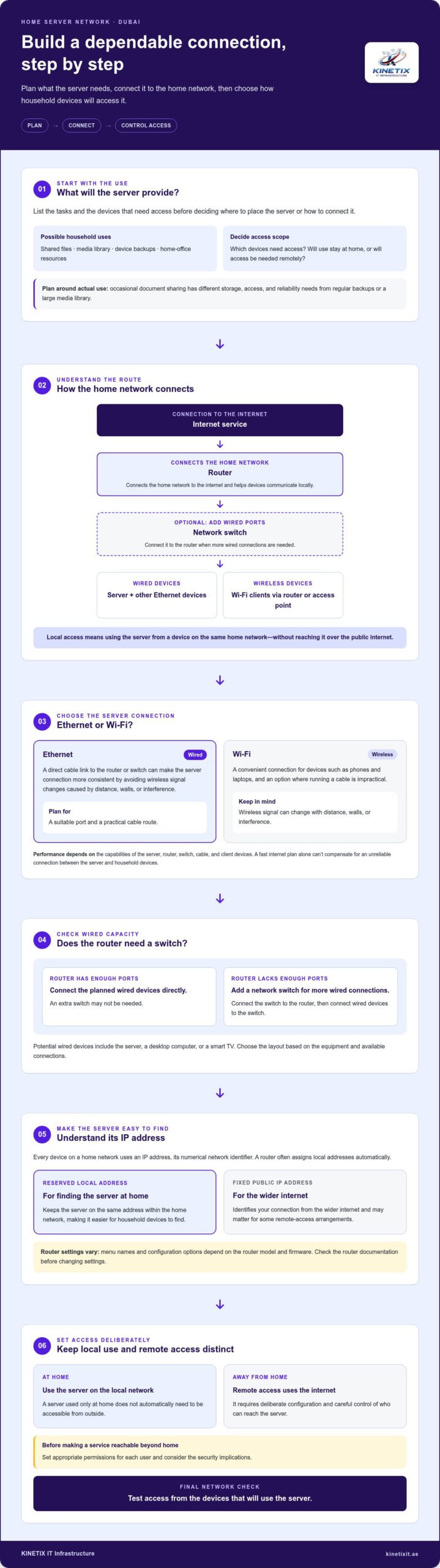
The router connects the home network to the internet and helps devices communicate on the local network. A network switch adds wired connections when the router doesn’t have enough available ports or several devices need an Ethernet link. Phones and laptops can connect over Wi-Fi, while a server can use Ethernet for a steady wired connection.
Local network access means using a server from a device connected to the same home network, without reaching it over the public internet.
Typical network flow: Internet connection → router → optional network switch → server and wired client devices. Wi-Fi client devices connect through the router or a Wi-Fi access point.
A server used only at home doesn’t automatically need to be accessible from outside. Remote access means connecting over the internet while away, so it requires deliberate configuration and careful control of who can reach the server. Set appropriate permissions for each user and consider the security implications before making any service reachable beyond the home network.
The server’s capabilities, the home network’s performance, and secure configuration all shape the experience. A fast internet plan alone can’t compensate for an unreliable connection between the server and household devices. A well-planned home server network setup dubai should account for equipment locations, which devices need wired access, and how people will use shared resources. KINETIX IT Infrastructure supports residential and villa networking with network cabling, Ethernet installation, and router and switch configuration.
Home Server Network Components: Router, Ethernet, Switch, and IP Address
A home server depends on a clear connection between the server and the devices that use it. The router coordinates traffic on the household network and connects that network to your internet service. It also helps devices communicate locally, so accessing a file stored on the server doesn’t necessarily require an internet connection.
Typical connection path: internet service → router → optional network switch → Ethernet-connected server and other wired devices. Wi-Fi devices connect through the router or a wireless access point.
Why connect a home server with Ethernet?
Ethernet gives the server a direct wired link to the router or switch. Unlike Wi-Fi, a cable avoids wireless signal changes caused by distance, walls, or interference, which can make the connection more consistent. Wi-Fi is more convenient where running a cable is impractical, while Ethernet requires a suitable port and a practical cable route. Actual performance depends on the capabilities of the server, router, switch, cable, and client devices.
For a permanent connection, consider where the equipment will sit and how the cable will be routed. A planned route helps keep the connection practical for everyday use. KINETIX IT Infrastructure provides Ethernet cable installation in Dubai as part of residential network setup.
When does a network switch help?
A switch adds wired network ports when the router doesn’t have enough available connections for the server, a desktop computer, a smart TV, or other equipment. Connect the switch to the router, then connect wired devices to the switch. If the router already has enough ports for the devices you plan to wire, an extra switch may not be needed. Router and switch configuration should suit the equipment and the home layout.
Does a home server need a static IP address?
Every device on a home network uses an IP address, its numerical network identifier. A router often assigns local addresses automatically. A reserved local address keeps the server on the same address within the home network, making it easier for household devices to find it. This differs from a fixed public IP address, which identifies your connection from the wider internet and may matter for some remote-access arrangements.
A predictable local address can simplify everyday access, but menu names and configuration options vary by router model and firmware. Check the router documentation before changing settings. For a well-integrated home server network setup dubai, KINETIX IT Infrastructure can configure the router, switch, and cabling around your home’s layout and wired devices. Explore home and villa network setup for support connecting equipment reliably.
Choosing Wi-Fi, Ethernet, and Remote Access for a Dubai Home Server
The right connection depends on where the server sits, what it handles, and which devices need to reach it. A stationary server with a suitable cable route is often a good candidate for Ethernet, while Wi-Fi keeps phones and laptops connected without extra cabling. Remote access is a separate decision: it lets you reach the server from outside your home and needs additional security planning.
| Connection | Benefits | Limits | Suitable scenarios |
|---|---|---|---|
| Ethernet | A direct wired link can provide a consistent connection for a stationary server. | Requires an available port and a practical cable route. | Regular backups, shared files, or media stored on a server in a fixed location. |
| Wi-Fi | Connects devices without running a cable to each one. | Signal quality can vary with distance, walls, interference, and equipment. | Phones and laptops accessing shared documents, or client devices where cabling is impractical. |
| Remote access | Can provide access to server resources while you’re away from home. | Requires internet connectivity and careful configuration to limit exposure. | Accessing home-office files or other server resources while travelling or working elsewhere. |
When is Ethernet preferable to Wi-Fi for a server?
Consider Ethernet for a server that stays in one place, especially if it handles recurring backups or serves media to devices around the home. The server can be wired while phones, laptops, and other client devices remain on Wi-Fi. This mixed arrangement can suit a home well, but performance depends on the full connection path: the server, network equipment, cabling, and client device all matter. Test the network with the tasks you expect to use rather than assuming a particular speed or response time.
Your home internet speed in Dubai depends on the service connected to your home and the capabilities of its router and other equipment. If router settings need adjustment, professional router configuration in Dubai can help align the network with your devices and intended use.
How should remote access be approached safely?
Local access stays within your home network. Remote access makes a server reachable from beyond it, increasing exposure to unwanted access attempts. Use strong, unique credentials, keep server software updated, and grant each user only the permissions they need. Don’t treat opening router ports as a default beginner solution. Understand the access method and its security implications before enabling it.
A considered home server network setup dubai matches the connection to the task: Ethernet for a fixed server where cabling is practical, Wi-Fi for flexible client access, and remote access only when needed and secured. KINETIX IT Infrastructure supports the underlying residential network with router configuration, Ethernet installation, and Wi-Fi optimization.
Planning a Home Server Network Setup: A Practical Checklist
A reliable setup starts with a clear purpose and a simple map of how equipment will connect. Before changing router or switch settings, note the current layout and settings so you can identify what changed if a device loses access.
What should you check before connecting a home server?
Work through this sequence before installation. The server’s intended use and hardware determine its storage, power, and backup needs, so verify those requirements against the device documentation.
- 1. Define the purpose. List the services you plan to use, such as shared files, media, backups, or home-office resources.
- 2. Identify users and devices. Record who needs access and which computers, phones, or other devices will connect.
- 3. Decide where access is needed. Separate local use at home from remote access over the internet, which requires additional security planning.
- 4. Map the equipment. Mark the server and router locations, wired devices, existing Ethernet outlets, and likely cable route.
- 5. Check connection options. Count available router or switch ports, note the distance between equipment, and check Wi-Fi coverage where wireless devices will be used.
- 6. Record the current network. Note how devices are connected and any relevant router or switch settings before making changes.
- 7. Plan server resources. Match storage, power, and backup arrangements to the server hardware and the importance of the data.
A simple floor plan can reveal practical issues early. For example, if the server is in a study but the router is elsewhere, check for a suitable Ethernet outlet or map a cable route before settling on Wi-Fi. If the router has no spare ports, note whether a switch may be needed.
How can you test whether the setup works?
After connecting the equipment, confirm that each intended device can find and access the server on the local network. Try the tasks you expect to use, such as opening shared files or running a backup, while the household is using its usual devices. This gives a more realistic picture than testing when the network is otherwise idle.
Review access permissions so each user can reach the resources they need without unnecessary access to others. Check that the server’s software is updated and that its security settings suit the way it will be used. If remote access is enabled, test it separately and verify that only intended users can connect.
Quick checklist: define the purpose, map equipment and cabling, check ports and coverage, plan storage and backups, record existing settings, then test access and security.
For a home server network setup dubai residents can plan with confidence, KINETIX IT Infrastructure can help with home networking, Ethernet cabling, and router or switch configuration. Plan your home network setup.
Getting Home Server Network Support in Dubai
A home server works best when its network connection is planned alongside the rest of the household setup. A network assessment can map the server’s location, existing Ethernet outlets, cable routes, connected devices, and Wi-Fi coverage. Router and switch configuration, together with suitable cabling, can create a clear connection between the server and the devices that need it.
Network support focuses on the residential setup around the server: how equipment connects, how wired and wireless devices share access, and whether the layout suits the home’s needs. For a broader overview, read the Network Support guide for connected Dubai homes.
When can professional network setup help?
Support can help when you’re planning a cable route, choosing where to place the server, or working out how router settings and available switch ports affect connectivity. It can also be useful when a home has several connected devices, a home office, or a villa layout where equipment sits far apart. A planned wired link for a stationary server can be coordinated with wider home or villa networking, rather than treated as an isolated cable run.
Coverage matters too. If devices that use the server rely on Wi-Fi in different rooms or areas, include those locations in the network plan. KINETIX IT Infrastructure provides residential Wi-Fi setup, coverage improvement, Ethernet installation, and router and switch configuration. For guidance focused on coverage, see the Dubai villa Wi-Fi installation guidance.
What should a smooth home-network setup deliver?
A coordinated setup should leave you with a clear network layout, appropriately configured equipment, and tested connectivity for the devices that need access. Testing can include confirming that intended devices reach the server and that everyday tasks work as expected on the local network. This creates a considered foundation for shared work resources, media, and household devices.
For a home server network setup dubai residents can plan around their actual home layout, KINETIX IT Infrastructure brings cabling, Wi-Fi, and network configuration together as part of residential and villa networking. Explore network support for your home.
Build a Home Network That’s Ready to Support Your Server
A dependable server experience begins with a network planned around its purpose. Choose connections to suit the work: a wired link can be a practical fit for a stationary server, while Wi-Fi keeps household devices flexible. Map equipment locations, cabling, and available ports before making changes, then test everyday access and permissions. If you need to connect from outside the home, treat remote access as a separate security decision.
A thoughtful home server network setup dubai also considers how the server fits into the wider household network, rather than focusing on hardware alone. KINETIX IT Infrastructure supports residential Wi-Fi and home-network setup in Dubai, including network cabling, Ethernet installation, and router and switch configuration. Coordinated planning can help work resources, media, and connected devices function smoothly together.
Give your server a dependable foundation with network support tailored to your home. Explore network support for your Dubai home, and take the next step toward a more connected household.
Frequently Asked Questions
Does a home server need to be connected to a router?
Yes, a home server typically connects to your router, directly or through a network switch. The router helps devices on your home network communicate with the server and provides a path to the internet if needed. Ethernet is often practical for a stationary server, while client devices can connect over Wi-Fi. The right arrangement depends on the server, router, available ports, and how household devices will use it.
Is Ethernet better than Wi-Fi for a home server?
Ethernet is often a suitable choice for a stationary server because a direct cable avoids changes in wireless signal strength caused by distance, walls, or interference. Wi-Fi can work where cabling is impractical and remains convenient for phones and laptops accessing the server. Neither option guarantees a particular speed or reliability. Results depend on the server, router, cabling or wireless conditions, and the devices connecting to it.
Can I access my home server when I am away from home?
Yes, remote access can let you reach server resources over the internet, but it requires more planning than local access. A server reachable from outside the home has greater exposure, so use strong, unique credentials, keep its software updated, and limit permissions to intended users. Avoid opening router ports as a default beginner solution. Choose an access method you understand, then test its security and functionality before relying on it away from home.
Do I need a static IP address for a home server?
No, a fixed public IP address isn’t always necessary. A reserved local IP address gives the server a predictable address inside your home network, helping local devices find it. Remote access is different and may need a stable way to locate your home connection. Residential static IP availability can vary by provider and plan in the UAE. Dynamic DNS may be an option, depending on the remote-access method and network configuration.
Will a home server slow down my Wi-Fi?
Not necessarily. Local transfers between a wired server and wired devices don’t use Wi-Fi airtime, but wireless devices accessing the server do. Large backups or media streams can use network capacity, and tasks that send or receive data over the internet can also affect other activity. The impact depends on the server workload, router, connection type, and household use. Test typical tasks while other devices are online to see how the network performs.
What should I plan before setting up a home server network in Dubai?
Define what the server will do, who needs access, and whether use will be local or remote. Map the server and router locations, wired devices, Ethernet outlets, cable route, available ports, and Wi-Fi coverage. Check the server’s storage, power, and backup needs against its hardware documentation. A home server network setup dubai plan should also account for the home’s existing network and internet service. KINETIX IT Infrastructure provides residential Wi-Fi, cabling, Ethernet, router, and switch setup in Dubai.
One Response