
A replacement drive can restore recording, but it won’t recover footage already stored on a failing disk. If your recorder has stopped saving video or shows a drive error, the safest first step in cctv nvr hard drive replacement dubai is to protect the original media, not rush to format or replace it.
It’s understandable to want recording back quickly, especially if you may need footage for review. But the fault could be with the hard drive, NVR, camera connection, power, or network. Avoid initializing or formatting the original drive if you may need its recordings. A new disk won’t bring old footage back.
This guide explains how to respond carefully, distinguish replacement from footage recovery, and check which compatibility details matter for your NVR. You’ll also learn how CCTV troubleshooting in Dubai can help isolate the cause and verify system operation after repair, so you can make an informed decision about the next step.
Key Takeaways
- Learn which NVR warning signs may point to a drive issue, and why symptoms alone don’t identify the cause.
- See what details to record before taking action, and which steps could make footage harder to recover.
- Understand when cctv nvr hard drive replacement dubai is the right route and when preserving historical footage should come first.
- Find out why replacement storage must match the specific NVR model’s supported type, capacity, and configuration.
- Discover how professional CCTV troubleshooting can help distinguish storage faults from recorder, camera, connection, or network issues.
NVR Hard Drive Failure in Dubai: What Stops Working and What May Still Be Recoverable?
An NVR hard drive stores video recorded by connected cameras. Replacing it gives the recorder storage for future footage; it doesn’t automatically restore recordings from the old drive. Keep that distinction in mind if you need a particular clip for an incident review or another important purpose.
Replacement restores storage for new recordings; recovery seeks access to historical footage. If the NVR stops recording, that alone doesn’t prove the drive has failed. A fault in the recorder, loose or damaged cabling, a power issue, or a network problem can produce similar symptoms. A system diagnosis can help identify the cause before you choose what to do next.
How to recognise a possible NVR hard drive failure
Look for drive-related status messages, missing playback, unexplained recording gaps, or a schedule that appears active but produces no new footage. These are clues, not a diagnosis. A drive error may indicate a storage problem, but the recorder or its connections could also be at fault.
Check how many cameras are affected. If one camera has no live feed or playback while others continue recording, the issue may be specific to that camera, its cabling, or its connection. If recordings are missing across the system, the NVR, shared power, storage, or network may need inspection. Unusual noises from the recorder or repeated drive errors are reasons to stop unnecessary troubleshooting. Repeated restarts or attempts to make the NVR recognise the drive may complicate assessment, particularly if footage matters.
Before taking further action, note the exact error message, when the recording gaps began, which cameras are affected, and the dates or times of any footage you need. This information gives a technician useful context without requiring you to open the recorder or alter its storage.
Replacement versus CCTV footage recovery
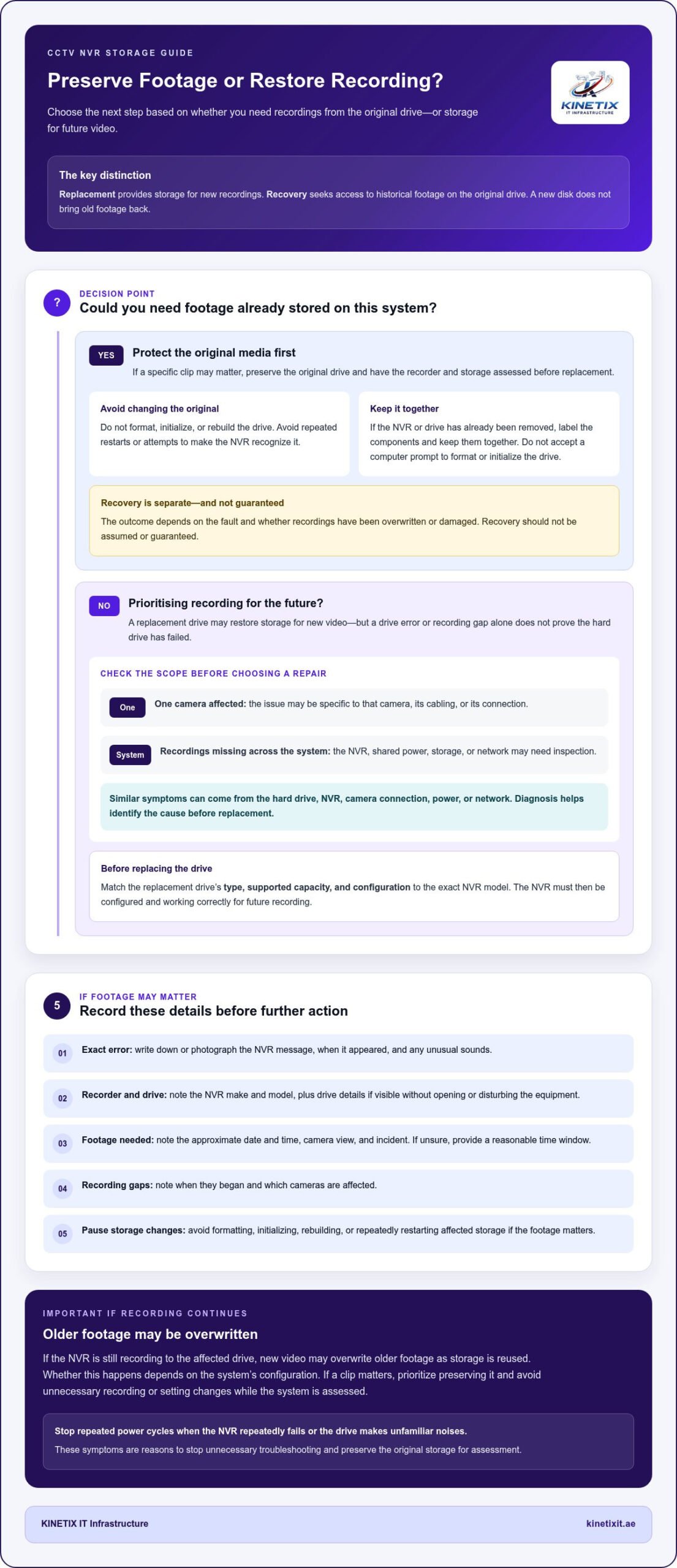
A compatible replacement drive can provide storage for new recordings once the NVR is configured and working correctly. It cannot recreate video held on the original drive. If historical footage matters, preserve the original storage and avoid formatting, initializing, or rebuilding it. These actions may change data or make later assessment more difficult.
Footage recovery is a separate process involving the original storage. It may also need to account for how the NVR records and organizes video. The data recovery principles overview explains why the condition of storage media and actions taken after a failure can matter. In CCTV systems, the outcome depends on the fault and whether recordings have been overwritten or damaged. Recovery should not be assumed or guaranteed.
For cctv nvr hard drive replacement dubai, first decide whether your priority is future recording or access to existing footage. If a specific recording may be needed, preserve the original drive and have the recorder and storage assessed before replacement. If your priority is restoring recording, check the replacement’s drive type, supported capacity, and configuration against the exact NVR model.
First Step: Preserve NVR Footage Before Replacing a Drive
If a recording may be important, pause before changing settings or swapping storage. First, capture what the NVR is reporting and identify the footage you need. These details help focus diagnosis and reduce the risk of changing the original drive unnecessarily.
Use this checklist in order:
- Record the error. Photograph or write down the exact message on the NVR screen, when it appeared, and any unusual sounds.
- Identify the recorder and drive. Note the NVR make and model. Record the drive details if they’re visible without opening or disturbing the equipment.
- Mark the footage you need. Write down the approximate date and time, camera view, and incident. If you’re unsure of the precise time, provide a reasonable window.
- Keep the original components together. If the NVR or drive has already been removed, label them and keep them together. Don’t connect the drive to a computer and accept a prompt to format or initialize it.
- Pause before changing storage settings. If footage matters, avoid formatting, initializing, rebuilding, or repeatedly restarting the affected storage.
These details help distinguish a drive alert from a broader recorder or camera-system issue. They also give the technician a focused starting point instead of relying on trial and error.
Account for ongoing recording
If the NVR is still recording to the affected drive, new video may overwrite older footage as storage is reused. Whether that happens depends on the system’s configuration, so don’t assume the recording is safe simply because playback still works. If a particular clip matters, prioritise preserving it and avoid unnecessary recording or setting changes while arranging a diagnosis.
If recording has stopped altogether, new footage may no longer be written, but the drive and recorder still need careful handling. A replacement may restore storage for future video, but it won’t recover recordings from the original drive. Avoid unverified recovery software. Connecting storage to a computer or following its prompts can lead to changes you didn’t intend.
Know when to stop troubleshooting
Stop repeated power cycles if the NVR repeatedly fails or the drive makes unfamiliar noises. If only one camera is affected, the issue may involve that camera or its connection. If recording is missing across the system, the recorder, shared connections, or storage may be involved. For related connection and system symptoms, KINETIX IT’s CCTV troubleshooting guide offers additional context.
For cctv nvr hard drive replacement dubai, preservation comes before replacement when historical footage matters. Once that priority is clear, check storage compatibility against the exact NVR model. Seagate’s NVR storage considerations provide manufacturer guidance on choosing storage for surveillance systems. KINETIX IT provides CCTV troubleshooting and repair in Dubai to help diagnose recorder, camera, and connection symptoms.
Replace the NVR Hard Drive or Recover Footage? Choose the Right Route
Choose your next step according to what matters most: reliable recording from now on, access to existing video, or both. If a particular clip may be important or evidential, put preservation first. Don’t treat the original drive as expendable until you’ve considered whether its recordings matter.
Replacement and recovery solve different problems: replacement supports future recording, while recovery aims to access historical footage. Neither route guarantees a particular outcome, and the drive fault should be diagnosed before decisions are made.
| Desired outcome | Does historical footage matter? | Action to avoid | Next step |
|---|---|---|---|
| Restore recording for the future | No, or existing footage has been assessed and isn’t needed | Installing a drive before checking the NVR and connections | Diagnose the fault, then verify replacement storage against the exact recorder model |
| Access a specific recording | Yes, a date, camera view, or incident is important | Formatting, initializing, rebuilding, or continuing avoidable writes to the original drive | Preserve the NVR and original drive for assessment before replacement |
| Restore recording and retain old footage | Yes, and future recording is also needed | Assuming one replacement drive will meet both goals | Separate the footage-preservation decision from the repair and recording plan |
When a replacement drive is the priority
Replacement is the practical route when your main goal is to resume recording and diagnosis identifies the drive as the fault. It restores storage for new video after the NVR is configured and tested. It doesn’t transfer or recover recordings from the old drive, so decide first whether any past footage needs attention.
Compatibility depends on more than capacity. Check the NVR manufacturer’s supported drive type, capacity, and configuration against the exact recorder model. A drive that fits physically or offers ample space may still be unsuitable for that NVR. For cctv nvr hard drive replacement dubai, verifying the model requirements helps prevent a replacement from creating another storage problem.
When preserving the original drive matters more
Prioritise preservation if you need footage from a particular date range, camera view, or incident. Keep the original drive with its recorder where possible, and avoid treating it as spare storage or testing it with ordinary computer tools. Some NVRs use proprietary recording formats, so a computer may not display usable video even if it detects the drive.
That doesn’t prove the footage is recoverable or lost. The condition of the storage and the recorder’s recording structure can affect assessment, and recovery results can’t be guaranteed. If both historical video and ongoing surveillance matter, make those separate goals clear during diagnosis. This helps ensure the replacement decision doesn’t take priority over preserving the original recordings.
NVR Hard Drive Replacement in Dubai: Diagnosis, Compatibility, and Setup
A reliable replacement starts with diagnosis, not simply matching the old drive’s size. An NVR may report a storage error because of a drive fault, but recorder problems, cabling, power, or network symptoms can point elsewhere. A careful process identifies the cause first, then selects and verifies storage suited to the specific recorder.
A professional replacement workflow generally follows these steps:
- Identify the symptoms. Record the displayed error, whether recording has stopped across the system or on selected cameras, and whether playback is affected.
- Inspect the recorder and connections. Check the NVR’s condition and relevant power and cable connections to help distinguish a storage problem from a wider system fault.
- Verify the drive fault. Assess the recorder’s status and available diagnostic information before treating the drive as the cause.
- Select compatible storage. Compare the NVR manufacturer and model with its documented supported drive type, capacity, and configuration.
- Install and configure the replacement. Handle the equipment safely, fit and configure the drive according to the recorder’s requirements, then verify recording and playback.
Compatibility is determined by the recorder’s specifications, not just by whether the drive connector fits. This model-specific check helps prevent a replacement that appears physically suitable but isn’t supported by the NVR.
How compatibility is checked for an NVR replacement drive
Start with the recorder’s exact model and manufacturer documentation. Confirm the supported storage type, capacity limits, and any configuration requirements for that NVR. Capacity alone isn’t enough to establish compatibility.
The number of cameras, recording settings, and desired retention period also shape the storage requirement. Consider them together rather than assuming a fixed capacity will suit every system. A desktop drive may not be intended for the operating demands of continuous surveillance recording, so select storage for the recorder and its use, not just by connector or price.
How to verify recording after replacement
After setup, confirm that the NVR recognises the drive and reports a normal recording status. Check that the intended cameras are included, then review playback from a newly created time range. A live camera view alone doesn’t confirm that video is being saved, so check both recording status and playback.
These checks show whether the system is recording new footage. They don’t establish that recordings from the removed drive have been recovered. Keep the replacement and historical-footage questions separate, especially if video from before the repair matters.
For cctv nvr hard drive replacement dubai, KINETIX IT’s CCTV troubleshooting and repair can help diagnose recorder, camera, and connection symptoms and assess system function after repair. Learn about CCTV troubleshooting in Dubai.
Restore CCTV Recording in Dubai with Kinetix IT Troubleshooting and Repair
A recorder error doesn’t always mean the hard drive is the cause. KINETIX IT Infrastructure provides CCTV troubleshooting and repair in Dubai, assessing the camera and recorder system to help distinguish storage failure from a recorder fault, camera issue, loose connection, or network symptom. The diagnosis guides the next step, whether the system needs a repair, compatible replacement storage, or further checks.
The goal is to restore system function and verify that recording works as intended. Replacing a drive addresses future storage needs; it doesn’t promise access to footage saved on the original drive. If historical recordings matter, preserve the original storage and make that priority clear before changes are made.
What a CCTV repair diagnosis can clarify
Useful details help focus the assessment. Have the NVR make and model, exact error message, affected cameras, and an estimate of when recording stopped ready. Note whether the problem affects one camera or the entire system, and whether live viewing, playback, or both are affected.
Checking recorder status and system connections helps narrow the cause before replacement is considered. If the issue involves a wider setup, KINETIX IT Infrastructure’s CCTV camera installation guide provides useful context on how cameras and recording equipment work as part of a system.
Next steps for CCTV hard drive replacement in Dubai
Once diagnosis points to storage failure, replacement storage should match the NVR manufacturer’s supported specifications and configuration. The exact recorder model matters: supported drive types and capacities can vary, so don’t select a replacement by connector or capacity alone. After repair, check the NVR’s status and playback to confirm that new footage is being recorded across the intended cameras.
Keep the original drive if footage from before the fault may be important. New recording checks confirm current system operation, not recovery of old video. KINETIX IT Infrastructure’s troubleshooting-led approach addresses the recorder, cameras, and connections together, helping you focus on restoring dependable CCTV recording while treating footage recovery as a separate process with no guaranteed result.
For cctv nvr hard drive replacement dubai, have your NVR model, displayed error, affected camera details, and approximate recording stop time ready. Arrange CCTV troubleshooting and repair in Dubai.
Make Your Next CCTV Repair Decision with Confidence
A recording fault is a good reason to review how the recorder, cameras, and property network work together. Looking at the whole system helps identify the actual cause instead of treating every interruption as a hard drive problem. It also gives you a clearer starting point for future maintenance or CCTV changes.
For cctv nvr hard drive replacement dubai, choose a next step that matches your priority: preserve footage that matters or restore dependable recording. KINETIX IT provides CCTV troubleshooting and repair in Dubai, considering how CCTV systems connect with the wider property network. This keeps the focus on system operation, not just the storage device.
When you’re ready, share the recorder details and symptoms you’ve observed. Arrange CCTV troubleshooting and repair in Dubai to take the next step toward getting your security system working as it should.
Frequently Asked Questions
Can an NVR hard drive be replaced without replacing the entire CCTV system?
Usually, yes. If the cameras and recorder are functioning and diagnosis identifies the storage drive as the fault, the existing CCTV system may only need a compatible replacement drive. For example, cameras that still show live video don’t necessarily need replacing just because recorded playback is unavailable. The NVR model and its supported storage specifications still matter, and the system should be checked after repair to confirm recording works.
Will replacing a failed NVR hard drive recover my old CCTV footage?
No. Installing a replacement drive gives the NVR storage for future recordings; it doesn’t restore video from the removed drive. If an old clip may matter, keep the original drive and recorder together and avoid treating the drive as spare storage. Recovery is a separate assessment, and results depend on the condition of the original media and what has happened to the recordings.
Should I turn off my NVR if its hard drive has failed?
Not in every situation. If the NVR is still operating, switching it off will stop any current recording, while leaving it writing to a failing drive may affect older footage. If you hear unusual drive noises or see repeated failures, stop unnecessary restarts and arrange a diagnosis. If you need historical footage, avoid further use where possible and use the recorder’s normal shutdown process rather than abruptly disconnecting power.
Can I use a regular computer hard drive in an NVR?
Not automatically. A desktop drive may connect physically but still be unsupported or poorly suited to the recorder’s operating demands. Check the NVR manufacturer’s specifications for the supported drive type, capacity, and configuration before choosing storage. A drive designed for video surveillance isn’t automatically compatible either; the exact NVR model determines which options the recorder can use.
Why does my NVR say there is no hard drive after replacement?
The replacement may not meet the NVR’s supported specifications, or the recorder may not be detecting or configuring it correctly. A connection issue or fault in the NVR itself can also produce a no-drive message. Check the model-specific setup guidance before changing settings. If the message persists, avoid repeated attempts to initialize storage, especially if the original drive or its recordings still need assessment.
Can CCTV footage still be recovered after an NVR drive has been overwritten?
Possibly, but overwritten footage may be incomplete or inaccessible, and recovery can’t be guaranteed. Recording systems can reuse storage as new video is saved, so avoid further writing if a specific clip matters. Keep the original drive and note the date, time, and camera view you’re seeking. Don’t run unfamiliar recovery software, since it may alter the storage or complicate an assessment.
How do I know whether my NVR or its hard drive has failed?
You can’t reliably identify the failed component from one symptom alone. If one camera is affected, its camera, cabling, or connection may be involved; if recording is missing across several cameras, the recorder or shared storage may need investigation. Also distinguish local recording from remote viewing: a network problem can interrupt access without proving that the NVR has stopped recording. A system diagnosis can narrow the cause.