
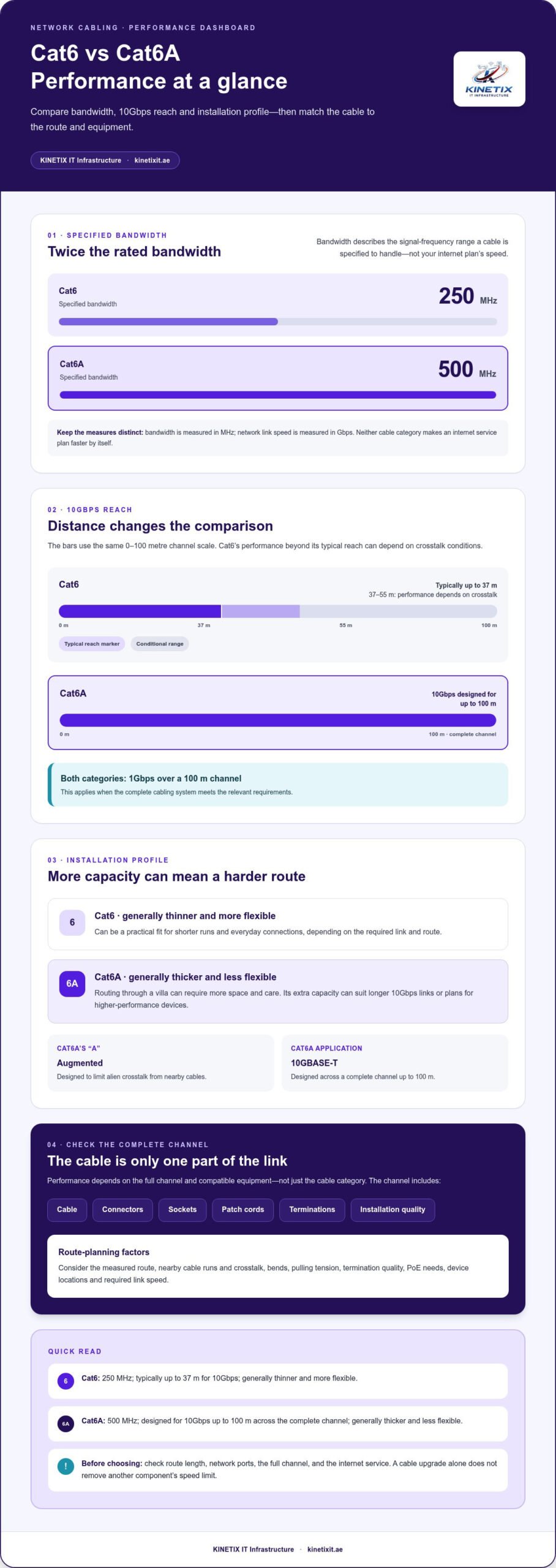
The higher-category cable isn’t automatically the better choice for every home. The difference between cat6 and cat6a cabling matters most when you consider the route length and the speed your network needs: Cat6 supports 10Gbps up to 37 metres, while Cat6A is designed to carry 10Gbps across a full 100-metre channel.
That extra capacity can be useful, but it may also make installation more demanding. Cat6A is thicker and less flexible, so routing it through a villa can require more space and care. For shorter runs and everyday connections, Cat6 may be suitable. For longer 10Gbps links or a network planned around higher-performance devices, Cat6A can provide more headroom.
This guide compares the categories by speed, distance, bandwidth and installation needs, so you can match the cable to your devices and routes. It also explains why the complete channel, including sockets, patch cords and terminations, matters to performance. Careful route planning helps network cabling support reliable connections throughout your home.
Key Takeaways
- Compare Cat6 and Cat6A by their rated bandwidth and link capabilities, but don’t confuse cable bandwidth with your internet plan’s speed.
- Understand the difference between cat6 and cat6a cabling by considering crosstalk and the performance of the complete channel, not just the cable itself.
- Account for cable size, bend radius, pulling tension, termination quality and PoE needs when planning routes through a home or villa.
- Map your devices, cable routes, speed requirements and upgrade horizon to decide where Cat6, Cat6A or a combination best fits.
- Plan cabling as part of an integrated network, including room locations, Ethernet sockets and connected devices. KINETIX IT Infrastructure provides network cabling, Ethernet installation, wall sockets and network configuration in Dubai.
Cat6 vs Cat6A Cabling: What Each Category Is Designed to Do
Cat6 is a Category 6 Ethernet cable standard; Cat6A, or Augmented Category 6, is designed to support higher-frequency transmission and 10Gbps over longer distances. Both contain four twisted pairs and can carry common Ethernet connections for computers, televisions, access points and other network devices. The right choice depends on the performance needed across the complete cable route, not the category label alone.
What does the Category 6 rating describe?
A category rating describes how cabling is designed to perform under specified test conditions. It covers characteristics such as bandwidth and resistance to interference. The ANSI/TIA-568.2-E standard specifies performance requirements for twisted-pair cabling, while ISO/IEC 11801 provides an international structured-cabling framework. These standards define the capabilities of the cabling system; they don’t set the speed of your internet service.
Bandwidth, measured in megahertz (MHz), describes the range of signal frequencies a cable is specified to handle. Network speed, measured in gigabits per second (Gbps), describes the data rate of a connection. The figures relate to transmission performance, but they aren’t interchangeable. A Category 6 cable can provide a high-speed local Ethernet link without making an internet plan faster than the service supplied to the home.
| Feature | Cat6 | Cat6A |
|---|---|---|
| Specified bandwidth | 250 MHz | 500 MHz |
| 10Gbps distance | Typically up to 37 metres; performance from 37 to 55 metres depends on crosstalk conditions | Up to 100 metres for the complete channel |
| Installation profile | Generally thinner and more flexible | Generally thicker and less flexible |
What does the “A” in Cat6A mean?
The “A” stands for Augmented. Cat6A is designed to limit alien crosstalk, which is interference from nearby cables, and support 10GBASE-T over a full 100-metre channel. Cat6 can support 10Gbps over shorter runs, but performance depends on distance and installation conditions. Both categories support 1Gbps over a 100-metre channel when the complete cabling system meets the relevant requirements.
A cable category describes a link’s transmission capability, not a guaranteed internet speed. Actual results depend on compatible network ports, the full channel and the internet service itself. Cat6A’s extra capacity can suit longer 10Gbps routes, while Cat6 can be a practical fit for shorter runs with standard-speed requirements. Cat6A’s larger, less flexible profile may also need more room for routing and termination. These are the main factors to weigh when considering the difference between cat6 and cat6a cabling.
Cat6 vs Cat6A Performance: Bandwidth, 10Gbps Distance, and Crosstalk
The key performance difference is how reliably each category can carry high data rates over distance. Cat6 is specified to 250 MHz and Cat6A to 500 MHz, but those figures describe bandwidth, not the speed of your internet connection. Ethernet link speed is measured separately in Gbps and depends on the cable channel and the equipment at both ends.
For 10Gbps Ethernet, Cat6 is typically specified for distances up to 37 metres. Beyond that, and up to 55 metres, performance depends on factors such as alien crosstalk. Cat6A is designed to support 10GBASE-T across a complete channel of up to 100 metres, when the installed channel meets the relevant requirements.
Why can Cat6 10Gbps distance vary?
A channel includes more than the cable inside the wall. Connectors, sockets, patch cords, terminations and installation quality all contribute to its performance. Tight bends, poor terminations or cables bundled closely together can affect the result, particularly at higher data rates.
The 37-metre figure is a standards-based guideline, not a promise that every building will achieve the same performance. For runs from 37 to 55 metres, adjacent-cable interference can determine whether 10Gbps works reliably. NIST guidance on twisted-pair cabling offers a useful perspective on planning cable systems for demanding environments: assess the channel and application, not just the cable category.
Will Cat6A make a home internet connection faster?
Not by itself. A cable can support a faster local link between compatible devices, but the connection is limited by the components and service involved. For example, Cat6A cannot deliver a 10Gbps link if the router, switch or device network adapter supports only a lower rate. Internet performance is also constrained by the speed of the service plan.
Upgrading the cable alone won’t increase internet speed if another part of the connection is the bottleneck. Cat6A can still be valuable when a longer run needs reliable 10Gbps capacity or when planning for higher-performance equipment. For a shorter run with devices that use standard gigabit links, its additional capacity may not change the everyday experience.
To understand the difference between cat6 and cat6a cabling in a real installation, consider the intended link speed, measured route and neighbouring cable runs together. KINETIX provides network cabling and Ethernet connections as part of coordinated home network installations, including network cabling installation.
Installation Trade-Offs: Cable Size, Terminations, PoE, and Project Cost
Choosing a cable category is only one part of planning a reliable installation. The route, fittings and termination work also affect how well the completed channel performs. Cat6A’s typically larger, less flexible profile can need more room than Cat6, especially where cables pass through narrow conduits, tight corners or crowded cabinets. In a villa, mapping those routes before installation helps avoid awkward bends and difficult access to wall sockets.
Do Cat6A cables need different installation planning?
Yes. A route that accommodates Cat6 may be restrictive for a thicker Cat6A cable. Plan conduit capacity, bend radius and access at both ends before pulling cable. Avoid excessive pulling tension and sharp bends, which can damage the cable or affect its transmission performance even if the outer jacket appears intact.
Plan the complete channel, not just the in-wall run. Jacks, wall sockets, patch panels and patch leads should be suitable for the intended category and performance. A higher-category cable paired with lower-capability components may not deliver the channel performance you expect. Shielded cabling also isn’t a cable-only upgrade: the shielding choice needs to work with the connectors, termination approach and installation design as a whole.
What should homeowners know about PoE?
Power over Ethernet (PoE) carries data and electrical power over the same Ethernet cabling, allowing compatible devices such as access points or cameras to receive power through a network connection. The right installation depends on the connected equipment’s power requirements and the cable’s construction, as well as the number of powered cables grouped together.
Power flowing through bundled cables produces heat. Bundle size, routing and heat dissipation should therefore inform the design, particularly where several PoE connections share a confined pathway. The latest PoE standard, IEEE 802.3bt, includes power levels up to 90 watts, but that doesn’t mean every home device needs Cat6A. Choose a cable and channel based on the equipment, run length and installation conditions.
Project cost depends on more than cable category. Materials matter, but labour, access, route complexity, conduit work, socket locations, compatible hardware and termination all shape the finished installation. An existing route may be straightforward, while a new path through a difficult space may require more planning and work. There’s no fixed Cat6-to-Cat6A premium that applies to every project.
- Before installation: map routes, conduit capacity and socket positions.
- During installation: protect the cable from sharp bends and excessive pulling force.
- At completion: check that the components and terminations suit the channel’s intended performance.
These practical details are central to the difference between cat6 and cat6a cabling. Careful route planning and compatible components help turn a cable choice into an integrated network connection, rather than an isolated specification on a box.
How to Choose Cat6 or Cat6A for a Home, Villa, or Office
Start with the network you need, not the highest category available. In a Dubai villa, a home office, living-room smart TV and wireless access points may have different connection needs and route lengths. Use this sequence to decide where Cat6 fits and where Cat6A may offer useful headroom.
- Map the devices. Mark the home office computer, TVs, access points, network cabinet and other devices that need wired connections. Note locations that may be added later, so socket placement supports how each room is used.
- Estimate each route. Trace the likely cable path from the cabinet or switch to each socket, including the route through walls or conduits. Use the actual pathway rather than the straight-line distance between rooms. Longer routes can change which category suits a planned high-speed link.
- Define the speed requirement. Check the link speed supported by the router or switch and the connected device. Cat6 supports 1Gbps over a channel up to 100 metres. It can support 10Gbps over shorter distances, typically up to 37 metres; Cat6A is designed for 10Gbps across a full 100-metre channel. The complete channel and installation conditions matter.
- Consider the upgrade horizon. Think about how long the cabling should serve the property and whether you expect higher-speed switches, access points or work devices. Added capacity can be worthwhile where replacing concealed cable later would be disruptive, but it isn’t essential for every room.
When is Cat6 a sensible choice?
Cat6 can suit standard gigabit links for devices such as a smart TV, printer or home office computer, when the route and equipment meet the relevant requirements. Shorter runs may support 10Gbps, but distance alone doesn’t guarantee it. Channel components and installation conditions also affect performance. Cat6 is a practical choice for appropriate needs, not a promise of suitability for every future workload.
When is Cat6A worth considering?
Consider Cat6A for planned 10Gbps links that need to reach farther, or for infrastructure intended to accommodate future network growth. Its thicker, less flexible cable can require more space in conduits and careful route planning. Balance that installation demand against the expected life of the network and the effort of replacing concealed runs later. A structured cabling solution plans connections as part of a coordinated system, rather than as isolated cable runs.
For example, a villa might use Cat6 for short gigabit connections to TVs and office devices, while reserving Cat6A for a longer route to an access point or a planned 10Gbps connection. A hybrid design can match cable capability to each route instead of using one category for every drop. The difference between cat6 and cat6a cabling is most useful as a planning guide: match device needs to route conditions, then select compatible cabling and components.
Planning a new installation or upgrade? Plan your home network cabling with route, socket and device locations in mind.
Plan a Reliable Cat6 or Cat6A Installation with KINETIX in Dubai
A dependable wired network starts with a plan for the whole property. In a Dubai home or villa, decide where devices will connect, how cables will reach them and where sockets and network equipment should sit. Selecting Cat6 or Cat6A is one part of the process. Route planning and coordinated connections help the finished network work as a system.
What does a well-planned home cabling project cover?
Start by mapping the rooms and equipment. A home office may need a wired connection for a computer, while a living room may need sockets for a smart TV or console. Access points, routers and switches also need suitable locations. A room-by-room plan makes it easier to place wall sockets where devices will actually be used and trace each run back to the network cabinet.
Next, coordinate routes with the building layout and intended network use. The chosen path should account for walls, available pathways, cabinet access and the cable category’s installation needs. A longer route to an access point may have different performance requirements from a short connection to a nearby TV. KINETIX provides network cabling, Ethernet cable installation and internet wall socket installation, alongside router and switch configuration. This coordinated approach connects cable selection to the devices and network equipment it supports. For more on planning the infrastructure, see this network cabling guide.
How can professional installation support a dependable network?
Careful routing helps keep cables protected and accessible, while compatible sockets and terminations support the intended channel performance. The installation plan should account for the route, cable handling and connection points, with checks that connections are completed correctly. These details matter alongside category selection: a cable cannot perform as intended if its route or termination is poorly managed.
Wired Ethernet connections can provide direct links for fixed devices such as a desktop computer or smart TV, while Wi-Fi serves phones, tablets and devices used around the home. The two work together. Access point placement and connection routes still need consideration to provide useful wireless coverage across rooms and floors. KINETIX can integrate Ethernet connections with home network setup and configuration, so wired devices and Wi-Fi access points fit into one considered layout. The Dubai villa Wi-Fi installation guide offers related planning context.
The difference between cat6 and cat6a cabling is only one part of a successful project. Device locations, cable routes, sockets and network equipment should align with the performance you need now and the upgrades you may plan later. This is especially useful in villas, where a home office, entertainment area and access points may be spread across multiple spaces.
For a coordinated installation in Dubai, plan your home network cabling with KINETIX.
Build a Network That’s Ready for What’s Next
Your network should fit the way you use your home today while leaving room for change. A renovated room, a new work-from-home setup or additional connected devices can affect where connections are needed. Planning for those possibilities helps you make considered choices now, rather than treating each new device as a separate fix later.
The difference between cat6 and cat6a cabling is most useful when it guides a broader plan: which rooms need wired connections, where network equipment belongs and how each route supports your priorities. There’s no need to choose the highest category everywhere by default. A carefully considered layout can balance current requirements with future flexibility.
Ready to plan a network around your home and the way you use it? Plan your home network cabling with KINETIX and take the next step toward a connected, well-organized space.
Frequently Asked Questions
Is Cat6A better than Cat6 for a home network?
Cat6A is a better fit when your planned network needs its additional capacity, but it isn’t automatically the right choice for every home. A villa with longer cable routes or equipment intended to use 10Gbps links may benefit from Cat6A. For shorter connections to devices with gigabit ports, Cat6 may be sufficient. Compare the supported speeds of your router, switch and devices before choosing.
Can Cat6 cable support 10Gbps?
Yes, Cat6 can support 10Gbps over shorter links. The commonly cited standards-based range is up to 37 metres; performance between 37 and 55 metres depends on conditions such as interference from nearby cables. If you’re planning a 10Gbps connection, account for the full channel, including sockets and patch leads, rather than measuring only the cable inside the wall.
Does Cat6A reduce network latency?
Not by itself. On a correctly installed network, the cable category generally isn’t the main cause of noticeable latency differences. Delays can instead come from network congestion, device processing, router performance or the path to an online service. Cat6A can support higher-capacity Ethernet links over longer distances, but switching to it won’t necessarily make gaming or video calls feel more responsive if another part of the connection is responsible.
Can Cat6 and Cat6A devices work on the same network?
Yes. Cat6 and Cat6A connections can coexist on one Ethernet network, provided each link uses compatible ports and components. The negotiated connection speed depends on the equipment at both ends and the capability of that particular cable channel. For instance, a Cat6A run connected to a gigabit switch won’t create a 10Gbps link. Labeling runs by room and purpose can make future upgrades easier to manage.
Is shielded Cat6A always better than unshielded cable?
No. Shielding can help address electrical interference in environments where it’s a concern, but it adds requirements to the installation design. The cable, connectors and termination method need to work together, including appropriate bonding and grounding practices. For a typical home route without a specific interference issue, unshielded cabling may be suitable. The right choice depends on the environment and the complete cabling system, not shielding alone.
Can Cat6 or Cat6A cable be used outdoors?
Only cable specifically constructed and rated for the intended outdoor conditions should be used outside. Standard indoor cable may not be designed to withstand sunlight, moisture or temperature changes. A route through an exterior wall, garden or exposed roof space needs suitable cable and protection for that location. In Dubai, plan outdoor runs around the actual exposure and pathway, rather than assuming an indoor-rated cable is suitable just because it is Cat6 or Cat6A.
What happens if a Cat6A cable is bent too tightly?
A bend tighter than the cable’s specified minimum radius can distort its internal pairs and affect transmission performance. The cable may still appear intact, but the damage can contribute to connection errors or prevent the link from meeting its intended performance. Avoid forcing thick Cat6A cable around sharp corners or tightly behind furniture. Leave enough space at sockets and cabinets for a smooth curve, and follow the cable manufacturer’s bend-radius guidance.