
Imagine you’re right in the middle of a high-stakes video call from your stunning Dubai Marina apartment when your screen suddenly freezes. It’s a nightmare scenario for anyone working from home. You’re losing time, focus, and potentially income because of a signal that just can’t penetrate your walls. We understand how frustrating it is when your basic router fails to keep up with your high-energy lifestyle! You’ve worked hard to build your success, and your internet should support that journey, not hinder it.
The good news is that you don’t have to settle for unreliable connections or dead zones any longer. This guide to emergency wifi repair Dubai Marina is designed to get you back at full speed immediately. We’ll show you how to optimize your setup and use professional mesh solutions to ensure a stable signal in every single room. We’ll walk through the exact steps to restore your connectivity and prevent future outages. Ready to transform your home into a high-speed digital powerhouse? Let’s get started on your path to perfect connectivity!
Key Takeaways
- Discover why the unique high-rise density of Dubai Marina causes signal interference and how you can easily overcome these digital hurdles!
- Master immediate troubleshooting steps like the 60-second power cycle to get your internet back online in just minutes.
- Learn exactly when to transition from DIY fixes to professional emergency wifi repair Dubai Marina for complex cabling or hardware failures.
- Prepare for your technician’s arrival by clearing access to your telecommunications cabinet and having your Etisalat or du account details ready!
- Explore how upgrading to a mesh WiFi solution can permanently eliminate dead zones and optimize your home for high-speed success!
Why WiFi Fails in Dubai Marina: Understanding the Connection Crisis
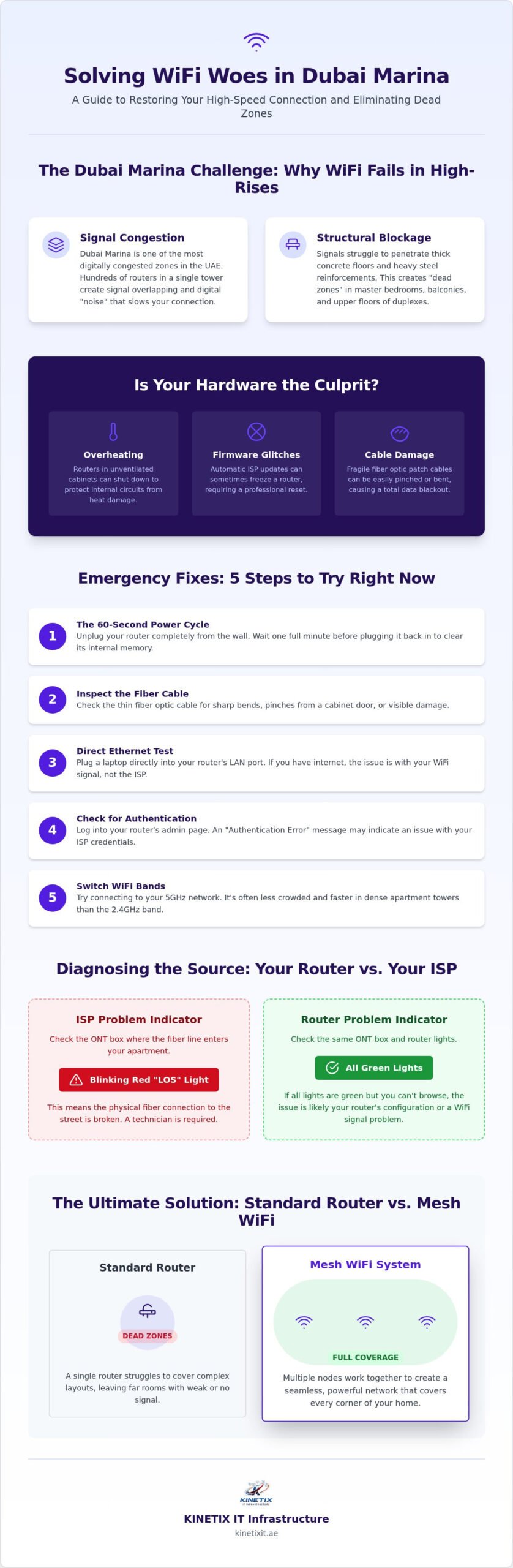
Dubai Marina towers are architectural marvels, but they’re also massive signal blockers! Living in such a high-density area means your router is fighting a constant battle every single second. It’s a fact that the Marina is one of the most digitally congested zones in the UAE. With hundreds of routers packed into a single tower, signal overlapping is almost guaranteed. This interference creates a digital “noise” that slows your connection to a crawl. You might be paying for premium speeds, yet your devices still struggle to load a simple webpage. It’s time to reclaim your speed!
The Challenge of High-Rise Connectivity
Living in a duplex or a sprawling penthouse feels amazing until you try to browse in the master bedroom. Standard signals simply weren’t built for these complex layouts. Your signal has to fight through thick concrete floors and heavy steel reinforcements designed to keep the building standing. These materials are your WiFi’s biggest obstacles! You deserve a connection that reaches every corner of your luxury home.
You might notice these common Marina-specific issues:
- The Neighbor Effect: When your neighbor boosts their signal, it can actually drown out yours. This causes random disconnects and frustrating lag during your important calls.
- Structural Dead Zones: Master bedrooms and balcony areas often become “no-go” zones. The signal can’t wrap around the heavy structural pillars used in Marina construction.
- Vertical Blockage: In many apartments, the router is stuck in a hallway cabinet. This leaves the far corners or upper floors of your home completely disconnected.
Common Hardware Failure Points
Sometimes the issue isn’t just the walls; it’s the gear itself. Many residents rely on basic ISP-provided routers. While these work for some, they often choke under the high demand of a modern Dubai smart home. If you’re experiencing a total blackout, you might need emergency wifi repair Dubai Marina services to diagnose a hidden hardware crash. We are here to help you identify these bottlenecks quickly!
Watch out for these frequent culprits:
- Overheating: Routers tucked away in laundry rooms or small electrical cabinets can overheat quickly. Without proper airflow, they eventually shut down to protect their internal circuits.
- Firmware Glitches: Automatic network updates from Etisalat or du can sometimes leave your router in a “frozen” state. This requires a professional reset to get things moving again.
- Physical Cable Damage: Those thin fiber optic patch cables are incredibly fragile. A tiny bend or a pinch in the cabinet door can stop all data flow instantly.
Is your hardware ready for the challenge? It’s time to ensure your setup is as modern and efficient as your Marina lifestyle! Let’s get your connection back on track today.
Emergency WiFi Troubleshooting: 5 Steps to Try Right Now
Don’t let a connection drop ruin your day! You have the power to get back online faster than you think. While you’re waiting for emergency wifi repair Dubai Marina, these five steps can often save the day. It’s time to take charge and restore your digital freedom!
- The 60-Second Power Cycle: Unplug your router completely. Don’t just tap the button; pull the plug! Wait for 60 full seconds to ensure all internal memory clears before restarting.
- Inspect the Fiber: Look at the thin fiber optic cable connecting to your wall. These cables are fragile! Even a small bend or a pinch from a cabinet door can cause total data loss.
- Direct Ethernet Test: Plug a laptop directly into your router’s LAN port. Does it work? If yes, your internet is fine, but your WiFi signal is struggling.
- Check for Authentication: Log into your router’s gateway through a browser. Look for “Authentication Error” messages. This usually means your ISP credentials need a quick update.
- Band Switching: Try connecting to the 5GHz band instead of 2.4GHz. It’s often less crowded in busy Marina towers and offers much higher speeds!
Identifying the Source: Router vs. ISP
Is the problem inside your home or with the provider? Check your ONT box, which is the small device where the fiber line enters your apartment. The LOS light is the primary indicator of a line break. If this light is blinking red, it means the physical connection to the street is broken. If all lights are green but you still can’t browse, your router configuration is likely the culprit. For complex setup issues, a professional WiFi technician Dubai can get your home network back in peak condition quickly.
Quick Settings Fixes
Your settings might be holding you back. You can find a less crowded frequency by manually changing your WiFi channel in the router dashboard. This bypasses the interference from your neighbors! Also, remember to disable any guest networks you aren’t using. These can hog your bandwidth and slow down your primary connection. Finally, try updating your DNS settings to a faster public server to see an immediate boost in how fast pages load. Will you take the first step toward a faster home network today?
Professional vs. DIY: When to Call an Emergency WiFi Technician
Fixing your own internet feels amazing! It’s a quick win that saves time and money. Simple tasks like changing your password or doing a basic reboot are perfect for a DIY approach. But what happens when the simple stuff doesn’t work? That’s when you need to know the boundary between a quick fix and a complex system failure. You deserve a connection that works without the constant stress of troubleshooting!
If you’re facing physical damage or persistent drops, it’s time for emergency wifi repair Dubai Marina. Technicians arrive with professional tools that go far beyond what a phone app can do. They use signal spectrum analyzers to see exactly where your neighbor’s router is stepping on your signal. This precision ensures your network is perfectly tuned for your specific apartment layout. It’s about moving from “it works sometimes” to “it’s always ready for you!”
The Limits of Home Troubleshooting
Many Marina residents try to fix dead zones with cheap range extenders. These often make the problem worse! They create more interference in already crowded high-rise buildings. You also need to be careful with factory resets. If you wipe your router without your PPPoE credentials from Etisalat or du, you’ll be stuck offline until you find them. Never try to open your ISP-provided hardware yourself. It’s a safety risk and could lead to extra fees if the device is damaged!
What a Professional Technician Brings to the Table
A professional WiFi technician Dubai understands the unique standards of local high-rise infrastructure. They bring high-gain antennas and enterprise-grade access points that standard shops just don’t carry. These experts can also handle complex network cabling Dubai repairs right on the spot. Whether it’s a damaged data point in the wall or a synchronization issue with your mesh system, they have the parts ready to go. You can stop worrying about the tech and focus on your creative or business goals! Don’t settle for a broken connection when emergency wifi repair Dubai Marina is just a call away.
How to Prepare for Your Emergency WiFi Repair Visit
You’re just one step away from perfect connectivity! Being prepared for your technician’s arrival ensures a smooth and efficient visit. We want you back online as quickly as possible, and a little preparation goes a long way. Start by clearing the space around your main telecommunications cabinet. In most Marina towers, this is located in the entrance hallway or a small utility closet. Having clear access allows the technician to start testing your fiber lines immediately without any delays.
Next, make sure you have your Etisalat or du account credentials on hand. Your technician will likely need to log into the router gateway to verify your connection status or update firmware. Do you know where your ‘dead zones’ are? Take a quick walk through your apartment and note exactly where the signal starts to fade. This helps the specialist decide if a mesh system is better for your layout than a single router setup. Finally, check with your building security about accessing the MDF room. If the fault is in the building’s main line, the technician will need permission to enter this area to fix it. Being ready for emergency wifi repair Dubai Marina saves everyone time!
Speeding Up the Repair Process
You can help us move even faster by being organized! Create a list of your most critical devices, like your work laptop or the office server. If you’ve noticed patterns in when the internet drops, share those logs with us. Did the signal fail during a heavy rainstorm or every day at 6 PM? Sharing what you’ve already tried, like cable swaps or resets, prevents us from repeating steps. This targeted approach gets your digital life back on track in record time!
Post-Repair Testing
Success is a signal that reaches every corner! Before your technician packs up, run a speed test in every room of your apartment. You should see a consistent, high-speed result from the balcony to the master bedroom. It’s also the perfect time to verify that your smart home ecosystem is fully functional. Check that your CCTV and intercom systems are reconnected and communicating properly. Ask for a quick summary of the repair to understand what went wrong. This knowledge helps you prevent future outages and keeps your home environment fully optimized. Ready to experience a seamless connection? Book your professional WiFi repair today and let’s get you back to your creative goals!
Reliable Emergency WiFi Repair in Dubai Marina by KINETIX IT Infrastructure
You deserve a connection that matches the high-energy lifestyle of the Marina! KINETIX IT Infrastructure is your dedicated local partner for seamless, high-speed connectivity. We believe that every resident and business owner should feel empowered by their technology. We don’t just patch a temporary problem; we transform your entire digital environment into a high-performance zone. Our specialized expertise covers the unique architectural challenges of Marina apartments, luxury villas, and modern commercial offices. Our team is ready to restore your world with a celebratory, can-do attitude! You can finally stop worrying about disconnects and start focusing on your creative journey.
We take pride in our rapid-response capabilities for emergency wifi repair Dubai Marina. When you call us, you’re not just getting a technician; you’re getting a partner who stands alongside you at the start of your project. We arrive fully prepared to diagnose and fix your issues on the spot. Our goal is to make the technical setup feel like a shared success between us and you. It’s time to experience the excitement of a home that is fully optimized and waiting for your input!
Beyond the Quick Fix: Long-Term Solutions
A fast repair is a great start, but a permanent solution is even better! We specialize in upgrading homes to a professional Mash Wi-Fi solution that offers total, wall-to-wall coverage. Our team provides expert router configuration that finally lets you maximize your ISP’s full potential. We also offer comprehensive home and office internet repair to address every possible bottleneck. KINETIX IT Infrastructure provides ongoing support to keep you prepared for any future tech shifts or network updates. This proactive approach ensures your environment is always fully optimized. You can focus on your business goals while we handle the technical heavy lifting!
Book Your Emergency Repair Now
Your journey to perfect internet starts right here! Our team is standing by and eager to bring your connection back to life. We understand the urgency of your situation and are ready to act immediately. Experience the pure joy of a fully optimized, high-speed home environment today. You’ve already done the hard work of identifying the issue; now let us provide the expert support you deserve. We are excited to help you achieve a seamless digital transition! Don’t let another minute of downtime hold you back from your success. Get your WiFi fixed in Dubai Marina today!
Take Control of Your Connection Today!
You’ve mastered the basics of troubleshooting and you know exactly why the Marina’s unique architecture poses a challenge. Now it’s time to move from frustration to total digital freedom! Whether you’ve tried a 60-second reset or you’re facing a complex hardware failure, you’re now fully prepared to handle any outage. Remember that professional optimization is the key to permanently eliminating dead zones and signal interference. If your DIY efforts haven’t restored your speed, our specialized emergency wifi repair Dubai Marina service is your ultimate solution for immediate results.
KINETIX IT Infrastructure brings certified networking experts who are true specialists in Dubai Marina high-rise buildings and are ready to act right now! We provide 24/7 emergency response to ensure you never have to miss a business milestone or a creative opportunity. You can trust us to handle the heavy lifting while you enjoy a perfectly stable and secure home network. Don’t let a signal drop slow your journey toward success. It’s time to experience the joy of a fully optimized environment that supports your goals!
Restore your connection with KINETIX IT Infrastructure now!
Are you ready for your best internet experience yet? We’re excited to help you start this new chapter of seamless connectivity today!
Frequently Asked Questions
How quickly can a WiFi technician arrive in Dubai Marina?
A technician can typically reach your Dubai Marina location within 60 to 90 minutes to get your day back on track! We prioritize your connectivity needs because we know how essential a stable signal is for your work and home life. Our local presence in the Marina allows us to bypass traffic and arrive at your doorstep ready to work. You’ll be back online and celebrating your high-speed connection before you know it!
Why is my WiFi signal so weak in the bedroom of my Marina apartment?
Your signal is likely struggling against the thick concrete walls and steel reinforcements common in Marina high-rises. These materials act as physical barriers that standard routers simply can’t penetrate effectively. Additionally, interference from hundreds of neighboring networks in your tower can drown out your signal. Upgrading to a professional mesh system is a fantastic way to ensure every room stays fully optimized and connected!
Can you fix my internet if the problem is with Etisalat or du?
We can definitely diagnose if the fault lies with Etisalat or du and help you communicate the specific technical issue to them. While we can’t repair the ISP’s external infrastructure, we often find that provider issues are actually internal router configuration errors. We’ll verify your LOS light and ONT status to give you immediate clarity. We’re here to stand alongside you and ensure your provider delivers the speed you pay for!
What is the difference between a router reset and a factory reset?
A router reset is a simple power cycle that clears temporary glitches without deleting your settings. In contrast, a factory reset wipes everything, including your WiFi name, password, and ISP credentials. You should only perform a factory reset if you have your PPPoE details ready for reconfiguration! It’s a powerful tool for a fresh start, but it requires preparation to get back online successfully.
Do I need to buy a new router if mine keeps disconnecting?
Not always! Frequent disconnections are often caused by outdated firmware, signal interference, or simple overheating in enclosed cabinets. Before you invest in new hardware, let us perform a professional diagnostic to see if a configuration update can save your current device. However, if your router is several years old, upgrading to a modern system can drastically improve your digital journey and daily productivity.
Will a mesh WiFi system fix dead zones in a large Marina penthouse?
Yes, a professional mesh WiFi system is the ultimate solution for large penthouses with complex layouts! Unlike standard extenders, mesh units work together to create a single, seamless network that blankets your entire home in high-speed signal. It’s the perfect way to eliminate dead zones in far-off bedrooms or balconies. You’ll love the freedom of moving from room to room without ever losing your connection!
Is emergency WiFi repair available on weekends and holidays?
You should check for providers that offer round-the-clock support, as many residents require emergency wifi repair Dubai Marina during off-hours or holidays. We understand that internet failures don’t follow a schedule! Rapid-response teams are often available to ensure your home office or smart system stays functional regardless of the day. Staying prepared with a reliable partner means you’re always just a call away from a fix!
What should I do if my router’s LOS light is blinking red?
A blinking red LOS light means there is a physical break in the fiber optic connection to your apartment. You should first check for any visible damage or sharp bends in the thin fiber cable leading to your wall socket. If the cable looks fine, the issue is likely with the external line or the ISP’s local exchange. This is a critical signal that you need professional assistance to restore your connectivity!