
A dark intercom screen doesn’t prove the power supply has failed. Before replacing a faulty intercom power supply unit, confirm whether power reaches the supply and whether its output remains correct at the intercom. A drop along the route points to wiring trouble instead. Replacing a component without making that distinction can leave the fault unresolved.
It’s understandable to suspect the power unit when an intercom stops working, especially if it switches off or restarts unpredictably. Testing helps distinguish a failed supply from a loose connection, damaged cable, fuse issue, or fault elsewhere in the system.
This guide explains the signs of a power-supply fault, practical checks that can help distinguish it from wiring trouble, and how to approach a replacement safely. It also outlines what influences service and component costs in the UAE. The price depends on the case and is given after a quote request; key factors include the fault diagnosis, compatible replacement parts and any wiring work required.
Key Takeaways
- Compare the power supply’s output at its source and at the intercom to help locate a fault in the supply or wiring path.
- Before suspecting a failed unit, look for other clues such as a tripped breaker, loose connections, a faulty adapter, or a problem with the door-release circuit.
- Choose a replacement based on the system’s required voltage, wiring arrangement, and communication method, not appearance alone.
- Service and replacement costs depend on the diagnosis, compatible parts, and any wiring work involved; ask for a clear breakdown of the proposed work.
- Repeated faults, unstable power, or problems affecting multiple households can signal a wider system issue that needs a broader assessment.
Distinguishing power-supply faults from wiring faults
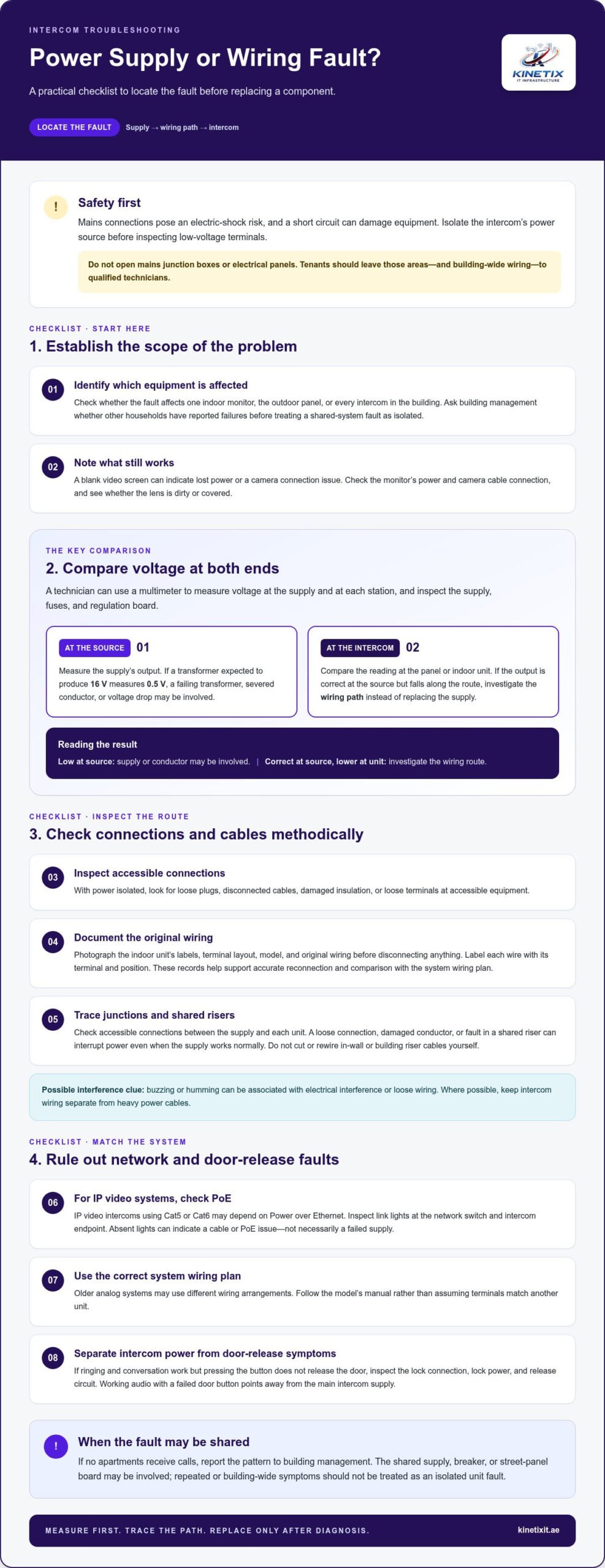
Replacing a supply without testing the wiring can leave the intercom fault unresolved. Mains connections pose an electric-shock risk, and a short circuit can damage equipment. Isolate the intercom’s power source before inspecting low-voltage terminals. Don’t open mains junction boxes or electrical panels. Tenants should leave those areas and building-wide wiring to qualified technicians.
- Record the symptoms and identify the affected equipment. Check whether the fault affects one indoor monitor, the outdoor panel, or every intercom in the building. A blank video screen can indicate lost power or a camera connection issue. Check the monitor’s power and camera cable connection, and see whether the lens is dirty or covered. Ask building management whether other households have reported failures before treating a shared-system fault as an isolated problem.
- Inspect visible connections before considering repair. With power isolated, look for loose plugs, disconnected cables, damaged insulation, or loose terminals at accessible equipment. Photograph the indoor unit’s labels, terminal layout, model, and original wiring before disconnecting anything. Label each wire with its terminal and position. These records support accurate reconnection and help a technician compare the setup with the system’s wiring plan.
- Compare supply voltage at the source and the intercom. A technician can use a multimeter to measure voltage at each station and inspect the supply, fuses, and regulation board. If a transformer expected to produce 16 V measures 0.5 V, a failing transformer, severed conductor, or voltage drop may be involved. If its output is correct at the source but falls at the panel or indoor unit, investigate the wiring path instead of replacing the supply.
- Trace wiring and riser cables methodically. Check accessible connections along the route, including junction points between the supply and each unit. A loose connection, damaged conductor, or fault in a shared riser can interrupt power even when the supply works normally. Where possible, keep intercom wiring separate from heavy power cables, since electrical interference or loose wiring can cause buzzing or humming. Don’t cut or rewire in-wall or building riser cables yourself.
- Check the system type before testing a network connection. IP video intercoms using Cat5 or Cat6 may depend on Power over Ethernet. Inspect link lights at the network switch and intercom endpoint; absent lights can indicate a cable or PoE issue, not necessarily a failed supply. Older analog systems may use different wiring arrangements, so follow the model’s manual rather than assuming terminals match another unit.
- Separate communication faults from door-release faults. If the intercom rings and conversation works but pressing the button doesn’t release the door, inspect the lock connection, lock power, and release circuit. Working audio with a failed door button points away from the main intercom supply. If no apartments receive calls, report the pattern to building management because the shared supply, breaker, or street-panel board may be involved.
Intercom not powering on
- Check the power source shown in the system manual. Intercom systems may use a dedicated supply or Power over Ethernet (PoE). Some wireless models use rechargeable batteries. Identify the setup before testing: a dark screen can result from a disconnected power source rather than a failing intercom unit.
- For a plug-in adapter, check the connection and socket. Confirm the adapter is firmly seated and the socket works with another suitable device. Look for visible damage to the adapter cable or plug. If the socket works but the intercom remains dark, the adapter or its output may be faulty.
- For a wired system, check the circuit breaker or fuse box. A tripped breaker or blown fuse can interrupt power to the intercom circuit. Inspect only controls you can access safely. If a breaker trips again or a fuse repeatedly fails, stop resetting it and arrange a professional inspection.
- Inspect battery-powered models and charging connections. Check whether the battery needs charging or replacement, then inspect the charging port for debris or damage. A loose port can prevent charging even when the battery appears connected. If the unit powers on briefly and then shuts down, note that pattern for diagnosis.
- Check the backup supply when the system uses a UPS. Confirm that the UPS is charged and operating, and inspect its visible status indicators. A failed backup can leave the intercom without power during an outage. If mains power has returned but the unit remains off, test the primary supply separately.
- For PoE systems, inspect the network path. Check that the network switch is powered and the intercom cable is connected at both ends. Link lights at the switch and endpoint can indicate whether a signal is reaching the device. No link may point to a cable, port, or PoE issue rather than a speaker fault.
- Observe what still works before replacing a component. Note whether the outdoor button lights up, the speaker produces sound, or access control still responds. If one function remains active, the system may be receiving partial power. This helps distinguish a supply failure from a fault affecting one circuit or component.
- Arrange intercom troubleshooting when basic checks don’t restore operation. Testing voltage, adapters, fuses, or PoE equipment involves electrical and network components. A technician can isolate the failing part before replacement. For persistent faults affecting calls or door access, professional intercom troubleshooting can help identify the cause without replacing parts by guesswork.
Intercom service-call and component replacement costs
- Ask for diagnosis before approving a component change. A service call should identify the failed part and explain how testing isolated it. A technician may test the supply, wiring, indoor station, video intercom panel, and door-release circuit separately. This matters because a replacement supply won’t correct a loose connection or a fault elsewhere in the system.
- Describe the fault pattern clearly. Record whether one station or several fail, whether the fault is constant or intermittent, and which functions still work. For example, note if calls connect but the door release fails, or if every unit loses power at once. These details help distinguish a local component issue from a failure in shared equipment.
- Request an itemised quote for the proposed work. The price depends on the diagnosis, compatible component, access to the equipment, wiring condition, and testing required after repair. A quote should separate diagnosis, replacement parts, labour, and any additional wiring work, so you can see what each amount covers.
- Check what the replacement scope includes. Ask the quote to identify the equipment model, number of indoor units, and whether the door station or main unit is included. It should also explain whether existing wiring will be reused, how door-lock control will be handled, and which operational tests are included. Review the stated warranty terms for the work and component before approving the repair.
- Consider the whole system if the fault affects other households. Ask building management whether anyone else has reported intercom problems. A shared power supply, host, breaker, or street-panel board can affect several stations, so replacing one household component may not resolve a wider failure. If access control will be interrupted during work, plan how residents will enter before repairs begin.
- Compare repeat repair spending with a planned upgrade. A useful decision point is whether accumulated repairs approach 30 to 40 percent of the cost of a modern replacement. Weigh the system’s age, parts availability, recurring failures, and whether existing wiring can support an upgrade. If a technician keeps replacing components without resolving the underlying fault, ask for a system-level assessment rather than another isolated change.
Before approving a replacement, distinguish a straightforward part change from work that needs further diagnosis. A faulty intercom power adapter may be a relatively simple replacement, but its apparent low cost doesn’t prove it caused the fault. Ask the technician to confirm the diagnosis and identify the proposed adapter in the itemised quote. If symptoms point elsewhere, don’t treat the adapter as a default fix; check the wider system.
Some jobs are not suitable for a simple component swap. A professional may be needed for an intercom wiring fault, damaged unit, or complex installation problem. Include that need in the scope and ask what testing will confirm the repair. Keep the 30 to 40 percent comparison as a prompt to consider an upgrade, not an automatic decision. Weigh it alongside the system’s age, parts availability, recurring failures, and whether existing wiring can support an upgrade, rather than treating one repair quote as the sole basis for a decision.
Are intercom power supplies interchangeable between brands and models
- Read the existing unit’s label and system manual. Record its model, rated output, and whether it supplies AC or DC power. Similar-looking power units can have different electrical outputs, so appearance alone doesn’t establish compatibility. The manual helps identify the required supply and any model-specific connection instructions before parts are selected.
- Match the voltage and current type exactly. Analog intercom systems may use transformer outputs of 12VAC, 16VAC, or 24VDC, depending on the system. These values are not interchangeable by assumption: AC and DC describe different output types. Compare the replacement unit’s label with the original specification and the intercom manual, rather than choosing a unit based only on a matching voltage number.
- Compare terminals and wiring sequence. Photograph the original connections and note each terminal label before disconnecting anything. Two supplies with similar casings can assign power and signal connections differently. A changed sequence may prevent the station from working or disrupt connected equipment. Don’t rely on wire colours alone; compare terminal markings with the system’s wiring diagram.
- Identify how the intercom receives power. Some systems use a separate transformer, while others receive power through Power over Ethernet (PoE). A standard adapter is not a substitute for a PoE source, and a PoE connection doesn’t automatically suit every endpoint. Check the network equipment and system documentation to establish the intended power method before selecting a replacement.
- Confirm compatibility with the communication system. An intercom supply operates within a wider installation that may include indoor stations, an outdoor panel, and door-release control. A replacement must suit the complete setup, not just one unit’s connector. For a shared building system, an incompatible change can affect other residents, so involve building management before altering common equipment.
- Assess existing infrastructure before an upgrade. Replacing an older intercom with a different system can involve wiring, network connections, station quantity, and lock-control arrangements. Similar-looking units may use different communication protocols and power methods. Confirm that proposed equipment works with the existing infrastructure, or include necessary system changes in the installation scope.
- Test the full system after replacement. Verify operation at each indoor station, the outdoor panel, and the door-release function. For a network-connected model, check that its connection and PoE supply work as intended. Keep the model details, terminal photographs, and test results with the household or building records. These details support accurate troubleshooting if a fault occurs later.
When should an electrician or intercom technician replace the power supply
- Call an intercom technician when testing points to a failed supply. A technician can measure output at the source and connected station. If power is absent or unstable at the source while connections remain intact, the supply may need replacement. Random shutdowns or reboots also warrant diagnosis because an unstable supply can cause both symptoms.
- Use an electrician for faults involving mains wiring. Intercom technicians can assess low-voltage components, while mains junction boxes and electrical panels require appropriate electrical expertise. Don’t open a panel or attempt live testing yourself. If a breaker trips repeatedly, stop resetting it and arrange an electrical inspection before further intercom work.
- Choose an intercom specialist for station or access-control faults. A power issue can resemble a failed monitor, network connection, door-release circuit, or shared component. A specialist can test these parts together and determine whether the supply is the cause. This is especially useful when a system combines video, communication, and door-lock functions.
- Escalate faults affecting several households to building management. If multiple apartments lose calls or power, a shared supply, breaker, host, or street-panel board may be involved. Replacing one household’s unit won’t resolve a building-wide fault. Report which stations fail and whether the issue is constant or intermittent, then coordinate access through building management.
- Get a system-level assessment for recurring failures. Repeated reboots, a replacement supply that fails again, or repairs involving enhanced security features call for broader diagnosis. If the same intercom needs repair three times a year, compare continued component changes with modernisation. Consider system age, parts availability, wiring condition, and compatibility before deciding whether to replace the power supply again.
- Keep tenants away from shared and concealed wiring. Don’t cut or rewire in-wall or riser cables, open mains boxes, or repair building-wide equipment. These tasks can affect other residents and interrupt door access. Photographing labels and recording symptoms are safer ways to help a technician diagnose the fault without disturbing the installation.
- Arrange professional testing when the cause remains unclear. Provide the model label, symptoms, and affected stations so the technician can focus the assessment. For recurring intercom failures, arrange a professional fault assessment before replacing another component.
KINETIX IT Infrastructure: Wi-Fi Installation & Setup
KINETIX IT Infrastructure can help when an intercom concern sits alongside a wider home Wi-Fi problem. A faulty power supply needs intercom diagnosis, while weak wireless coverage or unreliable connectivity may call for Wi-Fi Troubleshooting & Repair, Wi-Fi Dead Zone Fixing, or Wi-Fi Optimization. For a new or changed home network, Wi-Fi Installation & Setup can help establish a more consistent connection for everyday devices. These services address network coverage and performance, not replacement of an intercom power unit, so identifying the fault first helps direct the next step.
For Wi-Fi installation, coverage, or troubleshooting support in Dubai, contact KINETIX IT Infrastructure or visit kinetixit.ae.
Make the next repair decision with confidence
Before authorising work, keep the intercom model, fault symptoms, and technician’s test results together. This record helps distinguish a one-time component failure from a recurring issue and gives building management useful context if the system is shared. Use the diagnosis to guide a replacement rather than selecting a part by appearance alone.
KINETIX IT Infrastructure also supports homes where intercom concerns coincide with Wi-Fi or wider connectivity problems. Its Wi-Fi Installation & Setup, Wi-Fi Troubleshooting & Repair, and Wi-Fi Dead Zone Fixing services address network coverage and performance, separate from replacing an intercom power supply.
For help with a home connectivity issue, contact KINETIX IT Infrastructure. A clear next step can make it easier to restore a smooth, dependable experience at home.
Frequently Asked Questions
How to diagnose a faulty intercom power supply unit?
Start by checking whether the fault affects every intercom handset or only one. If all units are unpowered or the system repeatedly resets, the power supply may be involved, but wiring or another failed component can cause similar symptoms. Before replacing the supply, have a qualified technician verify its output and check connections with the system safely isolated. Don’t open or test energized equipment yourself.
How much does an intercom power supply replacement cost in the UAE?
In Dubai, replacement cost depends on the compatible power-supply unit, the diagnosis, and the work required. Request an itemised quote that separates the part from labour and explains whether related wiring or another intercom fault needs attention. KINETIX IT Infrastructure provides Intercom Troubleshooting and Intercom Repair to identify the cause before work proceeds. This helps distinguish a failed supply from another system issue and keeps the proposed repair relevant.
What tools and parts are needed to replace an intercom power supply
A qualified technician can use a multimeter to verify voltage and record the unit’s labels and wiring before disassembly. The replacement supply must match the system’s required voltage and wiring arrangement. Have a qualified technician handle mains connections.
Does replacing an intercom power supply affect warranty or building regulations in the UAE
Review the warranty terms for the work and replacement component before approving the repair. For shared or building-wide wiring and equipment, involve building management and a qualified technician. The article does not state a specific UAE regulation.