
A network rack can look tidy on installation day and still be difficult to maintain if equipment, airflow and cable access weren’t considered from the start. Planning a network rack installation dubai homes and offices can use effectively means looking beyond the cabinet: it needs to suit the available space and connect cleanly with the wider network.
If you’re unsure how much room your equipment needs, where switches and routers should sit, or how to keep cables accessible, start by listing the devices and connections the setup must support. A well-planned rack can make routine network support and future changes more straightforward.
This guide covers how to assess equipment and space, choose a practical layout, plan cable routes and understand the installation sequence. It also explains how the rack relates to network switches, routers and cabling. KINETIX IT Infrastructure provides network cabling and switch configuration for Dubai homes and offices, helping connect these decisions to the wider network.
Key Takeaways
- Plan network rack installation dubai around your equipment, connections and likely additions, rather than guessing at rack size.
- Compare wall-mounted and floor-standing formats based on available space, equipment capacity and access for maintenance.
- Plan cable routes alongside equipment placement to keep connections organised and reachable.
- Understand the typical installation sequence, from assessing the room and cabling to checking the setup and handing it over.
- Connect rack planning with KINETIX Network Cabling and Network Switch Installation & Configuration for your home or office network.
What Network Rack Installation in Dubai Does for a Home or Office
A network rack is an enclosure or frame for arranging compatible networking equipment. In a Dubai home or office, it can bring devices and their connections together in one accessible place, rather than leaving them spread across a desk, cabinet or shelf. Its practical purpose is to make network equipment easier to locate, reach and maintain.
Rack planning involves more than placing a router or switch on a shelf. It considers which equipment belongs together, where cables enter and leave, and whether connections will remain accessible when something needs attention. A simple shelf may suit one device, but may not provide a clear arrangement for several components and cable runs. Planning network rack installation dubai around the actual setup helps avoid a cabinet that is cramped, awkward to access or larger than necessary.
Racks are also used in data centres, which house IT systems and supporting infrastructure at a much larger scale. The Data Center Overview explains that broader environment. A residential or office rack has a more focused role: organising the network equipment needed for the property, not recreating a data-centre installation.
Which network equipment can a rack organise?
Depending on its design and compatibility, a rack may hold network switches, routers, patch panels and other rack-mounted equipment. Not every device is made to mount in a rack, so base the layout on the equipment that will actually be used. An inventory also helps determine the capacity needed and how to arrange connections clearly.
- Switches connect devices across a wired network.
- Routers link the local network with the internet connection.
- Patch panels bring cable terminations together at an organised connection point.
- Other equipment belongs in the rack only if its size, mounting method and role suit the setup.
This equipment list is a starting point, not an assumption that every item will be present. A home office with a router and one switch has different requirements from an office with multiple network connections and a patch panel.
When does a home or office benefit from a rack?
A rack can be useful when several network devices or a growing number of connections need a dedicated, organised location. For example, a home office may have a router, switch and multiple wired connections, while an office may benefit from gathering cabling in one accessible place. A considered arrangement makes inspection and adjustment easier, without having to move unrelated items to reach a connection.
With loose equipment and tangled cable runs, identifying a cable can take longer, and routine access may mean shifting devices around. Grouping equipment and keeping connections visible makes network maintenance more manageable. The right approach depends on the room, the equipment and how the network is used.
Plan a Dubai Network Rack Around Equipment, Space, and Access
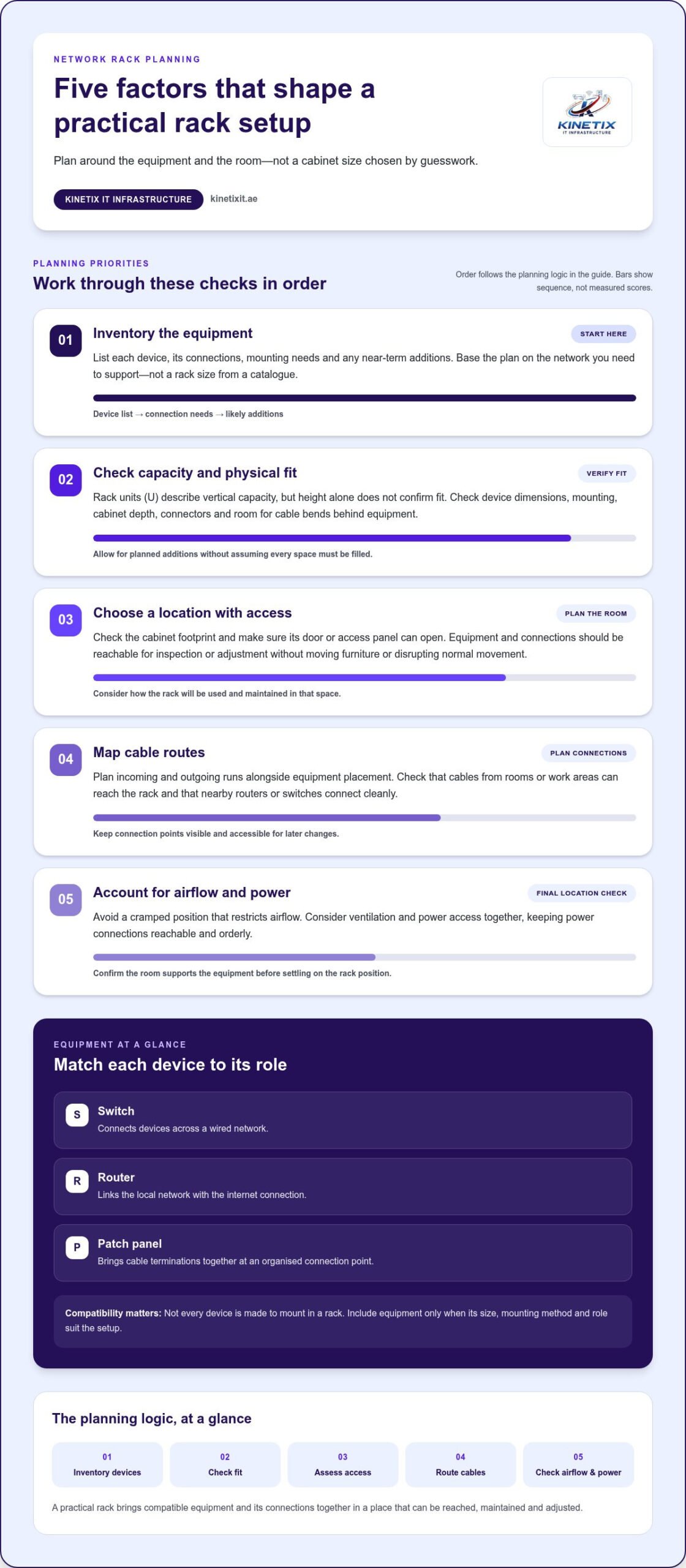
Start with the network you need to support, not a rack size you saw in a catalogue. For network rack installation dubai, an equipment inventory turns a rough space estimate into a practical plan. List each device, its connections, how it will be mounted and any additions expected in the near term. A home office adding wired workstations, for example, may need a different layout from an office with several network points.
Rack height is commonly described in rack units, or U. This measures vertical capacity, but not whether equipment will fit front to back or whether cables can be connected comfortably. Use your inventory to estimate the positions required, then check the physical dimensions and mounting needs of each device. Don’t choose a cabinet based on height alone.
How do you estimate rack size and depth?
Count the equipment that will occupy rack positions and note which items are rack-mountable. Leave room for planned additions without assuming every open space needs to be filled. Check cabinet depth against the deepest device, allowing space for connectors and cable bends behind it. Tight clearance can make connections hard to reach and later adjustments more difficult.
Check the full footprint as well. The cabinet must fit its intended location, and its door or access panel should open without obstructing normal movement. Supplier examples can help illustrate different capacities, but they aren’t universal recommendations. The right size depends on the equipment, cabling and room.
Where should a network rack be positioned?
Choose a location where equipment can be inspected and cables managed without moving furniture or disrupting the room. Consider how network cables will reach the rack from rooms or work areas, and how the rack will connect with nearby routers or switches. The structured cabling guide offers related context for planning cable routes before settling on a position.
Consider ventilation and power access at the same time. Avoid a cramped location that restricts airflow, and plan for power connections to remain reachable and orderly. The ITU-T L.1300 Energy Efficiency Framework addresses energy efficiency in data-centre environments. It provides broader context, but a home or office rack should be planned for its own room and equipment.
Before finalising the location, walk through these checks:
- Equipment: Does the planned capacity suit the inventoried devices and near-term additions?
- Access: Can someone reach the equipment and connections for inspection or adjustment?
- Cable routes: Can incoming and outgoing runs reach the rack cleanly?
- Room conditions: Is there practical ventilation and accessible power?
A clear inventory and room plan make the next decisions easier. KINETIX IT Infrastructure can support your home and office network with Network Cabling and Network Switch Installation & Configuration.
Compare Wall-Mounted and Floor-Standing Network Rack Setups
Wall-mounted and floor-standing racks address different space and access needs. Neither is automatically the right choice for a Dubai home or office. First assess the equipment, available room, cable routes and how often someone may need to reach the devices. Then compare each format against those practical requirements. The table is a starting point, not a recommendation before the site and equipment have been assessed.
| Factor | Wall-mounted format | Floor-standing format |
|---|---|---|
| Space use | Uses wall space and can keep equipment off the floor. | Occupies floor area and needs room around it for access. |
| Equipment capacity | Can suit a more compact equipment set, depending on the rack and devices. | Can accommodate a larger layout, depending on the cabinet and equipment. |
| Access | Equipment is elevated, so mounting position and reach matter. | Provides room-based access, with clearance needed around the cabinet. |
| Suitable context | May suit a home office or smaller network where floor space is limited. | May suit a home or office with more equipment and a suitable location. |
When is a wall-mounted rack a practical option?
A wall-mounted format may be practical when floor space is limited and the equipment set is compact and compatible with that arrangement. Before choosing one, consider whether the wall can support the planned installation, whether the equipment will remain comfortably accessible and how cables will reach the rack. The mounting location should make inspection and cable management manageable, rather than simply keeping devices out of sight.
When might a floor-standing cabinet suit the setup?
A floor-standing format may work better when the equipment inventory calls for a room-based layout with more equipment or easier access around the cabinet. It uses floor space, so the location needs enough clearance for routine inspection and cable work. The deciding factor isn’t whether the property is a home or office, but whether the equipment, room and access needs suit this format.
For either option, consider the full layout rather than capacity alone. A rack that fits the devices but blocks a walkway, hides connections or makes cable routes awkward won’t be convenient to maintain. In a villa, wall space may be valuable in a compact home office; in an office, a floor-standing cabinet may be practical if there’s a suitable room and the equipment inventory supports it. The reverse may also be true.
Use the equipment and space assessment to narrow the choice. Include planned additions, cable entry and the clearance needed to reach devices. This keeps the decision grounded in the actual setup, rather than appearance or assumptions about the size of the business.
What Happens During a Network Rack Installation?
A well-organised installation follows a clear sequence, but the work plan depends on the room, existing cabling, equipment and access. A home with established network connections may need a different approach from an office where cable routes and equipment placement are being planned together. For network rack installation dubai, the aim is to fit the setup to the property and leave the network easier to access and maintain.
From site assessment to equipment layout
Preparation starts with reviewing the available space, network connections, equipment and intended layout. The installer can then plan where cables enter and how devices will be positioned before mounting begins. Planning first helps avoid awkward cable paths and blocked access. KINETIX’s Network Cabling Dubai guide covers related cabling considerations.
From there, the installation generally moves through these stages:
- Assess the site: Review the planned rack location, room access, existing connections and equipment to be organised.
- Set the layout: Decide how the rack will sit in the space and where each compatible device belongs, keeping connections accessible.
- Route the cables: Plan and arrange cable runs between the rack and network points. Clear routes keep cabling orderly and make individual connections easier to identify.
- Mount the equipment: Place compatible equipment in its planned position and connect it as required. Keep devices and connection points accessible.
- Identify connections: Label or otherwise clearly identify cables so they’re easier to trace during routine maintenance or adjustments.
- Verify and hand over: Check that the installed network connections and equipment operate as intended, then explain the arrangement during handover.
Cable management, checks, and handover
Orderly cable routing helps preserve access and prevents the cabinet from becoming a dense bundle of wires. Clear identification is useful too: knowing which cable serves which point can simplify later troubleshooting. The exact work varies with the existing cabling and equipment being integrated.
Before handover, check the installed setup as a working network, not just as a finished-looking rack. Verification can help surface issues while the arrangement is still being completed. Handover should leave the household or office with a clear understanding of the equipment layout and how the connections are organised.
For a coordinated approach to cabling and switch configuration for your home or office network, plan your network setup with KINETIX IT Infrastructure.
Connect Rack Planning with KINETIX Home and Office Networking
A network rack is one part of a connected home or office. Its layout should reflect how cabling, switches and other network equipment work together across the property. KINETIX IT Infrastructure supports home and office environments with clean installations, reliable support and seamless technology integration. Connecting rack decisions to the wider network helps make sure the cabinet serves the setup, rather than becoming a standalone piece of equipment.
How network cabling and switch setup relate to the rack
Network Cabling determines how connections reach the rack and continue to rooms or work areas. Network Switch Installation & Configuration supports the connection of wired devices within that environment. Planning cable routes and switch placement together can create a clearer equipment arrangement and more practical access to connections. The right layout depends on the home or office network, its existing connections and the equipment in use.
For example, a home office with wired connections in more than one room needs a layout that accounts for where those cables arrive and how the switch fits into the network. In an office, the relationship between cable entry points and switch location can influence where equipment is easiest to reach. KINETIX’s home and office networking work brings cabling and switch configuration into the wider network plan for a clean, integrated setup.
These performance figures reflect KINETIX’s stated focus:
- Expert Installation: 95%.
- Reliable Support: 96%.
- Seamless Integration: 94%.
- Customer Satisfaction: 97%.
Plan the next step for your Dubai home or office
Before discussing your network needs, note what the setup must support, where the current connections are and what you’d like to improve. You might be planning a home office, organising connections across a villa or making an office network easier to manage. This context is a useful starting point for relating equipment placement to the wider network.
If you’re planning network rack installation dubai, KINETIX can support the wider setup with Network Cabling and Network Switch Installation & Configuration for home and office environments. The aim is a clean installation, reliable support and technology that integrates smoothly with the network in place. Describe your requirements and discuss the next step through Discuss your home or office network.
Make Your Network Ready for What Comes Next
A network rack should support the way your home or office uses technology now, while accommodating needs that may change. Before taking the next step, consider what you want your network to make easier, whether that’s working from a home office, connecting devices across your property or keeping business connections accessible. That goal can shape a practical plan based on more than the equipment alone.
With network rack installation dubai, thoughtful planning can turn a collection of devices and cables into part of a more manageable network. KINETIX IT INFRASTRUCTURE can help connect your rack considerations with your broader home or office networking needs.
Discuss your home or office network with KINETIX and take a clear next step toward a setup designed around your space and the way you work. Get in touch to discuss your home or office networking needs.