
A dedicated recorder isn’t automatically the better choice for a villa. The right answer to synology surveillance station vs dedicated nvr for villa cctv depends on your cameras, recording needs and network, not just the type of device.
The comparison can feel unclear because the two options work differently. Synology Surveillance Station runs on a compatible NAS, while a dedicated NVR is built to record and manage camera footage. Both can suit a villa, but camera compatibility, storage capacity, daily management and network reliability can make one a better fit for your setup.
This guide compares the two approaches and explains what to consider when planning cameras, storage and connectivity across your property. You’ll get a clearer view of the trade-offs and how to match the recording system to your household’s needs. For a coordinated installation in Dubai, KINETIX IT Infrastructure provides Security Camera & CCTV Installation, bringing cameras and the villa network into one plan with clean installation and long-term performance in mind.
Key Takeaways
- Compare Synology Surveillance Station and a dedicated NVR by setup, management and how each fits into a villa CCTV system.
- Use synology surveillance station vs dedicated nvr for villa cctv as a practical comparison, weighing camera compatibility, storage planning and your household’s recording needs.
- Choose a recorder based on the villa’s camera plan and operating requirements, rather than assuming one approach suits every property.
- Map camera locations, recording needs, compatibility and network connections before testing the complete setup.
- Security Camera & CCTV Installation can coordinate cameras with the home network through a clean installation and seamless integration.
Synology Surveillance Station vs Dedicated NVR: What Changes in a Villa CCTV Setup?
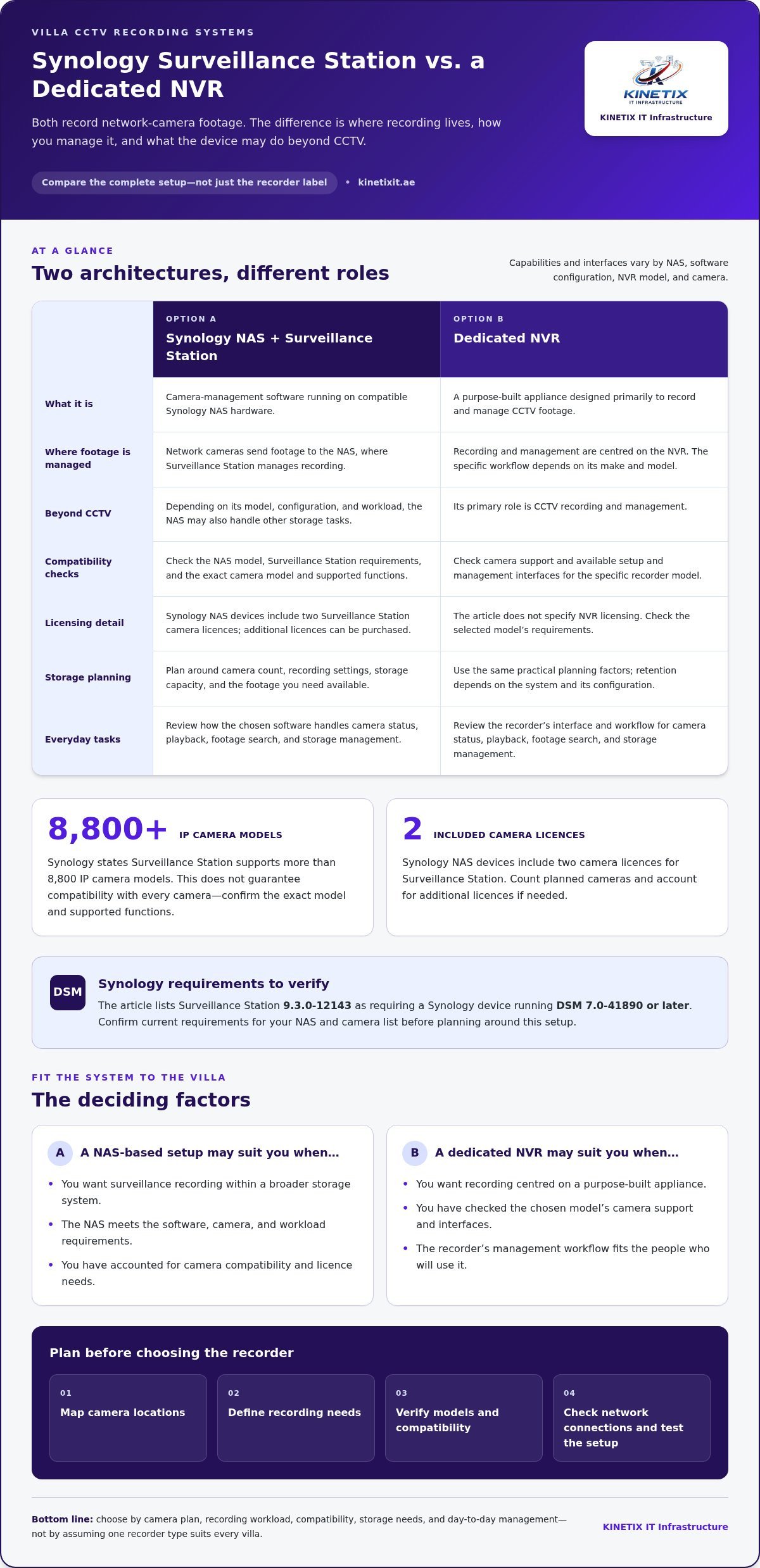
Both options record footage from network cameras, but they place that function in different systems. Synology Surveillance Station is camera-management software that runs on compatible Synology NAS hardware; a dedicated NVR is a purpose-built appliance for recording and managing CCTV footage. The difference affects how recording fits into your villa’s network, how you manage the system and what else the recording device may do.
That’s the central point in synology surveillance station vs dedicated nvr for villa cctv: compare the complete setup, not just the recorder’s label. Consider the cameras, recording workload and the role you want the device to play.
How does Synology Surveillance Station fit into a villa system?
Surveillance Station is installed on a Synology NAS, which connects to the home network and provides storage and computing resources. Network cameras send footage to the NAS, where the software manages recording. Depending on its model, configuration and workload, the NAS may also handle other storage tasks. That flexibility doesn’t mean every Synology NAS is suitable for surveillance.
What does a dedicated NVR do?
A dedicated NVR is designed primarily to record and manage video from CCTV cameras. Camera support, management functions and available connections vary by manufacturer and model, so “NVR” doesn’t describe one standard set of capabilities. For a foundational explanation of the recorder category, see Network Video Recorder (NVR).
Before planning around Synology, verify the current requirements for both the NAS model and the camera list. As of October 2026, Synology Surveillance Station 9.3.0-12143 requires a Synology device running DSM 7.0-41890 or later. Synology states that Surveillance Station supports more than 8,800 IP camera models, but that figure doesn’t establish compatibility with every camera. Confirm the exact camera model and its supported functions in Synology’s current compatibility information.
Licensing is another planning detail. Synology NAS devices include two camera licences for Surveillance Station; additional licences can be purchased. Count the cameras in your villa plan and account for licensing before settling on this architecture. These reference points don’t replace checking your specific hardware and system needs.
A dedicated NVR also needs model-level checking. Camera compatibility and the interfaces available for setup and management depend on the particular recorder. Don’t assume cameras from different manufacturers will work with every NVR, or that two recorders offer the same management experience. Use the specifications and compatibility information for the selected model to guide the design.
In practical terms, a NAS-based setup may suit a household that wants surveillance recording within a broader storage system, provided the NAS meets the software, camera and workload requirements. An NVR keeps the recording role centred on a purpose-built appliance. Neither approach is automatically the better fit. For a Dubai villa, start with the camera plan and decide how the recording system should connect to the property network. KINETIX IT INFRASTRUCTURE provides Security Camera & CCTV Installation, coordinating camera placement and connectivity as part of a clean, integrated setup.
How Synology Surveillance Station and Dedicated NVRs Differ Day to Day
The practical differences show up after installation: where you manage the system, how you review footage and how recording fits into the villa’s wider network. When comparing synology surveillance station vs dedicated nvr for villa cctv, focus on routine tasks rather than assuming one platform is simpler or more capable in every configuration.
With Synology, camera management runs through Surveillance Station on the NAS, alongside its other network storage functions. A dedicated NVR centres management on a separate recorder, but its interface and workflow depend on the make and model. In either case, routine tasks may include checking camera status, searching footage, reviewing recordings and managing available storage. The exact steps differ.
Which system is simpler to manage over time?
Familiarity matters. A household already using Synology storage may find it natural to manage recording on the same platform, while someone accustomed to a dedicated recorder may prefer a system focused on CCTV. Neither is automatically easier. Consider who will handle routine checks and playback, and how straightforward those tasks feel in the chosen system’s interface.
Before installation, list the tasks household members will need to do: view live camera feeds, locate a past event, confirm recording is active and manage the system. Review how those tasks work in the selected software or recorder. This turns a broad comparison into a practical one, especially if more than one household member will use the system.
How should storage and camera compatibility affect the comparison?
Storage planning starts with the footage you want to keep available. The result depends on factors such as camera count, recording settings and storage capacity, so a fixed retention promise doesn’t fit every villa. Define what footage you need to review, then size and configure storage around that requirement.
Compatibility also matters if you plan to change or add equipment later. Check the chosen camera models against current Synology compatibility information or the selected NVR’s documentation. Review support for the cameras you may add and the system’s expansion options before settling on a design.
| Category | Potential advantage | Trade-off | Detail to verify |
|---|---|---|---|
| Setup | A NAS approach can place camera management within an existing storage environment. | It adds surveillance configuration to a multi-purpose device. | NAS model, software requirements and camera support. |
| Daily management | A dedicated NVR keeps recording tasks centred on a purpose-built appliance. | Its interface and workflow vary by model. | How users access playback, status and recording controls. |
| Storage | Either approach can be planned around the footage the household needs. | Available capacity and retention depend on the system setup. | Camera count, recording settings and usable storage. |
| Expansion | Both may support a changing camera plan, depending on configuration. | Compatibility isn’t universal across cameras or systems. | Supported devices and model-specific expansion options. |
Compare each system against the same camera plan and daily tasks. KINETIX IT INFRASTRUCTURE’s Security Camera & CCTV Installation brings camera connectivity and the villa network into one considered plan, with clean installation and seamless integration in view.
Which CCTV Recorder Fits Your Villa? A Practical Comparison
There isn’t one recorder that suits every villa. The better fit depends on how you want to manage CCTV, whether you already use a compatible storage system and how the cameras will connect across the property. For synology surveillance station vs dedicated nvr for villa cctv, start with those preferences, then confirm that the specific cameras and recording device work together.
When might a Synology NAS-based setup make sense?
A Synology NAS-based setup may appeal if your household already uses Synology and prefers to manage camera recording within a familiar storage environment. It can bring surveillance management and other NAS tasks together, but only if the specific NAS model, software requirements and camera support suit the planned setup. Don’t assume general flexibility means every feature or workload is supported.
When might a dedicated NVR be the more straightforward fit?
A dedicated NVR may suit owners who want a purpose-built appliance with CCTV recording at its centre. That focus makes the system’s role clear, but it doesn’t mean every model is simpler or better suited to a villa. The interface, camera support and management experience depend on the chosen recorder and its compatibility with the cameras.
Think about how the system will be used after installation. If a household member already knows the Synology environment, that familiarity may favour a compatible NAS. If you prefer to keep CCTV recording on its own appliance, an NVR may be a better match. Either way, consider the full setup, including where footage is stored and how the recorder connects to cameras around the property.
A practical decision rule is:
Choose Synology Surveillance Station when the specific NAS, software and cameras meet your requirements and you prefer its broader storage role; choose a dedicated NVR when a compatible purpose-built recorder better matches your CCTV management preferences.
Before deciding, compare both options against the same villa camera plan. This keeps the choice grounded in the way you intend to use the system, rather than assumptions about a product category.
- Lean toward Synology if you already use its NAS environment and want camera management there, subject to model and camera verification.
- Lean toward an NVR if you prefer a dedicated recorder and its documented compatibility and management features fit your system.
- Revisit the design if neither option supports the planned cameras or aligns with how your household expects to manage recordings.
Network integration matters whichever route you choose. Plan camera connections and recorder placement around the villa’s layout and network design, rather than treating them as separate decisions. KINETIX IT INFRASTRUCTURE provides Security Camera & CCTV Installation, coordinating CCTV with the home network for a clean, considered installation.
Plan a Reliable Villa CCTV Recording Setup in Dubai
A well-planned recording system starts with the property, not the recorder. A Dubai villa may have separate entrances, garden areas, parking and multiple floors, so plan camera positions and cable routes together. Choose the recorder after checking camera compatibility and defining recording needs, including the footage you want available for review.
What should you map before selecting the recorder?
Start with a simple floor plan and mark the areas each camera needs to cover. Note the priority view at each position, such as an entrance or driveway, and identify any areas that should remain outside the camera view. Then record which cameras need to record and how the household expects to review footage.
- Map camera locations. Mark each proposed position and the view it should capture. Consider how rooms, floors, entrances and outdoor areas connect across the villa.
- Define recording needs. Decide which views matter most and how the household expects to review footage. These choices inform storage planning without assuming a fixed retention period.
- Record camera models. List the exact camera models under consideration. Use current compatibility documentation for the selected Synology system or NVR to assess support before finalising the recorder.
- Choose equipment locations. Identify where the recorder, network equipment and relevant cabling will sit. Plan practical cable routes from camera positions to network connection points.
- Test the complete system. After installation, check each camera’s connection and confirm that footage is being recorded and can be reviewed through the chosen management system.
How do cabling and network integration fit into the plan?
Camera connectivity is part of the recording design. Plan how each camera will reach the network and how that network will connect to the recorder. A route that works for one floor may not suit another, so account for the villa’s layout and equipment locations before installation. Planned Ethernet connections can provide a direct network path where the design calls for cabling. KINETIX’s structured cabling guidance offers further context for organising network routes within a home.
Keep the CCTV plan focused: connect the cameras and recording equipment reliably without treating the project as a redesign of every part of the household network. A coordinated layout can make installation cleaner and simplify system testing. For additional residential CCTV planning context, see professional CCTV camera installation in Dubai.
For a villa setup that brings camera placement, recording equipment and network connections into one plan, explore Security Camera & CCTV Installation from KINETIX IT INFRASTRUCTURE.
Bring Villa CCTV Recording and Network Integration Together with KINETIX
A recording system works as part of a wider setup: cameras need suitable positions, the recorder needs a place within the property, and the network needs to connect the components. KINETIX IT INFRASTRUCTURE provides Security Camera & CCTV Installation for homes and offices in Dubai, coordinating CCTV with the property network. This joined-up approach keeps installation planning clear and supports a clean, integrated home technology experience.
What does coordinated CCTV installation contribute?
Planning camera positions, recording equipment and network connections together helps align the system with the villa’s layout and the household’s recording needs. For example, a camera plan covering an entrance, parking area and upper floor should be considered alongside where footage will be managed and how each camera connects. A coordinated design brings these decisions together instead of treating cameras and connectivity as separate tasks.
Clean installation matters, too. Organised network cabling and considered equipment placement contribute to a neater setup and help the system integrate into the property. The details depend on the villa and selected equipment, so plan the arrangement around the home rather than assuming one layout works everywhere.
How can professional support help keep the setup manageable?
Choosing between Synology Surveillance Station and a dedicated recorder is only one part of the decision. The synology surveillance station vs dedicated nvr for villa cctv comparison also needs to account for the camera plan and the network connections that support recording. KINETIX brings these considerations together through Security Camera & CCTV Installation, with reliable support and seamless integration as part of its service approach.
KINETIX reports 96% Reliable Support and 94% Seamless Integration. These figures describe the stated service performance points, not a promise that a particular installation will deliver a specific result. For existing system issues, readers can also explore CCTV troubleshooting guidance.
For villa owners, professional planning brings camera placement and network integration together, with clean installation and long-term use in mind. KINETIX provides services for home and office environments in Dubai, connecting CCTV installation with relevant network integration. The approach supports an organised setup while allowing for each property’s requirements.
If you’re planning a villa system, discuss your villa CCTV installation with KINETIX and take the next step toward a coordinated camera and network setup.
Turn Your CCTV Plan into a Confident Next Step
The best recorder choice is the one that fits the villa’s cameras and the way your household will use the system. Before installation, bring the decisions into one clear plan: document camera locations, recording priorities, chosen equipment and network connections. This gives the project a practical reference point and can make future changes easier to plan.
That’s the real value behind synology surveillance station vs dedicated nvr for villa cctv. The decision isn’t about choosing a winner for every home. It’s about creating a recording setup that suits your property and feels manageable in everyday use.
KINETIX IT INFRASTRUCTURE provides Security Camera & CCTV Installation for homes and offices in Dubai. Its stated performance points include 95% Expert Installation and 97% Customer Satisfaction, alongside a focus on clean installation and network integration.
Ready to shape a CCTV plan around your villa? Discuss your villa CCTV installation with KINETIX and take a considered next step toward a well-integrated setup.