
A single router is rarely enough for whole-home Wi-Fi in a large Dubai villa. A villa Wi-Fi setup in Dubai can start with 4 to 6 access points for a home with 5-8 bedrooms across 2-3 floors, with multiple wired access points connected to the main router or switch offering a stable approach. The right layout depends on the villa’s floors, walls and room arrangement.
Concrete walls and reinforced floors can weaken Wi-Fi signals between rooms and levels. Adding equipment without planning its placement may still leave dead zones. Reliable coverage matters throughout the home, from bedrooms and work areas to entertainment spaces.
This guide explains how villa layouts affect Wi-Fi, when wired access points or mesh make sense, and how to place mesh units for better coverage. It also covers the factors that shape installation costs in Dubai, helping you identify a setup that suits your home.
Key Takeaways
- Learn why concrete walls and floor slabs can disrupt signals, and how villa layout informs access point planning.
- See when Ethernet-connected access points make sense, and when mesh is a practical alternative if cabling isn’t possible.
- Use placement principles to position mesh units for smoother coverage across floors and rooms.
- Understand which factors shape Wi-Fi installation costs in Dubai, including the coverage area, equipment and cabling needs.
- Find out when professional Wi-Fi troubleshooting, dead zone fixing or optimization can help improve a villa network.
Concrete walls and floors affecting Wi-Fi coverage
Concrete walls and reinforced floors can interrupt a villa’s Wi-Fi signal between rooms and levels. Check fiber availability by entering your villa address in e& or du’s availability tool.
Dead-Zone Reduction Across Villa Floors
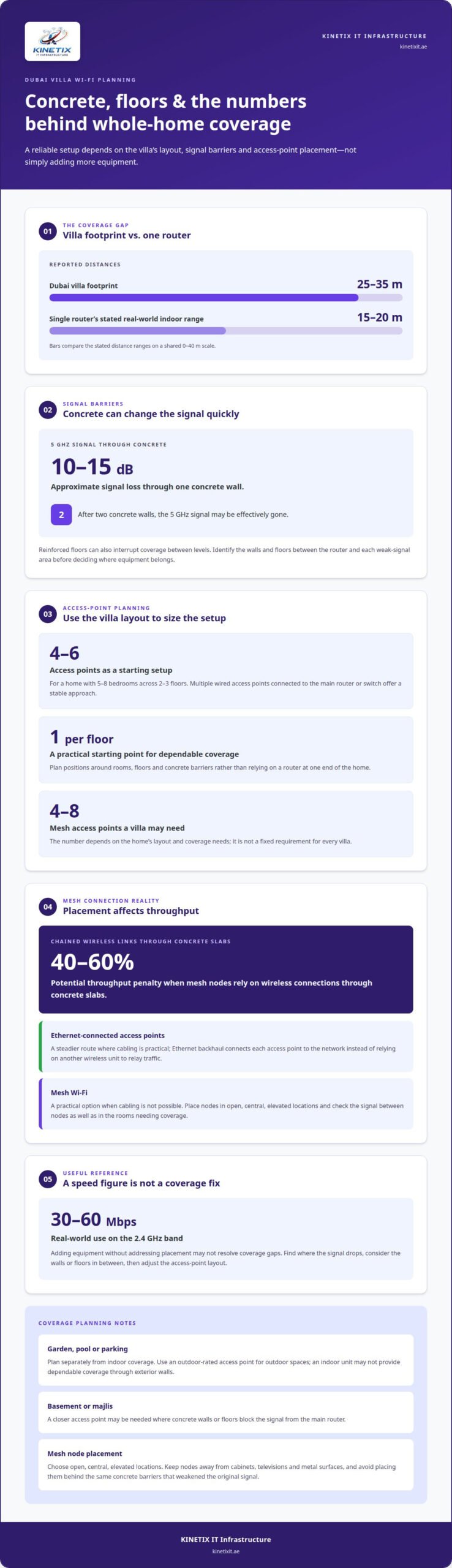
A 5 GHz signal can lose roughly 10-15 dB through one concrete wall. After two concrete walls, it may be effectively gone. A single Wi-Fi 6 router in one corner may not provide reliable coverage across a 2-3-floor villa. For dependable whole-home Wi-Fi, a practical starting point is one access point per floor.
How can you get reliable coverage across a large or multi-storey villa? Start by mapping the rooms, floors and spaces where connected devices need signal. Then plan access point positions around the concrete barriers between those areas, rather than relying on a router at one end of the home. A typical villa may need 4-8 mesh access points, depending on its layout and coverage needs.
Common problems include weak signal behind concrete walls, dead zones upstairs, and inconsistent connections in distant rooms. The 2.4 GHz band can deliver 30-60 Mbps in real-world use, but adding equipment without addressing placement may not resolve coverage gaps. Identify where the signal drops, consider which walls or floors sit between that area and the router, then adjust the access point layout.
Garden, Pool, Basement and Majlis Coverage
Outdoor spaces need separate planning because indoor coverage may not pass reliably through exterior walls. For a garden or parking area, use an outdoor-rated access point and position it to serve that space. A basement or majlis may need a closer access point if concrete walls or floors block the signal from the main router. Include security devices and other connected equipment in the coverage plan.
Map each area according to how it is used: streaming in the majlis, connected devices in the basement, or Wi-Fi in the garden. Poolside coverage is also an outdoor requirement, so plan for an outdoor-rated access point rather than assuming an indoor unit will reach it. Walls, doors and the router’s position all affect the usable signal in each space.
Mesh Systems for Full-Villa Coverage
A mesh Wi-Fi system uses multiple nodes to extend coverage beyond a single router. In a Dubai villa, placement matters: position units in open, central, elevated locations, away from cabinets, televisions and metal surfaces. Avoid putting nodes behind the same concrete barriers that weakened the original signal.
Mesh can help connect floors, bedrooms and shared areas under one network. Check the signal between nodes as well as in the rooms needing coverage. If nodes rely on wireless connections through concrete slabs, chained links can incur a 40-60% throughput penalty. Ethernet-connected access points offer a steadier route where cabling is practical, while correctly positioned mesh suits villas where cabling isn’t possible.
Wired access points versus mesh Wi-Fi and range extenders
A Dubai villa footprint can span 25-35 metres, beyond a single router’s stated real-world indoor range of 15-20 metres. Choosing between Ethernet-connected access points, mesh Wi-Fi and a range extender depends on the layout, cabling options and areas needing coverage. For large homes, multiple wired access points connected to the router or network switch provide a stable approach.
Ethernet backhaul gives each access point a wired connection to the network, rather than relying on another wireless unit to relay traffic. That can improve consistency for video calls, streaming and connected devices. A structured setup may use 2-6 access points, depending on the home’s shape and coverage needs. A medium villa with 3-5 bedrooms and 2 floors can start with 2 to 3 access points.
Mesh Wi-Fi is useful when running Ethernet isn’t practical. Its nodes work together to extend the network, but their placement affects how well they communicate. In a villa, avoid placing nodes where several walls or a floor obstruct the path between units. A range extender can extend a router’s signal, but it doesn’t create a wired connection. If placed where the original signal is already weak, it may carry that weakness into the next area.
For a garden, pool or parking area, use an outdoor-rated access point. An indoor unit may not provide dependable coverage through exterior walls. An outdoor access point can connect to the main router or switch by Ethernet, avoiding a chain of wireless relays. Plan its placement around the garden’s boundaries, poolside seating and any outdoor connected devices.
Plan indoor and outdoor installation around the network layout. First mark the router and identify the rooms and outdoor areas that need signal. Then choose wired or wireless connections for each access point. For example, a wired unit can serve a distant majlis, while mesh can extend coverage to an upstairs room where cabling isn’t practical. This approach helps reduce weak spots without adding equipment blindly.
Network security matters when adding access points, a firewall or remote access. Keep router and access-point settings organised, use distinct strong passwords for network administration and Wi-Fi, and limit remote administration to people who need it. Document which device manages each function during installation. This makes later monitoring and troubleshooting clearer, especially when a villa has separate indoor and outdoor access points.
Whole-home Wi-Fi solutions for Dubai villas
A 5G home internet plan can suit a Dubai villa when indoor reception and plan capacity match household use. It provides the internet connection, while access point placement determines Wi-Fi coverage between rooms.
Guest, Family and Security Networks
Separate guest, family and security networks to organise how devices connect. Visitors, for example, can use a guest network while cameras and intercoms remain on a dedicated security network. This keeps everyday browsing and streaming distinct from security devices.
Plan the network around the devices and people using it. A villa can have 30-80+ connected devices, including smart home and entertainment equipment. Group devices by purpose, then configure access so guests use their own network and household devices remain on the family connection. Include CCTV cameras and video intercoms in the security plan, rather than treating them like phones or televisions.
New Villa Setup and Network Upgrades
For a new villa, map internet access, rooms, work areas and connected equipment before installation. A large home with 5-8 bedrooms across 2-3 floors can start with 4 to 6 access points. The final layout should account for walls, floor plan, device locations and how residents use each space.
For an upgrade, identify what the existing network needs to support. A home office may need a wired connection, while a living room needs steady streaming and smart TVs. Linksys, TP-Link and ASUS routers can be set up and configured for residential networks. Wi-Fi 6 and Wi-Fi 6E access points are also available for installation in Dubai. Wi-Fi 6 can improve efficiency with many connected devices, but does not by itself resolve dead zones.
Plan beyond indoor Wi-Fi. The network may need access points for indoor areas, gardens and other outdoor spaces, as well as connections for CCTV and intercom systems. Villa layouts vary across Dubai, including in communities such as Dubai Marina, Palm Jumeirah and Downtown Dubai. Base the access-point plan on the property’s actual rooms and how they are used.
A 5G connection is suitable when the indoor signal at the router location supports the household’s internet use. Check the intended router position and consider the devices sharing the connection. Wi-Fi coverage inside the villa remains a separate design question, particularly where rooms sit across multiple floors.
Keep the network rack and cabling organised. Label Ethernet runs by room or device, group cables neatly, and place the router, switch and related equipment together. Clear cable management makes it easier to identify connections serving a home office, access point or security device, and simplifies future upgrades.
Where should mesh units go in a 2-3 floor townhouse?
Place mesh units to maintain a clear connection between floors and rooms needing Wi-Fi. A Springs or JVC townhouse measuring 200-250 m² across two floors is estimated to need three mesh units. Treat that as a layout example, not a fixed placement map: concrete walls, staircases and room positions affect where each unit works best.
Start with the main router near the internet entry point, then position a mesh unit on each floor where it can still communicate with the next. In a two-floor townhouse, a practical arrangement is one unit near the router, another upstairs, and a third near a distant living area or bedroom wing. Don’t place a node at the far edge of a dead zone. It needs a usable signal from another unit to relay the connection.
Choose open, elevated locations rather than enclosed cabinets, spaces behind televisions or spots beside metal surfaces. A hallway or landing may connect nearby rooms more effectively than a corner bedroom. Keep units away from dense furniture and avoid placing one directly behind a concrete wall. In a three-floor home, the middle floor can serve as a connection point between the top and ground levels.
Mesh can reduce dead zones by distributing the network across several locations, but adding units alone won’t fix poor placement. Walk through rooms used for calls, streaming and smart home controls. Note where the connection weakens, then move a nearby node toward that area while maintaining its link to the router. Check upstairs bedrooms and stair landings separately, as a floor slab can weaken the signal between levels.
Wi-Fi 6 can support efficient handling of connected devices in a busy home, but the standard doesn’t remove physical barriers. Select a mesh system that fits the router and the household’s device needs. Linksys, TP-Link and ASUS are router brands that can be configured for villa networks; the right system depends on how its units integrate with the existing network and each other. Avoid choosing equipment by generation name alone.
For whole-home mesh, map the router, nodes and priority rooms before settling on their positions. Test the connection in a bedroom, home office and main living space, then move nodes if an area remains weak. In a townhouse with a garden, plan outdoor Wi-Fi separately and use an outdoor-rated access point where needed. This avoids expecting an indoor mesh unit to cover distant outdoor areas through exterior walls.
How much does Wi‑Fi installation cost in Dubai?
The price depends on the villa’s coverage needs, equipment, cabling and configuration. Installation time also varies: most villa and small-office Wi-Fi installations take 1 day, while larger multi-floor buildings take 2-3 days.
Villa Installation Pricing
The price depends on the requirements and is provided after a quote request. Key factors include the villa’s size and layout, the number of access points, cabling requirements, router or switch configuration, outdoor coverage and device integration.
A single-router setup involves different work from a whole-villa wireless network. A property needing access points across several floors, for example, requires a different equipment and installation plan from a home that needs router configuration alone. The number and placement of access points, Ethernet runs and connected devices all affect the scope.
Installation involves more than mounting equipment. The network needs to be configured and tested across the areas it is designed to serve. This can include checking access-point connections, confirming router settings and testing coverage in rooms used for streaming, work or smart home devices. An upgrade may also involve integrating existing equipment rather than replacing the full network.
Rental Villa Cabling and Equipment
In a rental villa, treat drilling, concealed cabling and fixed equipment as approval matters. Get permission from the landlord or property manager before altering walls, ceilings or built-in network points. Mesh units and other removable equipment may avoid some physical changes, while Ethernet cabling can require a more involved installation.
Before work begins, identify the areas that need coverage and whether the plan involves permanent changes. Ask about proposed cable routes through walls or ceilings, for example, and agree where fixed access points or network sockets will be placed. This clarifies the installation scope and helps prevent disputes about alterations when the tenancy ends.
Router installation should include secure configuration, not just connecting the device. Set a strong administrator password, use a separate Wi-Fi password and review remote-access settings. For a family villa, confirm which devices need to connect, such as a television, home-office computer or security camera. These steps help tailor the setup to actual household use.
Testing should cover every planned area, including upstairs rooms and outdoor spaces if they are part of the plan. A technician can check the wireless signal, access-point links and connected devices after configuration. If an upgrade adds cameras, intercoms or other equipment, include their network integration in the project scope. This makes the expected work clear before installation begins.
KINETIX IT Infrastructure: Wi-Fi Installation & Setup
KINETIX IT Infrastructure provides Wi-Fi Installation & Setup for villa networks, along with troubleshooting, dead-zone fixing and Wi-Fi optimization. These services can help when weak coverage persists across rooms, existing equipment needs configuration, or a new setup must support everyday household use. The right solution depends on the villa layout, access-point placement and network requirements. Troubleshooting addresses connection problems, optimization refines an existing setup, and dead-zone fixing focuses on areas where the signal drops. Contact KINETIX IT Infrastructure to discuss your villa’s network needs and plan the next step.
Make your villa network ready for what’s next
A well-planned villa Wi-Fi setup in Dubai should support how your household uses its home now and adapt to changing needs. A new work area, additional smart devices or a change in how rooms are used can affect where reliable connectivity matters most. Consider these priorities before changing equipment to make a more informed plan.
For a new installation or a persistent connection issue, KINETIX IT Infrastructure provides Wi-Fi Installation & Setup and Wi-Fi Troubleshooting & Repair. Its Wi-Fi Dead Zone Fixing service focuses on areas where coverage drops, helping you prioritise the rooms and routines that matter to your household.
Share the coverage problem or installation goal you want to address. Contact KINETIX IT Infrastructure to discuss the next step for your home network, and move forward with greater clarity.
Frequently Asked Questions
Do you provide service, maintenance and technical support?
KINETIX IT Infrastructure provides Wi-Fi Installation & Setup, Wi-Fi Troubleshooting & Repair and Network Support. Its residential communication and security services include support and maintenance for CCTV and intercom systems. A villa with unstable Wi-Fi and a video intercom issue, for example, may need both network troubleshooting and intercom support. The work depends on the system affected and whether the need is installation, repair or ongoing support.
How do I set up a new home internet connection in a Dubai villa?
For a villa Wi-Fi setup in Dubai, first arrange an internet connection for the property, then configure the router and connect the home network. Place the router near the internet entry point, with practical access to power and network connections. Connect key devices, such as a television or home-office computer, and test them in the rooms where they will be used. If coverage is weak, include access points or mesh in the setup plan.
Should I use a mesh Wi-Fi system, access points, or a router for a Dubai villa?
Use a router to connect the home network to the internet, then choose mesh or additional access points based on the villa’s wiring. Ethernet connections to distant rooms can support wired access points, while mesh can extend coverage where cabling isn’t practical. A router alone may suit a compact layout but may not reach every room across multiple floors. A well-planned villa Wi-Fi setup in Dubai matches the equipment to the building and its connectivity needs.
What are the best Wi-Fi router and mesh system options available in the UAE?
There isn’t one best system for every villa. Linksys, TP-Link and ASUS routers are options for home network setup and configuration. Choose equipment based on the villa’s layout, existing network and connected devices. A household adding smart TVs and home-office equipment, for example, should consider how its router and mesh units work together. A considered villa Wi-Fi setup in Dubai depends on suitable network design, not brand alone.
How much does professional Wi-Fi installation and troubleshooting cost in Dubai?
The price depends on the requirements and is provided after a quote request. Cost factors include the villa layout, equipment, number of access points, cabling, router configuration and troubleshooting needed. A router setup differs in scope from an installation involving multiple floors or existing network faults. Sharing the property layout and describing affected rooms or devices helps define the work needed for installation or repair.