
If you’re searching for “router configuration service Dubai,” you may be dealing with unreliable Wi-Fi, devices that keep disconnecting, or settings that are difficult to interpret. A professional setup looks beyond the router itself, aligning its configuration with the internet connection and the needs of your home network.
It’s frustrating when devices disconnect or Wi-Fi coverage feels inconsistent. Security changes can also raise concerns: you want a safer network without disrupting the people and devices already connected. A careful setup brings these details into one coordinated process.
This article explains what router configuration can cover, how it fits into a stable home network, and what to expect from a service visit in Dubai. You’ll learn how a technician can review the router, related switches or cabling, and connected devices, then address configuration issues and explain practical next steps.
Key Takeaways
- A router configuration service in Dubai can help when setup is unclear, connections fail, or devices disconnect frequently.
- Professional setup follows a methodical process: understand the issue, review network equipment, configure settings, and test connected devices.
- Learn what network names, passwords, DHCP, and DNS do to make everyday router settings easier to understand.
- A new router or correct configuration can help, but neither guarantees strong Wi-Fi in every room or removes physical barriers.
- Prepare for a service visit by noting affected devices and recurring issues, and keeping router access and relevant ISP details available privately.
When a Router Configuration Service in Dubai Can Help
A router does more than broadcast Wi-Fi. It directs data between your home devices and the internet, while its settings determine how devices access the network. A router configuration service in Dubai can align network access, security, and device connectivity with the equipment and connection in your property. For a simple overview of how routers work, think of the router as the point coordinating traffic between networks.
Professional help is useful if a connection fails during setup, you’re unsure which settings to use, or devices repeatedly disconnect. For example, a Dubai apartment may have a smart TV that connects reliably while a work laptop keeps dropping off the network. In a villa, several devices may have connection issues at different times. These symptoms can have different causes, so reviewing the router and wider network is more useful than assuming every problem comes from one setting.
What does router configuration include?
Configuration can include setting the network name, access password, and relevant router options, then checking that devices can join and use the connection. ISP-specific values depend on the internet connection and equipment, so settings shouldn’t be copied blindly from another setup. Router configuration covers the equipment and home network. Internet service activation and account support are separate from configuring the router.
It’s also useful to distinguish configuration from improving Wi-Fi reach. Adjusting settings won’t necessarily extend a weak signal through every room or past physical obstacles. If the issue is coverage, additional access points or network cabling may be more appropriate. Reviewing the network helps identify whether the problem relates to router setup, connectivity, or signal reach.
Which Dubai homes may benefit from professional setup?
Apartments, villas, and home offices can all benefit when the network needs to support several devices or the setup is unclear. Smart TVs, work devices, and security systems may rely on the same home network, alongside phones and computers. The right configuration depends on the router or gateway, connection, and devices in the property. Homes across Dubai have different layouts and provider equipment, so the setup should reflect the actual environment.
By treating the router as part of the connected home network setup, rather than an isolated device, configuration can account for relevant switches, cabling, access points, and connected equipment. That context helps identify whether the issue calls for configuration or a separate coverage solution.
How Professional Router Configuration Connects Your Network
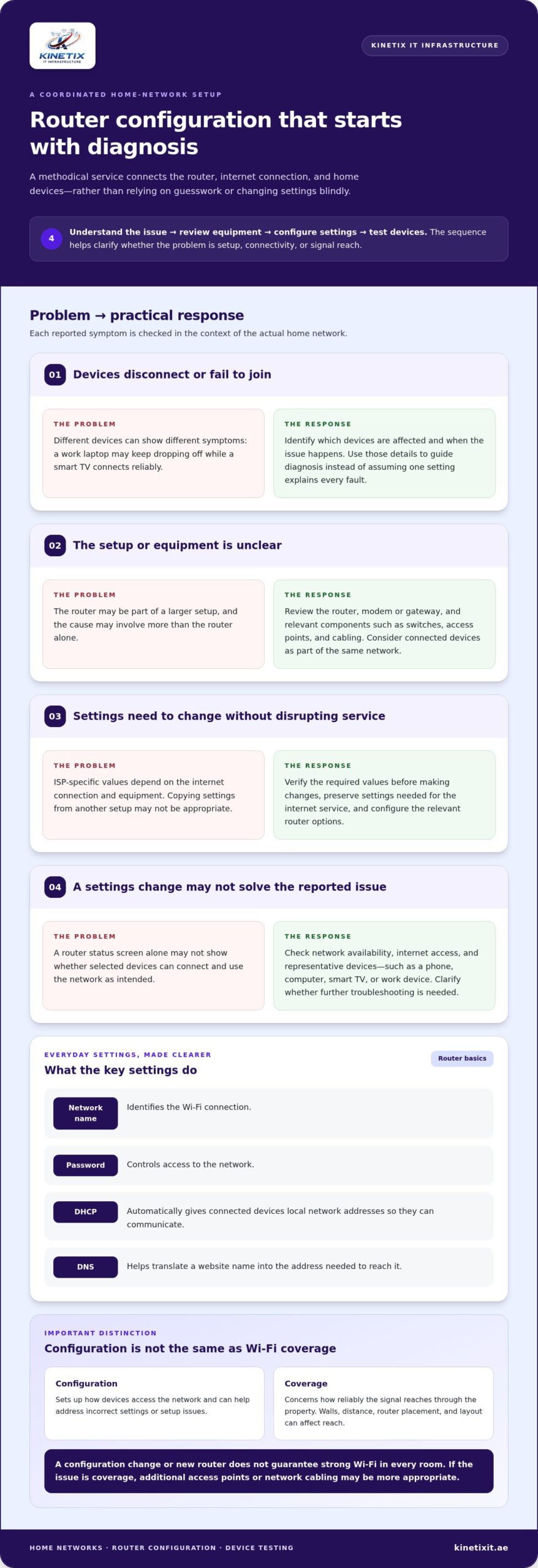
A reliable setup starts with diagnosis, not guesswork. A professional router configuration service in Dubai follows a clear sequence: understand the connection problem, review the equipment and existing settings, make relevant adjustments, then test internet access and selected devices. This helps keep the router, any modem or gateway, and the wider home network working as a coordinated system.
What happens before router settings are changed?
First, the technician establishes which devices are affected and when the problem occurs. A laptop that disconnects during video calls may point to a different issue than a smart TV that never connects. The review also identifies the router, modem or gateway, and relevant network components such as switches or access points.
ISP-specific settings matter. The required values depend on the connection and equipment, so they should be verified before changes are made. Preserving settings needed for the internet service helps avoid disrupting the connection while resolving a local setup issue. This measured approach is especially useful when the router is part of a larger home network rather than a standalone device.
How are router settings and devices tested?
Once the relevant settings are configured, testing checks whether the network is available, internet access works, and representative devices can connect and perform their intended tasks. A technician may verify that a phone or computer joins the network and that a smart TV or work device can reach online services. Testing selected devices can reveal connection problems that a router status screen alone may not show.
Some settings have simple roles. The network name identifies the Wi-Fi connection, while its password controls access. DHCP automatically gives connected devices local network addresses so they can communicate. DNS helps translate a website name into the address needed to reach it. If the home network includes connected equipment or separate network components, these settings should be considered in context. For broader security principles, the NSA best practices resource offers guidance on securing home routing devices.
Final checks help clarify whether the configuration addressed the reported issue or whether further troubleshooting is needed. For connected-home support beyond router settings, explore KINETIX IT network support.
Router Configuration Myths: What It Can and Cannot Fix
A new router can be part of the solution, but it isn’t a cure-all. If a device can’t connect because of incorrect settings, professional configuration may help. If Wi-Fi is weak in a distant room, changing settings or replacing the router may not resolve the underlying coverage issue. The right solution depends on the internet connection, equipment, and physical environment.
Does router configuration fix weak Wi-Fi everywhere?
Not necessarily. Router configuration sets up how devices access the network. Wireless coverage is about how far and reliably the signal reaches through the property. Walls, distance, router placement, and the layout of a home can all affect the experience. A connection that works near the router but drops in another part of a Dubai villa may call for a coverage assessment rather than configuration alone.
Depending on the property, an additional access point may help extend coverage. In some cases, network or Ethernet cabling installation in Dubai can provide a more suitable connection between network equipment. These are distinct from changing router settings, though they can work alongside a correctly configured router. For considerations specific to larger homes, see this guide to Dubai villa Wi-Fi installation.
Configuration also can’t guarantee faster internet speeds. Results depend on the service connection, the capabilities and condition of the equipment, and the environment in which Wi-Fi is used. If the underlying issue is with the internet service rather than the home network, router adjustments alone may not address it.
Is professional setup always better than doing it yourself?
No. A straightforward setup may be manageable if you’re comfortable following the router’s instructions and connecting your devices. Professional support is useful when the right settings are unclear, several devices are affected, or repeated troubleshooting hasn’t identified the cause.
A router configuration service in Dubai brings a systematic review to those situations. Rather than changing settings at random, the process considers the router alongside relevant network equipment and the devices that rely on it. That helps distinguish a configuration issue from a need for coverage improvement, access-point installation, or cabling.
Think of configuration as one part of a connected network, not a promise that every Wi-Fi problem will disappear. Clear diagnosis helps match the work to the problem, whether that means adjusting router settings, addressing coverage, or investigating another part of the connection.
How to Prepare for Router Configuration in Your Dubai Home
A little preparation helps make a router configuration service in Dubai more focused. Note what isn’t working, which devices are affected, and when interruptions happen. For example, connections might drop during work calls, or a particular device may fail to join the network. These details give the technician a useful starting point without requiring you to diagnose the cause.
What information helps the configuration process?
If readily accessible, note the router model and connection type, and have relevant ISP details available. You can also describe any recent changes, error messages, or devices that can’t connect. A short list of equipment that needs reliable access, such as work devices, smart TVs, or security systems, helps clarify how the network is used.
Have access to the router or gateway available for the visit. Keep account and network credentials private: don’t post or send passwords publicly. Share sensitive information only through appropriate secure steps as part of the service process.
When might the network need more than configuration?
The symptoms and equipment review help determine whether configuration alone fits the issue. If problems occur mainly in distant rooms, coverage may need attention. If devices connected through a particular cable or network point have trouble, cabling or equipment may be involved. Structured cabling can support a more integrated home network; learn more in this guide to structured cabling for connected homes.
Before the appointment, gather these practical details:
- Which devices are affected, and which connect normally.
- Where and when interruptions occur, including any recurring pattern.
- Router or gateway model and connection type, if easy to find.
- Recent network changes, displayed error messages, and relevant ISP details.
- Devices that need reliable access, such as work equipment or a smart TV.
With this information, the service can focus on the actual network rather than guesswork. KINETIX IT also supports home networks with Wi-Fi troubleshooting, coverage optimization, and network cabling.
What to Expect from KINETIX IT Infrastructure Router Configuration in Dubai
KINETIX IT Infrastructure provides router setup and configuration in Dubai, with related network troubleshooting when connectivity problems extend beyond a single setting. The service considers the router as part of the home network, including connected equipment and how you use the connection, not just the router interface.
How KINETIX IT Infrastructure approaches a home router setup
The visit begins with your connectivity needs and reported symptoms. KINETIX IT Infrastructure assesses the relevant equipment, which may include the router or gateway, a network switch, Ethernet cabling, or devices that need to connect. The configuration is tailored to the network in your home, with ISP-related settings considered for the connection and equipment in use.
After the relevant settings are addressed, the technician tests internet access and selected devices. This helps check whether the setup supports everyday use, such as connecting a work device or smart TV. If the symptoms point to a wider Wi-Fi or network issue, troubleshooting can identify the next practical step. Learn more about professional Wi-Fi technician services in Dubai.
What should customers expect after configuration?
Expect a walkthrough of the configured network and the devices tested, so you understand what was adjusted and what to keep in mind. Share any remaining concerns, such as a device that still disconnects or a room where coverage feels weak. Those details help distinguish a remaining configuration issue from a coverage or equipment concern, without assuming every problem has the same cause.
A router configuration service in Dubai should leave you with a clearer view of how your home network is set up and what steps may be relevant next. KINETIX IT Infrastructure brings router configuration together with related home-network support to help align the setup with your property’s needs.
Arrange router configuration support in Dubai with KINETIX IT Infrastructure.
Take the Next Step Toward a More Reliable Home Network
A well-configured router supports secure access and smoother connections, but it’s only one part of the network. The right approach starts by understanding the symptoms, reviewing the equipment and ISP connection, and testing the devices that matter to your household. If the underlying issue is coverage, cabling, or another network component, router settings alone may not resolve it.
With a router configuration service in Dubai, KINETIX IT brings router installation and configuration together with related troubleshooting. Its Dubai support covers home and villa networks, helping put the router in context with connected devices and relevant network equipment.
Ready to make your home network easier to use and understand? Arrange router configuration support in Dubai with KINETIX IT and take a clear next step toward dependable connectivity.
Frequently Asked Questions
What does a router configuration service in Dubai include?
A router configuration service in Dubai can include setting relevant router and network options, connecting devices, and testing the connection. The precise work depends on your router, internet connection, provider requirements, and reported issue. Configuration doesn’t change your internet plan or automatically extend Wi-Fi coverage. If you need a plan change, wider coverage, or additional network equipment, that involves work beyond configuring the router.
Can a technician configure my existing router?
Yes, an existing router can be configured when it’s suitable for the connection and the task. The technician can review the router and wider network setup, apply relevant settings, and test connected devices. Whether the router is appropriate depends on the equipment and internet connection in your home. Reviewing these together helps clarify what can be addressed through configuration and whether another network issue needs attention.
How long does router configuration take?
There isn’t one fixed duration for every setup. The time depends on the router, ISP-related settings, network complexity, and how many devices need connecting or testing. Identifying the problem first helps focus the configuration work. If troubleshooting reveals another issue, or the network needs additional changes, that may require further work. Sharing the symptoms and affected devices beforehand helps the technician understand the task.
Will router configuration fix Wi-Fi dead zones in my villa?
Not by itself in every case. Configuration can address settings-related problems, but it doesn’t automatically extend the wireless signal into every area. A villa’s layout, construction, router position, and existing network equipment can all affect coverage. If Wi-Fi works near the router but struggles in particular rooms, an access point or broader coverage solution may be relevant. The appropriate approach depends on the property and the source of the weak signal.
Is professional router configuration more secure than setting it up myself?
Professional setup can help apply security settings suited to the router and connection, but no configuration makes a network completely secure. Use strong, private passwords for network access and router administration, and don’t share them publicly. Security options and firmware guidance can differ by equipment, so follow the router manufacturer’s current recommendations. A professional review can help you understand which settings have been applied and how to manage access.
How much does router configuration service cost in Dubai?
The cost depends on the router and connection, the troubleshooting required, and whether related network work is involved. A straightforward configuration may have different requirements from a setup that includes connected devices or wider network issues. KINETIX IT tailors router setup and related network work to the needs of the property. To discuss your setup, share the equipment involved and the symptoms you’re experiencing with KINETIX IT.
Do I need to provide my ISP details for router configuration?
Some internet connections require provider-specific information or settings, and the exact requirements depend on the ISP and equipment. Have relevant connection details available for the setup. You don’t need to share passwords openly or post them in public messages. Keep sensitive credentials private and provide them only through appropriate secure steps as part of the service process.
One Response