
Imagine you’re in the middle of a high-stakes video call or a critical gaming session in your upstairs office, only for the connection to stutter and drop the moment you step toward the window. It’s a common frustration in large properties where standard routers simply can’t reach every corner. You likely agree that a single router, no matter how powerful, isn’t designed to penetrate the thick walls of a modern villa or provide consistent speeds across multiple floors. You want technology that works silently in the background without cluttering your home with unsightly cables. Professional Wi-Fi Access Point Installation offers the precision and reliability needed to transform your home network into a high-performance utility.
In this guide, you’ll discover how to eliminate dead zones and achieve seamless, high-speed connectivity across your entire property with professional access point integration. We’ll explore the transition to Wi-Fi 7, the necessity of a robust wired backbone, and how strategic placement ensures your hardware remains a discreet, invisible enabler of your digital lifestyle. By understanding the technical requirements of modern networking, you can secure the peace of mind that comes from a perfectly connected home. We’ll cover everything from PoE++ standards to site surveys that ensure your setup is both efficient and future-proof.
Key Takeaways
- Discover why dedicated access points outperform traditional extenders to ensure consistent, high-speed connectivity across every floor of a large property.
- Learn how a professional Wi-Fi Access Point Installation utilizes Cat6a or Cat7 cabling to create a dependable, high-bandwidth backbone for your home network.
- Understand the importance of RF heatmapping in navigating the unique architectural challenges of UAE villas, such as signal-absorbing concrete walls.
- Explore the advantages of Power over Ethernet (PoE) for achieving a clean, sophisticated aesthetic with hardware that integrates seamlessly into your interior design.
- Gain insights into securing your infrastructure through VLAN segmentation and regular firmware audits to protect your private data and smart home devices.
Beyond Extenders: Why Dedicated Access Points are Essential for Large Properties
A Wi-Fi Access Point (AP) acts as a dedicated portal to your wired network. Unlike a basic router that attempts to handle every task, an AP focuses solely on delivering a high-speed wireless signal from a hardwired Ethernet connection. This distinction is vital for a high-quality Wi-Fi Access Point Installation. By bridging the gap between physical cables and the air, these devices ensure that your wireless performance matches the full speed of your fiber optic connection.
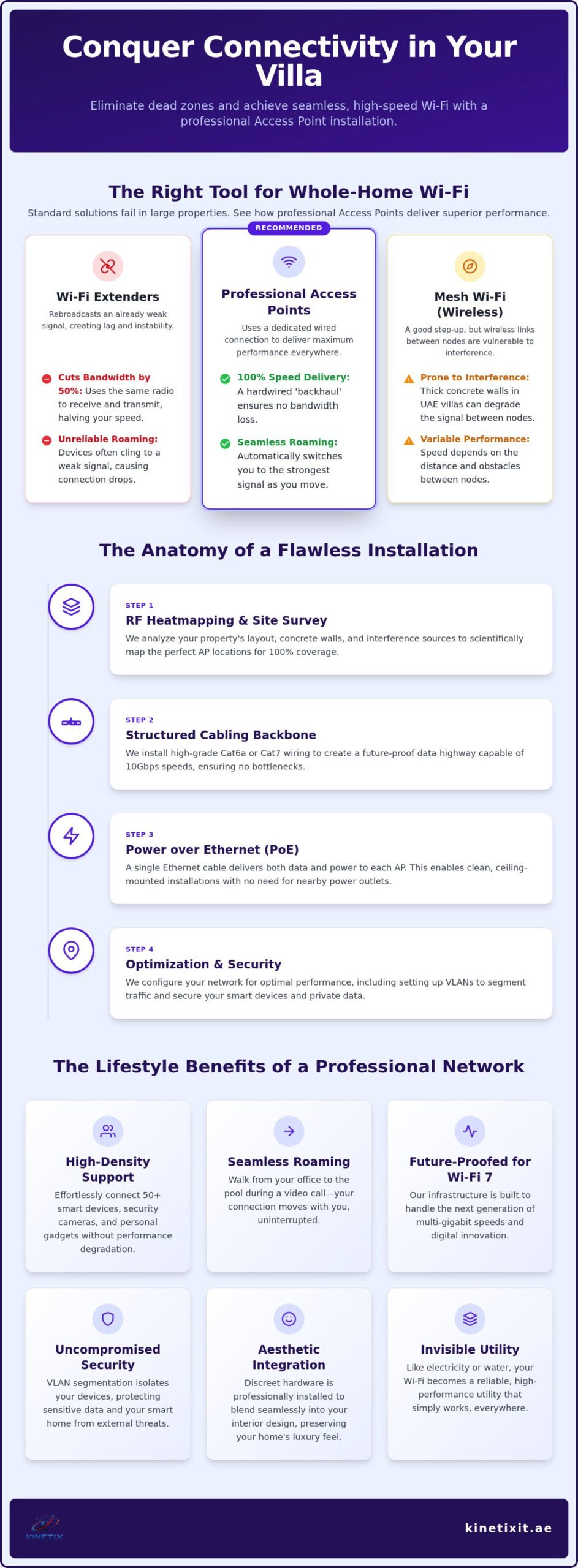
Many homeowners fall into the “half-speed” trap by using plug-in extenders or repeaters. These devices catch an existing, often weak, wireless signal and rebroadcast it. This process effectively cuts your available bandwidth in half because the device must use the same radio to talk to the router and your phone. In a large villa with thick walls, this results in lag and frustration. Dedicated APs avoid this entirely. They use a dedicated wired line to the main router, ensuring 100% of your internet speed reaches your device without compromise.
Modern smart homes often support 50 or more connected devices, ranging from security cameras to smart appliances. A single router struggles with this density. Professional APs manage high device capacity while maintaining seamless roaming. This technology allows your phone to hand off from one AP to another as you walk between floors. Your video call stays active, your stream remains crisp, and your connection never drops.
Access Points vs. Mesh Wi-Fi: Which is Right for You?
Choosing between these systems often comes down to the “backhaul,” which is how the nodes communicate with the main router. Mesh systems typically use a wireless backhaul, which is prone to interference in dense environments or homes with concrete walls. A professional Wi-Fi Access Point Installation relies on a wired backhaul, providing a stable, interference-free foundation. For many large properties, a Whole-Home Wi-Fi solution works best as a hybrid, using wired APs in main areas and mesh nodes for lighter coverage needs.
The Lifestyle Benefits of a Professional Wireless Network
A robust network is an invisible utility that enhances every aspect of luxury living. It means enjoying uninterrupted 4K streaming by the pool or hosting high-stakes video conferences from a home office without the fear of pixelation. By installing professional-grade hardware now, you also future-proof your property for upcoming Wi-Fi 7 standards. This preparation ensures your home remains a sanctuary of high-speed connectivity, ready for the next generation of digital innovation and connected devices.
The Anatomy of a Professional Access Point Installation
A high-performance wireless network is only as strong as the physical infrastructure supporting it. While the access points themselves are the visible face of the system, the invisible backbone of cables and switches determines the ultimate speed and stability of your connection. A professional Wi-Fi Access Point Installation prioritizes this foundation to ensure your luxury property enjoys a frictionless digital experience.
One of the most significant advancements in modern networking is Power over Ethernet (PoE). This technology allows a single Ethernet cable to carry both high-speed data and electrical power to the device. By utilizing PoE, installers eliminate the need for unsightly power outlets near the ceiling. This results in a much cleaner aesthetic, allowing hardware to be mounted in optimal locations for signal distribution without compromising your interior design. Ceiling mounting is generally preferred over wall mounting, as it provides a clear line of sight and reduces signal absorption from furniture and partitions.
Structured cabling serves as the non-negotiable foundation of this setup. To support the massive bandwidth requirements of Wi-Fi 7 and future standards, professionals utilize Cat6a or Cat7 cabling. These cables are designed to handle 10Gbps speeds and provide superior shielding against electromagnetic interference. Without this high-grade wiring, even the most expensive access point will be bottlenecked by the very cables feeding it data.
Essential Hardware Components
Beyond the cables, the network switch acts as the central brain of your infrastructure. A managed network switch allows for precise control over data flow and power distribution to multiple APs. When selecting hardware, tri-band access points are often the superior choice for modern villas. These devices utilize the 2.4GHz, 5GHz, and 6GHz bands to reduce congestion, ensuring your smartphones and laptops don’t compete for bandwidth with smart home sensors. Because the quality of these physical connections is so critical, professional Network Cabling Dubai services are the essential first step in any successful deployment.
PoE Standards Explained
Understanding PoE standards is crucial for device stability. As of 2026, many high-performance Wi-Fi 7 access points require the PoE++ (IEEE 802.3bt) standard, which can deliver between 60W and 90W of power. This is a significant jump from the older PoE (15.4W) and PoE+ (30W) standards. If your switch doesn’t provide enough wattage, your APs may reboot unexpectedly or operate at reduced radio power. Calculating a total power budget for your network rack ensures every device receives the energy it needs for peak performance. If you’re unsure about your current hardware capacity, a quick network assessment can identify potential bottlenecks before they cause downtime.
Strategic Placement: Overcoming Concrete Walls and Multi-Story Layouts
In the UAE, the very materials that provide structural durability also create significant obstacles for wireless signals. Modern villas are built with high-density concrete and reinforced steel, creating what professionals call the “concrete shield” effect. While older Wi-Fi standards struggled with these barriers, the higher frequencies used by Wi-Fi 6E and Wi-Fi 7, specifically the 6GHz band, are even more susceptible to attenuation. A successful Wi-Fi Access Point Installation must account for this physical reality by placing hardware where it can bypass these architectural roadblocks rather than trying to punch through them. For a deeper understanding of how to engineer coverage across every floor and outdoor space, our Whole-Home Wi-Fi Guide for Dubai Villas outlines the strategies professionals use to achieve seamless connectivity across even the most challenging estate layouts.
To move beyond guesswork, professional installers use RF heatmapping software. This technology allows us to upload your property’s floor plans and simulate how signals will interact with specific wall materials and furniture. By visualizing signal decay before a single hole is drilled, we can identify the precise locations where an access point will provide the most value. This data-driven approach ensures that your high-speed connection isn’t swallowed by a load-bearing wall or reflected away by floor-to-ceiling glass partitions.
Vertical coverage is another critical consideration for luxury villas. Wireless signals primarily propagate horizontally in a “donut” shape, meaning an access point on the ground floor rarely provides adequate speeds to the bedrooms above. For a truly seamless experience, one AP per floor is the absolute minimum requirement. This strategy extends to your outdoor spaces as well. We integrate weatherized access points to cover the garden, pool area, and perimeter gates, ensuring your security cameras and mobile devices stay connected as you move across the property.
Dealing with Wi-Fi Dead Zones
Dead zones aren’t just caused by distance; they often result from “shadowing” and interference. Large kitchen appliances, massive decorative mirrors, and even aquarium tanks can reflect or absorb signals, creating pockets of zero connectivity. Our approach to Wi-Fi Dead Zone Fixing involves identifying these hidden obstacles during the initial site survey. By repositioning access points away from these interference sources, we restore fluidity to your network and eliminate the frustration of dropped calls in specific rooms.
The Science of Signal Overlap
Achieving the “sweet spot” in a multi-AP environment requires careful channel planning to avoid self-interference. In densely populated Dubai neighborhoods, your neighbors’ networks can bleed into your space, causing congestion and lag. We configure each access point to operate on non-overlapping channels, maximizing the available airtime for your devices. A deliberate 20% signal overlap ensures that your mobile devices can perform seamless handoffs between access points without any perceptible drop in connection speed. This precision allows you to walk from the basement cinema to the rooftop terrace while maintaining a perfect, uninterrupted stream.
How-To: The Wi-Fi Access Point Installation Process
A professional Wi-Fi Access Point Installation follows a disciplined, five-phase workflow designed to ensure long-term reliability. The process begins with a final pre-installation survey to identify the most efficient cable paths through existing conduits. This proactive step prevents structural damage and ensures the infrastructure remains completely hidden. Once the paths are confirmed, we move to physical mounting. Each access point is secured to its bracket and connected to the PoE backbone, drawing power and data through a single high-grade cable.
The transition from hardware to software is where the network truly comes to life. We perform software provisioning by pushing the latest firmware updates to every unit, ensuring they’re protected against the security vulnerabilities identified in early 2026. Following this, we configure the SSID and security protocols. The final stage is post-install validation. We don’t just check for a signal; we conduct throughput stress tests and roaming audits to verify that your devices transition between floors without a single dropped packet.
Cabling and Mounting Best Practices
Maintaining the aesthetic integrity of a luxury villa requires meticulous cable management. We utilize ceiling voids and internal trunking to keep every centimeter of wiring out of sight. Proper termination of these cables is critical. A poorly crimped connector can lead to intermittent packet loss, which mimics the symptoms of a weak signal. While wireless is our focus, high-bandwidth devices like media servers benefit from a dedicated Internet Wall Socket Installation to provide a stable, wired alternative alongside the AP network.
Software Configuration and Optimization
True fluidity in a home network comes from a unified SSID. This allows your smartphones and tablets to treat the entire property as one continuous environment. To optimize this, we adjust the transmit power levels of each AP. If the power is too high, you’ll experience “sticky client” issues, where a device clings to a distant, weak signal instead of switching to a closer unit. We also implement WPA3 encryption, which is the current mandatory standard for new Wi-Fi 6 and 7 certifications as of June 2026. This ensures your private data remains protected by the most advanced residential security protocols available. If you’re ready to upgrade your home connectivity with this level of technical precision, request a professional Wi-Fi setup from our expert team.
Optimizing and Securing Your New Wireless Infrastructure
Once the physical Wi-Fi Access Point Installation is complete, the focus shifts to the digital architecture that keeps your network fast and secure. A high-performance system requires more than just a strong signal; it needs intelligent management to handle the diverse traffic of a modern luxury home. By implementing advanced optimization techniques, you ensure that your network remains a dependable asset rather than a source of maintenance frustration. This stage is where a collection of hardware becomes a unified, high-performance utility.
VLAN segmentation is a cornerstone of professional network security. This process involves creating separate virtual networks for different types of traffic. For instance, your smart home sensors and guest devices should live on a separate “lane” from your private laptops and NAS drives. This prevents a compromised IoT device from accessing your sensitive personal data. Beyond security, VLANs improve performance by reducing broadcast traffic. When fifty smart bulbs aren’t competing for attention on the same subnet as your work laptop, your latency drops significantly.
Regular firmware audits complement this setup. As new threats emerge, manufacturers release patches that your access points must receive to stay resilient. We utilize cloud controllers to manage these updates and monitor performance in real-time. This allows us to spot potential interference or hardware issues before they cause a second of downtime. Instead of waiting for a device to fail, we can see when an AP is reaching capacity or when a neighbor’s new router starts interfering with your signal.
Integrating your wireless infrastructure with your security systems adds a layer of sophisticated control to your property. By connecting your CCTV camera network to a high-bandwidth AP backbone, you enjoy lag-free remote viewing from anywhere in the world. This integration ensures that high-definition video feeds don’t congest the bandwidth needed for your other daily activities.
Smart Home Integration
A truly connected home relies on low-latency connections to ensure smart lighting, thermostats, and voice assistants respond instantly. We configure Quality of Service (QoS) rules to prioritize bandwidth for critical devices, such as your home office PC or gaming consoles, ensuring they receive the highest priority during peak usage. This Complete Villa Networking approach unifies your intercoms, entertainment systems, and automation into a single, fluid ecosystem that works in perfect harmony.
When to Call a Professional WiFi Technician
While basic setups might seem approachable, the architectural complexity of Dubai villas presents unique challenges. Drilling through reinforced concrete requires specialized tools and the expertise to avoid damaging internal conduits or structural steel. Identifying the source of intermittent RF interference requires professional-grade diagnostic tools that go far beyond what a standard smartphone app can provide. If you’re ready to experience the peace of mind that comes with a perfectly engineered network, Contact KINETIX IT Infrastructure for a professional Wi-Fi survey today and let our experts handle the heavy lifting.
Elevate Your Digital Lifestyle with Precision Networking
Achieving a flawless home network requires moving beyond basic retail solutions and embracing a professional approach. We’ve explored how a successful Wi-Fi Access Point Installation depends on a robust foundation of structured cabling and strategic RF planning to overcome the unique architectural challenges of Dubai villas. By prioritizing high-grade hardware and intelligent software configuration, you transform your property into a seamless digital sanctuary where connectivity functions as an invisible, reliable utility.
Kinetix IT Infrastructure is here to handle the technical complexities for you. As Dubai Villa Networking Specialists, we provide Professional Structured Cabling Experts who ensure your home is fully optimized for Wi-Fi 7 and beyond. With our methodical approach, Seamless Whole-Home Coverage is Guaranteed. You can finally enjoy high-speed internet in every bedroom, the garden, and even the pool house without interruption. It’s time to eliminate the frustration of dead zones and lag forever. Upgrade Your Villa Wi-Fi with Kinetix IT Infrastructure and discover the comfort of a perfectly connected home. Your future-proof network is just a consultation away.
Frequently Asked Questions
How many access points do I need for a standard 5-bedroom Dubai villa?
A standard 5-bedroom Dubai villa typically requires between three and five units to ensure full coverage. While a single device might cover a small apartment, the reinforced concrete and multi-story layouts of local properties demand more hardware. We usually recommend at least one unit per floor. Large master suites or outdoor seating areas often require dedicated points to maintain high-speed connectivity throughout the entire property.
Can I install a Wi-Fi access point without running new cables?
You can use mesh systems with wireless backhaul, but a professional Wi-Fi Access Point Installation requires structured cabling for maximum performance. Wireless extenders often suffer from signal degradation and interference. By running Cat6a or Cat7 cables to each unit, you ensure every access point receives the full bandwidth of your fiber connection. This wired foundation is the only way to achieve the zero-lag environment required for modern luxury living.
What is the best height and location to mount a Wi-Fi access point?
The optimal location for an access point is a high, central position on the ceiling. Mounting hardware at this height provides a clear line of sight for the signal to propagate downward and outward, minimizing obstructions from furniture. It’s best to avoid placing units inside cabinets or behind metal partitions. A central hallway or the middle of a large living area usually offers the most efficient signal distribution for surrounding rooms.
Will a professional access point work with my existing Etisalat or Du router?
Yes, professional access points are fully compatible with standard Etisalat and Du routers. Your existing router will still manage your internet connection, while the new access points handle the wireless distribution throughout your villa. This setup allows you to keep your current service provider while significantly upgrading your internal network’s range and speed. We often disable the built-in Wi-Fi on the ISP router to prevent signal interference and congestion.
How long does a professional Wi-Fi access point installation usually take?
A standard installation for a large property usually takes between one and two business days. The timeline depends on the complexity of the cable routing through your villa’s existing conduits and the number of units being installed. Phase one involves the physical cabling and mounting, while phase two focuses on software configuration and signal optimization. We work efficiently to ensure your new network is fully operational with minimal disruption to your daily routine.
What is the difference between an access point and a Wi-Fi router?
A router is the “brain” of your network that connects to the internet and assigns IP addresses to your devices. An access point is a dedicated portal that provides a wireless signal from a wired Ethernet connection. While a router often has built-in Wi-Fi, professional systems use dedicated access points to extend that signal much further and with greater stability than a single router can achieve on its own.
Can Wi-Fi access points be installed outdoors in the UAE heat?
Yes, we install specialized, weatherized access points designed to withstand the extreme temperatures and humidity of the UAE. These units feature industrial-grade enclosures with high IP ratings to protect against dust and moisture. Installing outdoor hardware ensures your network extends seamlessly to the pool, garden, and perimeter gates. This allows you to enjoy uninterrupted streaming or control your smart home systems while relaxing in your outdoor living spaces.
Do I need to update my access points every year?
You don’t need to replace your hardware every year, but regular firmware updates are essential for security and performance. Most professional-grade access points remain technologically relevant for three to five years. As new standards like Wi-Fi 7 become mainstream, you may choose to upgrade specific units to take advantage of faster speeds. Our team provides ongoing network support to ensure your system remains secure and optimized against the latest digital threats.
One Response