
Imagine walking from your terrace into your home office for a vital video call, only to watch the connection vanish as you cross the threshold. In many of Dubai’s most prestigious villas, the premium materials that provide privacy and insulation also create significant barriers to your digital life. You’ve likely invested in a top-tier internet package, yet you still face dropped calls or poor security camera connectivity by the pool. Professional Wi-Fi Dead Zone Fixing is the solution that moves beyond basic troubleshooting to address the structural challenges of your property.
It’s frustrating when your technology fails to keep pace with your daily routine, especially when you rely on a stable connection for both work and leisure. You’ll discover the specific reasons why these signal gaps happen in modern villas and the expert methods used to eliminate them for a frictionless digital experience. This guide outlines how structured cabling and professional access point placement ensure consistent, high-speed internet in every corner of your home. You can finally enjoy the peace of mind that comes with a reliable, professional setup that works perfectly without the need for constant rebooting.
Key Takeaways
- Understand how the architectural materials of your villa, including reinforced concrete and masonry, act as significant barriers to your wireless signal.
- Discover how professional Wi-Fi Dead Zone Fixing uses heat map surveys to visualize coverage gaps and ensure precision in hardware placement.
- Learn the technical differences between consumer mesh systems and professional access points to choose the most reliable solution for your property.
- Explore the benefits of a unified network that seamlessly integrates your CCTV and intercom systems for improved home security and ease of use.
- Gain insights into extending high-speed connectivity to outdoor areas to support your smart irrigation, pool heaters, and garden security devices.
What Are Wi-Fi Dead Zones and Why Do They Occur?
A Wi-Fi dead zone is essentially a pocket of your home where the wireless signal is either non-existent or too weak to maintain a stable link. In a sophisticated smart home, these gaps create digital friction that disrupts the ease of your lifestyle. You might experience slow loading screens, frequent disconnections during video calls, or ghost signals where your device shows connectivity bars but fails to transmit any data. Identifying these zones is the first step toward professional Wi-Fi Dead Zone Fixing. It’s important to recognize that if your internet works perfectly in the living room but fails in the guest wing, the issue is localized distribution rather than a service outage from your provider.
The Anatomy of a Dead Zone
Several factors contribute to these connectivity gaps. Physics plays a major role. The inverse square law of signal strength means that the power of your Wi-Fi diminishes rapidly as you move away from the primary router. Household electronics like microwaves, baby monitors, or cordless phones also emit radio frequency interference that competes with your network. Often, the bottleneck isn’t the fiber line coming into the villa; it’s outdated hardware struggling to manage high-speed demands. Integrating a professional Wireless Access Point (WAP) allows for a more robust distribution of data, ensuring that every device has a clear path to the internet without the signal being absorbed by distance or interference.
Why Your High-Speed Package Isn’t Reaching Every Room
Many residents subscribe to the fastest fiber packages available, yet they still struggle with buffering in the bedroom or home office. This disconnect occurs because the high-speed data arriving at your villa’s entry point is entirely different from how that signal is distributed throughout the property. Older Wi-Fi 4 or 5 routers create a significant bottleneck when trying to handle the demands of a Wi-Fi 6 world. While your provider delivers the speed to your front door, your internal hardware is responsible for moving that data through thick walls and across multiple floors. Ultimately, a Wi-Fi dead zone is a distribution failure rather than a speed failure. Professional Wi-Fi Dead Zone Fixing ensures your internal network infrastructure is as capable as the high-speed line feeding it, providing a seamless experience in every room.
The Science of Signal Loss: Why Villa Architecture Blocks Wi-Fi
Dubai’s luxury villas are architectural marvels, built with reinforced concrete and thick masonry to provide superior insulation. While these materials keep your home cool, they act as massive physical barriers to wireless data. Signal attenuation occurs when these dense materials absorb or reflect your Wi-Fi signal, preventing it from reaching its destination. This is why a router in the foyer rarely provides a stable connection in a first-floor master suite. The ‘Mirror Effect’ further complicates matters. Large mirrors, floor-to-ceiling glass, and even swimming pools reflect signals in unexpected directions, creating pockets of interference. For homeowners, this means that professional Wi-Fi Dead Zone Fixing is often a necessity rather than an optional upgrade.
Multi-story layouts pose a unique challenge. Wi-Fi signals generally radiate outward and downward, meaning they struggle to penetrate the thick concrete floor slabs used in modern construction. When you’re trying to stream high-definition content or conduct a business meeting from an upper floor, the signal has to fight through layers of rebar and stone. This physical struggle results in the dropped calls and buffering screens that disrupt your daily routine.
Material Impact on Signal Strength
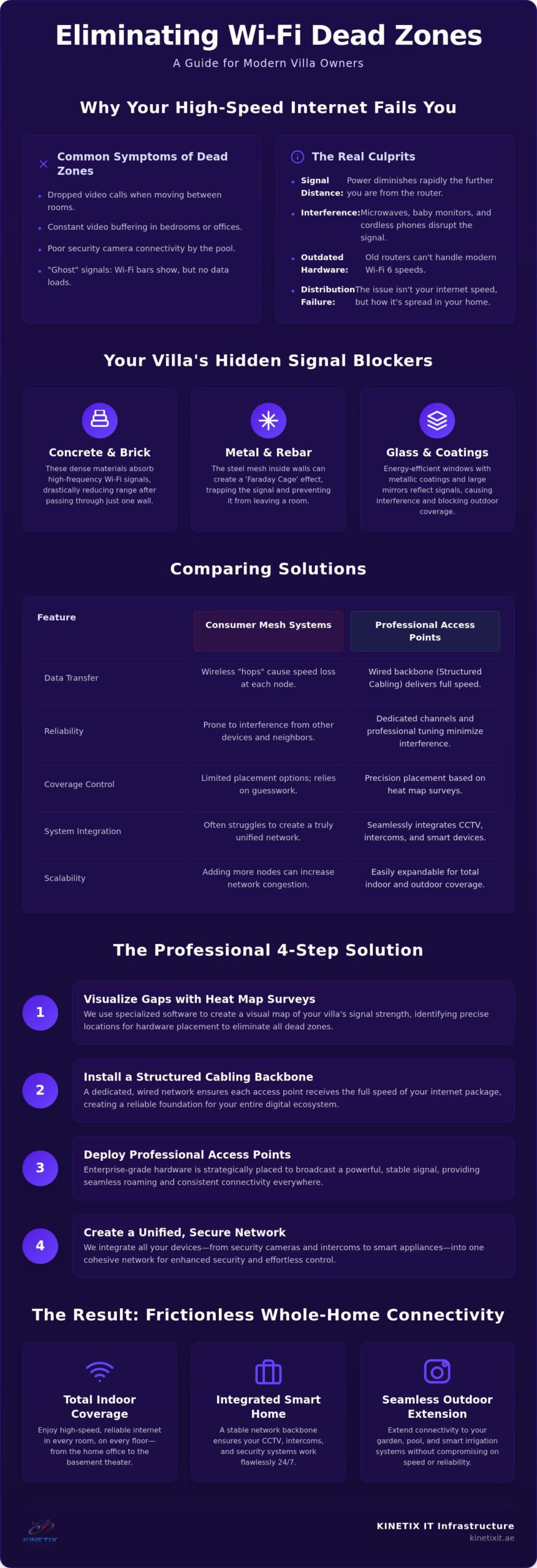
- Concrete and Brick: These materials are the primary enemies of 5GHz and 6GHz frequencies. They absorb high-frequency waves, causing the signal to drop significantly after passing through just one solid wall.
- Metal and Rebar: The steel mesh inside your walls can create a ‘Faraday Cage’ effect. This traps the signal within a single room, preventing it from reaching the rest of the house.
- Glass and Modern Coatings: Energy-efficient windows often have metallic coatings that reflect outdoor Wi-Fi signals. This makes it difficult to extend your network to the garden or pool area without specialized hardware.
The Limitations of 5GHz and 6GHz Frequencies
Modern Wi-Fi standards offer incredible speeds, but they come with a physical trade-off. Higher frequencies have shorter wavelengths, which means they lack the power to push through solid objects. This is why your connection might be blazing fast next to the router but non-existent in the next room. Effective Wi-Fi Dead Zone Fixing requires a strategy that accounts for these physical limitations. It’s about placing hardware where it can bypass these architectural barriers rather than trying to blast through them. By prioritizing strategic distribution over raw power, you can achieve a seamless digital experience that matches the premium standards of your home.
Comparing Solutions: Mesh Systems vs. Professional Access Points
Many homeowners start their journey toward Wi-Fi Dead Zone Fixing by purchasing a consumer mesh system from a retail store. These systems are marketed as a plug and play fix, but they often struggle in the heavy-duty architecture of a Dubai villa. The core of the issue lies in the backhaul, which is the way individual nodes communicate with the main router. In a standard mesh setup, nodes talk to each other wirelessly. If the signal is already weakened by a concrete wall before it reaches the second node, the speed provided by that node will be significantly compromised. You end up with a network that is only as strong as its weakest wireless link. For a comprehensive understanding of how to engineer true Whole-Home Wi-Fi coverage across a Dubai villa, it’s essential to look beyond consumer-grade solutions.
Professional Access Points (APs) offer a more reliable architecture. Instead of relying on a fragile wireless link, each AP is connected via structured cabling to the central network switch. This creates a hardwired backbone that ensures maximum speed at every broadcast point. It transforms your Wi-Fi from a series of repeating signals into a unified, high-performance infrastructure that doesn’t falter when you move between rooms.
When Mesh is Enough (and When it Fails)
Consumer mesh systems perform well in open-plan apartments or smaller homes with thin partitions where signals can travel freely. However, in a multi-story villa, these systems often fall into a daisy chain failure. This happens when the third or fourth node is too far from the primary router, causing the signal to degrade with every wireless hop. While you might see full bars on your device, the actual data throughput is often a fraction of your internet package. Professional installers avoid this by using wired backhaul. This method guarantees consistent 1Gbps+ speeds regardless of how many walls stand in the way.
The Power of Professional Access Point Installation
Choosing professional hardware provides benefits that go beyond raw speed. Ceiling-mounted access points provide a superior top-down coverage pattern, mimicking the way light spreads through a room. This placement minimizes physical obstructions and ensures a cleaner aesthetic. These units use Power over Ethernet (PoE), which means a single cable provides both data and power, eliminating the need for unsightly power outlets near every unit. Perhaps most importantly, professional systems support seamless roaming. You can move from the majlis to the garden or pool area without your device dropping the connection, providing the fluidity required for a modern digital lifestyle. For a deeper understanding of how this technology works in practice, our complete guide to professional Wi-Fi Access Point Installation covers everything from hardware selection to network configuration.
Effective Strategies for Fixing Wi-Fi Dead Zones
Achieving a reliable network requires a methodical approach rather than guesswork. Professional Wi-Fi Dead Zone Fixing begins with data. By visualizing the invisible signals in your home, you can address the root cause of connectivity gaps rather than just treating the symptoms. A professional heat map is the essential diagnostic tool for large properties, providing the blueprint for a perfect installation. This process ensures that every access point is placed with mathematical precision to maximize coverage while minimizing interference from the villa’s structural elements.
The transition from a patchy network to seamless connectivity follows a specific sequence of professional strategies:
- Heat Map Survey: Technicians use specialized software to visualize signal strength and identify dead zones across every floor and outdoor area.
- Strategic Placement: Hardware locations are identified based on your villa’s floor plans to ensure signals bypass thick masonry and metal reinforcements.
- Structured Cabling: High-speed data lines are run to each broadcast point, providing a hardwired path that is immune to the signal loss caused by physical obstacles.
- Smart Roaming Configuration: The network is tuned so your devices always hand off to the strongest point, allowing you to move through the house without losing your connection.
DIY Tactics to Try First
You can often see minor improvements by making simple adjustments to your existing setup. Try centralizing your router away from corners, cabinets, or large appliances that might block the signal. Updating your router’s firmware can also resolve known software-based connectivity bugs that mimic physical dead zones. Additionally, changing your frequency channels in the router settings may help you avoid interference from neighboring networks. While these steps don’t solve structural distribution issues, they can optimize the performance of your current hardware before you commit to more significant changes.
Professional Troubleshooting and Repair
When simple adjustments aren’t enough, professional-grade tools become necessary. Experts use spectral analyzers to find hidden sources of radio frequency noise that disrupt your Wi-Fi. Installing high-speed Ethernet sockets in home offices and bedrooms provides a dedicated, lag-free connection for high-bandwidth devices. This structured approach ensures your network is robust enough to handle the demands of a modern smart home. If you’re ready to eliminate digital friction, explore our Wi-Fi troubleshooting and repair services to restore perfect connectivity to your home.
Whole-Home Connectivity: The Kinetix Approach
Kinetix takes a holistic view of your property’s digital infrastructure. We don’t just place hardware; we design a unified ecosystem where every device performs at its peak. Our approach to Wi-Fi Dead Zone Fixing focuses on creating a high-performance backbone that remains entirely invisible to the eye but essential to the home’s daily operation. By prioritizing structured cabling and professional integration, we ensure your connectivity is as dependable as your villa’s foundation. This level of precision allows for a frictionless experience that matches the premium standards of your lifestyle.
Beyond Browsing: Supporting the Smart Home
In a modern luxury villa, a weak signal does more than slow down your web browsing. Signal gaps are the primary cause of CCTV connection failures, which can leave your property vulnerable at critical moments. By integrating your wireless network with CCTV and Intercom systems, we create a secure, unified environment. This ensures that smart intercoms and video doorbells never miss a visitor and that your home cinema provides a stutter-free experience for high-end gaming and 4K streaming.
The reach of your network should extend beyond your interior walls. We specialize in providing robust outdoor coverage for smart irrigation systems, pool heaters, and garden security sensors. This level of detail transforms a standard house into a fully responsive smart home. Whether you’re hosting a gathering by the pool or managing your home’s energy efficiency from abroad, the connection remains fluid and fast. We eliminate the frustration of outdoor dead zones, ensuring your garden is just as connected as your living room.
The Peace of Mind of a Managed Network
Reliability comes from professional oversight and long-term planning. Instead of dealing with multiple vendors for different systems, you benefit from a single point of contact for all your IT infrastructure. This shifts the focus from reactive fixing to proactive performance optimization. We also look ahead to future-proofing your property for upcoming standards like Wi-Fi 7, ensuring your investment remains relevant as technology evolves. Our goal is to handle the technical complexities behind the scenes so you can enjoy a truly integrated home.
A professional setup offers more than just speed; it offers the security of knowing your systems are maintained by experts. We monitor the health of your network to prevent issues before they disrupt your routine. Ready for a seamless digital experience? Contact Kinetix for a Wi-Fi Survey today and discover how professional Wi-Fi Dead Zone Fixing can transform your home’s connectivity.
Elevating Your Digital Lifestyle Through Professional Connectivity
Your home should be a place of ease, where technology functions perfectly behind the scenes. We’ve explored how the unique architecture of Dubai villas often disrupts wireless signals and why professional access points offer a superior alternative to basic consumer systems. By prioritizing structured cabling and strategic hardware placement, you can eliminate digital friction and ensure your network supports everything from high-stakes business calls to your integrated home security.
Professional Wi-Fi Dead Zone Fixing transforms your property into a truly integrated smart home. As specialists in Dubai villa architecture, Kinetix IT provides expert structured cabling solutions and seamless mesh and AP integration. This precision ensures that your connectivity is as robust as the walls of your home. You don’t have to settle for a network that requires constant troubleshooting or manual reboots.
Take the first step toward a frictionless digital experience. Fix Your Wi-Fi Dead Zones Today with Kinetix IT and enjoy the peace of mind that comes with reliable, high-speed internet in every corner of your property. Your seamless digital lifestyle is within reach.
Frequently Asked Questions
What is the most effective way to fix a Wi-Fi dead zone in a villa?
The most effective strategy is installing professional access points connected via high-speed Ethernet cabling to a central network switch. This method bypasses the structural barriers of your villa by providing a dedicated data path to each room. While retail solutions might offer temporary relief, professional Wi-Fi Dead Zone Fixing ensures a permanent, high-performance infrastructure. This approach allows your devices to maintain a stable, high-speed connection regardless of the villa’s size or complex architectural layout. You can learn more about the full process in our professional Wi-Fi Access Point Installation guide, which covers every step from survey to final configuration.
Can thick concrete walls completely block a Wi-Fi signal?
Thick concrete walls and reinforced steel are significant obstacles that can almost entirely absorb or reflect wireless signals. In Dubai’s premium villas, these dense materials are designed for insulation but act as physical barriers to radio frequencies. You’ll often find that a signal fails to penetrate even a single solid partition. This attenuation is why professional distribution strategies are necessary to move data around these structural blocks rather than attempting to push signals through them.
Do Wi-Fi extenders actually work for large homes?
Extenders are generally insufficient for large homes because they simply repeat an existing, often weakened, wireless signal. This process typically cuts your available bandwidth in half and increases latency, leading to a poor user experience. For a property with multiple floors or thick masonry, a professional setup using wired access points is a far more reliable choice. It provides the consistent speed and stability required for modern smart home devices and high-definition streaming.
How many access points do I need for a 5-bedroom villa?
A typical 5-bedroom villa usually requires between three and six professional access points to ensure seamless coverage across all floors and outdoor areas. The exact number depends on your specific floor plan, the density of your walls, and the presence of signal-reflecting materials like large mirrors or glass. We recommend a professional heat map survey to visualize your home’s unique requirements. This data-driven approach ensures you have exactly the right amount of hardware for perfect connectivity.
Why is my Wi-Fi fast in the living room but slow in the bedroom?
This discrepancy is usually a distribution failure caused by the distance from your router and the physical obstacles between rooms. While your fiber package delivers high speeds to your living room, the signal degrades as it travels through hallways and thick villa walls. By the time it reaches your bedroom, the frequency is too weak to support stable data transmission. Professional Wi-Fi Dead Zone Fixing addresses this by placing broadcast points where they are needed most.
Is a wired connection always better than a mesh system?
A wired connection is always the gold standard for luxury villas because it provides a dedicated, interference-free path for your data. While consumer mesh systems are convenient, they often rely on wireless communication between nodes, which can fail in homes with heavy concrete construction. Using Ethernet cabling for wired backhaul ensures that each access point delivers the full speed of your internet package. This creates a robust backbone that supports high-bandwidth activities without any signal degradation.
How do I know if I need a new router or just better coverage?
You can determine this by testing your internet speed while standing directly next to your primary router. If the speed matches your ISP package but drops significantly in other rooms, your router is functioning, but your coverage is insufficient. If the speed is slow even at the source, you likely need a hardware upgrade or a configuration change. Most villa connectivity issues stem from distribution challenges rather than the raw speed of the router itself.
Can security cameras cause Wi-Fi dead zones?
Security cameras don’t physically create dead zones, but they can consume significant bandwidth and create network congestion if they aren’t properly integrated. High-resolution cameras constantly stream data, which can slow down other devices if they share the same wireless frequency. Professional integration ensures that your security system and your personal devices operate on optimized channels. This prevents your cameras from interfering with your daily digital life while maintaining a secure and reliable connection for your property.
3 Responses