
A premium internet plan from Etisalat or Du is often powerless against the reinforced concrete walls of a luxury Dubai villa. You might pay for the highest speeds available, yet still face dropped video calls in your home office or frustrating lag while streaming by the pool. It’s a common paradox in high-end properties where architectural beauty often conflicts with signal penetration. Achieving true Wi-Fi Optimization requires moving beyond basic retail hardware to a professional, structured approach that respects the unique layout of your home.
We understand that your home network is the invisible backbone of your lifestyle, supporting everything from security systems to the latest smart home innovations. This article provides a professional roadmap to eliminating dead zones and establishing a seamless roaming experience from the front door to the garden. You’ll discover how to future-proof your connectivity for 50 or more devices, ensuring your villa is ready for the demands of Wi-Fi 7 and the emerging Wi-Fi 8 standards arriving in the UAE later this year. By following this expert checklist, you can transform a fragmented signal into a dependable, high-performance asset.
Key Takeaways
- Identify how Dubai’s reinforced concrete construction creates signal barriers and learn to use professional heat-mapping tools to visualize coverage gaps.
- Transition from consumer-grade mesh systems to professional access points with a wired backhaul for superior Wi-Fi Optimization across your property.
- Configure frequency bands and manage channel interference to maintain a stable, high-speed connection in high-density areas like Dubai Marina.
- Integrate high-definition CCTV and video intercom systems into your network without compromising the bandwidth available for streaming and remote work.
- Establish a professional maintenance routine, including annual stress tests and firmware updates, to support a growing ecosystem of smart home devices.
Step 1: Environmental Audit and Physical Placement
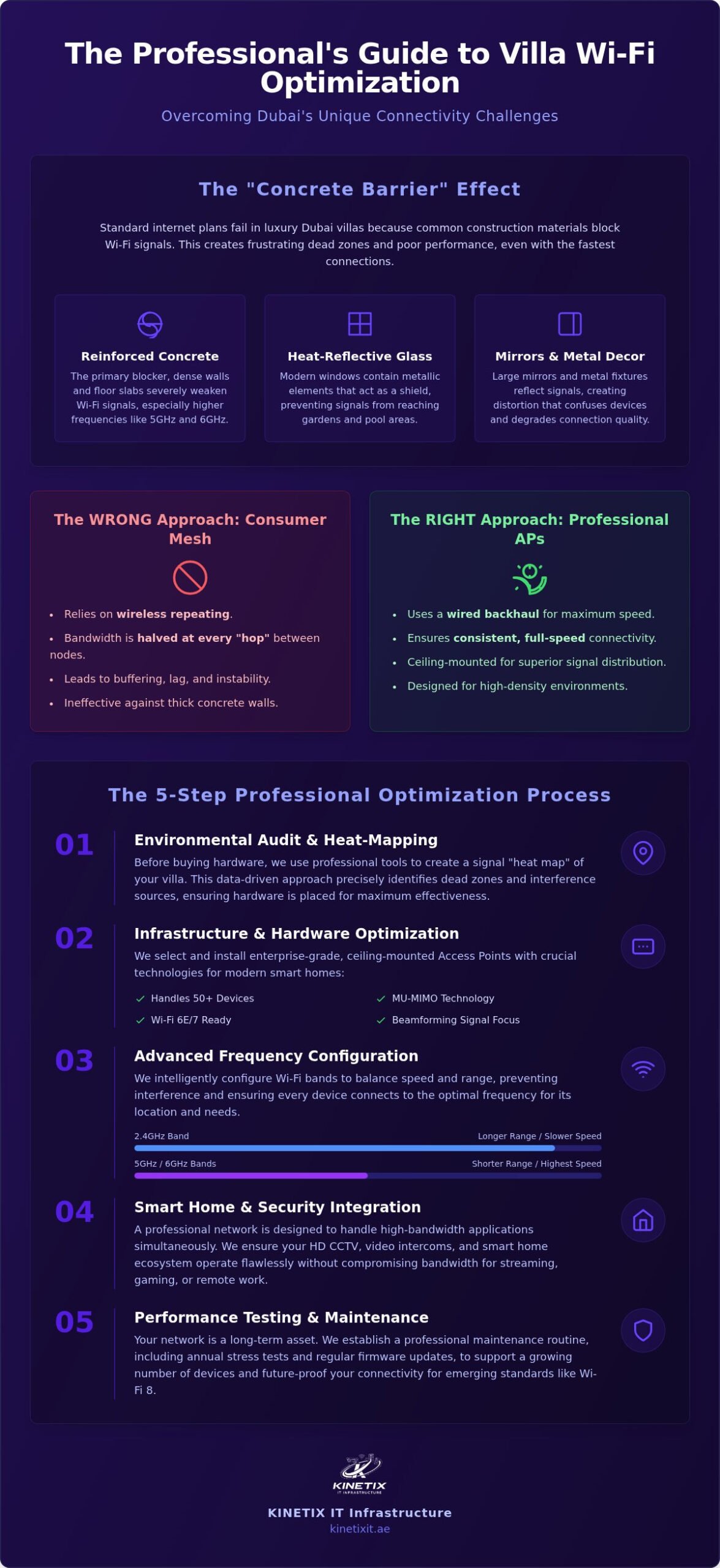
Before you invest in new hardware, you must understand the environment your network inhabits. Dubai villas present a unique set of challenges due to their heavy construction materials. Unlike the timber frames common in other regions, our local villas use reinforced concrete and dense blockwork that effectively block radio frequencies. This is known as the “Concrete Barrier” effect, and it’s the primary reason why standard ISP routers fail to provide whole-home coverage. Understanding how different Wi-Fi standards interact with these physical barriers is essential for effective Wi-Fi Optimization.
Higher frequency bands, like the 5GHz and 6GHz bands used in modern systems, offer incredible speeds but have much shorter ranges. They struggle significantly more with wall penetration than older 2.4GHz signals. This means that a single central router is rarely enough for a large property. To better understand how these physical factors impact your connectivity, watch this helpful video:
The Dubai Villa Signal Challenge
Luxury finishes often introduce unexpected interference. Large mirrors in dressing rooms or bathrooms reflect signals, creating multipath distortion that confuses your devices. Similarly, the heat-reflective glass used in many Dubai properties to combat the summer sun contains metallic elements. These act as a shield, often preventing signal from reaching your outdoor pool or garden areas. In multi-story G+1 or G+2 villas, the thick floor slabs create a vertical barrier that necessitates a floor-by-floor strategy. You should also audit your property for interference from luxury appliances. Common culprits include:
- High-end smart kitchen appliances and microwaves.
- Older baby monitors and cordless phone systems.
- Large decorative metal structures or internal art installations.
Strategic Mapping for Seamless Coverage
A professional audit begins with mapping your property for “Wi-Fi Dead Zones.” You can perform a basic assessment by walking through your villa with a smartphone and a signal testing app. Identify your “Core” zones, like the living room and master bedroom, and compare them against “Usage Zones” like the garden or home office. If you find significant drops in signal quality, you may require professional Wi-Fi Dead Zone Fixing to ensure every corner of your property remains connected. This mapping phase ensures that your Wi-Fi Optimization strategy is driven by data rather than guesswork, allowing for precise placement of additional hardware where it’s needed most.
Step 2: Infrastructure and Hardware Optimization
Once you’ve mapped your villa’s dead zones, the next stage of Wi-Fi Optimization involves selecting hardware that can actually penetrate those barriers. While consumer mesh systems are popular for their ease of setup, they often rely on wireless repeating. This method frequently halves your bandwidth at every “hop” between nodes. In a large Dubai property, this leads to the very buffering and latency you’re trying to avoid. Professional solutions move beyond these retail shortcuts to create a robust, enterprise-grade foundation for your home.
Choosing the Right Hardware for Your Villa
Modern villas require hardware that can handle 50 or more concurrent devices without congestion. When selecting your equipment, look for units that support MU-MIMO (Multi-User, Multiple-Input, Multiple-Output) and Beamforming. These technologies allow your network to communicate with multiple devices simultaneously and direct the signal specifically toward your phone or laptop rather than broadcasting it in every direction. Professional Wi-Fi Access Point Installation is superior to plug-in extenders because these units are designed to be ceiling-mounted. This placement provides a clearer line of sight and better signal distribution across open-plan living areas.
In 2026, readiness for Wi-Fi 6E and Wi-Fi 7 is non-negotiable. These standards utilize the 6GHz band, which was specifically allocated by the UAE’s TDRA for indoor use. This spectrum is less congested than older bands, providing the low latency required for virtual reality and high-speed gaming. If you’re unsure which hardware fits your architectural layout, our team can help you design a custom villa network that balances performance with aesthetics.
The Importance of Structured Cabling
The secret to a flawless network isn’t actually wireless; it’s wired. A “Wired Backhaul” is the gold standard for Wi-Fi Optimization. This means every access point is connected back to the main router via physical Ethernet cables. Using Cat6 or Cat7 cabling ensures that the full speed of your internet plan reaches every corner of the house without interference from thick masonry.
Integrating wired points is particularly vital for stationary high-bandwidth devices. Smart TVs, 4K streaming boxes, and gaming consoles should always be hardwired to free up wireless airtime for truly mobile devices. You can find detailed hardware requirements and cable specs in our Dubai Villa Wi-Fi Installation: 2026 Buying Guide. A dedicated network switch acts as the central brain of this system, managing traffic flow to ensure your smart home devices don’t compete with your work-from-home video calls. This structured approach creates a dependable, high-speed environment that functions perfectly behind the scenes.
Step 3: Advanced Software and Frequency Configuration
High-performance hardware provides the foundation, but the software configuration acts as the intelligence directing your traffic. Without precise tuning, even the most expensive access points can underperform due to signal overlap and congestion. This stage of Wi-Fi Optimization focuses on the invisible settings that ensure your data moves with maximum efficiency and security. It’s about creating a logical structure that mirrors the physical infrastructure you’ve already established.
Spectrum Management for High-Density Homes
Dubai’s residential landscape often involves high-density living, especially in areas like Dubai Marina or Downtown. In these locations, your neighbors’ networks can bleed into yours, causing significant interference. To combat this, you must manage your frequency bands with precision. The 2.4GHz band is crowded but offers the best range; it’s ideal for smart home sensors and legacy devices. The 5GHz and 6GHz bands should be reserved for high-bandwidth activities like streaming and gaming. Use this checklist to clean up your airwaves:
- Assign all smart home (IoT) devices to a dedicated 2.4GHz SSID to keep high-speed lanes clear.
- Select non-overlapping channels (1, 6, or 11) on the 2.4GHz band to reduce self-interference.
- Enable DFS (Dynamic Frequency Selection) channels on the 5GHz band to access less-congested frequencies.
Channel width refers to the size of the frequency pipe used for data transmission; wider channels allow for higher speeds but are more susceptible to interference in crowded environments.
Reducing Latency and Jitter
Consistency is often more valuable than raw speed, especially for professional video calls or online gaming. Latency and jitter are the primary enemies of a smooth experience. You can address these by configuring Quality of Service (QoS) rules within your router settings. This allows you to prioritize traffic from your work laptop or home office over background downloads or software updates. Proper Router Installation & Configuration is the invisible enabler that ensures these QoS settings are correctly applied, transforming standard hardware into a high-performance lifestyle asset. It’s a proactive step toward maintaining Whole-Home Wi-Fi stability during peak usage hours.
You should also enable “Airtime Fairness.” This setting prevents older, slower devices from hogging the network’s attention and slowing down your modern Wi-Fi 7 hardware. For a seamless experience as you move through your villa, ensure “Fast Roaming” protocols (802.11r, 802.11k, and 802.11v) are active. These allow your phone to hand off from one access point to another without dropping the connection. Finally, upgrade your security from WPA2 to WPA3. This latest standard provides superior encryption, protecting your personal data and smart home ecosystem from modern threats. These software refinements ensure your Wi-Fi Optimization efforts deliver a polished, lag-free experience across every floor.
Step 4: Smart Home and Security System Integration
A modern Dubai villa is a complex ecosystem of connected devices. Beyond laptops and smartphones, your network must support high-definition security feeds and sophisticated automation. Achieving comprehensive Wi-Fi Optimization requires a strategy that prevents these background systems from compromising your primary connectivity. When your security cameras, intercoms, and smart appliances all compete for the same airtime, the result is often a degraded experience for every user in the house.
Security System Network Optimization
High-resolution CCTV cameras are notorious for consuming vast amounts of bandwidth. If left unmanaged, these continuous streams can saturate your wireless channels, leading to lag in other applications. We recommend hardwiring as many cameras as possible to alleviate pressure on the airwaves. For those that must remain wireless, configuring static IP addresses ensures your recording hardware always maintains a stable connection with each feed.
This stability is equally vital for video intercom systems. A professional configuration ensures that when someone rings your gate, the video feed reaches your mobile device instantly. High latency in an intercom system often results in missed visitors or failed connections. By prioritizing these critical security packets within your network settings, you ensure that your home’s safety features remain fluid and responsive. If you’re experiencing delays with your security hardware, our experts provide specialized CCTV and intercom network configuration to restore peak performance.
The IoT Management Checklist
Your villa likely contains dozens of smaller devices, including smart lighting, AC controllers, and pool sensors. While these use little data individually, their cumulative “chatter” can clutter your main network. Implementing a dedicated “IoT SSID” on a separate VLAN (Virtual Local Area Network) is a professional standard for both speed and security. This segmentation ensures that a vulnerability in a smart bulb doesn’t provide a gateway to your personal data. It also keeps your primary high-speed lanes clear for demanding tasks. Consider this audit for your connected home:
- Group all low-bandwidth sensors on a dedicated 2.4GHz IoT network.
- Separate guest access to prevent visitors from accessing your smart home controls.
- Integrate biometric access points into the wired backbone to ensure fail-safe entry.
Managing your Smart TV network setup is the final piece of the integration puzzle. For the best experience with 8K streaming, a physical Ethernet connection is always superior to wireless. It eliminates the risk of buffering during a cinematic experience and frees up wireless capacity for truly mobile devices. This structured approach to integration ensures that your smart home technology serves your lifestyle without creating digital friction.
Step 5: Professional Performance Testing and Maintenance
The final phase of Wi-Fi Optimization is validation. You’ve placed the hardware and configured the software, but now you must ensure the system holds up under real-world pressure. A network that works well for one person might fail when the whole family is home, especially when signals must penetrate the reinforced concrete slabs of a multi-story villa. A true stress test involves activating multiple high-bandwidth streams simultaneously across different floors to identify any remaining bottlenecks in the infrastructure.
Maintenance is just as important as the initial setup. The digital landscape in Dubai changes rapidly; new neighbors move in, and new devices are added to local networks. These changes can shift channel congestion, particularly in dense communities like Dubai Marina. Annual maintenance allows you to update firmware for security and re-evaluate your frequency bands. This proactive approach ensures your villa remains a high-performance environment through consistent Wi-Fi Optimization.
Verifying Your Optimization Success
Reliability isn’t just about download speed. When testing your network, pay close attention to “Ping” and “Jitter.” These metrics determine how responsive your connection feels during interactive tasks like gaming or Zoom calls. You should also verify the Received Signal Strength Indicator (RSSI) in the furthest reaches of your property, such as the garden or guest wing. An optimal RSSI for 4K video streaming is typically between -60 dBm and -50 dBm, ensuring a strong and stable connection. If your signal drops below -70 dBm, you’ll likely experience buffering and reduced video quality.
Partnering with a Dubai Wi-Fi Expert
While DIY steps provide a solid start, luxury villas often require the precision of a professional site survey. KINETIX IT Infrastructure acts as your sophisticated problem solver, handling the technical heavy lifting of structured cabling and enterprise-grade configuration. We use advanced diagnostic tools to audit your infrastructure and eliminate friction points that retail hardware simply can’t resolve. This professional intervention provides the peace of mind that comes from a future-proof network designed specifically for your home’s unique architecture. Ready for a seamless connection? Contact KINETIX IT Infrastructure for a Professional Wi-Fi Audit Today.
Future-Proofing Your Villa Connectivity
Achieving a truly seamless network in a luxury Dubai villa requires moving beyond retail-grade solutions to a professional, structured infrastructure. By addressing the specific architectural challenges of UAE properties and prioritizing a wired backhaul, you ensure your home remains connected from the main entrance to the furthest corner of the garden. This holistic approach to Wi-Fi Optimization balances high-performance hardware with precise frequency management and smart home integration, creating a digital environment that is as fluid as it is secure.
KINETIX IT Infrastructure serves as your trusted partner in this digital evolution. Our team of Dubai-based experts specializes in high-end villa networking, ensuring that complex layouts and heavy construction materials never compromise your connectivity. We handle the technical heavy lifting of installation and configuration, providing you with a future-proof system that scales with your evolving lifestyle. Get a Professional Wi-Fi Audit for Your Villa today and experience the peace of mind that comes from a perfectly integrated home. Your property deserves a network that is as dependable and sophisticated as its design.
Frequently Asked Questions
How much does professional Wi-Fi optimization cost in Dubai?
Professional costs vary based on the scale of your property and the complexity of the existing infrastructure. Factors like the number of floors, the total square footage, and the requirement for new Ethernet cable installation influence the final investment. We recommend a professional site survey to determine the exact requirements for your villa. This personalized approach ensures you only invest in the hardware and cabling necessary for a seamless connection.
Can I fix Wi-Fi dead zones without drilling holes in my villa walls?
You can often improve coverage without visible drilling by utilizing existing internal conduits or upgrading to a high-performance mesh system. However, for the most reliable results in Dubai’s concrete villas, we use professional access points that leverage your home’s pre-installed piping for wired backhaul. This “invisible enabler” approach provides a clean, ceiling-mounted installation that eliminates dead zones without compromising your interior design or structural integrity.
Why is my 5GHz Wi-Fi signal so weak in the next room?
The 5GHz frequency offers high speeds but has a very limited range when passing through physical barriers. In Dubai, most villas are constructed with reinforced concrete and heavy blockwork that absorb these shorter wavelengths almost entirely. This is why you might have a full signal in the living room but experience a complete drop-off once you move behind a single thick masonry wall.
How many Access Points do I need for a 5,000 sq. ft. villa?
For a 5,000 sq. ft. villa, you generally require between three and five professional access points. The exact number depends on your home’s layout and the density of its walls. A multi-story G+1 or G+2 property typically needs at least one dedicated access point per floor to ensure signals don’t have to travel through thick floor slabs. A signal heat-map is the best way to confirm placement.
Will Wi-Fi 7 make my current devices faster?
Wi-Fi 7 won’t upgrade the hardware inside your older devices, but it significantly improves the environment they operate in. By utilizing the 6GHz band and advanced features like Multi-Link Operation, Wi-Fi 7 reduces the overall traffic on the 2.4GHz and 5GHz bands. This creates “clearer lanes” for your legacy devices, allowing them to reach their maximum potential speeds without competing for airtime with newer, high-demand hardware.
Is a Mesh Wi-Fi system better than a traditional router for Dubai homes?
A mesh system is significantly more effective than a single router for the large footprints of Dubai villas. However, retail mesh units often rely on wireless “hops” that lose speed through concrete. For a truly optimized experience, we recommend professional access points connected via physical cabling. This hybrid approach combines the seamless roaming of a mesh system with the raw speed and stability of a wired enterprise network.
How does CCTV installation affect my Wi-Fi speed?
High-definition CCTV cameras can significantly impact your network performance if they aren’t properly integrated. These devices constantly stream data, which can saturate your wireless upload capacity. Effective Wi-Fi Optimization involves segmenting these cameras onto a separate VLAN or hardwiring them via Ethernet. This ensures your security system stays online without causing lag during your work calls or streaming sessions.
What is the best Ethernet cable for home networking in 2026?
In 2026, Cat6a and Cat7 are the industry standards for premium home networking. These cables support speeds up to 10Gbps and offer superior shielding against the electromagnetic interference common in smart homes. While Cat6 is sufficient for many tasks, Cat7 provides the future-proofing needed for the next decade of internet speeds. Using these high-grade cables for your wired backhaul ensures your villa’s infrastructure remains relevant as technology evolves.