
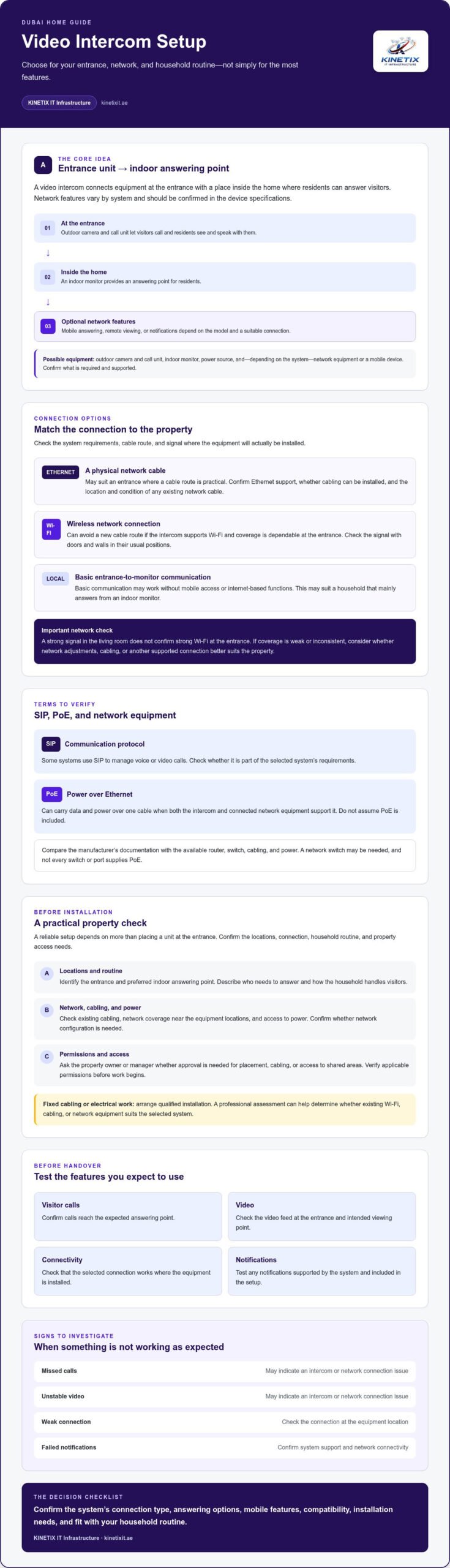
The best Video Intercom Setup for your Dubai home is not necessarily the one with the most features. It is the one that fits your network, entrance, and daily routine. Before choosing a system, check whether it uses Ethernet, Wi-Fi, or a local connection, and confirm how it will work with your existing router and devices.
A reliable setup depends on more than placing a unit at the entrance. The connection, network conditions, and way your household answers visitors all matter. A few checks before installation can help you choose suitable equipment and understand what to expect from setup and handover.
This guide covers common components and connection options, what an installer should assess, and which checks can help prevent avoidable issues. It also explains what to confirm about compatibility and network integration. KINETIX IT Infrastructure provides video intercom setup and network configuration for homes and villas in Dubai.
Key Takeaways
- A Video Intercom Setup connects equipment at the entrance with an indoor answering point. Network features depend on the system.
- Compare connection type, answering options, mobile access, and installation needs against the device specifications and your household routine.
- Before installation, have the network, cabling, equipment locations, and property access needs checked.
- Before handover, test visitor calls, video, connectivity, and any notifications the system supports.
- Missed calls, unstable video, weak connections, or failed notifications can indicate a problem with the intercom or its network connection.
What does video intercom setup involve in a Dubai home?
A Video Intercom Setup connects equipment at the entrance with an indoor answering point and, where supported, network functions. The outdoor unit lets residents see and speak with visitors before deciding how to respond. A video intercom combines a camera and communication system with equipment inside the home. The exact components vary by system.
Basic communication between the entrance and indoor units may work without mobile access. Answering remotely, receiving notifications, or viewing video on a phone depends on the model, its features, and a suitable network connection. Confirm these capabilities before choosing equipment rather than assuming they are included.
For a practical look at wiring and testing, watch this educational video:
Which components might a home video intercom use?
A typical system may include an outdoor camera and call unit, an indoor monitor, and a power source. The outdoor unit captures the entrance and lets visitors call; residents answer through the indoor monitor. Depending on the system, network equipment or a mobile device may also be involved. Check the equipment specifications to confirm what is required and supported.
What should Dubai homeowners clarify before setup?
Start by considering how the entrance is used and where residents want to answer calls. Then check the existing cabling, network coverage near the equipment locations, and access to power. These details help identify installation requirements and whether network configuration is needed.
- Identify the entrance location and preferred indoor answering point.
- Describe the household’s visitor routine, including who needs to answer.
- Ask the property owner or manager whether approval is needed for equipment placement, cabling, or access to shared areas.
Requirements vary by property, so verify applicable permissions before work begins. Arrange qualified installation for fixed cabling or electrical work. A professional assessment can also help establish whether existing Wi-Fi, cabling, or network equipment suits the selected system.
How do video intercoms connect to your home network?
Network-dependent features require a compatible device and a dependable connection. Basic communication between an entrance unit and an indoor monitor may work without internet-based functions. Remote viewing or phone notifications depend on the selected system’s capabilities and connectivity.
For a villa, the suitable connection depends on the intercom’s specifications, the route between equipment, existing cabling, and coverage where the outdoor unit will be installed. A strong signal in the living room does not confirm strong Wi-Fi at the entrance. Check the signal at the proposed installation location before choosing a connection method.
Wired Ethernet or Wi-Fi: which connection suits the property?
Ethernet connects compatible equipment to the home network through a physical cable. It may suit an entrance where a cable route is practical, but first confirm that the intercom supports Ethernet and that cabling can be installed. Existing network cabling may be useful, though its location and condition should be checked.
Wi-Fi can avoid a new cable route if the intercom supports it and the signal is dependable at the installation point. Check coverage at the entrance with doors and walls in their usual positions. If the signal is weak or inconsistent, ask whether network adjustments, cabling, or another supported connection would better suit the property.
Some systems provide door communication with limited or no network-dependent features. That may be enough if residents mainly answer from an indoor monitor. If mobile access matters, confirm that the model supports it and check what network and internet conditions its features require.
When do SIP, PoE, or network equipment matter?
These terms matter when they appear in the selected system’s requirements. SIP is a communication protocol that some systems use to manage voice or video calls. PoE, or Power over Ethernet, can carry data and power over one cable when both the intercom and connected network equipment support it. Neither feature should be assumed to be included.
Before installation, compare the manufacturer’s documentation with the available router, switch, cabling, and power. A network switch may be needed, and not every switch or port supplies PoE. Confirm the requirements with the installer to avoid mismatched equipment or unsupported features. For help checking how a home network fits a Video Intercom Setup, review intercom network configuration guidance to understand how connection paths and router settings affect performance.
How to compare video intercom setup options before choosing
Compare systems by how they handle visitor calls, what connection they need, and which features your household will use. Mobile access is not guaranteed with every intercom, and a network connection alone does not confirm that an app, notifications, or remote answering are supported. For a Video Intercom Setup that fits your villa, ask the vendor to demonstrate the functions included and confirm them against the device specifications.
| Setup type | Connection | Indoor answering | Mobile access | Installation and support considerations |
|---|---|---|---|---|
| Standalone | May connect entrance and indoor equipment locally, without network-dependent features. | Available if supported by the proposed system. | Do not assume it is included. | Check equipment placement, power, and cabling. Confirm how faults will be diagnosed. |
| Network-connected | Uses Wi-Fi or wired network connectivity if supported. | Depends on the system’s indoor equipment and specifications. | May offer network features, but remote access is not automatic. | Assess network coverage, cable routes, and router or switch requirements. |
| Mobile-enabled | Requires the device’s supported network and any stated internet conditions. | May include an indoor monitor, depending on the system. | App access, notifications, and remote answering vary by model. | Confirm setup steps, account requirements, and what support is available if access stops working. |
Standalone, network-connected, and mobile-enabled setups
These categories describe how a system communicates, not a guarantee of specific features. Local communication may meet the need to answer at home. Network-dependent features may extend access if the device supports them. Ask the vendor to demonstrate call handling, app access, and notifications on the proposed equipment. Clarify which functions still work if the home network or internet connection is unavailable.
Which setup factors matter in a villa?
Consider the distance between the entrance and indoor monitor, construction that may affect a wireless signal, practical cable routes, and where residents want to answer. Check whether the current router and network can support the selected device and its intended functions. For wider planning around fixed network routes, see this structured cabling guidance.
Compare installation complexity and support needs as well as the feature list. Ask who will configure network-dependent functions, test them at the entrance and indoors, and explain troubleshooting at handover. A clear plan sets expectations before equipment is installed.
How to prepare, install, and test a video intercom
A dependable installation follows a clear sequence, from checking the property to showing residents how the system works. In a Dubai villa, confirm access arrangements and ask the owner or property manager about any permissions that may apply before installation, especially if the work involves shared areas or fixed cabling.
What should the pre-installation assessment cover?
Before booking, note the entrance and preferred indoor monitor locations, available power, and possible cable routes. Check for Ethernet or assess Wi-Fi coverage at the exact equipment locations. The installer should confirm that the selected equipment supports the functions you want and that property access is arranged.
Follow a practical installation and handover workflow
- Assess: Review the entrance, indoor answering point, power, cabling, and relevant network conditions.
- Plan: Confirm equipment placement, connection method, installation access, and any permissions that may be needed.
- Install: Mount and connect the equipment according to its requirements. Use a qualified installer when electrical work, fixed cabling, or property access calls for professional handling.
- Configure: Set up the supported connection and any available network-dependent functions in line with the device documentation.
- Test: Place a visitor call and check two-way audio and image quality. Test each access method supported by the system.
- Hand over: Ask for a demonstration, confirm resident access, and record device-specific support and maintenance instructions.
What should commissioning and handover include?
Test the system as residents will use it. Check that they can hear and speak to a caller through the indoor monitor, then review the entrance image under typical conditions. If the device supports mobile access, verify its setup, notifications, and resident accounts. Ask what to check if a call or connection later fails.
Keep the device documentation and any configuration details provided at handover. These can make future troubleshooting more straightforward and help residents understand which functions depend on the home network. KINETIX IT Infrastructure provides intercom installation and network integration for homes and villas in Dubai. Request video intercom setup support to discuss your installation needs.
When professional video intercom setup helps: how to get support
Professional help can be useful when an intercom needs to connect with existing cabling, Wi-Fi, a router, or a network switch, or when the entrance is difficult to reach. It can also help when the system works inconsistently and the source is unclear. A missed call, unstable video, weak connection, or failed notification may involve different parts of the setup. Checking them in order can help narrow down the cause.
What can cause common video intercom problems?
Start with the basics: check that the equipment has power, look for visible cable issues, and confirm that the connection method matches the device instructions. If the indoor monitor works but a mobile notification does not arrive, the issue may involve an internet-dependent feature rather than local door communication. If both fail, check power, cabling, and device configuration. Avoid factory resets or changes to advanced settings until you have checked the manufacturer’s guidance. Those changes can make it harder to identify the original fault.
- Missed calls: Check whether calls reach the indoor monitor and whether any supported mobile feature is configured.
- Unstable video or weak connection: Assess the connection at the intercom’s location, not just near the router.
- Failed notifications: Confirm that the selected system supports notifications and has the required network access.
What to ask an installer before confirming the work
Clarify which functions the proposed model supports, how it connects, and whether the existing network and cabling meet its requirements. Ask whether the work includes network configuration, testing of each supported access method, and a resident handover. Confirm what documentation or device-specific troubleshooting instructions you will receive. For broader planning considerations, see this comprehensive guide to intercom network configuration for modern UAE villa intercoms.
KINETIX IT Infrastructure provides video intercom setup, network integration, and troubleshooting for homes and villas in Dubai. An assessment can help distinguish an intercom issue from a Wi-Fi or cabling problem and clarify the next step. Arrange professional video intercom setup to discuss your villa’s requirements.
Make your home’s visitor communication work smoothly
A reliable Video Intercom Setup matches the features to your household, confirms that the network can support them, and helps residents learn how to use the system. Mobile access depends on the device and its connection, so verify its capabilities before installation. A careful assessment and practical handover help make everyday visitor communication easier to manage.
KINETIX IT Infrastructure provides video intercom setup, installation, troubleshooting, and repair, along with network configuration and integration for homes and villas in Dubai. If you are planning a new system or need help with an existing one, arrange professional video intercom setup with KINETIX IT Infrastructure.
With a suitable setup and clear handover, residents can understand how to respond to visitors and which features rely on the home network.
Frequently Asked Questions
What is included in a video intercom setup?
A typical Video Intercom Setup may include an outdoor camera and call unit, an indoor monitor, power, and configuration. Network equipment or mobile access may also be involved, depending on the model. Before work begins, confirm the scope, device requirements, entrance location, and cable routes. The installer should configure supported functions, test calls and audio, and show residents how to use the system.
Can a video intercom work over Wi-Fi?
Some video intercoms support Wi-Fi, while others use Ethernet or rely on network connectivity only for selected features. Performance depends on the device and signal at its installed location. Check the manufacturer’s requirements and test Wi-Fi near the entrance or monitor. A strong signal elsewhere in the home does not guarantee reliable performance at the installation point.
Does a video intercom need an internet connection?
No, not always. Some systems support local communication between the entrance unit and indoor monitor, while remote viewing, app notifications, or answering from outside the home may require internet access and a compatible device. Capabilities vary by model. Ask which functions continue during an internet outage, then have the installer test local communication separately from supported remote features.
How do I connect a video intercom to my phone?
Phone access depends on whether the selected intercom supports a companion app and remote connectivity. Follow the model-specific instructions, connect the unit to its required network, and configure the relevant user account or permissions. Ask the installer to test calls and notifications on the phone you plan to use. Do not assume every video intercom supports mobile answering or remote access.
Is Ethernet better than Wi-Fi for a video intercom?
Neither connection is automatically better for every home. Ethernet offers a direct network connection when the intercom supports it and a cable route is practical. Wi-Fi may simplify installation, but depends on signal quality where the device will be placed. Compare the system’s supported connection types with your villa’s layout and existing infrastructure, then test coverage at the proposed installation point.
What should I check before installing a video intercom in a Dubai villa?
Check the entrance and monitor locations, available power, existing cabling, and network coverage. Confirm whether the selected model requires Ethernet, Wi-Fi, or particular network equipment. Arrange property access and ask the owner or property manager whether an approval process applies. Requirements may vary by property, so verify them with the relevant parties.
Why is my video intercom not connecting to the network?
Possible causes include power or cabling issues, weak Wi-Fi at the unit, incorrect network settings, or a device compatibility problem. Check the manufacturer’s basic troubleshooting guidance and note which functions still work. Avoid changing advanced settings or resetting the system before checking the instructions. If the issue persists, KINETIX IT Infrastructure provides intercom troubleshooting and network support for homes and villas in Dubai.
One Response