
Choosing an intercom for your Dubai villa means looking beyond screen clarity. The system also needs to stay connected from the gate to the devices you use to answer. A missed visitor or unidentified caller can undermine confidence in your home’s security, while thick villa walls can make reliable network planning just as important as choosing the equipment.
For a large villa, the right system depends on the entry points, the home network and how you want to communicate with visitors. A video intercom with mobile access can let you see and speak with callers remotely. Professional cabling and network configuration can help support dependable communication across the property.
This guide explains how modern intercom systems combine security and convenience, what to consider when choosing a setup for a large villa, and how mobile access can support remote gate control. You’ll also learn why integration with your villa network and CCTV, along with planning for thick walls, can make the difference between a connected system and one that keeps letting you down.
Key Takeaways
- Learn how modern intercom systems go beyond audio-only doorbells to support clearer, more connected visitor communication.
- Compare wired, wireless and IP technologies to see which setup best suits your villa’s layout and reliability needs.
- Use practical feature considerations, including weather resistance and microphone clarity, to narrow your options for the UAE climate.
- Understand why professional installation, cabling and signal testing can help prevent connectivity issues across a large property.
What is a Modern Intercom System? Beyond the Simple Doorbell
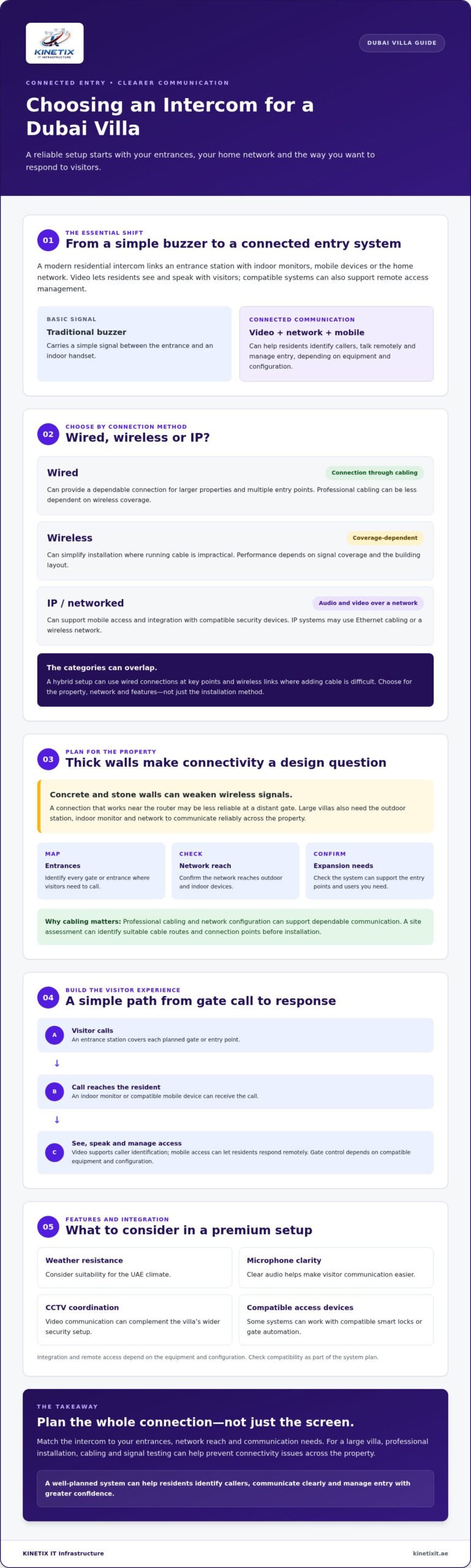
A modern residential intercom connects an entrance station to indoor monitors, mobile devices or the home network. Rather than only sounding a buzzer, a video system lets residents see and speak with visitors. Some systems also allow remote access management, depending on the equipment and configuration. In a large Dubai villa, this can make arrivals easier to handle without walking to the gate each time.
For background on how these systems developed and the forms they can take, see this overview of the intercom system. The key shift is from audio-only communication to networked video and mobile access. How reliably the system works depends in part on the home’s layout and network configuration.
For a practical overview of what to consider, watch this video:
The Evolution of Home Communication
Traditional wired buzzers carry a simple signal between the entrance and an indoor handset. IP-based digital systems can send audio and video over a network, allowing compatible mobile devices to receive a visitor call even when residents aren’t beside a monitor. Depending on the equipment and configuration, the system may also work with compatible smart locks or gate automation, connecting communication with access control.
This matters for convenience and security. Seeing who is at the entrance before responding gives residents useful context, and a stable connection helps keep that communication available across the property. Professional cabling and network configuration can support reliable performance, particularly where thick walls or long distances make connectivity more challenging.
Smart Doorbell Compared
A smart doorbell can suit a single entrance, but a large villa may need a more considered setup. Dedicated equipment can be planned around permanent power, indoor answering points and several entrances. Consumer devices may rely more heavily on wireless coverage, batteries or a single app. Check their requirements against your home’s layout before choosing.
Think through the complete entry experience:
- Coverage: Identify each gate or entrance where visitors need to call.
- Connectivity: Check that the network reaches the outdoor station and indoor devices.
- Expansion: Confirm that the system can support the entry points and users you need.
- Security integration: Consider how video communication can complement CCTV and compatible access devices.
A doorbell signals that someone has arrived. A well-planned intercom system can help residents identify callers, communicate clearly and manage entry with greater confidence, while fitting into the home’s wider security setup.
Types of Intercom Technologies: Wired vs. Wireless vs. IP
The connection method affects how reliably an intercom communicates across your villa and how easily the system can be expanded. Wired systems use physical cabling, which can provide a dependable connection for larger properties and multiple entry points. Wireless systems can simplify installation where running cable is impractical, but their performance depends on signal coverage and the building layout. IP systems communicate over a network and can support features such as mobile access and integration with compatible security devices.
These categories can overlap. An IP system may use Ethernet cabling or a wireless network, while a hybrid setup can combine wired connections at key points with wireless links where adding cable is difficult. The right choice depends on the property, the network and the features you want, not simply on which option sounds easiest to install.
The Challenge of Dubai Villa Construction
Concrete and stone walls can weaken wireless signals, especially between an outdoor station, indoor monitor and router. A connection that works near the router may be less reliable at a distant gate. For clear video and consistent communication, professional cabling can provide a stable connection that is less dependent on wireless coverage.
Planning structured cabling can also make it easier to support future networked devices. A site assessment can identify suitable cable routes and connection points before installation, helping avoid a patchwork of weak signals and improvised fixes.
Choosing the Right Protocol for Your Home
Power over Ethernet, or PoE, can carry power and data through a single Ethernet cable when the intercom equipment and network hardware support it. That can simplify connections at a gate or entrance and reduce dependence on a separate power source at the device. Confirm compatibility across the system before selecting equipment.
Wi-Fi 6 may improve wireless network capacity when compatible devices and a suitable router are in use, but it can’t remove physical barriers or fix poor coverage on its own. Placement and signal strength still matter. For internet-connected systems, use strong, unique passwords, keep device software updated, and limit access to the accounts and features residents need. Security depends on thoughtful setup as well as hardware.
Intercoms can serve as a vital part of any organization’s security plan by helping residents communicate with visitors before responding to a call. If you’re weighing cabling, network configuration or an upgrade, professional villa intercom support can help align the system with your property’s layout and connectivity needs.
The Rise of Video Intercoms and Mobile Access
A video call at the gate adds useful context: residents can see who is there before deciding how to respond. High-definition video can make it easier to distinguish a courier, invited guest or unfamiliar caller. Mobile access means you don’t need to be beside an indoor monitor to answer. With a compatible system and internet connection, you can check a visitor while away and, if supported, release the gate remotely.
That flexibility can help with everyday arrivals. You might speak to a delivery driver while out, or confirm a service visit before granting entry. Mobile notifications mean calls aren’t tied to one room, but the experience depends on the equipment, app configuration and a reliable connection between the entrance station and your home network. For a detailed look at components, connection options and what an installer should assess, this video intercom setup guide for Dubai homes covers the key checks that can help prevent avoidable issues.
Key Benefits of Video Integration
Video provides visual verification that audio alone can’t offer. Some systems include night vision to show visitors after dark, and some can record calls or entry events for later review. Features vary by model, so check what the equipment captures, how recordings are stored and who can access them. Recording can provide a useful record of an attempted entry, but it doesn’t replace sensible access control or other security measures.
Consider how the system will perform at your actual entrance. Camera positioning, lighting and the view of the approach all affect how useful the image is. If CCTV is already part of your home setup, compatible integration can help bring communication and visual monitoring into a more coordinated security arrangement.
Mobile App Functionality and Connectivity
A well-configured app can deliver real-time visitor alerts, two-way communication and, on supported systems, one-touch gate release. Some systems also allow access for multiple household members or staff. Before setup, confirm how users are added and removed, what permissions they receive and whether access can be managed individually.
App features rely on more than the phone. The entrance station needs a dependable connection to the villa network, and the home’s internet connection must be available for remote access. Thick walls or weak coverage near the gate can delay alerts or interrupt video. A carefully planned Wi-Fi installation can help address coverage gaps. Understanding intercom network configuration can also help the equipment and network work together smoothly.
Before choosing a system, check that its video, notification, recording and gate-release functions match your needs. Confirm that the network can support the entrance location. That planning helps make mobile access a practical part of daily villa life, not simply another app on your phone.
Essential Features to Look for in a Premium Intercom
A premium intercom should suit the villa’s environment, entry points and daily routines, not just look impressive on a specification sheet. Prioritise clear communication, durable outdoor hardware and features that work with your home’s network. Check manufacturer documentation for environmental ratings and operating limits, then consider how each option will perform at your specific gate.
Hardware Durability and Aesthetics
Outdoor stations face heat, dust and exposure to the elements. Compare the manufacturer’s stated weather-resistance rating, such as IP65 where specified, and confirm that the unit’s operating temperature range suits its installation location. Noise-reducing microphones can also help make conversations clearer near a busy road. Look for sturdy construction and tamper alerts if available, and choose a finish that complements the villa exterior without compromising visibility or usability.
Inside, touchscreen monitors offer a clean interface, while physical buttons may be easier to use without navigating menus. Consider who will use the system and where monitors are needed. A large villa may benefit from multiple indoor stations, but confirm that the equipment supports expansion before installation. Planning locations early can help avoid awkward cable routes or inconvenient call points later.
Security and Integration Features
Some systems offer features such as facial recognition or RFID card access. Treat these as optional capabilities to evaluate, not automatic guarantees of security. Check how credentials are managed, whether access can be revoked, and what happens if a device or network connection is unavailable. Likewise, confirm whether an emergency alert function is supported and where an alert is sent. Direct links to security personnel depend on compatible equipment and an appropriate service arrangement.
Connecting the entrance view with CCTV camera installation may help residents review a visitor alongside other camera views, provided the systems are compatible and configured together. This can contribute to a more coordinated picture of activity around the property, but it doesn’t replace careful camera placement or access management.
- Check durability: Review documented weather and temperature ratings for the installation site.
- Test usability: Compare touchscreen and button controls, and plan monitor locations around household routines.
- Verify integration: Confirm compatibility with CCTV, mobile access and optional access-control features.
Professional installation and network configuration help align the equipment, cabling and connected security devices. For a setup planned around your villa’s entry points and network, arrange professional intercom installation.
Ensuring Reliability: Professional Installation and Repair
A video intercom depends on more than the outdoor station and indoor monitor. It also relies on suitable cabling, network equipment and a stable connection between devices. A DIY setup may overlook weak coverage near the gate, incompatible components or network congestion, leading to dropped calls, delayed video or unreliable mobile access. A professional assessment can identify these issues before they affect everyday use.
The Professional Installation Workflow
Installation starts with assessing the villa’s entry points, network layout and preferred monitor locations. The installer can plan cable routes and conduit placement to protect connections and keep the finish neat. Where the system uses Ethernet, network switches and routers must be configured to connect the equipment correctly and support communication across the home.
Once installed, the system should be tested where residents will use it. Check audio and video, confirm indoor monitors receive calls, and verify that mobile app notifications and remote access work as intended. A reliable setup also needs ongoing care: check for firmware updates from the manufacturer, install them according to its guidance, and review settings and user access when household needs change.
Common Problems and Professional Repairs
Audio interference, video lag and missed app alerts can have several causes. Loose or damaged connections, weak Wi-Fi near the entrance, device settings or congestion from other network traffic may all affect performance. Troubleshooting should identify the source rather than assume the outdoor unit is faulty. For example, if calls work on an indoor monitor but mobile alerts fail, the issue may involve intercom network configuration rather than the camera itself.
Repair is often a sensible first step if the equipment is otherwise suitable and the problem is limited to a connection, configuration or faulty component. Consider an upgrade if the system can’t support the features or entry points you need, or if compatible parts and software are no longer available. A villa networking specialist can assess how the system connects with the wider network and CCTV before recommending a path forward. If your villa also serves as a workspace, a well-planned home office network setup can help ensure that work devices, video calls and connected security systems share the same infrastructure without affecting each other’s performance.
For persistent faults, intercom repair and troubleshooting can help pinpoint whether the cause lies in the device, cabling or network. A clear diagnosis supports a more dependable result, with the system integrated into the home’s wider IT infrastructure rather than treated as an isolated doorbell.
Make Your Villa’s Entry Experience More Connected
A well-planned intercom system brings visitor communication, mobile access and security devices together, making it easier to manage arrivals as part of daily life. The right technology depends on your villa’s layout and entry points. Reliable cabling and professional network integration help support clear communication, while careful setup can connect video intercom functions with compatible mobile devices and CCTV.
Choosing hardware is only part of the decision. Consider who needs access and whether your network can support the features you plan to use. Professional installation, troubleshooting and repair can help keep the components working together and identify the source of connectivity issues.
KINETIX IT Infrastructure provides video intercom installation and repair, with integration into villa networks and CCTV. If you’re ready to plan a dependable setup for your home in Dubai, contact KINETIX IT Infrastructure about professional intercom installation. A carefully integrated system can help you welcome visitors with greater confidence and convenience.
Frequently Asked Questions
Do I need a special internet connection for a video intercom?
No, you don’t necessarily need a special internet plan, but you do need a reliable connection suited to the system’s requirements. Check whether the equipment uses Wi-Fi, Ethernet or both, and whether its mobile features rely on an internet connection. In a Dubai villa, coverage at the gate matters as much as signal strength indoors. A network assessment can help identify weak spots before setup.
Can I install an intercom system in an existing villa without tearing down walls?
Often, yes. The installation approach depends on the villa’s existing wiring, the chosen system and the locations of its entry stations and monitors. A wireless or hybrid setup may reduce the need for new cable routes, while Ethernet cabling can provide a stable connection where practical. An installer can assess existing pathways and plan the work to limit disruption, but the site layout determines what’s possible.
What happens to my intercom if the Wi-Fi goes down?
It depends on how the system is connected. A wired system or local indoor monitor may continue to work if its equipment has power and doesn’t rely on Wi-Fi for communication. Remote app access and notifications may stop if they require an internet connection. Ask the installer which functions remain available during a network outage, and whether the system has a wired connection or another fallback method.
Is it possible to connect my intercom to my smart home system?
Yes, if the intercom and smart home platform support compatible integrations. Capabilities vary, so check whether the system can connect with the specific devices or platform you use, such as a smart lock or gate control. Confirm which functions are supported, whether an additional hub is needed, and how user permissions are managed. Verify compatibility before purchase rather than assuming it from general “smart home” claims.
How much does professional intercom installation cost in Dubai?
Installation pricing depends on the villa layout, number of entrances and monitors, equipment selected, existing cabling and network work required. A straightforward replacement may involve different work from adding a video system to a large property with limited cable routes. KINETIX IT Infrastructure provides intercom installation and network configuration in Dubai. Request an assessment and quote based on your requirements rather than relying on a general estimate.
Can I answer my villa intercom from my phone when I am abroad?
Yes, if your system supports mobile access and is configured for remote use. You’ll generally need the system, home internet connection and phone app to be online, and the feature must be enabled for your account. Some setups also let you release the gate remotely, but that depends on compatible equipment and permissions. Before travelling, test calls and notifications, and review who has access to the app.
What is the difference between an IP intercom and an analog one?
An analog system typically uses a direct electrical connection between stations for basic audio or video communication. An IP system sends communication over a computer network, which can support features such as mobile access and integration with compatible devices. The right option depends on your property, existing wiring and desired functions. For a Dubai villa, consider network coverage and cabling needs alongside the features you want.
How often should a residential intercom system be serviced?
There isn’t one service interval that suits every system. Follow the manufacturer’s maintenance guidance, and arrange a check if calls become unclear, video lags, alerts stop arriving or a device disconnects. It’s also sensible to review system operation and available firmware updates periodically, following the manufacturer’s instructions. KINETIX IT Infrastructure offers intercom troubleshooting and repair in Dubai when a fault needs professional diagnosis.